
Choosing the Best Custom PC for Video Editing in the UK: 2026 Buying Guide
Your professional workstation is only as fast as its most restrictive bottleneck. Selecting a custom PC for video editing UK based requires a strategic approach that balances raw processing power with high-speed data architecture. You have likely experienced the irritation of a 4K timeline stuttering during a critical playback or the anxiety of a rendering bar that refuses to move whilst a project deadline approaches. It is a common struggle to determine whether to prioritise the 24 cores of an Intel Core Ultra 9 285K or the 16GB of GDDR7 memory found in the NVIDIA GeForce RTX 5080.
This guide provides the technical clarity you need to master your workstation requirements and eliminate performance throttles for good. You will learn how to configure a build that ensures fluid playback and rapid exports, allowing you to focus on your creative output rather than hardware limitations. We will preview the latest 2026 standards, including PCIe Gen 5 storage and DDR5 memory configurations, to help you select a reliable hardware partner and secure the highest possible return on your investment.
Key Takeaways
- Identify why standard retail PCs often fail during intensive renders because they don’t have the thermal headroom or component quality of bespoke builds.
- Balance your processing power by prioritising CPU cores for timeline fluidity whilst ensuring your GPU’s VRAM is sufficient for complex colour grading.
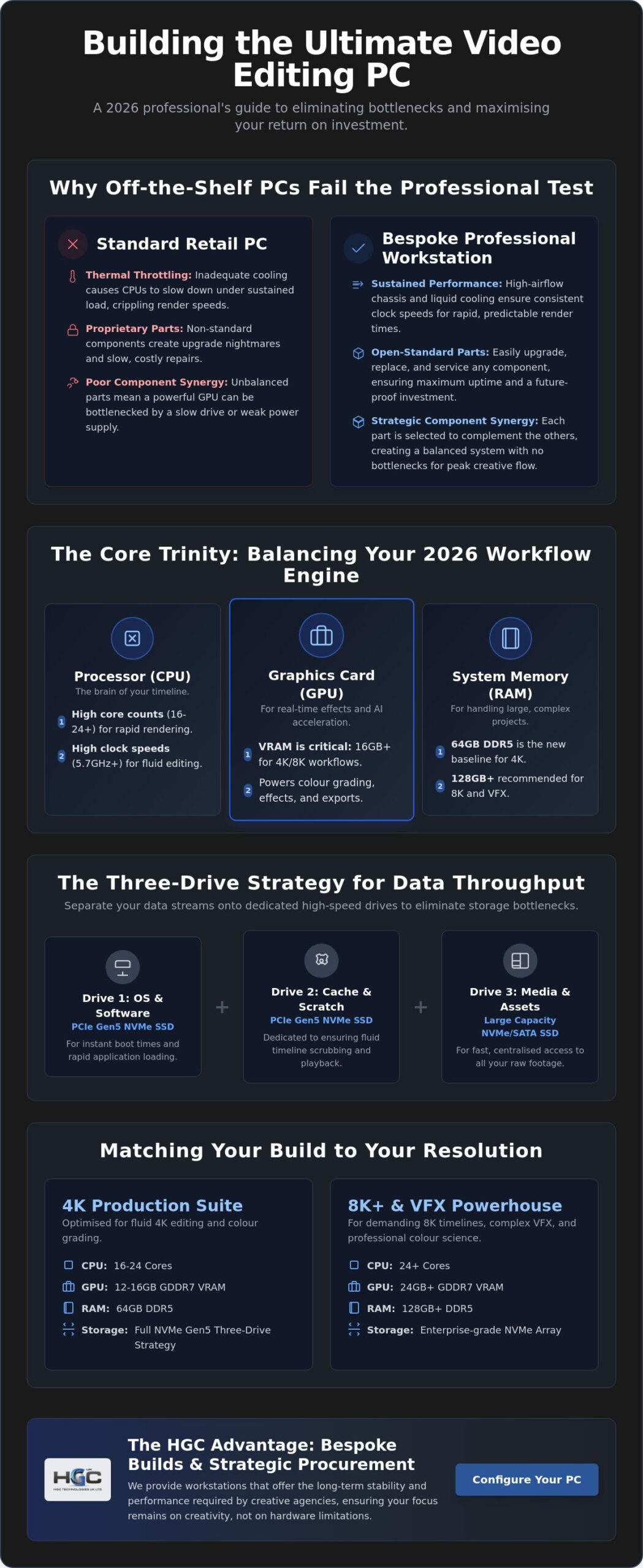
- Optimise data throughput by adopting a “Three-Drive Strategy” that utilises high-speed NVMe Gen5 SSDs to separate your OS, cache, and raw media.
- Select the correct specification tier for your specific resolution to ensure your custom PC for video editing UK delivers a maximum return on investment.
- Discover the benefits of strategic procurement for professional workstations that offer the long-term stability and performance required for creative agencies.
Why Off-the-Shelf PCs Fail the Professional Video Editing Test
Standard retail workstations often appear impressive on a technical specification sheet. However, they frequently falter under the sustained pressure of high-resolution video production. For a professional seeking a custom PC for video editing UK based, the primary issue is that mass-produced units are designed for intermittent bursts of activity. They are not built for the relentless thermal load of a six-hour 4K render or the complex data throughput required by modern codecs. High-end components are wasted if the surrounding architecture cannot support their peak performance.
The Problem with Thermal Throttling in Standard Builds
Thermal throttling is the hidden enemy of productivity. It occurs when a processor reaches its heat limit and intentionally slows its clock speed to prevent hardware damage. In 2026, flagship CPUs like the AMD Ryzen 9 9950X demand sophisticated heat dissipation to maintain their 5.7 GHz boost clocks. Standard office-grade cases lack the airflow to manage these 170W TDP components effectively. Professional builds utilise high-performance liquid cooling and high-airflow chassis to ensure your render times remain consistent. Without this, a render that starts fast will inevitably crawl as heat builds up within a cramped, poorly ventilated retail case.
Proprietary vs. Open Standard Components
Many “big box” brands use proprietary motherboards and power supplies with non-standard connectors. This creates a significant strategic risk for business continuity. If a proprietary component fails, you cannot simply source a replacement from a local vendor; you are beholden to the manufacturer’s often slow support cycles. A custom PC for video editing UK professionals choose from HGC Technologies UK Ltd. utilises open-standard components. This ensures that every part is replaceable, upgradeable, and serviceable. It allows your IT department to perform rapid repairs or performance increments without replacing the entire system.
True performance relies on component synergy rather than raw, “on-paper” numbers. Every part must be chosen to eliminate bottlenecks. Understanding the specific hardware requirements for video editing is essential because software optimisation varies between platforms. A bespoke build allows you to invest in the specific architecture that accelerates your unique timeline. This approach creates a “future-proof” workstation that can grow alongside your production needs, providing a far better long-term return on investment than any off-the-shelf alternative.
The Core Trinity: Balancing CPU, GPU, and RAM for 2026 Workflows
A high-performance workstation is defined by the synergy between its three primary pillars: the processor, the graphics card, and the system memory. For professionals commissioning a custom PC for video editing UK based, achieving this balance is the difference between a fluid creative process and a fragmented one. If any single component is under-specified, it creates a bottleneck that prevents the others from reaching their full potential. In the 2026 hardware landscape, the baseline for professional standards has shifted significantly due to the demands of AI-integrated NLEs (Non-Linear Editors) and higher-bitrate raw formats.
Choosing the Right Processor: Cores vs. Clock Speed
The CPU remains the engine of your editing suite. It handles the heavy lifting of software instructions and timeline responsiveness. For multi-threaded tasks like final rendering, high core counts are essential. The AMD Ryzen 9 9950X, with its 16 cores and 32 threads, offers exceptional throughput for parallel processing. Conversely, the Intel Core Ultra 9 285K provides a 24-core architecture that excels in hybrid workloads. Whilst high core counts accelerate renders, single-core clock speed determines how “snappy” your timeline feels during active editing. You must prioritise a chip that offers a high boost frequency, such as 5.7 GHz, to ensure your software remains responsive when scrubbing through complex sequences.
Graphics Horsepower and VRAM Requirements
Your GPU is no longer just for final output; it is now the primary driver for real-time effects, noise reduction, and AI-accelerated tasks. In 2026, VRAM capacity has become more critical than raw clock speed. High-resolution 4K and 8K timelines require substantial video memory to store frame data during colour grading. The NVIDIA GeForce RTX 5080, equipped with 16GB of GDDR7 memory, is the current favourite for professional suites. This capacity allows for smoother playback of high-bitrate footage without the need for constant proxy generation. If you are working with complex motion graphics or 8K raw files, the 16GB threshold is a non-negotiable requirement for maintaining real-time performance.
Memory and connectivity provide the necessary infrastructure for these powerhouses. Whilst 32GB of RAM was once the standard, 64GB of DDR5 memory is now the recommended baseline for professional 4K workflows. This ensures that your system can cache enough data to prevent sluggish behaviour during long editing sessions. To support these components, your motherboard must offer sufficient PCIe Gen 5 lanes to accommodate both your GPU and high-speed I/O cards. If you are ready to move beyond off-the-shelf limitations, you can explore bespoke workstation configurations that are specifically engineered for these demanding technical standards.
Storage Architecture and the Critical Need for Colour-Accurate Monitors
A high-performance workstation is incomplete without a data pipeline capable of feeding its processor. Whilst the CPU and GPU handle the computational load, your storage architecture determines how quickly that data reaches them. For a professional custom PC for video editing UK based, a single-drive system is a recipe for catastrophic performance dips. You require a multi-tiered storage strategy to manage the massive bitrates associated with 8K raw footage and complex multi-cam sequences. High-speed storage ensures that your hardware is never waiting for data to arrive.
Designing a High-Speed Storage Pipeline
The most effective configuration is the “Three-Drive Strategy.” This approach separates distinct tasks to prevent data collisions and maximise throughput. Your primary drive should be a dedicated NVMe SSD for the operating system and applications. The second drive, ideally a PCIe Gen5 NVMe SSD, acts as a dedicated scratch and cache disk. This is where your software performs temporary calculations; having a high IOPS (Input/Output Operations Per Second) rating here is vital for timeline fluidity. Finally, a high-capacity media drive stores your active project files.
You should never edit directly from a mechanical hard drive (HDD). Mechanical drives lack the sustained read speeds required for modern codecs like ProRes 4444 or CinemaDNG. For data redundancy and increased throughput, consider a RAID 0 or RAID 10 array for your active media. This setup provides the strategic advantage of speed whilst protecting your project against single-drive failures. For archiving, high-speed external storage via Thunderbolt 4 or USB4 ensures that transferring multi-terabyte projects doesn’t paralyse your workflow. These external solutions provide the necessary bridge between active production and long-term storage.
Visual Excellence: Selecting the Right Monitor
Your investment in a custom PC for video editing UK is effectively wasted if your visual output is compromised. Colour accuracy is not a luxury; it is a fundamental requirement for professional project delivery. A monitor with 100% sRGB and at least 98% DCI-P3 colour gamut coverage ensures that the grading decisions you make in the studio translate accurately to cinema screens and mobile devices. Without this precision, you risk delivering content that looks inconsistent across different viewing platforms.
Resolution alone is insufficient. You must pair 4K clarity with superior panel technology. IPS (In-Plane Switching) panels remain the industry standard for viewing angles and colour consistency, whilst OLED and QD-OLED options offer the true blacks required for HDR mastering. To ensure your hardware matches your creative standards, we invite you to browse our curated collection of professional monitors to complete your workstation. High-quality visual hardware is the final, essential link in your production chain, ensuring that every pixel is rendered with absolute fidelity.
Tiered Specifications: Matching Your Build to Your Resolution
A successful configuration depends entirely on your intended output. Whilst a high-end custom PC for video editing UK based can handle any task, investing in excessive hardware for simple social media content is a poor use of capital. Conversely, attempting to edit feature-length 8K projects on a mid-range system will lead to project delays and hardware instability. You must align your hardware investment with the specific demands of your resolution and codec requirements to ensure maximum operational efficiency.
The 4K Content Creator Build
This tier represents the primary choice for independent freelancers and corporate videographers. For professional 4K editing in 2026, we recommend a 12-core processor paired with 32GB of DDR5 RAM and a GPU with at least 8GB of VRAM. This configuration provides the necessary bandwidth for smooth scrubbing in modern NLEs whilst maintaining a sensible budget for independent operations. The sweet spot for 4K editing hardware in 2026 is a balanced system that prioritises high-speed NVMe storage over extreme CPU core counts to maintain timeline fluidity.
The 8K Post-Production Powerhouse
Feature films and complex VFX work require a different class of hardware. These builds demand a 24-core architecture, such as the Intel Core Ultra 9 285K, and a minimum of 128GB of RAM to handle massive frame buffers. A high-end GPU with at least 24GB of VRAM is essential for real-time 8K playback and heavy 3D integration. At this level, enterprise-grade cooling solutions are mandatory to support 24/7 rendering cycles without thermal degradation. High-speed I/O, including Thunderbolt 4, is also critical for moving the multi-terabyte files common in high-end post-production.
Portability often becomes a requirement for on-set grading or remote editing sessions. Whilst a desktop offers the ultimate performance, a high-specification workstation laptop provides a viable alternative for field work. If you need to scale your production capabilities with hardware that matches your specific output, you can customise your professional workstation today to meet these exact resolution standards. Whether you are delivering for social media or the cinema, selecting the right tier ensures your technology supports your creative vision without compromise.
The HGC Advantage: Bespoke Builds and Strategic IT Procurement
Strategic procurement is the foundation of a scalable creative agency. HGC Technologies UK Ltd. acts as an authoritative industry leader by simplifying the acquisition of high-performance hardware for businesses across the country. When you invest in a custom PC for video editing UK based, you aren’t just buying a machine; you’re securing a long-term partnership designed to ensure operational excellence. We understand that professional studios require more than just raw power. They need a stable, scalable infrastructure that supports their specific software ecosystem and protects their project timelines from hardware failure.
Bespoke Consultation vs. Off-the-Shelf Frustration
Our consultation process identifies your unique software-specific requirements before a single component is selected. We don’t believe in the “one size fits all” approach that leads to the thermal throttling and proprietary limitations discussed earlier. We prioritise business-grade components that offer maximum uptime and long-term reliability. This methodical approach helps UK businesses scale their IT infrastructure efficiently, ensuring that every workstation is an asset rather than a liability. By focusing on open-standard hardware, we provide a strategic advantage in repairability and future upgrades that off-the-shelf retail units simply cannot match.
Complete Your Studio Setup
A modern production house often requires a hybrid approach to hardware. Whilst your primary edits happen on a bespoke workstation, your team may need cost-effective secondary machines for administrative tasks or light assemblies. You can integrate your high-end builds with bulk Dell refurbished laptops to create a versatile and budget-conscious hybrid studio. This strategy allows you to allocate your heaviest investment where it matters most whilst maintaining a consistent fleet of reliable machines for the rest of your staff.
For on-set DIT work or remote reviews, you can complement your custom PC for video editing UK setup with high-performance Lenovo refurbished laptops. These machines offer the durability required for field work without the premium price of new hardware. To ensure your editors have the absolute best view of their colour-critical work, we invite you to visit our professional monitor collection. Beyond individual workstations, we provide national UK support and professional server solutions for media asset management. Contact our team today for a tailored quote on enterprise-grade server hardware to secure your studio’s data architecture for 2026 and beyond.
Mastering Your Post-Production Infrastructure
Building a high-performance workstation requires more than just high-end specifications; it demands a balanced architecture that eliminates every potential bottleneck. You now understand that a truly efficient custom PC for video editing UK professionals rely on must harmonise processing power with sophisticated storage pipelines and colour-accurate visual output. By prioritising business-grade components and a tiered storage strategy, you ensure your studio remains productive whilst others struggle with thermal throttling and rendering delays.
HGC Technologies UK Ltd. provides the strategic expertise needed to navigate these technical complexities. We specialise in bespoke PC builds for business-critical environments, supported by national UK distribution for all your IT hardware needs. Whether you require individual workstations or authoritative expert guidance on enterprise server solutions for media asset management, we are your dedicated partner in growth. View our professional monitor collection to complete your editing workstation and begin your bespoke configuration today. Your next creative breakthrough deserves the stability of world-class hardware.
Frequently Asked Questions
What is the best CPU for 4K video editing in the UK in 2026?
The Intel Core Ultra 9 285K and the AMD Ryzen 9 9950X are the premier choices for high-resolution workflows. Intel’s 24-core architecture provides exceptional performance for hybrid tasks, whilst AMD’s 16-core flagship offers incredible multi-threaded efficiency for final renders. Your selection should depend on whether your specific NLE software prioritises single-core clock speeds or total core count for its background processes.
How much RAM do I really need for Adobe Premiere Pro and After Effects?
You should consider 64GB of DDR5 RAM the absolute baseline for professional 4K editing. Whilst 32GB may suffice for basic social media content, After Effects is notoriously memory-hungry and requires substantial RAM to cache preview frames. For 8K projects or complex motion graphics, upgrading to 128GB is a strategic move that ensures your system remains responsive during intensive sessions.
Is an NVIDIA or AMD graphics card better for DaVinci Resolve?
NVIDIA graphics cards are generally superior for DaVinci Resolve due to their proprietary CUDA cores and better optimisation for AI-driven features. Features such as Magic Mask and automated tracking perform more efficiently on NVIDIA hardware. The RTX 5080, with its 16GB of GDDR7 memory, provides the necessary VRAM to handle complex colour grading without playback stuttering.
Do I need a separate SSD for my video editing cache files?
A dedicated SSD for your cache and scratch files is essential to maintain high data throughput. Using a separate drive prevents your system from competing for bandwidth on your primary OS or media drives. We recommend using a high-IOPS PCIe Gen5 NVMe drive for this purpose to ensure your software can read and write temporary data at maximum velocity.
Can I use a gaming PC for professional video editing?
Whilst a gaming PC often contains powerful core components, it frequently lacks the thermal management and component stability required for professional work. A professional custom PC for video editing UK specialists use is built with higher-grade motherboards and power supplies designed for sustained loads. These builds prioritise long-term reliability and business continuity over the flashy aesthetics typical of consumer gaming rigs.
What monitor specs should I look for to ensure colour accuracy?
You must prioritise a monitor that offers 100% sRGB coverage and at least 98% of the DCI-P3 colour gamut. Ensure the display utilizes an IPS or OLED panel for consistent viewing angles and has a factory-calibrated Delta E value of less than 2. This level of precision is critical for ensuring that your colour grading remains consistent across cinema screens and mobile devices.
Does HGC Technologies offer national UK delivery for custom PC builds?
HGC Technologies provides reliable national UK delivery for all our bespoke workstations and server solutions. Our logistics processes are tailored to the requirements of the B2B technology sector, ensuring that sensitive hardware is handled with the highest standards of care. We manage the entire procurement and delivery cycle to ensure your new equipment is ready for immediate professional use.
Is it better to buy a custom PC or a high-end laptop for editing?
A custom desktop PC is almost always the superior choice for a primary editing workstation because of its thermal headroom and upgradeability. Laptops are invaluable for on-set work or remote editing, but they inevitably suffer from thermal throttling during long rendering tasks. A desktop allows for a more complex storage architecture and provides a better long-term return on investment through easier component increments.

Original Smartphones Wholesale UK: The 2026 Strategic Procurement Guide
Did you know that whilst the UK smartphone market revenue is hitting $18.1 million in 2026, nearly a

Wholesale Laptop Distributor UK: The 2026 Strategic Partner Reference
With a 12% drop in UK PC and laptop shipments forecast for 2026, the traditional model of simple har

The Reliability of Refurbished Business Laptops: A 2026 Procurement Guide
The brand-new consumer laptop on a retail shelf is often less durable than a three-year-old enterpri
Comments are closed.