

How to Configure Server Hardware for UK Business: A 2026 Step-by-Step Guide
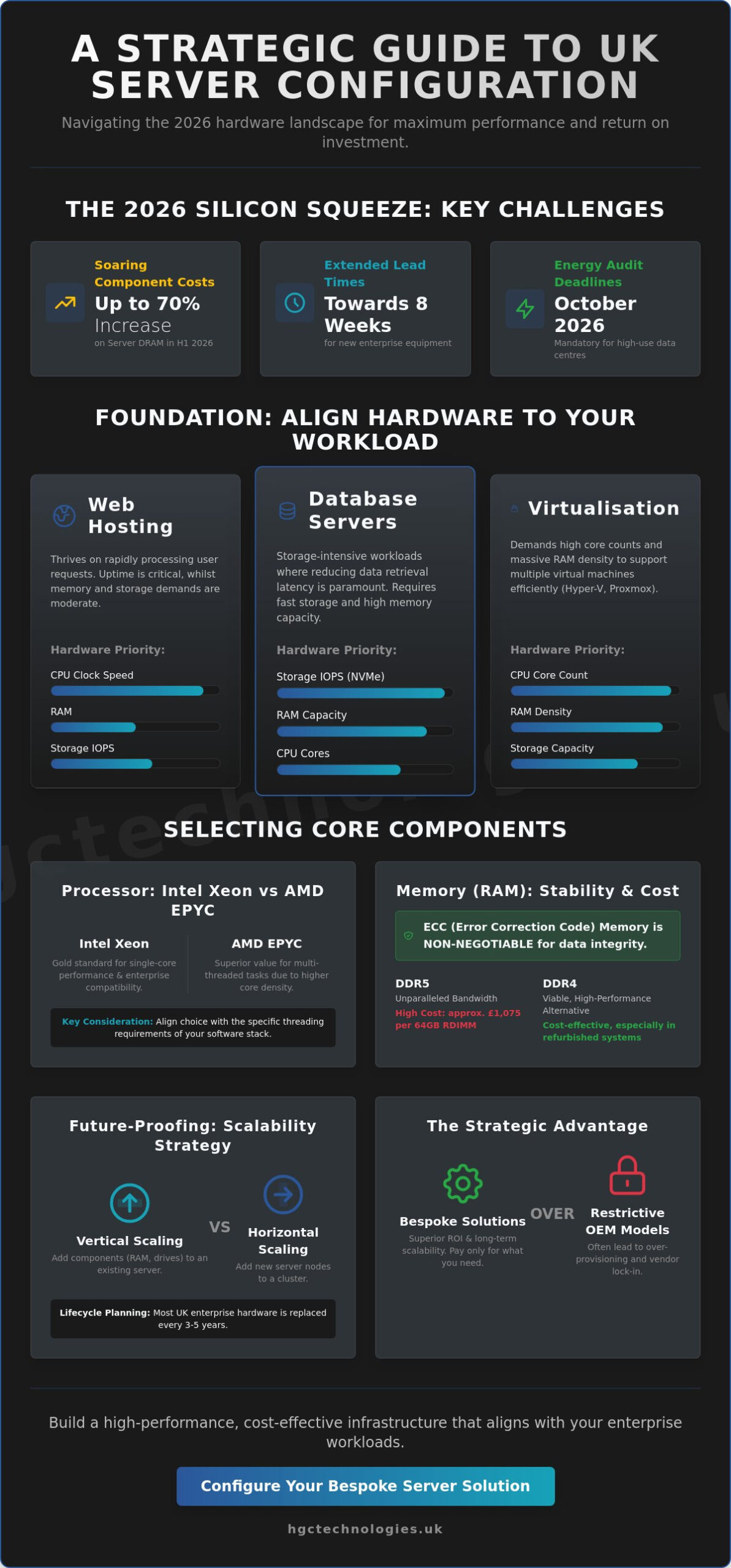
Strategic hardware procurement is no longer optional; it’s a necessity for survival in a volatile market. With server DRAM prices soaring by up to 70% in early 2026, the traditional strategy of over-provisioning for safety is now a direct threat to your operational budget. As the “silicon squeeze” pushes lead times for new equipment toward the eight-week mark, British enterprises must maintain agility without over-spending on unnecessary components. You’re likely concerned about the rising cost of DDR5 memory and the looming October 2026 energy audit deadlines, which now demand a more sophisticated approach when you configure server hardware UK wide.
We recognise that the intersection of component compatibility and soaring energy tariffs creates a high-stakes environment for IT procurement. This guide provides the clarity you need to master server specification, allowing you to build a high-performance, cost-effective infrastructure that aligns perfectly with your specific enterprise workloads. You’ll gain a definitive roadmap for your hardware strategy, moving logically from chassis format selection to the technical nuances of modern memory and storage. This ensures your next deployment delivers maximum ROI whilst remaining resilient against market volatility and shifting regulatory standards.
Key Takeaways
- Identify how to align your hardware resources with specific enterprise workloads, such as virtualisation or database management, to prevent costly over-provisioning.
- Understand the critical performance differences between Intel Xeon and AMD EPYC processors to ensure your CPU selection matches your multi-threaded task requirements.
- Learn the professional methodology used to configure server hardware UK organisations require, balancing space-efficient rack units against the versatility of tower formats.
- Discover why ECC memory and strategic storage logic are non-negotiable components for maintaining business stability and data integrity in 2026.
- Recognise the strategic advantage of bespoke server solutions over restrictive OEM models to achieve superior ROI and long-term infrastructure scalability.
Understanding Your Workload: The Foundation of Server Configuration
Effective infrastructure starts with a clinical assessment of your software’s demands. To configure server hardware UK businesses can rely on for long-term stability, you must move beyond generic specifications. At its core, server configuration is the meticulous process of aligning physical resources, such as processing power and memory, with the specific requirements of your applications. Understanding what a server is in a modern context allows you to avoid the common pitfall of “over-speccing.”
While it’s tempting to procure the most powerful components available, this often leads to trapped capital and inflated energy bills. In 2026, efficiency is a financial imperative. UK data centres and server rooms consuming over 10 TJ of energy annually now face mandatory energy audits if they lack a certified management system. Over-provisioning hardware doesn’t just waste money at the point of purchase; it creates a persistent drain on your operational budget through cooling and power costs. Your goal is future-proofing that respects your current financial boundaries.
Mapping Workloads to Hardware Priorities
Every workload has a unique technical signature that dictates your procurement strategy. UK enterprises typically manage three primary categories: Database, Virtualisation, and File Storage. Matching the hardware to the task is essential for performance.
- Web Hosting: These environments thrive on high clock speed CPUs to process requests rapidly. They generally require moderate RAM but high uptime guarantees.
- Database Servers: These are storage-intensive. You should prioritise Input/Output Operations Per Second (IOPS) via NVMe storage and high-capacity memory to reduce data retrieval latency.
- Virtualisation (Hyper-V/Proxmox): This demands high core counts and massive RAM density. As many UK firms shift away from VMware due to 2026 pricing structures, the hardware must remain flexible enough to support alternative hypervisors.
The Role of Scalability in UK Enterprises
Strategic growth requires a choice between vertical and horizontal scaling. Vertical scaling involves adding components like RAM or drives to an existing chassis, whilst horizontal scaling adds entirely new server nodes to a cluster. Most enterprise hardware in the UK operates on a 3-5 year lifecycle before the cost of maintenance outweighs the benefits of replacement.
Infrastructure scalability in 2026 is the ability of a system to adapt to fluctuating AI-driven data processing demands through modular component upgrades or seamless cluster expansion. By selecting a chassis with spare DIMM slots and drive bays today, you protect your investment for tomorrow without over-spending today.
Selecting Core Components: CPU, RAM, and Storage Logic
Selecting the right silicon is the most critical decision when you configure server hardware UK wide. Your choice of processor dictates the entire architecture of the system. Intel Xeon Scalable processors remain the gold standard for enterprise compatibility and single-core performance. Conversely, AMD EPYC chips often provide superior value for multi-threaded tasks due to their higher core density. In a market where x86 processors still command over 72% of the share, your decision should rest on the specific threading requirements of your software stack.
Memory selection in 2026 requires a strategic view of the global supply chain. The “silicon squeeze” has caused server DRAM contract prices to surge by up to 70% in the first half of the year. Whilst DDR5 offers unparalleled bandwidth, a 64GB RDIMM module now costs approximately $1,350. For many UK businesses, DDR4 remains a viable, high-performance alternative in refurbished systems, provided the workload doesn’t demand the peak throughput of the latest generation. Regardless of the generation, ECC (Error Correction Code) memory is non-negotiable. It detects and corrects data corruption at the hardware level, preventing the spontaneous system crashes that can cripple a business during peak hours.
Processor Power and Core Density
High clock speeds are vital for legacy applications and single-threaded tasks, but high core counts are the priority for modern virtualisation. You must also consider Thermal Design Power (TDP). Higher TDP processors require more aggressive cooling, which directly impacts your energy bills. Given the UK’s stringent energy audit requirements arriving in October 2026, selecting a processor with an optimal performance-per-watt ratio is a fiscal necessity. If you are balancing a tight budget, choosing a refurbished chassis with mid-range Xeon Silver or Gold processors often provides the best ROI for general office workloads.
Storage Performance and Redundancy
Storage is no longer about capacity alone; it’s about the interface. NVMe (Non-Volatile Memory Express) has become the standard for high-performance databases, offering significantly lower latency than traditional SAS or SATA SSDs. For “cold” storage or massive backups, high-capacity HDDs still offer the lowest cost per terabyte. Most 2026 enterprise environments are now shifting toward All-Flash Arrays (AFA) for active data to maximise speed and reliability. If you need help navigating these technical specifications, consulting with experts in Server Solutions can ensure your configuration remains balanced and cost-effective.
Data redundancy is your final line of defence against hardware failure. Your RAID (Redundant Array of Independent Disks) configuration should match your uptime requirements:
- RAID 1 (Mirroring): Best for OS boot drives, providing simple redundancy with two disks.
- RAID 5 (Striping with Parity): Offers a balance of capacity and protection, ideal for general file storage.
- RAID 10 (Combining 1 and 0): The gold standard for databases, providing the highest performance and fault tolerance by mirroring and striping data across at least four drives.
Chassis and Form Factors: Rack vs Tower Servers
Spatial strategy is as vital as silicon when planning your infrastructure. When you configure server hardware UK organisations often overlook how the physical footprint affects long-term maintenance and cooling. Rack servers, measured in Rack Units (U), are the industry standard for high-density environments. A 1U chassis offers maximum space efficiency but often sacrifices thermal headroom and expansion slots. Conversely, 2U and 4U models provide the internal volume required for multiple GPUs or high-capacity drive arrays, making them the preferred choice for virtualisation nodes.
Tower servers offer a different set of advantages, primarily for businesses without a dedicated, climate-controlled server room. Because they utilise larger, slower-spinning fans, towers are significantly quieter than their rack-mount counterparts. This makes them perfect for “under-desk” deployments in open-plan offices where noise pollution would otherwise disrupt staff. If you are looking to optimise your workspace for both technology and comfort, you may wish to explore Office Fit-outs that incorporate acoustic and thermal considerations. However, the larger footprint of a tower means you cannot stack them easily; once your fleet grows beyond three or four units, the lack of centralised organisation becomes a liability.
When to Choose a Rack-Mount Solution
Centralised management is the primary driver for rack adoption. If your business utilises a standard 19-inch rack, you gain access to professional cable management and sliding rails that allow for “hot-swappable” maintenance without disconnecting neighbouring equipment. You must also account for Power Distribution Units (PDUs). These units ensure that high-density racks receive consistent power, but they require a structured electrical setup that most standard office environments lack. Rack solutions are built for scale, allowing you to add capacity vertically as your data demands increase.
The Case for Tower Servers in SMEs
Tower servers are the definitive “plug-and-play” solution for small to medium enterprises. They don’t require expensive rack cabinetry or specialised cooling ducts to operate reliably. Many UK branch offices favour “quiet-office” certified towers, which are engineered to run enterprise workloads whilst maintaining a decibel level comparable to a standard workstation. If your business grows, many professional tower chassis can be converted to rack-mounts using a simple rail kit. This flexibility ensures that your initial hardware investment remains protected even as your IT requirements evolve into a more structured data centre environment.
Expansion capabilities are strictly tied to the chassis size. A 1U rack server may only support two PCIe slots, whilst a 4U rack or a full-sized tower can accommodate up to seven. This difference is crucial if you plan to add dedicated RAID controllers, high-speed 10GbE network cards, or fibre channel adapters in the future. Always select a chassis that offers at least two more expansion slots than you currently require.
Step-by-Step: How to Configure Your Server Hardware
Building a robust infrastructure requires a methodical execution of technical steps. When you configure server hardware UK vendors and IT managers must look beyond the specification sheet to ensure long-term reliability. A structured approach prevents the common errors that lead to system instability or performance bottlenecks. Follow this logical progression to move from a workload audit to a production-ready deployment.
- Step 1: Audit Software and User Load. Begin by quantifying your concurrent user count and the specific IOPS requirements of your applications. This data informs every subsequent hardware choice.
- Step 2: Select a Base Chassis. Dell PowerEdge and HP ProLiant remain UK favourites due to their extensive local support networks. With lead times for new equipment currently stretching to 4-8 weeks in 2026, verify chassis availability before finalising your design.
- Step 3: Populate CPU and RAM. Install your processors and populate DIMM slots following the manufacturer’s balanced memory configuration rules. This ensures maximum bandwidth across all memory channels.
- Step 4: Design the Storage Array. Select a dedicated hardware RAID controller with a battery-backed write cache. This provides a critical layer of protection for your data during unexpected power events.
- Step 5: Finalise Power and Networking. Transitioning to 25GbE is increasingly common for high-throughput environments, though 10GbE remains the standard for most UK SME infrastructures.
Power and Network Redundancy
Dual-redundant power supplies (PSUs) are essential for maintaining uptime. UK power fluctuations, though infrequent, can trigger sudden reboots that lead to database corruption if your system lacks PSU redundancy. You should also select a Network Interface Card (NIC) that matches your existing switch fabric to avoid speed mismatches. For remote management, ensure you configure out-of-band tools such as iDRAC or iLO. These interfaces allow your technical team to monitor hardware health and perform BIOS updates without being physically present in the server room. Explore our bespoke Server Solutions to begin your build with expert guidance.
Verification and Burn-in Testing
Never move a server into a live environment without a rigorous stress test. A 24-hour burn-in period identifies “infant mortality” in components like RAM and SSDs before they can impact your business operations. During this phase, update all firmware to the latest stable versions and optimise BIOS settings for energy efficiency, which is vital for meeting the October 2026 energy audit standards. Rigorous hardware verification is the hallmark of a professional build, ensuring that individual components function as a unified, resilient system.
Bespoke Server Solutions with HGC Technologies UK Ltd.
HGC Technologies UK Ltd. acts as a strategic partner for businesses looking to configure server hardware UK organisations need for resilient growth. We remove the friction from procurement by providing a clear, logical path through the technical landscape. Our approach focuses on your specific workload, ensuring that every CPU core and gigabyte of RAM serves a definitive purpose. This clinical focus eliminates the uncertainty often associated with high-value IT investments, allowing you to deploy infrastructure with total confidence.
Choosing a bespoke build over a restrictive off-the-shelf OEM model offers a significant strategic advantage. Standard models often come with proprietary components that make future upgrades difficult or unnecessarily expensive. By opting for a custom solution, you maintain control over your hardware lifecycle. We utilise our deep industry expertise to select components that offer the best performance-per-watt, helping you stay ahead of the supply chain constraints that define the 2026 market.
Expert Configuration and Support
Our professional methodology focuses on building tailored computing infrastructure that bypasses the “OEM tax.” This tax refers to the inflated margins that major manufacturers place on standard components like memory and storage. We help you select high-performance, industry-aligned alternatives that deliver equivalent reliability at a more sustainable price point. For a complete office infrastructure, our server solutions integrate seamlessly with our extensive inventory of bulk Dell refurbished laptops. This allows you to synchronise your back-end processing power with high-quality user endpoints, creating a unified technology stack that supports your entire workforce.
Direct Procurement Without the Complexity
Acquiring enterprise-grade hardware shouldn’t involve navigating a maze of resellers and middle-men. HGC Technologies UK Ltd. operates a direct sales model that prioritises transparency and efficiency. This ensures that your technical requirements are translated directly into a physical build without the risk of miscommunication or unexpected lead-time delays. Our technical team is ready to consult on your specific infrastructure needs, whether you’re deploying a single database node or a complex virtualisation cluster. Configure server hardware UK enterprises can trust by choosing a partner that values long-term value over short-term gains. Contact HGC Technologies UK Ltd. for your custom server configuration to secure a high-performance foundation for your business operations.
Securing Your Infrastructure for a Resilient Future
Mastering the complexities of server specification requires a shift from component-first shopping to a workload-first strategy. By clinical assessment of your software’s demands and prioritising energy-efficient silicon, you protect your enterprise against market volatility and shifting regulatory standards. Whether you select a space-saving rack or a quiet-office tower, your configuration must balance immediate performance with a clear roadmap for long-term scalability.
When you choose to configure server hardware UK wide with a specialist partner, you bypass the restrictive costs of traditional OEM models. HGC Technologies UK Ltd. stands as an authoritative wholesale IT specialist, providing the expertise required to build high-performance foundations for your business operations. Our direct procurement model ensures you receive enterprise-grade hardware tailored to your specific technical requirements without the complexity of traditional supply chains.
Optimise your infrastructure with HGC Technologies UK Ltd. bespoke server solutions to access expert custom-built PC and server solutions. We’re here to ensure your technology stack remains a strategic advantage rather than a financial burden. Take the next step with confidence and build a more efficient, high-performance future for your organisation today.
Frequently Asked Questions
How much RAM do I need for a small business server in the UK?
Most UK small businesses should start with at least 64GB of ECC RAM to handle modern operating system overheads and basic file sharing. If you plan to run multiple virtual machines or a central database, this requirement quickly scales to 128GB or 256GB. Correctly sizing your memory helps you configure server hardware UK organisations can rely on without over-spending on the currently expensive DDR5 modules.
Is it better to buy a refurbished server or a new custom build?
Refurbished hardware offers an exceptional balance of cost and performance, particularly during the 2026 component shortages. Custom builds are superior when your workload demands the latest PCIe 5.0 lanes or specific high-density storage configurations. Both approaches provide more flexibility than rigid off-the-shelf models, allowing you to tailor the machine to your exact operational needs.
What is the difference between a rack server and a tower server?
Rack servers are designed for standard 19-inch cabinets and offer high-density compute power in space-efficient 1U or 2U formats. Tower servers resemble traditional PCs and are engineered for standalone operation in offices. Towers are typically quieter and don’t require specialised cooling infrastructure, making them ideal for smaller premises without a dedicated server room.
Can I upgrade my server hardware after it has been configured and installed?
Yes, most enterprise server chassis are designed for modular growth. You can typically add more RAM to vacant DIMM slots or insert additional drives into empty bays as your data requirements expand. You must verify the power supply capacity before adding high-draw components like powerful GPUs or multiple high-speed network cards to ensure the system remains stable under load.
What RAID level is best for a business file server?
RAID 6 is often the most reliable choice for business file servers because it provides dual-drive failure protection. Whilst RAID 5 is popular for its capacity efficiency, the larger drive sizes common in 2026 make the extra redundancy of RAID 6 a safer investment. For performance-critical applications like active databases, RAID 10 remains the gold standard for speed and fault tolerance.
How do I ensure my server configuration is energy efficient?
Prioritise high-efficiency power supplies with an 80 Plus Platinum or Titanium rating to reduce wasted electricity. You should also select processors with a Thermal Design Power (TDP) that matches your actual workload rather than peak theoretical needs. This approach is essential for complying with the UK’s October 2026 energy audit mandates for data centres and large server rooms.
What are the most reliable server brands for UK enterprises in 2026?
Dell and HP remain the primary choices for UK enterprises because they offer extensive local support and parts availability. Lenovo is also a highly reliable contender, particularly for high-density compute tasks. These brands ensure that when you configure server hardware UK vendors can provide consistent maintenance and firmware updates throughout the hardware’s typical three to five-year operational life.
Do I need a dedicated server room for a rack-mount configuration?
A dedicated room isn’t strictly required, but it’s highly recommended for rack-mount systems due to their high noise levels and heat output. Rack servers utilise small, high-speed fans that create a significant acoustic disturbance in open-plan offices. If you lack a cooled and isolated server room, a tower server is a much more practical choice for maintaining a productive work environment.

Mobile Hardware Distributor UK: The 2026 Strategic Procurement Checklist
Did you know that whilst UK businesses can save up to 50% by sourcing refurbished handsets, a single

Refurbished Servers UK Wholesale: The 2026 Enterprise Procurement Guide
With OEM prices surging by up to 20% in the opening months of 2026 and lead times often exceeding ei
Pre-installing Custom Software on Bulk Laptops: The 2026 UK Procurement Guide
With DRAM prices forecast to rise by 125 per cent across 2026, the era of buying cheap and fixing la
Comments are closed.