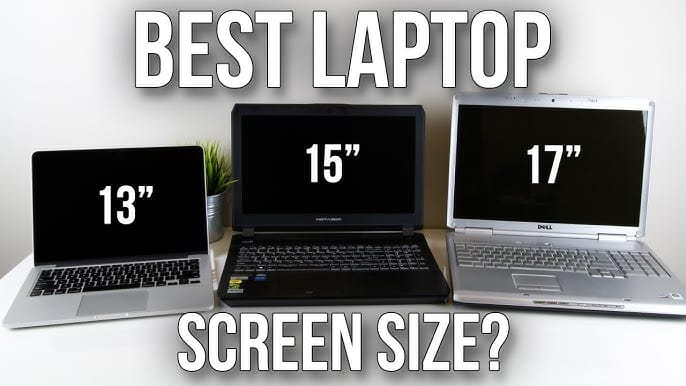
Best Laptop Screen Size for Business Use: A 2026 Procurement Guide
What if the primary bottleneck in your team’s daily output isn’t a software issue, but a physical one? Selecting the best laptop screen size for business use is a complex strategic decision that impacts everything from employee eye health to the long-term viability of your IT budget. Most IT procurement leaders recognise the frustration of managing a fragmented fleet where mismatched accessories and complaints about cramped displays are the norm.
Strategic hardware allocation ensures every department performs at its peak. This 2026 guide promises to help you streamline your strategy by identifying the optimal dimensions for every corporate role. You will discover a clear framework for departmental hardware allocation, understand the critical shift toward 16:10 aspect ratios, and learn how to maximise your budget through high-quality bulk refurbished sourcing. We will examine why 15 to 16.9-inch models now command 38% of the market whilst explaining when a compact 13-inch chassis remains the superior choice for your mobile workforce.
Key Takeaways
- Identifying the best laptop screen size for business use requires a strategic balance between role-specific mobility and the visual demands of modern hybrid working.
- Discover why 14-inch models remain the versatile standard for bulk deployment whilst 13-inch ultra-portables cater to executive and travel-intensive roles.
- Learn how the transition to 16-inch displays provides a superior workstation experience for data-heavy tasks that benefit from integrated numeric keypads.
- Understand the critical shift toward 16:10 aspect ratios and how maintaining a 1080p minimum resolution protects employee eye health and productivity.
- Streamline your procurement strategy and maximise budget efficiency by standardising your fleet with high-quality refurbished enterprise hardware.
Evaluating the Best Laptop Screen Size for Business Use in 2026
Determining the best laptop screen size for business use involves more than just picking a number from a spec sheet. Technically, screen size represents the diagonal distance from one corner of the display panel to its opposite. In the 2026 corporate environment, this choice has become a critical pillar of hybrid-first procurement. IT leaders now recognise that screen real estate directly influences employee cognitive load; a display that is too small forces constant window switching, which drains mental energy and reduces task efficiency. To simplify procurement, most organisations categorise their fleet into three distinct tiers: ultra-portable models under 14 inches, versatile standards between 14 and 15 inches, and desktop-replacements of 16 inches and above.
Why Screen Size is a Strategic IT Decision
Choosing a display size is a balancing act between ergonomics and mobility. Larger screens provide a canvas that often negates the immediate need for external monitors in temporary hot-desking setups, yet they increase the overall chassis weight and dictate the thermal cooling capacity of the machine. A 16-inch laptop has more internal volume to dissipate heat, allowing for sustained performance during intensive tasks. Conversely, smaller panels often contribute to better battery longevity in enterprise models, as there is less surface area to illuminate, making them the preferred choice for roles that prioritise time away from a power socket.
The Shift from 16:9 to 16:10 Aspect Ratios
The evolution of screen aspect ratios has moved away from the cinematic 16:9 format toward the productivity-focused 16:10 standard. Vertical space is far more valuable for business applications like spreadsheets, coding environments, and document editing than horizontal width. This shift means that a modern 13.3-inch 16:10 screen can actually feel more spacious and functional than an older 14-inch 16:9 display. Major industry leaders, including Dell and Lenovo, have already transitioned their flagship business lines to these taller ratios to meet the demands of professionals who need to see more of their work without excessive scrolling. When you are looking for the best laptop screen size for business use, prioritise these taller displays to give your team a significant advantage in daily software navigation.
The 13-14 Inch Category: Why Portability Remains the Corporate Favourite
Within the UK business sector, the 13 to 14-inch bracket is widely considered the best laptop screen size for business use due to its unparalleled versatility. Whilst larger panels offer more visual real estate, this category strikes a precise balance between chassis weight, keyboard ergonomics, and physical footprint. It is no coincidence that refurbished Dell Latitude and Lenovo ThinkPad 14-inch models dominate the secondary market. These machines are engineered for the rigours of daily corporate life whilst remaining light enough for a hybrid commute. They represent a safe, reliable investment for IT managers looking to standardise their fleet without compromising on performance.
Selecting between 13.3 and 14 inches often depends on specific job roles. The 13-inch ultra-portable is a specialist tool, tailored for frequent flyers and executive roles where every gram of weight matters. These devices often sacrifice a few ports to maintain a slim profile, but they offer the mobility required for high-level management moving between international sites. For bulk procurement, however, the 14-inch model is the undisputed standard. It provides a slightly larger canvas that supports more comfortable typing and a wider array of legacy ports, which simplifies choosing the right laptop screen size for a diverse workforce.
Pros and Cons of the 14-Inch Form Factor
- Pro: These devices fit perfectly into standard laptop rucksack compartments and aeroplane tray tables, making them the ultimate hybrid companion.
- Pro: The screen is large enough for comfortable split-screen multitasking, allowing users to reference a browser whilst drafting an email.
- Con: The display can feel cramped for intensive data analysis or professional video editing where multiple timelines are involved.
Best Use Cases for Ultra-Portable Displays
Field sales teams are the primary beneficiaries of ultra-portable 13-inch displays. Their priority is all-day battery life and a light carry weight that won’t cause strain during a day of client visits. Similarly, senior management who move frequently between meeting rooms and external sites find these compact dimensions ideal. For resellers, there is a consistent and high demand for refurbished 13.3-inch models within the professional services sector, where sleek aesthetics and mobility are often prioritised over raw screen size. If your organisation requires a fleet that balances these needs, consider the value of bulk refurbished enterprise laptops to stretch your IT budget further.

The 15-16 Inch Powerhouse: Maximising Productivity for Data-Heavy Roles
Whilst the 14-inch model serves as the corporate all-rounder, certain technical and data-intensive roles demand more expansive visual real estate. The transition from the traditional 15.6-inch panel to the modern 16-inch standard has redefined the high-performance workstation. This extra vertical space is a significant advantage for engineers and financial analysts who must oversee complex datasets or detailed CAD drawings without constant zooming. For these power users, the best laptop screen size for business use is often the largest portable option available, providing the necessary canvas for intricate professional tasks.
Beyond the screen itself, the larger chassis offers significant functional benefits. Most 16-inch laptops include an integrated numeric keypad, a vital tool for accounting departments and data entry specialists. These larger machines also boast superior thermal management. A bigger footprint allows for more robust cooling systems, which in turn permits the use of higher-wattage processors that would otherwise throttle in a smaller 13-inch frame. This ensures that performance remains consistent during intensive workloads, preventing the hardware slowdowns that can hamper productivity during peak periods.
When to Choose a 16-Inch Screen for Your Team
Roles that involve managing intricate spreadsheets or keeping multiple windows open simultaneously thrive on a 16-inch display. This “desktop replacement” philosophy is ideal for internal staff who rarely travel between sites; it reduces hardware clutter by potentially removing the need for a secondary monitor. When evaluating key specs for business laptops, consider whether the productivity gains of a larger panel outweigh the need for extreme portability for your specific department. If your team spends eight hours a day at a desk, the ergonomic benefits of a larger display are indisputable.
The Weight Penalty vs. Visual Gains
There is a tangible weight difference to consider, typically moving from around 1.3kg in a 14-inch model to 1.9kg for a 16-inch powerhouse. However, modern bezel-less designs mean that a 2026 16-inch laptop often has a similar physical footprint to an older 15-inch machine. This makes the visual gain significant without making the device unnecessarily unwieldy. For budget-conscious organisations, sourcing refurbished 15-inch HP EliteBooks provides an excellent way to equip stationary teams with high-performance workstations at a fraction of the cost of new units. This approach allows you to provide the best laptop screen size for business use whilst maintaining strict control over your hardware procurement budget.
Technical Nuances: Resolution, Aspect Ratio, and Fleet Standardisation
Selecting the best laptop screen size for business use requires a deep dive into the technical specifications that define daily usability. By 2026, 1080p (Full HD) has established itself as the absolute minimum standard for professional environments. Whilst higher resolutions like 4K are available, they frequently prove counterproductive on smaller panels. High-pixel-density displays consume significantly more power, draining batteries faster during off-site meetings. They also introduce scaling headaches for IT departments; software interfaces often appear microscopic or blurry when moved between a high-resolution laptop and a standard external monitor.
The real 2026 standard for productivity is the 16:10 aspect ratio. This taller format provides roughly 10% more vertical space than traditional widescreen displays, allowing users to view more spreadsheet rows or lines of code without scrolling. Standardising your fleet on a consistent resolution and aspect ratio simplifies IT support and ensures that software images deploy uniformly across the organisation. Additionally, prioritise anti-glare coatings over glossy finishes. These matte surfaces are essential for maintaining visibility under bright office lights, reducing employee eye strain and headaches over long shifts.
Mapping Screen Size to Business Roles
Effective procurement involves matching hardware to specific departmental workflows. A one-size-fits-all approach often leads to wasted budget or frustrated staff. Consider this framework for your next refresh:
- Administrative and Support: 14-inch FHD models. This size offers the perfect balance for standardisation, fitting every desk and rucksack whilst providing ample space for core office apps.
- Finance and Data Science: 15.6 or 16-inch models. These roles require the integrated numeric keypad and the extra width for complex data visualisation.
- Executive and Sales: 13.3-inch 16:10 models. These prioritise maximum mobility and a premium chassis for frequent travellers.
The Role of External Monitors in Size Selection
Modern connectivity has fundamentally changed how we view laptop dimensions. Many organisations now opt for 13 or 14-inch laptops paired with high-quality docking stations. This best of both worlds setup provides a lightweight machine for travel and a multi-monitor powerhouse at the desk. Technologies like USB-C and Thunderbolt 4 allow a single cable to handle power, data, and dual-screen output, making the physical size of the laptop screen less of a limitation for stationary work. You can explore this further by Comparing Dell Laptop Screen Sizes for Your Team to find the right hardware mix. If you are ready to upgrade your fleet, view our bulk refurbished laptop solutions to find high-performance machines that fit your specific role requirements.
Procurement Strategy: Sourcing the Right Sizes in Bulk
Efficiency in IT procurement starts with fleet standardisation. Selecting the best laptop screen size for business use is only the first step; the second is developing a scalable sourcing strategy that simplifies long-term management. By limiting your organisation to one or two primary screen sizes, you significantly reduce the complexity of your IT environment. Mismatched docking stations, inconsistent cable management, and software imaging errors become relics of the past when your hardware footprint is uniform. This methodical approach ensures that every device remains compatible with your existing office peripherals, from monitor arms to laptop risers, protecting your investment for years to come.
The refurbished market offers a distinct logistical advantage for bulk buyers, particularly regarding 14-inch enterprise models. Because these were the dominant choice for corporate fleets in previous years, they’re now available in high volumes on the secondary market. HGC Technologies UK Ltd. specialises in organising bulk orders of Dell, Lenovo, and HP units by precise screen specification. This allows you to maintain a professional, uniform aesthetic across your entire department without the prohibitive costs of buying brand-new units. We ensure that every batch meets rigorous quality standards, providing the reliability your business demands whilst significantly stretching your hardware budget.
The Refurbished Advantage for Bulk Buyers
Sourcing high-grade ex-corporate laptops in consistent sizes is the most cost-effective way to achieve a uniform fleet look. Many organisations find they can provide premium 15-inch workstations to their technical teams without the “new” price premium by opting for refurbished enterprise-grade hardware. Beyond the financial savings, this is a responsible, forward-thinking decision. Extending the lifecycle of high-performance screens reduces e-waste and aligns your procurement strategy with modern sustainability goals. It’s a strategy that balances fiscal responsibility with a commitment to environmental excellence.
Partnering with a Specialist UK Wholesaler
HGC Technologies UK Ltd. acts as a knowledgeable guide for resellers and business owners alike. We support our partners in identifying high-demand screen sizes that reflect current market trends, ensuring your inventory or fleet remains relevant for the 2026 landscape. Our expertise isn’t limited to laptops; we provide custom-built PCs and robust server solutions to complement your mobile hardware. This holistic approach ensures that your entire technical infrastructure is built on a foundation of quality and stability. Enquire about our latest bulk refurbished laptop inventory to discover how we can help you identify the best laptop screen size for business use within your specific budget and role requirements.
Future-Proofing Your Corporate Hardware Strategy
Selecting the best laptop screen size for business use is a foundational step in building a high-performing, hybrid-ready workforce. By matching specific dimensions to departmental roles, you ensure that executives remain mobile whilst data analysts have the expansive workspace they require. Embracing the 16:10 aspect ratio and standardising your resolution choices simplifies IT support and protects your team from unnecessary cognitive fatigue. These technical decisions, when paired with a disciplined procurement strategy, create a hardware environment that is both efficient and sustainable.
HGC Technologies UK Ltd. stands ready to support your next fleet refresh. As a specialist UK wholesaler of refurbished Dell, Lenovo, and HP hardware, we provide the scale and expertise needed for successful bulk procurement. Whether you require national UK delivery for a laptop rollout or expertly configured custom PC and server solutions, our team ensures your infrastructure meets the highest professional standards. We invite you to browse our wholesale refurbished laptop range to find the ideal match for your organisation’s requirements. Investing in quality hardware today builds the stability your business needs for the years ahead.
Frequently Asked Questions
Is a 13-inch or 14-inch laptop better for business travel?
A 13-inch laptop is typically the superior choice for frequent business travel due to its smaller footprint and lighter weight. It fits more comfortably on aeroplane tray tables and in compact carry-on bags. However, many organisations prefer 14-inch models as they offer a slightly larger display and more ports whilst remaining highly portable for the average hybrid worker.
Does laptop screen size affect battery life significantly?
Screen size has a direct impact on battery longevity because larger panels require more power to illuminate. A 16-inch display has a significantly larger surface area than a 13-inch model, which naturally drains the battery faster. Whilst larger chassis can house bigger batteries to compensate, the efficiency of a smaller screen remains a key advantage for users who spend long periods away from a power source.
What is the most common screen size for business laptops in the UK?
The 14-inch model is currently the most common screen size for business laptops across the UK corporate sector. It is widely regarded as the best laptop screen size for business use because it balances ergonomic comfort with mobility. Market data indicates that whilst the 15 to 16.9-inch category holds a 38% share, the 14-inch form factor remains the primary choice for bulk fleet deployment.
Should I buy 15-inch laptops for my office-based staff?
Opting for 15-inch or 16-inch laptops is a sound strategy for office-based staff who rarely commute or travel for meetings. These larger displays provide the extra real estate needed for multitasking and complex data entry. If your team uses their laptops as primary workstations without external monitors, the increased visual space and integrated numeric keypads found in larger models will significantly improve their daily productivity.
What is the best aspect ratio for productivity in 2026?
The 16:10 aspect ratio has become the gold standard for productivity in 2026. This format provides more vertical space than traditional 16:9 widescreen displays, allowing users to see more lines of a document or rows in a spreadsheet. This reduction in vertical scrolling helps maintain focus and efficiency, making it the preferred specification for modern enterprise hardware procurement and software navigation.
Can I use a 14-inch laptop for intensive spreadsheet work?
You can certainly use a 14-inch laptop for intensive spreadsheet work, provided the resolution is at least 1080p. Whilst a 16-inch screen offers more native space, a 14-inch model with a high-quality display and a 16:10 ratio remains highly functional for most users. For prolonged data tasks, many businesses pair these versatile 14-inch machines with docking stations and external monitors to provide a full desktop experience.
Why are 16-inch laptops replacing the traditional 15.6-inch models?
Modern 16-inch laptops are replacing 15.6-inch models because of advancements in bezel-less design. Manufacturers can now fit a larger, taller screen into a chassis that has roughly the same physical footprint as older 15-inch machines. This transition offers users more workspace without increasing the bulk of the device, effectively making the traditional 15.6-inch widescreen format obsolete in high-end business circles.
Is screen resolution more important than physical screen size for business?
Resolution and physical size are equally important and must be balanced to avoid scaling issues. A high resolution on a very small screen can make text difficult to read without significant software scaling, which can lead to interface blurring. Finding the best laptop screen size for business use often involves selecting a 14-inch or 16-inch panel with a crisp 1080p or 1440p resolution to ensure text remains sharp.