

Custom PC for Financial Modelling: A 2026 Buying Guide
A financial modelling PC doesn’t need to win a gaming benchmark. The right custom PC for financial modelling keeps pace with your actual work, whether you’re recalculating complex spreadsheets, handling large datasets or running several business applications at once. Processor performance, memory, storage and everyday responsiveness may matter more than headline-grabbing graphics hardware.
If you’re unsure which components deserve budget, start with the software you use and the tasks that take the most time. A model’s scale, calculation patterns and the applications you keep open all affect the specification. A considered build can balance current performance with practical upgrade options, without paying for gaming-focused features your workflow won’t use.
This 2026 buying guide shows how to set component priorities around real modelling tasks, then compares desktop, workstation and laptop approaches, including trade-offs in performance, portability and flexibility. You’ll also find what to include in a requirements brief when commissioning a bespoke business PC, so the build can reflect your workload and working environment.
Key Takeaways
- Match your PC specification to the scale and calculation demands of your models, rather than assuming gaming-focused components are essential.
- Understand how the processor, memory, storage, graphics and connectivity contribute to a responsive modelling setup.
- Compare desktop, workstation-style desktop, laptop and all-in-one formats against your needs for portability, upgradeability and desk space.
- Build a clear buying brief by recording your software, workbook scale, calculation patterns, multitasking and display requirements.
- A custom PC for financial modelling can be tailored around your business workload, with a clear requirements brief guiding the specification discussion.
What makes a custom PC suitable for financial modelling?
A suitable computer is configured around the work it needs to handle, not a generic idea of a “powerful PC”. Financial modelling can involve updating a straightforward spreadsheet, building linked forecasts, testing scenarios or analysing large datasets. The scale of the model, its calculation complexity, the data sources it uses and the applications you run alongside it all influence the hardware that makes sense.
A custom PC for financial modelling is a computer configured to support the user’s modelling software and workload. Hardware suitability describes its capacity for that work, whilst software compatibility depends on the application’s own requirements. The distinction matters: a capable specification doesn’t, by itself, prove that a particular program or add-in will run correctly. Check the software publisher’s current documentation before settling on a build.
Financial models represent business performance and help users explore possible outcomes. For a broad overview of the practice, see What is Financial Modeling? The computer demands depend on how the work is done. A model drawing from multiple data sources or recalculating linked sheets repeatedly may place different demands on a system from a routine update to a smaller workbook.
Which financial modelling tasks shape the specification?
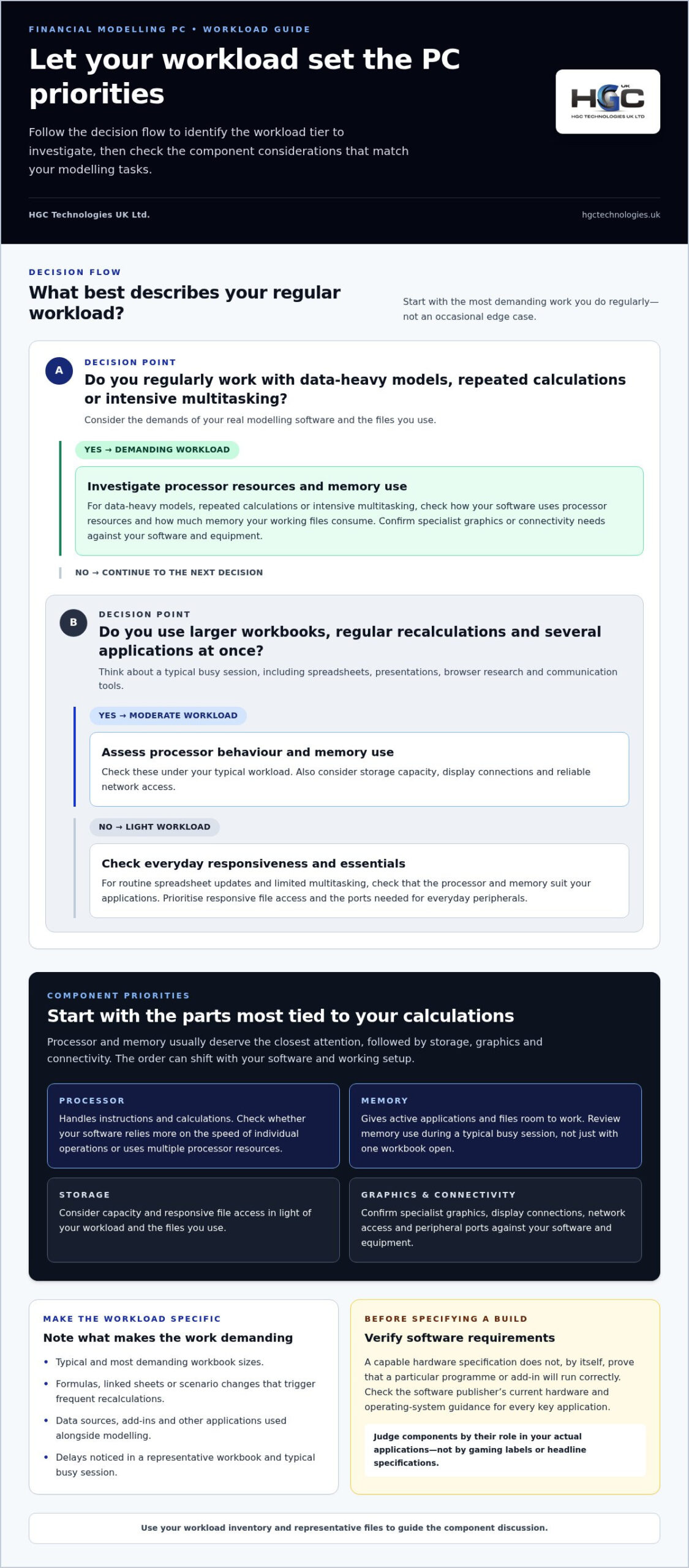
Start with the work you do regularly, rather than an occasional edge case. Routine spreadsheet updates and report viewing may call for a different balance of components from opening large workbooks, running repeated recalculations or refreshing data-heavy models. Multitasking matters too: a finance professional may keep spreadsheets open alongside presentations, browser research and communication tools.
Before selecting components, identify your most demanding recurring task and note what makes it demanding. Consider:
- How large your typical and most demanding workbooks are.
- Whether formulas, linked sheets or scenario changes trigger frequent recalculations.
- Which data sources and add-ins the workflow relies on.
- How many other applications are usually open during modelling.
This inventory turns “I need a faster PC” into a practical description of what the system must support. If possible, use a representative workbook and a typical busy session to identify where you notice delays, rather than relying on general impressions.
Does a financial modelling PC need gaming-level hardware?
Not automatically. Gaming-oriented features are designed around particular graphics and gameplay demands, which may not help with a spreadsheet-led workload. For many modelling tasks, other parts of the specification may be more relevant. The right balance still depends on your software, model and working habits: a visually intensive application or specialist analytical workflow could have different requirements from ordinary spreadsheet use.
Judge each component by its role in your actual applications, not by gaming labels or headline specifications. Check the publisher’s hardware and operating-system guidance for every key program, including add-ins where applicable. That verification, combined with your workload inventory, gives you a sound starting point for a build discussion and helps avoid paying for features that don’t serve your work.
Which PC components matter most for financial modelling?
Let the workload set the component priorities: processor and memory usually deserve the closest attention, followed by storage, graphics and connectivity. The order can shift with your software and working setup. A workbook that recalculates often places different demands on a PC from one mainly used to review reports. Use the guide below to identify what to investigate, rather than treating any tier as a fixed specification.
| Workload | Component considerations |
|---|---|
| Light | For routine spreadsheet updates and limited multitasking, check that the processor and memory suit your applications. Prioritise responsive file access and the ports needed for everyday peripherals. |
| Moderate | For larger workbooks, regular recalculations and several open applications, assess processor behaviour and memory use under your typical workload. Consider storage capacity, display connections and reliable network access. |
| Demanding | For data-heavy models, repeated calculations or intensive multitasking, investigate how the software uses processor resources and how much memory your working files consume. Confirm specialist graphics or connectivity needs against the software and equipment in use. |
Processor and memory: supporting calculations and large workbooks
The processor handles instructions and calculations, so its importance depends partly on how your modelling software performs them. Some tasks may rely more on the speed of individual operations; others may use multiple processor resources. Don’t choose by core count alone. Check the application’s documentation and, where possible, assess representative files and calculation patterns.
Memory gives active applications and files room to work. Large workbooks, presentations, browser tabs and communication tools can all increase demand when open together. Review memory use during a typical busy session before specifying a build. This is more useful than judging memory needs from a single workbook viewed in isolation.
Storage, graphics and connectivity: where they fit
A solid-state drive can make everyday access to applications and files feel more responsive, though it doesn’t replace adequate processor capacity or memory. Graphics needs depend on the modelling software, visual workload and display arrangement. A spreadsheet-focused setup may have different requirements from specialist visualisation tools, so verify the requirements with the publisher.
Account for practical details too. List the monitors, keyboard, storage devices and other peripherals you use, then identify the required ports and network connection. A custom PC for financial modelling should reflect these working conditions as well as calculation demands. For a bespoke build discussion, HGC’s custom-built PCs can be tailored to specific business requirements.
Desktop, workstation, or laptop: which setup suits your modelling work?
Choose a format based on where you work, how you use displays and peripherals, and whether you expect to upgrade the system later. A desktop can suit a fixed workspace, while a laptop prioritises mobility. A workstation-style desktop is a desktop approach for sustained or demanding professional workloads. An all-in-one describes how the computer and display are arranged, not how powerful it is. No single format suits every modelling role.
| Format | Upgradeability | Portability and desk space | Displays and shared use |
|---|---|---|---|
| Desktop | Often offers more scope to change components, depending on its design. | Best suited to a fixed desk; occupies space for a separate system unit. | Can support a multi-display arrangement if the system has suitable connections. Useful where a consistent shared workstation is needed. |
| Workstation-style desktop | Designed as a desktop format, with upgrade options determined by the specific build. | Not intended for routine carrying between locations. | Can form a dedicated work area for sustained professional tasks and multiple peripherals. |
| Laptop | Upgrade options are generally more limited and vary by model. | Portable for work across locations, with less desk space needed when used on its own. | Can be connected to external displays and peripherals where supported, making it adaptable between mobile and fixed-desk use. |
| All-in-one | Upgrade options depend on the design and may be more restricted than a desktop tower. | Combines the computer and display, reducing separate equipment on the desk; less convenient to move regularly. | A tidy single-display arrangement may suit shared desks, but confirm display connections if you use extra monitors. |
When does a desktop make more sense than a laptop?
If you mainly work at one desk, a desktop can provide a stable base for several monitors, full-sized peripherals and possible future upgrades. A laptop may be a better fit if you move between work locations, with the trade-off that portability can limit upgrade options. An all-in-one can reduce desk clutter, but assess its connections and upgrade scope separately from its appearance.
How should software compatibility affect the choice?
Before choosing a format, check the current operating-system and hardware requirements for each modelling tool, including essential add-ins. Factor in your organisation’s IT standards, security policies and approved application environment too. A platform that suits your personal preference may not fit a managed workplace. Base the decision on current documentation and workplace requirements, not dated forum posts or assumptions about compatibility.
For a fixed business workspace, a bespoke custom-built PC can be tailored to specific requirements. Match the format to your working pattern first, then use your software and workplace needs to guide the build discussion.
How to turn your modelling workload into a clear PC buying brief
A useful buying brief translates daily work into requirements a build can be assessed against. It helps distinguish essentials from preferences, gives a bespoke specification discussion a clear starting point and makes proposals easier to compare. Use these steps to document what the PC must support.
Five steps for documenting the right requirements
- List your software and platform needs. Record modelling applications, add-ins and operating-system requirements, using current publisher documentation. Include workplace IT constraints, such as approved applications or device policies, and any security requirements that affect deployment.
- Describe typical and demanding sessions. Give real examples, such as updating a regular forecast or recalculating a large workbook while refreshing linked data. Note workbook scale, calculation patterns and how often the most demanding work occurs.
- Map your multitasking. Record which applications run alongside modelling software, such as spreadsheets, presentations, browser research and communication tools. Note whether you switch between tasks frequently or keep several files active together.
- Document the physical setup. List your displays, required connections, keyboard and other peripherals. Explain whether the PC will stay at one desk, move between locations or be used in a shared office, and include any desk-space constraints.
- Set priorities for deployment and change. Note who will use and manage the system, the support environment it must fit, and any likely changes to software, workload or display arrangements. State which upgrades matter to you, without assuming they’ll be needed.
How to compare proposals without getting lost in specifications
Use the brief as your reference point. For every proposed component, ask how it relates to a documented requirement: a processor choice to repeated calculations, memory to large active workbooks and multitasking, or connectivity to your monitors and workplace network. If a component materially changes the proposed build, seek a plain-language explanation of its benefit for your stated use.
Keep requirements separate from performance claims. A benchmark describes a result under particular test conditions, but it doesn’t automatically show how your own files or software will behave. Give greater weight to verified compatibility, the applications and tasks you’ve documented, and a clear account of how the specification addresses them. This keeps the decision focused on your business workflow rather than an isolated number.
A precise brief makes a custom PC for financial modelling discussion more productive by showing which needs are essential and where there’s room to tailor the build. HGC Technologies creates bespoke PCs for business requirements. Use your completed brief to explore bespoke business PC builds and discuss a tailored PC build.
How HGC Technologies can tailor a custom PC for financial modelling
Once you’ve documented your software, modelling demands and workplace needs, that brief can guide a build designed around the job. HGC Technologies UK Ltd. supplies bespoke custom-built PCs for business requirements, with the specification discussion shaped around the intended workload and working environment. Define what the computer needs to support and which requirements matter most, rather than starting with a generic parts list.
A custom PC for financial modelling should be considered in context. The applications in use, the files and calculations they handle, the user’s setup and the organisation’s IT environment all inform a suitable specification. Your brief makes those requirements clear without assuming that one component configuration fits every modeller.
What to include when discussing a bespoke build
Bring practical information that connects the proposed system to real work. A concise written summary is often easier to assess than a list of component names without context. Include:
- Software and compatibility: the modelling applications, add-ins, operating-system requirements and any workplace IT or security constraints.
- Representative workload: the size and complexity of typical workbooks, demanding calculations, data sources and tasks that run alongside modelling.
- Workspace and equipment: display arrangements, peripherals, storage needs, network access and whether the PC will remain at one desk or move between locations.
- Users and environment: who will use the computer, whether it is a dedicated or shared workstation, and how it fits the organisation’s support and deployment processes.
- Future priorities: expected changes to applications, workload or display needs, plus any upgrade priorities that should inform the build discussion.
These details give HGC Technologies UK Ltd. a clearer basis for tailoring a build to your business requirements. Include priorities as well as constraints, such as whether a multi-display setup is essential or portability takes precedence over a fixed workstation.
When should a business consider server hardware instead?
A PC build is generally intended for an individual user’s working environment. Server hardware is a separate consideration when the requirement centres on shared infrastructure, access for multiple users or broader business operations. Whether that architecture is appropriate depends on how applications and data are hosted, who needs access and how the organisation manages its systems. It isn’t simply a higher-powered replacement for a modeller’s desktop.
For requirements focused on shared infrastructure, HGC Technologies UK Ltd. also configures professional server solutions for enterprise needs. The enterprise server hardware guide provides a related perspective on infrastructure-focused planning.
Use your completed brief to define the next step, whether you need an individual modelling PC or have a wider infrastructure requirement. Explore HGC Technologies UK Ltd.’s custom PC and server solutions for business environments.
Make your next PC decision with confidence
Your modelling requirements can change as workloads, applications and team practices evolve. Treat the buying brief as a practical planning tool: it clarifies today’s priorities and provides a useful reference when your needs shift. Choosing a custom PC for financial modelling then becomes a considered business decision, rather than a race to select the most impressive specification.
HGC Technologies supports businesses and resellers across the UK with custom-built PCs tailored to specific business requirements, alongside professional server solutions configured for enterprise needs. Whether you’re planning for an individual modeller or considering wider infrastructure, a clear view of the work and environment gives the discussion a sound starting point.
When you’re ready to plan a build, explore HGC’s custom PC and server solutions and use your requirements brief to shape the discussion.
Frequently Asked Questions
Does financial modelling software use multiple processor cores?
Some financial modelling applications can use multiple processor cores for certain operations, but the benefit depends on the software and the calculation being performed. A task that relies on sequential steps may behave differently from one that can divide work across cores. Check the publisher’s current documentation for how your specific tools handle processing, and consider testing representative calculations before choosing a processor based on core count alone.
Is 32 GB of RAM enough for financial modelling?
32 GB is a reasonable recommendation for complex financial modelling, but it isn’t a guarantee that every workload will fit comfortably. The number and size of open workbooks, add-ins and other applications all affect memory use. If your team handles exceptionally large datasets or keeps demanding applications open together, monitor actual usage during a typical busy session and compare it with the software publisher’s requirements before deciding.
Does a financial modelling PC need a dedicated graphics card?
Not necessarily. A dedicated graphics card is most relevant if your applications require particular graphics capabilities or your work involves demanding visualisation. For spreadsheet-led modelling, first establish what the software requires and whether the chosen system can support your monitor arrangement. For example, a user with several displays should verify available display connections rather than assuming a higher-end graphics card is essential for calculations.
Can a custom-built PC run Microsoft Excel reliably?
Yes, a custom-built PC can run Excel if its operating system and components meet the current requirements for the specific Excel version and any associated add-ins. Reliability also depends on correct installation, updates and the wider business environment, so hardware choice alone can’t guarantee it. Before deployment, test the organisation’s real workbooks and macros in the intended setup, especially if several employees rely on the same files or processes.
Is a workstation necessary for financial modelling?
No. A workstation isn’t essential for every modeller; a suitable desktop or laptop may meet an individual’s needs. It becomes worth considering when the work is sustained, resource-intensive or part of a specialist professional workflow. For instance, a team running large calculations alongside data analysis may have different requirements from an employee updating regular forecasts. Base the decision on the software, workload and business environment, not the workstation label alone.
Should I choose Windows or a Mac for financial modelling?
Choose the platform that supports your required applications, add-ins and workplace systems. Before selecting Windows or macOS, check current publisher documentation for each tool, including any platform-specific limitations, and confirm that your employer’s IT and security policies permit the setup. If colleagues share files or depend on established macros, test those workflows on the intended platform. For a custom PC for financial modelling, compatibility should be a core part of the build brief.
Refurbished Laptop Grades Explained: A 2026 Strategic Procurement Guide
With the UK refurbished electronics market projected to reach a staggering $24.37 billion by 2035, t

The Strategic Business Case for Refurbished Hardware in 2026
Sales of refurbished PCs in the UK almost doubled between the final quarter of 2024 and the end of 2

The Reliability of Refurbished Business Laptops: A 2026 Procurement Guide
The brand-new consumer laptop on a retail shelf is often less durable than a three-year-old enterpri