
Best Laptops for Businesses on a Budget
Affordable Laptops for Businesses in 2026
Laptops for businesses on a budget can be both efficient and reliable, catering to various business needs without breaking the bank.
- Look for models with at least 8GB RAM and SSD storage for optimal performance.
- Brands such as Lenovo, Dell, and Acer consistently offer budget-friendly options with good durability.
- Consider purchasing refurbished laptops, which can provide significant savings while still delivering quality.
- Beware of opting for excessively cheap models, as they may lack essential features and lead to higher costs over time due to repairs or replacements.
Investing in the right laptop not only supports day-to-day operations but also enhances productivity and efficiency. Always check user reviews and specifications to ensure the device meets your business requirements. Prioritising quality over the lowest price can save money in the long run.
What You’re Actually Trying to Accomplish with Budget Laptops
Choosing budget laptops for your business isn’t just about saving money; it’s about striking the right balance between cost and performance.
Many businesses focus solely on the upfront cost, often neglecting the long-term performance and maintenance requirements that can affect productivity. For instance, I recently worked with a small marketing firm that initially opted for lower-priced models, only to realise they were under-equipped for essential software updates and multitasking needs. This oversight resulted in frequent slowdowns and increased frustration among their team.
To avoid these pitfalls, I recommend considering a few key factors:
- Performance specifications that align with your business’s software requirements.
- Warranty and support options that minimise potential downtime.
- Future upgrade potential, allowing flexibility as your business grows.
A common mistake is to disregard the total cost of ownership, which includes maintenance and potential replacements. By prioritising long-term value over initial savings, you can ensure that your budget laptops serve your business effectively in the long run. Invest wisely to facilitate smoother operations and enhance overall productivity.
What Most People Misunderstand About Budget Laptops
Many people mistakenly believe that budget laptops equate to compromised quality, which isn’t always the case. From my experience in the tech field, I’ve observed that several budget models offer remarkable performance and durability, often matching their pricier counterparts.
A key issue arises when businesses overlook hidden costs associated with budget laptops. While the initial price tag may seem attractive, additional expenses can quickly accumulate. For instance, a retail company I consulted had to invest in software licences and essential accessories, pushing their total expenditure well beyond their initial budget.
- Consider ongoing software costs that can inflate your budget.
- Accessories such as docking stations or external drives can add unexpected expenses.
- Don’t forget about potential repair costs if the laptop lacks a robust warranty.
Ignoring these factors can lead to financial strain and operational hiccups. For those seeking laptops for businesses on a budget, it’s crucial to conduct thorough research and consider total costs rather than just the sticker price. Always account for the complete picture to ensure you make a sound investment.
What Actually Matters When Evaluating Budget Laptops
Choosing the right budget laptop for your business requires careful consideration of specific features that impact performance and longevity.
From my observations, battery life and durability are paramount. A laptop that won’t last through a full workday is a liability, especially if your team is often on the move. I recommend looking for models that offer at least eight hours of battery life while maintaining a robust build quality to withstand daily use.
A common mistake many businesses make is undervaluing after-sales support and warranty options. Selecting a laptop with a limited warranty can lead to significant costs down the line if hardware issues arise. It’s wise to opt for manufacturers that provide comprehensive support services, as this can save your business time and money in the event of a malfunction.
- Prioritise battery life and durability.
- Invest in a solid warranty that includes support services.
- Consider brands known for reliability and customer service.
For example, in my work with an IT consultancy, we focused on laptops from brands renowned for their robust support systems, ensuring that their teams could operate without disruptions. This attention to after-sales care has proven invaluable.
Make your decision by balancing performance, durability, and support. Doing so will help ensure that your investment in budget laptops pays off for years to come. Visit HGC Technologies UK LTD to explore all our practice areas.
Key Criteria to Evaluate Before Choosing
Choosing the right laptop for a budget-conscious business requires careful consideration of several key criteria. According to National Institute of Standards and Technology (NIST), these standards help ensure quality outcomes.
First, assess the performance specifications against your specific business needs. For instance, a finance company may require robust processing power for complex calculations and data analysis. Opting for a laptop with a high-performance CPU and adequate RAM can prevent slowdowns during critical tasks.
Additional resources are available on our Benefits and Of and Bulk and Buying and Laptops page.
Many overlook how new laptops integrate with existing systems, leading to inefficiencies. For example, if your current software relies on legacy systems, compatibility issues may arise, resulting in disruptions that hinder productivity.
- Determine the necessary specifications based on the software you will be using.
- Ensure compatibility with existing infrastructure, including peripherals and networks.
- Check for the laptop’s ability to support required security protocols and applications.
Another common mistake is not considering the longevity of the laptop. Evaluate the warranty and support options to ensure that you can easily access assistance if needed. To ensure your laptop remains reliable, it’s essential to monitor its performance, so here’s how to check the battery health of your laptop on How to Check the Battery health of your Laptop On Windows or Macos.
As you make your decision, remember that investing in a slightly more expensive model with better specifications may save you costs in the long run through increased efficiency and reduced downtime. Take the time to research and select a laptop that genuinely meets your operational requirements to avoid complications later on.
Comparison of Available Options for Online Businesses
Choosing the right laptop for businesses on a budget requires careful consideration of various factors beyond just price.
From my experience working with online retailers, I’ve observed that many businesses often fail to take into account the tradeoffs between features and performance. This oversight can lead to frustrations down the line, particularly when compatibility with essential software becomes an issue.
Here’s a comparison table of top budget laptops to help clarify your choices:
| Factor | Acer Aspire 5 | HP Pavilion x360 | Lenovo IdeaPad 3 |
|---|---|---|---|
| Processor | AMD Ryzen 5 | Intel Core i3 | AMD Ryzen 5 |
| RAM | 8 GB | 8 GB | 8 GB |
| Storage | 256 GB SSD | 128 GB SSD | 256 GB SSD |
| Battery Life | 8 hours | 7 hours | 6 hours |
| Weight | 1.8 kg | 1.6 kg | 1.5 kg |
| Price | £499 | £499 | £450 |
Each model has its advantages and disadvantages. For instance, the Acer Aspire 5 offers superior battery life and storage but may be bulkier than the HP Pavilion x360, which has the advantage of a convertible design.
Many clients I’ve worked with initially focus solely on the lowest price, but this can lead to regrettable choices if they overlook the importance of processing power or storage capacity for their specific needs, especially for online operations that require multitasking.
To make an informed decision, consider what tasks your business will perform on the laptop. Assess whether the tradeoffs in performance or design will impact your daily operations.
When Budget Laptops Are Not the Right Fit
Opting for budget laptops can lead to significant inefficiencies when high performance is essential for your business needs.
In my work, I often see businesses in creative fields, such as graphic design firms, struggle with budget models that simply can’t handle the processing demands of specialised software. These laptops often lack the necessary RAM and graphics capabilities, which can slow down workflow and lead to frustration.
Choosing a budget laptop when performance is vital can result in higher long-term costs, as delays in project delivery and additional maintenance can arise. According to EDUCAUSE, these standards help ensure quality outcomes. Moreover, limited processing power can stifle creativity and reduce productivity, which affects overall business output.
To make an informed decision, explore our guide on How to Choose the Right Laptop for Different Business Needs.
- Consider the software requirements: Does it demand high processing power or advanced graphics?
- Think about the longevity of your investment: Will a budget laptop last as long as a premium model?
- Assess your team’s behaviour: Are they likely to multitask extensively or run demanding applications?
For businesses that rely on complex design or engineering applications, investing in premium laptops is often the smarter choice. Additional expertise in this area is provided by Chichome Decor. This way, you can ensure your team operates efficiently and meets deadlines without the constant hindrance of inadequate technology.
How Location and Industry Context Affect Laptop Choices Online
The choice of laptops for businesses operating online is heavily influenced by location and industry context.
With the rise of remote work, I’ve observed that organisations require laptops that can handle both portability and performance. A remote team, for instance, may need devices that support collaboration tools and video conferencing software like Zoom or Microsoft Teams, alongside robust security features to protect sensitive data.
Industry-specific software also plays a critical role in determining the right laptop specifications. For example, graphic designers often rely on high-performance machines with powerful GPUs, whereas a finance team may prioritise battery life and processing speed for data-intensive applications.
- Ignoring industry-specific requirements can lead to suboptimal laptop choices, resulting in decreased productivity.
- Consider factors like the need for extensive storage versus lightweight design depending on your team’s workflow.
- Be aware of compatibility issues that can arise from mismatched hardware and software needs.
When selecting laptops, always align your choices with both the specific demands of your industry and the challenges posed by remote work environments. This ensures that your team remains efficient and effective in their roles.
Common Mistakes People Make During This Process
Many businesses overlook critical factors when purchasing laptops on a budget, leading to regret down the line. Focusing solely on the initial purchase price can result in significant ongoing costs that aren’t immediately apparent.
As I analyse various tech procurement strategies, I’ve observed that organisations often neglect the total cost of ownership (TCO). This includes maintenance, software updates, and potential repairs, which can accumulate over time. For instance, a tech startup I worked with once chose the cheapest laptops, only to face escalating repair costs and employee dissatisfaction due to poor performance.
Another common mistake is failing to consider employee feedback. Engaging users in the selection process can help identify their needs and preferences, leading to a more effective laptop choice. Ignoring this can result in lower productivity and employees struggling with inadequate tools.
- Neglecting total cost of ownership
- Ignoring employee feedback
- Choosing based solely on price
To avoid these pitfalls, ensure that you assess both the upfront costs and what it will take to keep those laptops functioning effectively over the long term. Engaging your team in the decision-making process can lead to a more productive environment and better technology investment.
Frequently Asked Questions
What are the best budget laptop brands for businesses?
Brands like Lenovo, Dell, and HP offer reliable budget laptops starting from £300, providing essential features suitable for business use.
How can I ensure a budget laptop meets my business needs?
Evaluate performance specs, compatibility with your systems, and ensure a minimum warranty of three years with support services.
Are refurbished laptops a good option for businesses?
Yes, refurbished laptops can save businesses up to 30% while still delivering reliable performance if sourced from reputable sellers.
What should I avoid when buying budget laptops?
Avoid focusing solely on price; consider long-term costs, warranty options, and compatibility with existing software and hardware systems.
Can budget laptops handle remote work requirements?
Many budget laptops can support remote work requirements, but ensure they have at least 8GB RAM and reliable Wi-Fi connectivity.
Browse our range of laptops, mobile phones, computer accessories at HGC Technologies UK LTD. Get in touch today if you have any questions.
Article created using Rankchat.AI
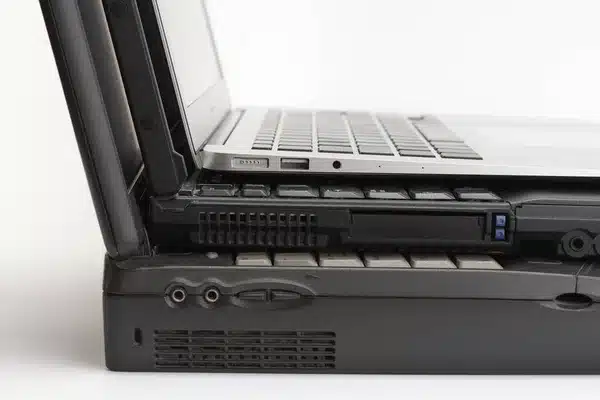
The Evolution of Laptop Design: From Clunky to Sleek
Laptops have come a long way since their early days. What started as bulky, heavy machines has evolv

The Impact of 5G Technology on Laptop Sales and Features
The introduction of 5G technology is revolutionizing industries across the globe, and the laptop mar

HP vs. Dell: Which Brand is Best for UK IT Managers and System Administrators?
For IT managers and system administrators in the UK, choosing the right laptops for their teams is a
Comments are closed.