

Business IT hardware partner or supplier? Choose the right provider
The lowest hardware quote is not always the best choice. Knowing how to choose a business IT hardware partner, not just a supplier, means comparing the full value on offer: suitable products, clear costs, relevant expertise and support beyond the sale. Choose a provider whose capabilities match your requirements, rather than relying on price alone.
A supplier should deliver the equipment you order. A strategic partner should also help you make informed decisions, communicate clearly and support your longer-term technology goals. This guide explains how to compare value, support, technical expertise and provider types so you can make a choice that fits your business.
We’ll cover practical ways to assess proposals, distinguish resellers, suppliers and managed service providers, and understand what each can contribute. A specialist hardware wholesaler may suit businesses sourcing equipment in volume, while other needs call for a different kind of relationship.
Key Takeaways
- Set your evaluation priorities before comparing proposals, then weigh the full value of the offer rather than the headline price alone.
- Use Cyber Essentials as a security reference point: the National Cyber Security Centre says it requires five technical controls.
- Compare support arrangements and roadmaps against your business goals, including what happens after a project is complete.
- Match the provider type to the job, and assess technical experience through relevant examples and evidence of past work.
1. Evaluating supplier value and red flags
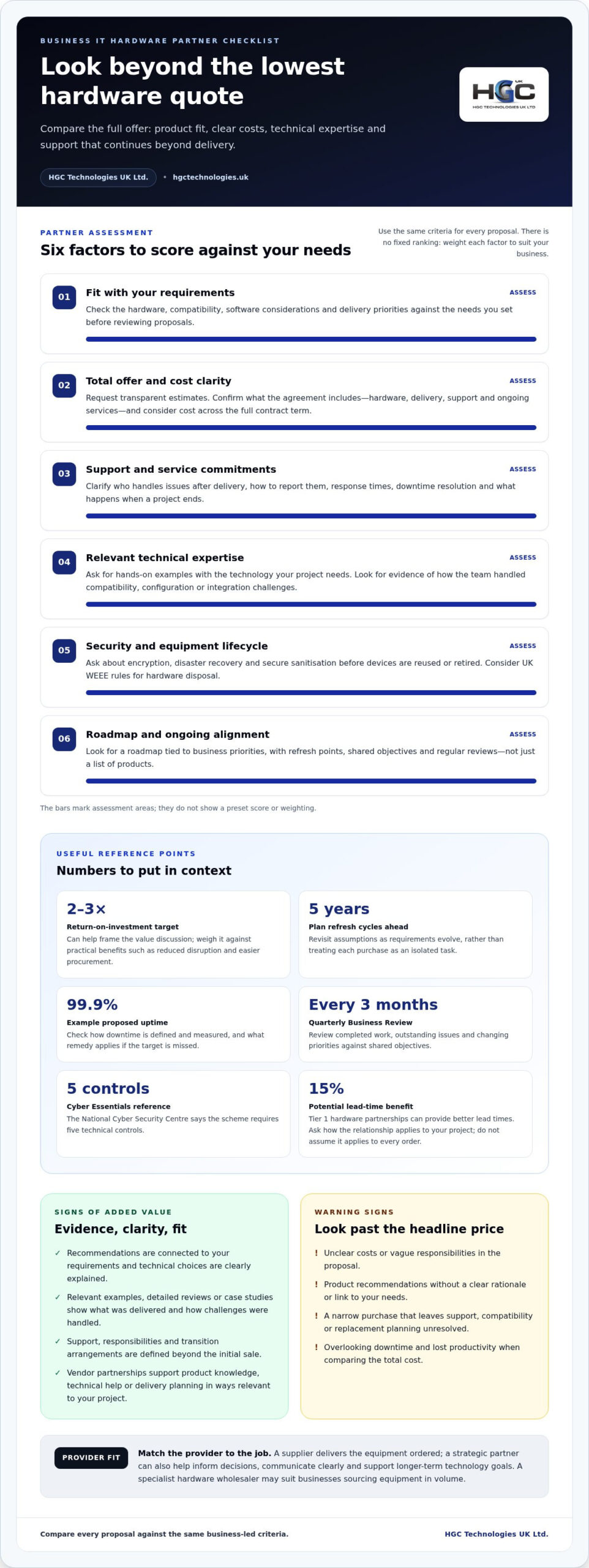
Set your evaluation criteria before reviewing proposals. List the hardware you need, compatibility requirements, delivery priorities, support expectations and software considerations. Weight each criterion according to your business needs, then assess every proposal against the same criteria. This makes differences in value easier to identify.
Compare the complete offer, not just the headline price. Ask for transparent pricing estimates and clarify what the agreement covers, including support, delivery and any ongoing services. Assess cost across the full contract term, then weigh it against practical benefits such as reduced disruption and easier procurement. A return-on-investment target of 2-3x can help frame the value discussion.
What questions should you ask when choosing a business IT hardware partner? Ask how it handles support after delivery, how it explains technical choices, and when it has recommended a product outside its main partnerships. Request relevant examples, then examine detailed positive reviews for the circumstances behind them. A reseller adding value should connect its recommendations to your requirements, not simply its preferred products.
For UK hardware disposal, consider WEEE rules for waste electrical and electronic equipment and secure sanitisation of data-bearing devices. The National Cyber Security Centre’s guidance on secure sanitisation can provide a benchmark when reviewing how data is handled before equipment is reused or retired. Its Cyber Essentials scheme also sets out five technical controls that can serve as a useful security reference when comparing providers.
What are the risks of choosing a low-cost IT hardware supplier instead of a long-term partner? A narrow, transactional purchase can overlook support, compatibility and replacement planning, leaving your team to manage the consequences. Hidden downtime and lost productivity can add to the total cost. Compare the supplier’s service with its price, and treat unclear costs, vague responsibilities or product recommendations without a clear rationale as warning signs.
2. Roadmaps, support and service levels
A useful technology roadmap connects hardware decisions to business priorities. It should identify upcoming changes, dependencies and refresh points, rather than simply list products. Plan hardware refresh cycles five years in advance, then revisit assumptions as requirements evolve. This helps teams coordinate investment with operational needs and avoid treating each purchase as an isolated task.
Define service expectations in the contract. A Service Level Agreement can set out uptime commitments, issue response times and downtime resolution. If a provider proposes 99.9% uptime, assess how it defines and measures downtime, and what remedy applies if the target is missed. A percentage alone doesn’t explain the practical support your team will receive.
Agree shared objectives and measures, not only a list of deliverables. Review the roadmap every three months in a formal Quarterly Business Review. Use that meeting to discuss completed work, outstanding issues and changing priorities. This gives both parties a regular point to align the technology plan with business goals and assess progress.
Support matters after equipment or systems enter daily use. Establish who handles troubleshooting, how issues are reported and what response times the agreement sets out. Ongoing support should help keep systems secure, up to date and functional. Include transition arrangements so responsibilities remain clear when a project ends.
Local and national support each suit different operating needs. A local team may offer familiarity with a particular site or working environment, whilst a national provider may be structured for organisations operating across locations. Compare the support model with your teams’ locations, communication needs and escalation process. The right fit is the one that can work effectively with your business.
For organisations planning equipment choices alongside their wider technology direction, explore business IT hardware options.
3. Assessing technical credentials and industry partnerships
Match a vendor’s expertise to the equipment and systems your project requires. Request examples of hands-on work with relevant technology, then ask how the team handled compatibility, configuration or integration challenges. For instance, a business planning server hardware needs evidence that the provider understands the intended environment, not just the product catalogue. A practical test for how to choose a business IT hardware partner, not just a supplier, is whether its guidance addresses your specific project.
Cybersecurity and data protection should be part of your assessment. Ask the provider to explain its processes for encryption, disaster recovery and secure sanitisation of storage media. For devices that may hold business data, find out how information is handled before equipment is reused or retired. The National Cyber Security Centre’s guidance on secure sanitisation can provide a benchmark for reviewing the process.
Industry partnerships can give a provider access to product knowledge and manufacturer resources, but a badge alone doesn’t demonstrate suitability. Ask how vendor relationships affect product recommendations, technical support and delivery planning. Tier 1 hardware partnerships can provide 15% better lead times, so establish how relevant relationships support your project rather than assuming the figure applies to every order.
How can you assess technical expertise and industry experience? Request case studies or testimonials involving similar technologies or business challenges. Ask what the partner delivered, which obstacles arose and how its team responded. Those details help you judge whether the experience applies to your needs and provide a stronger basis for choosing a business IT hardware partner, not just a supplier.
To assess references, certifications and financial stability, review any certificates and their scope, then speak with past clients about project outcomes. Review available company accounts and business information alongside the proposed agreement. Consider these checks alongside the technical evidence, and select a partner whose credentials and experience align with your requirements.
4. Comparing IT resellers, suppliers and managed service providers
Choose a provider type by defining what your team needs. A hardware supplier focuses on providing equipment. An IT reseller can source hardware from different vendors and may add services such as configuration or procurement support. A managed service provider (MSP) typically takes responsibility for ongoing IT services under an agreed service model. These roles can overlap, so compare the actual scope, not just the label.
For a defined equipment purchase, a supplier or reseller may fit. A reseller can be useful when you need options across manufacturers or help matching specifications to operational requirements. Ask what the proposal covers, which tasks remain with your team and how delivery is coordinated. For example, distinguish supplying laptops from managing the wider IT environment in which staff use them.
An MSP may be a better fit when your organisation needs ongoing management, rather than a hardware transaction alone. Assess its Service Level Agreement, track record, transition approach and exit provisions. Confirm how responsibilities are divided during onboarding and what information or systems must transfer if the arrangement ends. These details help you judge whether the service model suits your operations.
Using one strategic partner may simplify procurement, but it isn’t automatically the right choice for every business. Businesses managing three or more separate vendors spend 20% more time on procurement tasks than businesses using one strategic partner. Consider whether consolidating suppliers would reduce coordination work, or whether separate specialists better match distinct requirements.
Compare provider types using the same practical test: identify the outcome you need, map each provider’s responsibilities, then assess the agreement and handover arrangements. Contact past clients to learn whether projects met expectations and whether communication worked in practice. A hardware reseller may suit equipment sourcing; an MSP may suit ongoing service management. Select the arrangement that fits your requirements, and explore IT hardware provider options.
HGC Technologies UK: Bulk Dell Refurbished Laptops
HGC Technologies UK Ltd. supplies bulk refurbished Dell, Lenovo and HP laptops, as well as custom-built PCs. Its wholesale laptops may suit organisations equipping teams or resellers sourcing devices in volume. For requirements that call for a tailored desktop setup, consider its custom-built PCs.
Use the criteria in this guide to match the offering to your needs: define the equipment required, consider how it fits your environment and compare the options against your procurement priorities. This helps you decide whether bulk refurbished laptops or custom-built PCs suit your planned purchase.
To discuss your business hardware requirements, contact HGC Technologies UK Ltd. or visit hgctechnologies.uk.
Make your next hardware decision count
Turn your procurement priorities into a clear equipment brief. Decide what your teams need, which requirements are essential and how each option fits your working environment. This makes it easier to choose equipment that supports your plans, rather than buying hardware without a defined purpose. Use the brief to guide how to choose a business IT hardware partner, not just a supplier, and keep the decision focused on your business needs.
For organisations sourcing devices in volume, HGC Technologies UK Ltd. supplies refurbished Dell, Lenovo and HP laptops. These options may suit business teams or resellers looking for multiple devices. HGC Technologies UK Ltd. also builds custom PCs for requirements better suited to tailored desktop equipment. Match the hardware to the job before taking the next step.
When you’re ready to discuss your requirements, contact HGC Technologies UK Ltd. A considered brief is a strong starting point for a confident purchasing decision.
Frequently Asked Questions
Supplier or Partner?
A supplier fulfils an order; a partner connects purchasing decisions to the way your organisation works. For a one-off replacement device, a supplier may meet the need. If equipment choices affect several teams, systems or future purchases, a partner can help coordinate decisions and responsibilities. Judge the relationship by accountability and fit, rather than relying on the provider’s preferred label.
What services should a business IT hardware partner provide beyond supplying equipment?
Beyond supplying equipment, a business IT hardware partner should help devices fit into your organisation’s working setup. Useful tasks include coordinating deployment, recording device assignments, sharing setup guidance and clarifying how staff receive support. For example, a business equipping a new team needs a clear handover process so devices reach the right users and everyone understands ownership and next steps.
How to compare UK business IT hardware partners on total cost of ownership and pricing?
Compare like with like by using the same device specification, quantity and delivery assumptions for each proposal. Record the purchase cost, then include configuration, deployment, support and eventual disposal costs where relevant. Ask providers to separate included items from optional charges. A consistent comparison makes it easier to see which proposal suits your procurement plan, not simply which has the lowest initial cost.
What warranties, repair, replacement and support SLAs should an IT hardware partner offer?
Warranty and response terms vary, so make them explicit in writing. Establish what the warranty covers, when it starts, what it excludes and how to make a claim. Clarify whether a fault leads to repair or replacement, who arranges transport and how support issues are logged and escalated. These details help your team understand the process before a device fails.
How important are hardware lifecycle management, upgrades and end-of-life planning?
Lifecycle planning helps your organisation track equipment from purchase through reuse or retirement. Maintain an asset record showing each device’s user, location, configuration and condition, then review it when roles or technical needs change. This can reveal where upgrades are practical and where replacement makes more sense. Plan end-of-life responsibilities early, including data handling and how retired devices leave your organisation.

Exploring Strategic Alternatives to Buying New Corporate Laptops in 2026
The manufacture date on your corporate hardware is no longer the most accurate measure of its perfor

Refurbished Laptops for Remote Workers in the UK
A refurbished laptop can be a practical work machine, not simply a second-hand gamble. Refurbished l

Matching Laptop Models: 2026 Bulk Procurement Guide
Did you know that standardising hardware across a corporate fleet can slash IT help desk troubleshoo