
Refurbished Laptops for Remote Workers in the UK
A refurbished laptop can be a practical work machine, not simply a second-hand gamble. Refurbished laptops for remote workers in the UK are previously owned devices assessed and prepared for reuse. Refurbishment may include secure data erasure and a factory reset. Condition varies, so check the device’s grade and battery condition as carefully as its processor and storage.
Look beyond the headline specification. A laptop that works well at a desk may be less suitable if you carry it between home and the office, and a weak battery can disrupt a workday away from a socket. This guide explains what refurbishment can involve, how to assess battery condition and which specifications to prioritise for email, video calls and more demanding work.
You’ll also find practical guidance on choosing between refurbished ThinkPad and Dell business laptops, including how screen size, memory and storage affect everyday use. The aim is to help you choose a device that suits your workload and working routine.
Key Takeaways
- Look beyond cosmetic grade: learn how condition descriptions can help you compare refurbished laptops more clearly.
- Assess battery condition separately from the laptop’s overall condition, and consider how reported capacity may affect your working routine.
- Match memory and processing power to your workload: everyday tasks have different demands from running demanding software or many applications at once.
- Choose a screen size and display that suit where you work, how often you travel and the conditions in your workspace.
- For online laptop purchases, the Consumer Contracts Regulations give UK customers 14 days from receipt to cancel an order after changing their mind.
Why Choose a Refurbished Business Laptop?
A refurbished business laptop can pair work-ready specifications with clearer checks on condition, warranty and returns than a casual second-hand purchase.
Warranty coverage and returns
Warranty terms differ by seller and machine, so read the duration, covered faults, exclusions and claim process before buying. Refurbished laptop warranties can range from 30 days to three years, with one year more typical. Save the order confirmation, warranty terms and serial number. If a fault appears, record what happens, contact the seller through its stated claims process, and follow its instructions for assessment or return.
Returns and warranty claims are separate routes. Under the Consumer Contracts Regulations, UK customers buying a laptop online have 14 days from receipt to cancel after changing their mind. Under the Consumer Rights Act, customers can reject a faulty, unsatisfactory, unfit-for-purpose or misdescribed laptop for a full refund within 30 days of taking ownership. Keep evidence of the fault and purchase date.
Comparing refurbished and new budget laptops
A new budget machine offers unused components, whilst a refurbished business laptop may provide a stronger specification for similar everyday work. Compare the processor generation, screen, ports and keyboard, not just the word “new”. For example, an Intel Core processor and 16GB RAM may suit multitasking better than a lower-memory configuration, whether the laptop is new or refurbished.
Check the condition grade alongside the specification. Cosmetic marks may be acceptable if the screen, keyboard and connections meet your needs. For remote work, consider video calls, document editing and portability alongside the price. A refurbished model can represent good value when its tested condition and warranty suit your requirements; a new budget laptop may be preferable if unused hardware is your priority.
Business value and costs
How much do refurbished laptops for remote workers cost in the UK? There’s no single price: the model, processor, memory, storage, condition grade and warranty all affect the cost. Compare devices with similar specifications and account for any operating-system requirements. A lower headline price may not mean better value if the laptop lacks the memory or storage your workload requires.
ThinkPads, Latitudes and EliteBooks can offer good value, with configurations designed for workplace tasks. Compare the exact model and specification, then consider your expected use, portability and support terms. For a work purchase, keep the receipt and record its business purpose. Whether a UK remote worker can claim tax relief or treat a laptop as a business expense depends on employment status, who paid and how the laptop is used.
Reliable UK retailers and refurbishers
Choose a UK retailer or refurbisher that explains its grading, testing, warranty and returns terms in writing. Clear descriptions help you distinguish cosmetic wear from functional faults, while a defined claims process explains how problems are handled. Compare these details before choosing a model, rather than relying on brand names alone.
Check whether the listing specifies the processor, RAM, storage, operating system and screen condition. Then read the warranty terms to see which faults are covered and how to submit a claim. These details make it easier to compare refurbished laptops and choose one suited to remote work.
Battery condition and refurbished laptop risks
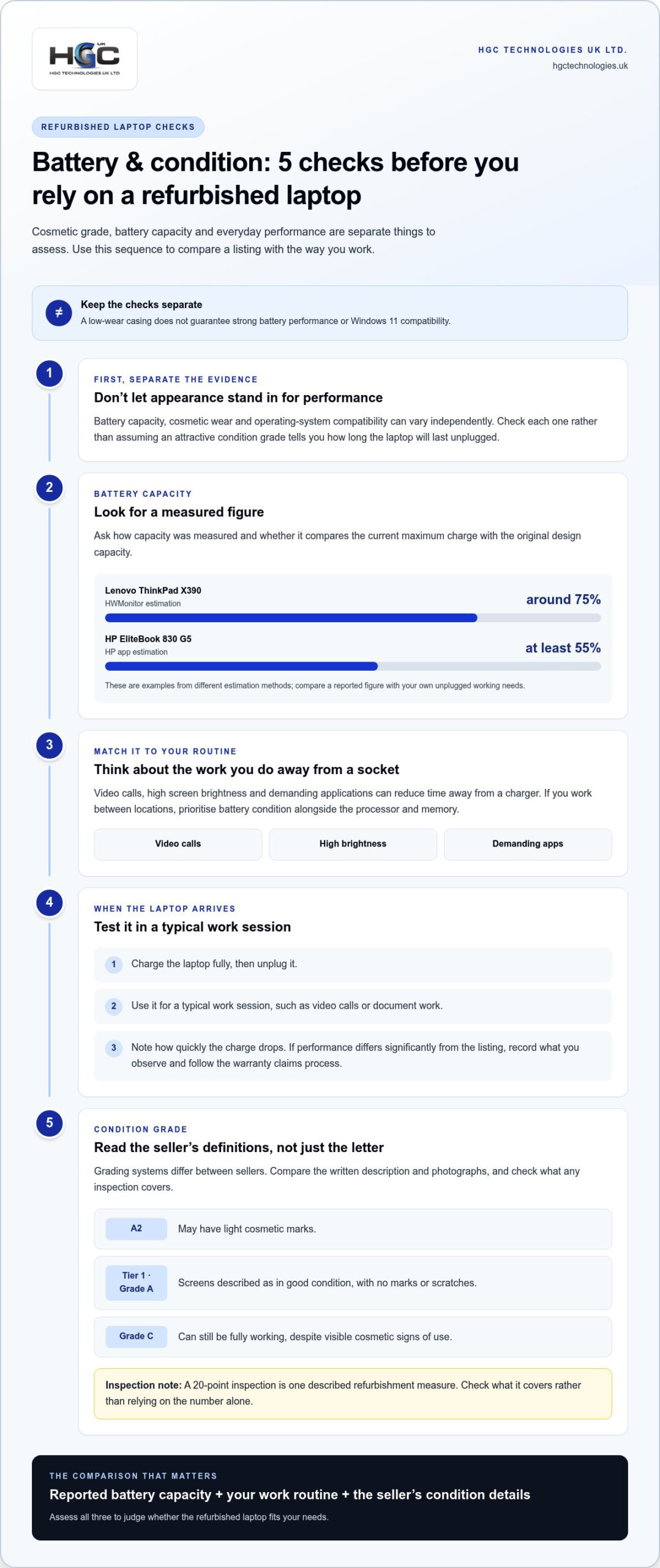
Battery capacity, cosmetic wear and operating-system compatibility can vary between refurbished devices. Assess these separately: a low-wear casing doesn’t guarantee strong battery performance or Windows 11 compatibility.
Battery condition and capacity
Look for a measured capacity, not just a general statement that the battery works. A Lenovo ThinkPad X390 battery holds around 75% capacity, based on a HWMonitor estimation. An HP EliteBook 830 G5 battery holds at least 55%, based on an HP app estimation. These examples show why comparing the reported figure with your unplugged working needs matters.
Ask how battery capacity was measured and whether it reflects the current maximum charge compared with the original design capacity. Consider your routine, too: video calls, high screen brightness and demanding applications can reduce time away from a charger. If you work between locations, prioritise battery condition alongside the processor and memory.
When the laptop arrives, charge it fully, unplug it and use it for a typical work session. Note how quickly the charge drops during video calls or document work. If battery performance differs significantly from the listing, record what you observe and follow the warranty claims process.
Refurbished device condition grades
Grades describe visible condition, but grading systems can differ between sellers. An A2 refurbished product may have light cosmetic marks. Tier 1 describes Grade A laptop screens as being in good condition, with no marks or scratches. Read the seller’s own grade definitions, especially for screen condition, casing and keyboard wear.
Grade C devices can still be fully working, despite visible cosmetic signs of use. Decide whether appearance matters for your home office, or whether your priority is the machine’s specifications and function. A 20-point inspection is one described refurbishment measure; check what the inspection covers rather than treating the number alone as a complete condition report.
Before buying, compare the grade description with the photographs and written listing. Save them, then inspect the screen, hinges, ports and keys when the laptop arrives. This gives you a clear reference if the delivered device doesn’t match its stated grade.
Windows support is another risk to assess. Windows 11 requires TPM 2.0 and newer hardware, so check that the specific device meets its requirements. Windows 10 reached end of life on 14 October 2025; a Windows 10 licence can be extended for one year only after that date. For work, confirm the installed version and plan around ongoing security support.
Compare refurbished laptop options against your battery, grade and Windows requirements before choosing a device.
Choosing a laptop processor, RAM and operating system
Match the processor, memory and operating system to your daily workload. Email and video calls need less capacity than specialist software or several demanding applications running at once.
Processor and RAM for remote work
An Intel Core i5 processor with 8 GB of RAM is sufficient for everyday tasks such as email, Office, video calls and web research. For demanding software or many open applications, consider 16 GB of RAM. That extra memory also gives more headroom as your working needs change.
Compare the processor model, not only its Core i5 label. For example, the HP 15-fq5510sa has an Intel Core i5-1235U 10-core processor. The HP EliteBook 830 G5 uses an Intel Core i5-8250U, running at 1.6 GHz with boost up to 3.4 GHz. These examples show why model details matter.
For Lenovo models, compare memory capacity with the applications you use. An 8 GB configuration can suit everyday office work, whilst 16 GB is worth considering for heavier multitasking. Check whether the memory can be upgraded, since upgrade options vary by machine.
Storage and specification choices
Solid-state drive capacity affects how much software and local work you can store. A 256 GB SSD can suit basic office files, whilst a 512 GB SSD offers more room for large projects and applications. Some refurbished laptops can be upgraded with a 512 GB SSD, so assess the full configuration rather than assuming every model has the same storage.
For example, the HP EliteBook 830 G5 has 16 GB of RAM and a 256 GB SSD. The Lenovo ThinkBook 16 G8 IRL has 8 GB of RAM and a 512 GB SSD, but is sold without an operating system. Compare those trade-offs against your workload and software requirements.
Operating system and security checks
Windows 11 requires TPM 2.0 and newer hardware. Check that the specific model supports Windows 11 before purchase, then confirm which operating system is installed. A Lenovo ThinkBook 16 G8 IRL sold without an operating system needs one installed before normal work software can run.
Before using a refurbished laptop for work, install available operating-system updates, remove previous user accounts and run a security scan. Confirm that essential applications open correctly, and use current passwords and multi-factor authentication for your work accounts.
Testing and repair process
Refurbishment may include secure data erasure and a factory reset. These steps remove previous user data and return the device to a clean software state, but complete your own setup before signing in to work accounts.
Test the laptop systematically: open your regular applications, connect to Wi-Fi, check the keyboard and ports, and make a video call. If a fault appears, note the error and when it occurs. This record can help you describe the issue clearly when arranging a repair under the applicable warranty.
Display quality and anti-glare screens
A comfortable display helps make long work sessions easier. Compare resolution, screen finish and size, then inspect the panel and built-in controls before choosing a model.
Screen sizes and display types
A 13-inch or 14-inch notebook is easier to carry between home and work whilst leaving room for everyday productivity. Larger screens can suit a fixed desk, where portability matters less. Think about your usual workspace before choosing: frequent commuting favours a compact device, whilst a larger display can make documents and spreadsheets easier to view.
Panel type and finish affect the experience as much as screen size. A Full HD IPS anti-glare display is a practical minimum for home working. Anti-glare surfaces reduce distracting reflections from windows and lamps. For example, the Dell Latitude 7410 listing specifies an anti-glare screen, whilst the HP EliteBook 840 G7 has a 14-inch Full HD display.
Screen sizes and resolutions
Check both diagonal size and resolution in the listing. Full HD means 1920×1080 pixels, providing space for documents and browser windows without relying on a larger screen. The Lenovo ThinkPad X390 combines a 13.3-inch Full HD IPS display with a compact format, while the HP 15-fq5510sa has a 15.6-inch Full HD display at the same resolution.
Resolution alone doesn’t show the panel’s condition. When the laptop arrives, display a plain white screen, a dark image and a document with fine text. Look for scratches, pressure marks, uneven brightness or dead pixels. Compare your observations with the stated grade and listing, and record any mismatch.
Plan for video calls too. A 1080p webcam can provide a sharper image than a lower-resolution camera, while lighting and connection quality also affect call clarity. Check whether the webcam sits at a comfortable angle, then test it in the software you use. A camera positioned above the screen usually keeps your face at a natural viewing height.
Ports determine how easily the laptop connects to your desk setup. The Lenovo ThinkPad T470 has three USB-A ports, useful for compatible peripherals. The ThinkPad T480s includes Thunderbolt 3 and two USB-C ports. Match these connections to your mouse, headset, external display and any adapters you already use.
Test the keyboard and trackpad during the same inspection. Type a short document, use the arrow keys and try two-finger scrolling. Check that every key registers consistently and that the trackpad responds across its surface. A clear screen, comfortable keyboard and working webcam all contribute to a dependable remote-work setup.
Refurbished ThinkPad and Dell laptop recommendations
Model names can narrow the options, but compare the full specifications before deciding. For remote work, balance processor, memory, storage, screen size and ports against your day-to-day tasks.
Lenovo ThinkPad options
The ThinkPad X390 suits workers who value portability. It combines an Intel Core i5-8265U quad-core processor, 8 GB of RAM, a 256 GB SSD and a 13.3-inch Full HD IPS display. Its weight starts at 1.22 kg, making it easier to carry between locations. This configuration can suit email, web research and video calls, though demanding software may benefit from more memory.
For a larger screen and more connections, compare the ThinkPad T470. It has a 14-inch Full HD display and three USB-A ports, with configurations offering 8 GB or 16 GB of RAM. The ThinkPad T480s weighs 1.32 kg and includes Thunderbolt 3 and two USB-C ports. Choose based on the peripherals you use and whether your work needs the extra memory.
Dell Latitude configurations
A Dell Latitude 5420 configuration with 16 GB of RAM and a 512 GB NVMe SSD offers useful capacity for multitasking and local files. The Latitude 7420 is listed with 16 GB of RAM, whilst the Latitude 5520 is listed with 8 GB. Compare the exact model and configuration, since a shared Latitude name doesn’t mean identical performance or storage.
If a wider workspace matters more than compact size, consider the Latitude 5530, listed with a 15.6-inch Full HD screen. For a smaller home desk, a 14-inch model may be easier to position alongside an external monitor. Check the listing for the specific processor, screen and ports rather than assuming they match another Latitude model.
Match the model to your workload
Start with your software. For everyday office tasks, the ThinkPad X390’s 8 GB of RAM and Core i5 processor provide a clear baseline. For larger workloads or many open applications, favour a configuration with 16 GB, such as the Latitude 5420. Then compare SSD capacity: 256 GB may suit lighter local storage, whilst 512 GB gives more room for files and applications.
Before choosing, make a checklist of your requirements for memory, storage, screen size, ports and operating-system compatibility. Confirm each against the exact model listing, then compare the device’s condition and warranty terms. This keeps a familiar model name from overshadowing the details that shape everyday use.
For business or reseller requirements, explore bulk Dell and Lenovo refurbished laptops and compare configurations against your team’s needs.
HGC Technologies UK Ltd.: Bulk Dell Refurbished Laptops
HGC Technologies UK Ltd. supplies bulk refurbished Dell laptops to organisations and technology resellers sourcing devices for remote teams. Bulk refurbished Lenovo and HP laptops offer further brand options, while custom-built PCs can meet requirements for a different configuration.
Use the checks in this guide to prepare a procurement brief: list the required processor, memory, storage, screen size and operating system, then include battery condition and cosmetic grade. This gives your team a practical basis for matching specifications to remote-working needs. HGC Technologies UK Ltd. can help when you’re sourcing refurbished laptops in bulk rather than choosing a single device.
Contact HGC Technologies UK Ltd. to discuss your bulk refurbished laptop requirements.
HGC Technologies UK Ltd. supplies bulk refurbished Dell laptops, alongside refurbished Lenovo and HP models. It also builds custom PCs to suit different configuration requirements.
Build a procurement plan that fits your team
Turn your requirements into a clear purchasing plan. Consider how staff work across locations, which applications they use and whether devices need consistent configurations. A considered approach can simplify setup and support while ensuring each role has specifications suited to its tasks.
For organisations sourcing refurbished laptops for remote workers across the UK, HGC Technologies UK Ltd. supplies bulk refurbished Dell, Lenovo and HP laptops. Set out the models and quantities your team needs, then use that brief to guide your procurement conversation. A considered choice supports remote work and makes responsible use of business technology.
Contact HGC Technologies UK Ltd. to discuss your refurbished laptop requirements and take the next step with confidence.
Frequently Asked Questions
What is refurbished?
A refurbished laptop is a previously owned device assessed and reconditioned before resale. This may involve checking that it works, securely erasing previous data and resetting the software. Refurbished devices don’t all look the same: cosmetic wear, battery condition and included operating system can vary. Read the individual listing to understand the device’s condition and what preparation it has undergone.
Best Refurbished Laptop for Working From Home UK (2026): What Should You Buy?
Choose a model around your workload, rather than a headline “best” label. For a portable option, the Lenovo ThinkPad X390 pairs an Intel Core i5-8265U processor with 8 GB RAM, a 256 GB SSD and a 13.3-inch Full HD display. For heavier multitasking, compare configurations with 16 GB RAM, such as a Dell Latitude 5420 listing. Check the exact specification and operating system before deciding.
Is it worth buying a refurbished laptop?
A refurbished laptop can be worthwhile if its specification, condition and warranty match your work needs. A refurbished business model may suit everyday tasks without requiring a new device. Compare the full specification, including storage and operating system, rather than judging by age or brand alone. It may be unsuitable if your work depends on software the chosen model cannot support.
Refurbished laptops vs second-hand laptops: what’s the difference?
“Second-hand” usually describes a previously owned laptop being resold, while “refurbished” indicates that it has undergone some assessment or preparation before resale. The work varies: one listing may describe testing and a factory reset, while another may give little detail. Treat these terms as a starting point, then compare the seller’s description, condition grade, included software and warranty to understand what you’re buying.
What do refurbished laptop grades mean?
Grades indicate a device’s cosmetic condition, but definitions differ between sellers. A Grade A screen may be described as free from marks or scratches, while a Grade C laptop can be fully working yet show visible signs of use. Some grading systems also use labels such as A2. Read the seller’s own descriptions and distinguish appearance from functionality, which should be explained separately.
What are the best refurbished laptops for remote work in the UK?
The best choice depends on portability, workload and the software you need. Consider a Lenovo ThinkPad X390 for a compact setup, or compare Dell Latitude configurations when you need more memory or storage. A ThinkPad T470 offers a 14-inch Full HD display and three USB-A ports. Match the exact model’s processor, RAM, SSD and connections to your work rather than choosing by range name alone.
Which laptop specs are best for video calls, multitasking and remote work?
For everyday email, Office, web research and calls, an Intel Core i5 processor with 8 GB RAM can be sufficient. Choose 16 GB RAM for demanding software or several applications open together. A Full HD display helps keep text clear, while a suitable webcam and reliable internet connection support calls. Check available ports too, especially if your setup uses an external screen, headset or wired peripherals.
What grades do UK refurbished laptops come in, and what do they mean?
UK sellers use different grade labels, so there isn’t one universal scale to assume. Listings may describe Grade A screens as having no marks or scratches, while Grade C devices may show visible cosmetic wear despite working fully. A2 can indicate light cosmetic marks in some grading descriptions. Use the seller’s specific explanation, and compare it with the laptop’s photographs and condition details.

Scaling a Remote Team with Refurbished Laptops: The 2026 Procurement Strategy
The traditional model of purchasing brand-new enterprise hardware for every new hire is no longer a

Refurbished Laptops for Call Centre Staff: A 2026 Guide
A laptop can meet a basic specification and still frustrate a call-centre team. Choosing refurbished

Standardising Company Laptops Cost-Effectively: A 2026 Procurement Guide
What if the key to a perfectly uniform IT fleet wasn't found in the latest manufacturer catalogue, b