

Convincing Management to Switch to Refurbished IT
What if refurbished laptops were judged by how well they meet business requirements, rather than by the assumption that older means unreliable? Convincing management to switch to refurbished business laptops isn’t about claiming every device is right for every role. It’s about presenting a balanced case for performance, risk and value across the equipment lifecycle. Decision-makers are right to ask how a change in sourcing could affect consistency, deployment and staff acceptance.
Rather than relying on headline savings or broad sustainability claims, compare refurbished and new devices against the same workload, security and deployment criteria. This article explains how to build that evidence, address management’s concerns and propose a controlled evaluation before seeking wider approval. It also sets out a practical route from assessment to procurement, including how UK organisations can consider bulk refurbished Dell, Lenovo and HP laptops from a wholesaler such as HGC Technologies UK Ltd.
Key Takeaways
- Frame the proposal around role requirements and dependable operations. Refurbished laptops may suit some teams better than others.
- Compare new and refurbished options using your organisation’s costs, planned device use and operational needs.
- Turn concerns about condition, consistency and staff experience into criteria management can assess.
- Make the proposal more practical with a pilot that defines its scope, measures and reporting process.
- Use the pilot findings to shape a measured procurement recommendation, with bulk refurbished Dell, Lenovo and HP laptops as a sourcing option.
Why convince management to consider refurbished business laptops?
Every laptop decision has to balance budget discipline with employee needs and dependable day-to-day operations. A lower purchase cost may be attractive, but management also needs confidence that devices suit their intended roles and won’t create avoidable support or deployment challenges. Refurbished business laptops are one sourcing option to assess, not a universal replacement for new equipment.
Assumptions about used equipment can obscure important differences. A device sold as-is and one prepared for resale after refurbishment aren’t necessarily equivalent. Understanding Refurbished Electronics offers background on the process, but a procurement proposal still needs to define the standards and requirements that matter to your organisation.
Refurbished business hardware is previously owned equipment assessed and restored for resale, rather than simply sold on as-is. The work behind that description can vary, so base the decision on evidence, agreed requirements and intended use. A laptop suitable for routine office tasks may not meet the needs of a role using more demanding software or requiring specific security controls.
What management needs from a procurement proposal
Anchor the proposal in priorities management already recognises: predictable purchasing, suitable equipment for each role, dependable operations and responsible use of resources. State the decision you’re requesting, the evidence that will support it and where refurbished devices may or may not fit. This keeps the discussion focused on organisational needs rather than assuming the lowest initial cost should decide the outcome.
Involve finance, IT, procurement and department leads early. Finance can assess purchasing assumptions; IT can define technical and support requirements; procurement can consider supply planning; and department leads can explain how staff use their laptops. Bringing these perspectives together helps surface trade-offs before a decision is made. For wider market context, explore the wholesale refurbished IT equipment market trends guide.
How to define the decision before presenting it
Set boundaries before comparing options. Specify the laptop types under consideration, the roles and user groups in scope, and the intended procurement period. For example, assess whether refurbished laptops suit a defined group of standard office users, while considering specialist roles separately. This creates a fair comparison and avoids asking one device category to meet needs it wasn’t selected to address.
Then agree what success means. Choose measures that reflect your organisation’s priorities, such as fit with role requirements, user feedback, deployment effort, support impact and purchasing assumptions. Record the criteria before reviewing options so the conclusion follows the evidence rather than personal preference. Convincing management to switch to refurbished starts with presenting a bounded, assessable choice and letting organisational requirements determine the next step.
Compare refurbished and new laptops using whole-life business evidence
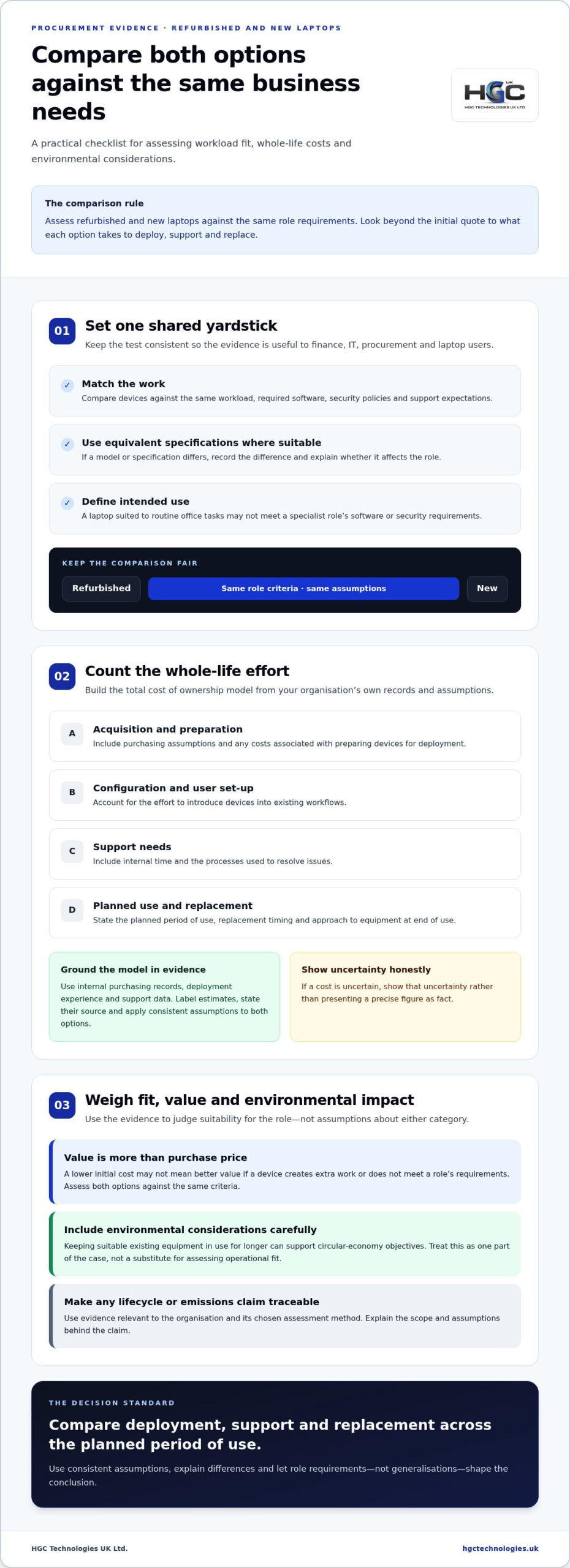
A credible comparison looks beyond the initial quote. Ask whether each option meets the same role requirements, what it will take to deploy and support, and how the organisation expects to manage replacement. This gives management evidence to weigh operational risk alongside purchasing assumptions, without treating refurbished and new devices as automatically equivalent or inherently different.
Build a fair new-versus-refurbished comparison
Create a side-by-side comparison for the options being considered. Assess devices against the same workload, required software, security policies and support expectations, using equivalent specifications wherever suitable options allow. If a model or specification differs, record the difference and explain whether it affects the role. This makes the basis for each conclusion clear to finance, IT, procurement and the teams who will use the laptops.
Include your organisation’s assumptions for:
- Acquisition and any costs associated with preparing devices for deployment.
- Configuration, user set-up and the effort required to introduce devices into existing workflows.
- Expected support needs, including the internal time and processes used to resolve issues.
- Planned period of use, replacement timing and the organisation’s approach to equipment at end of use.
Build the total cost of ownership (TCO) model from internal purchasing records, deployment experience and support data. Label estimates, state their source and apply consistent assumptions to both options. If a cost is uncertain, show that uncertainty instead of presenting a precise figure as fact.
Purchase price alone doesn’t determine lifecycle value. Compare what it takes to deploy, support and replace a laptop over its planned period of use. A device with a lower initial cost may not represent better value if it creates extra work or fails to meet a role’s requirements. Equally, don’t assume a new laptop is automatically the lower-risk choice. Assess both options against the same criteria.
Include environmental considerations without overstating them
Extending the useful life of suitable equipment can support circular-economy objectives by keeping existing hardware in use for longer. Treat this as one part of the case, not a substitute for assessing operational fit. If management wants to include lifecycle or emissions measures, use evidence relevant to the organisation and its chosen assessment method. Explain the scope and assumptions behind any claim.
Present environmental considerations alongside workload suitability, security, deployment effort and support implications. A balanced assessment avoids claims that are difficult to substantiate and shows where refurbished sourcing may fit within responsible procurement priorities.
Once the comparison criteria are agreed, use them to assess suitable bulk options, including refurbished Dell, Lenovo and HP laptops for businesses. This gives the team a concrete procurement route to consider without treating the outcome as predetermined. A well-evidenced model makes the trade-offs visible and keeps the decision accountable.
Address management’s concerns about refurbished laptop quality and risk
Questions about condition, consistency, device age and user experience are legitimate. A laptop may look suitable on paper yet fall short of a team’s practical needs. A mixed batch can also complicate allocation if requirements aren’t clear. Avoid dismissing these concerns or making blanket claims about refurbished equipment. The outcome depends on the devices selected and the procurement terms that apply.
Separate general concerns from criteria your organisation can define and assess. “Will these be reliable?” is too broad to guide a decision. “Do the proposed devices meet our agreed specifications, condition requirements and role needs?” is more actionable. It gives IT and procurement a shared basis for reviewing options, documenting exceptions and deciding what to do if a device doesn’t meet the agreed requirements.
Respond to reliability and consistency concerns
Set acceptable specifications and condition requirements before comparing options. Define suitable configurations for each role, then plan allocations so people doing equivalent work receive equipment that meets the same standard. If different models or specifications are proposed, record where they differ and whether that difference matters to the user or support team.
A defined acceptance process makes risk easier to assess by turning expectations into criteria that can be checked and recorded. Set out who reviews devices against the requirements, how exceptions are documented and how the organisation will decide what to do if an item does not meet them. This is an assessment framework, not a promise that every device or procurement arrangement will produce the same result.
Include support and replacement assumptions in the risk review. Use your organisation’s experience to estimate the internal effort involved in managing issues, and clarify how replacement decisions would fit existing processes. The aim is not to assume that refurbished devices will need more support, or less, but to make the operational implications visible before approval.
Cover security, compatibility and staff confidence
Map the proposed specifications to the requirements that shape everyday use: business software, security policies, peripherals, connectivity and configuration needs. IT can identify potential compatibility issues early, while department leads can flag role-specific requirements a general specification may miss. Include existing device configuration and onboarding in the readiness discussion, since those processes can affect deployment regardless of the purchasing route.
Evaluate security against your organisation’s own controls, rather than inferring risk from whether a laptop is new or refurbished. Identify the requirements a device must meet to be set up and used in your environment, and record any differences that need resolution before deployment. This keeps the review focused on demonstrable fit instead of assumptions based on age alone.
Staff confidence also benefits from evidence. Gather feedback during an evaluation, asking users about suitability for their actual tasks, ease of adapting to the equipment and any issues encountered. Don’t presume acceptance or resistance. A measured account of user experience gives management a clearer view of the practical impact and shows whether refurbished devices suit the roles tested.
Build a measurable pilot proposal management can assess
A pilot turns an abstract procurement debate into a bounded evaluation. It gives management evidence from your own users, systems and deployment conditions, while limiting the scope of the initial decision. Keep it manageable, but choose participants whose work reflects the workloads and practical requirements a wider rollout would need to support.
Set out the proposal in a clear sequence:
- Define the scope. State which laptop type, user group and evaluation period are included, and identify what falls outside the pilot.
- Select representative roles. Include users with realistic workloads and ordinary deployment conditions, rather than choosing only the easiest devices or tasks.
- Agree measures in advance. Set criteria for compatibility, user feedback, deployment effort and support activity before devices are issued.
- Evaluate against the baseline. Compare results with relevant information from existing devices and users, noting differences that could affect the findings.
- Report and recommend. Summarise the evidence, exceptions and limitations, then recommend whether to pause, revise or proceed against the agreed measures.
Set pilot measures before devices are deployed
Record baseline information for comparable roles and devices, such as existing support activity, common software needs and deployment steps. Choose measures that matter to your organisation instead of relying on generic benchmarks. Assign an evaluation owner to maintain the record, collect user feedback and coordinate IT and department input. Agree a review point, and capture exceptions and limitations as they arise rather than waiting until the end.
Make success observable. Define how the team will record whether required software and peripherals work as expected, what counts as a support issue, and how users will report their experience. Set thresholds according to your organisation’s requirements. Avoid choosing measures after seeing the results, as that can weaken management’s confidence in the recommendation.
Present the pilot as a controlled decision
Be precise about what the pilot can establish: whether the selected equipment appears suitable for the defined roles under the conditions tested. It cannot prove that every device, user or future deployment will have the same experience. State that boundary clearly so management can assess the findings without treating a limited evaluation as a guarantee of wider performance.
Before starting, document what would lead the organisation to pause, revise the scope or proceed to a broader procurement review. Include who reviews the results and who presents the final recommendation. If the pilot focuses on Dell laptops, the cost-effective IT procurement guide can add relevant sourcing context. This disciplined process makes the decision evidence-led rather than based on assumptions.
With the evaluation scope defined, explore bulk refurbished laptop sourcing as an option for the next stage.
Turn approval into a refurbished laptop sourcing plan
Approval is the start of the procurement decision, not the end of it. Turn the evaluation findings into a recommendation that specifies what management is being asked to approve, who the devices are for and how the organisation will review the outcome. A clear record of evidence and limitations helps decision-makers authorise a defined next step without implying that every team should move to refurbished equipment.
Prepare the approval and rollout recommendation
Keep the decision paper concise, but make its assumptions visible. Summarise the pilot scope, intended user groups, results against agreed measures and any exceptions. Separate observed findings from estimates, particularly for costs, support effort and deployment. This helps management understand what the evaluation demonstrated and where the recommendation relies on the organisation’s planning assumptions.
Include the practical details that connect approval to implementation:
- The specific user groups and roles covered by the proposed rollout.
- The device requirements and evidence that support their suitability.
- The organisation’s cost, support and deployment assumptions, including any material limitations.
- The proposed review process for monitoring rollout outcomes and informing future procurement decisions.
Make the recommendation proportionate to the evidence. It might support a defined rollout for roles represented in the evaluation, recommend a revised assessment for a different use case, or identify further information management needs before deciding. State who owns the review and how results will inform later purchasing decisions. This keeps procurement accountable as requirements change.
Move from approval to bulk sourcing
Translate the approved requirements into a sourcing scope: laptop types, intended quantities, user groups and procurement period. Keep the specification tied to the roles assessed, and distinguish any requirements that weren’t covered by the evaluation. For a planned rollout, bulk procurement lets an organisation consider supply across teams; technology resellers may also assess bulk quantities for their own operations. Define needs first, then align sourcing with the approved scope.
HGC Technologies UK Ltd. supplies refurbished Dell, Lenovo and HP laptops in bulk to businesses and resellers across the UK. If Dell is part of the approved scope, the UK wholesale laptop distributor guide provides context on the supplier model. Use the findings to make an informed sourcing decision, rather than treating approval as a commitment to a wider change than the evidence supports.
A documented recommendation, defined procurement scope and review plan make the proposal manageable. Explore bulk refurbished business laptops from HGC Technologies UK Ltd. for your organisation’s requirements.
Make your next procurement decision with confidence
A sourcing change doesn’t need to be an all-or-nothing decision. Treat each procurement cycle as an opportunity to apply what your organisation has learned, refine requirements and expand only where the evidence supports it. This measured approach keeps the focus on fit for purpose while giving management a practical path to adapt purchasing over time.
Convincing management to switch to refurbished is ultimately about making a well-defined choice that reflects your business needs. HGC Technologies supplies bulk refurbished Dell, Lenovo and HP laptops to UK business and reseller customers.
Explore bulk refurbished business laptops from HGC Technologies to consider how this sourcing option could fit your organisation’s procurement plans.
Frequently Asked Questions
What does refurbished mean compared with used when buying business laptops?
Refurbished generally describes a previously owned laptop that has been prepared for resale, whilst “used” can simply mean pre-owned, with no clear implication about further work. The labels alone don’t tell you whether a device meets your requirements. Compare the condition description, specifications and procurement terms, and decide how your organisation will handle any device that doesn’t match what was agreed.
Are refurbished laptops suitable for everyday business use?
They can be suitable if the device meets the demands of its intended role. A laptop for email, documents and web-based work has different requirements from one running specialist design or data software. Map the role’s applications and working practices to the proposed device, then assess compatibility and user experience in the context of those tasks. Suitability depends on fit, not the refurbished label alone.
Can a business standardise on refurbished laptops across different teams?
Yes, if the selected devices meet the needs of the roles included in the standard. A business might define one configuration for general office work and a separate requirement for teams using more demanding applications. Document those differences so staff receive equipment that supports their responsibilities and IT can plan for manageable configurations. Standardisation doesn’t have to mean issuing an identical laptop to every employee.
How can management assess the security of refurbished laptops?
Assess each proposed device against the organisation’s existing security requirements before it is put into use. IT can check whether its operating system and required security controls are appropriate, whether it can be configured within the organisation’s environment, and how user access will be managed. Include data-handling expectations in procurement terms, and make security review part of device acceptance rather than assuming age alone determines risk.
Is choosing refurbished laptops always better for the environment?
No. Keeping suitable equipment in use for longer can support resource efficiency, but the overall environmental case depends on the device’s useful life, how it performs in its role and what happens when it is retired. A replacement that arrives sooner than planned may change the calculation. If environmental impact is part of the approval case, use evidence relevant to the devices and assessment method rather than assuming every refurbished purchase has the same benefit.
How can a business convince management to approve a refurbished laptop pilot?
Ask for approval to evaluate a clearly defined use case, rather than proposing an immediate organisation-wide change. Explain which roles are included, what the organisation will assess and how the findings will inform the next decision. For example, a pilot could focus on a team with established software requirements and gather feedback on day-to-day suitability. A bounded proposal makes the decision easier to review and gives management a clear basis for considering next steps.

Enterprise-Grade Refurbished Servers: The 2026 Strategic Procurement Guide
The most resilient data centres in 2026 aren't built on the promise of "new" hardware; they're built

Security Risks of Improperly Wiped Laptops: A 2026 Enterprise Guide
Did you know that roughly 40% of discarded computers sold on the secondary market still contain sens

What to Check When Buying Bulk Used Laptops: A 2026 Procurement Checklist
A single BIOS lock in a batch of fifty laptops isn't just a technical hurdle; it's a complete write-