

Impact of Refurbished Tech on Employee Productivity: A 2026 Guide
A newer laptop isn’t automatically the more productive choice. The impact of refurbished tech on employee productivity depends on whether a device’s performance, condition and configuration suit the work it needs to support. A well-matched refurbished laptop may be a practical option for some roles, whilst hardware that struggles with everyday workloads can interrupt work, whatever its age.
It’s understandable to question whether refurbished equipment can keep pace with current demands. The answer isn’t a simple yes or no: performance risks depend on the tasks employees carry out, the device specifications and how its condition is assessed. Purchase price alone also won’t show the full value of a device over its working life.
This guide explains which hardware factors can affect productivity, where slowdowns or faults may arise, and how to compare refurbished and new equipment fairly for different roles. It also considers how bulk refurbished Dell, Lenovo and HP laptops, alongside bespoke custom-built PCs, can fit into a workplace procurement plan. The aim is to help you make a considered decision based on your team’s actual needs, not the assumption that refurbished always means lower performance.
Key Takeaways
- Assess the impact of refurbished tech on employee productivity by matching device condition and configuration to the work, rather than judging by age alone.
- Identify how processor, memory, storage and operating-system support relate to the demands of different roles.
- Compare refurbished and new devices against the same workload requirements, including user experience and support needs.
- Establish a baseline, pilot devices with employees and review feedback before making a wider procurement decision.
- Explore how bulk refurbished Dell, Lenovo and HP laptops or bespoke custom-built PCs could suit different team requirements.
What does refurbished tech mean for employee productivity?
Refurbished workplace technology sits between new equipment and a device sold simply as second-hand. It has had a previous life, then been assessed and prepared for resale; the precise checks, repairs and grading can vary. A second-hand device may be sold in its existing condition, with little or no preparation. The label alone, however, doesn’t tell you what work a laptop can handle. For background, What is refurbished electronics? outlines the general concept, but a business still needs to assess the actual device and its intended use.
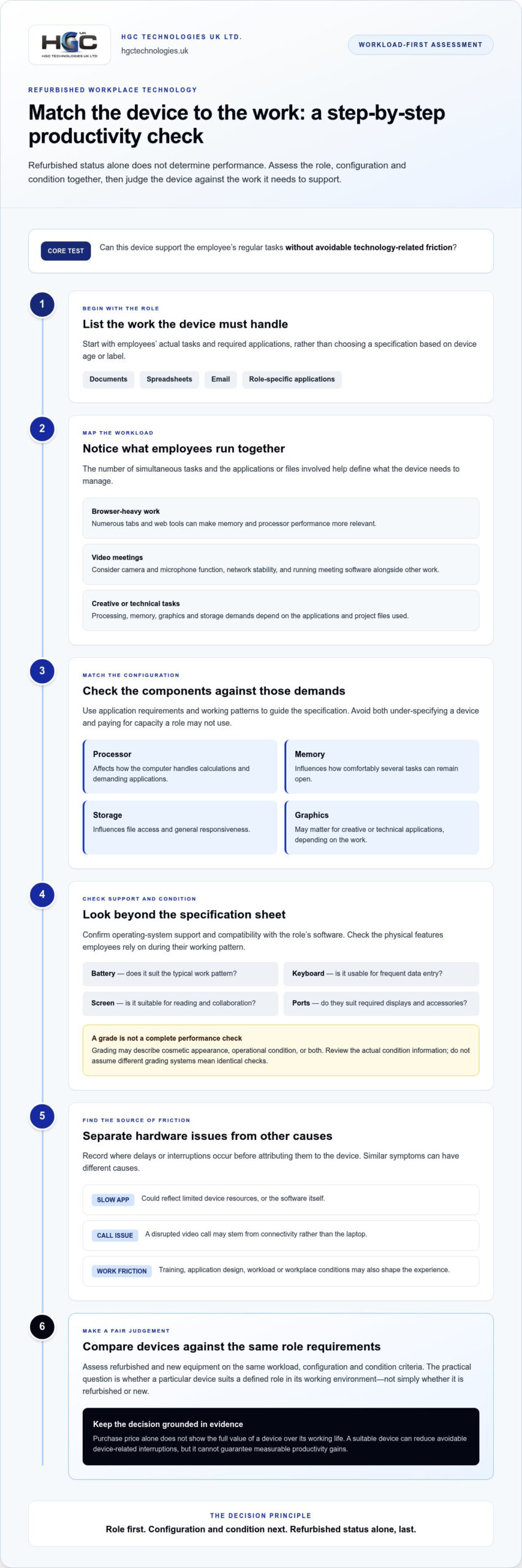
Productivity fit is the degree to which a device’s specifications and condition support an employee’s regular tasks without avoidable technology-related friction. This is a more useful procurement measure than refurbished status alone. A suitable device can help someone complete their work smoothly, but it can’t resolve every obstacle: application design, network connectivity, training, workload and workplace conditions also shape the employee experience.
Which parts of the employee experience can a device influence?
Think about the small actions employees repeat throughout the day. A device that starts promptly, opens required applications responsively and handles routine multitasking can make it easier to move between tasks. During video calls, performance may affect how smoothly the computer runs the meeting alongside documents or other work. These factors can reduce avoidable device-related interruptions, though they don’t guarantee measurable productivity gains.
Separate symptoms before blaming the hardware. An application that takes a long time to load might reflect limited device resources, but it could also be caused by the software itself. A disrupted video call may stem from connectivity rather than the laptop. Employees may also need training or a clearer process. Recording where delays occur helps distinguish device friction from wider operational issues.
Why does refurbished status not determine performance on its own?
Start with the configuration and condition. The processor affects how a computer handles calculations and demanding applications; memory influences how comfortably it can keep several tasks open; storage affects file access and general responsiveness. Physical condition matters too, as faults can disrupt normal use. These factors should be considered against real workloads, not inferred from whether a device is refurbished or new.
Refurbishment processes and grading systems aren’t interchangeable. A grade may describe cosmetic appearance, operational condition or both, depending on the system used. It shouldn’t be treated as proof that two devices have had identical checks. Review the device’s specification and condition information, then relate those details to the employee’s applications and work pattern. That role-based assessment offers a fairer basis for judging the impact of refurbished tech on employee productivity than broad quality claims.
The practical question is not simply whether refurbished equipment performs like new. It’s whether a particular device is suitable for a defined role, in the environment where that employee works. Set that standard first, and refurbished and new options can be assessed on the same terms.
How do device specifications and condition shape workplace performance?
A device’s usefulness depends on how its components handle the employee’s actual workload. The processor influences how quickly it can work through tasks; memory affects how well it manages several open applications; and storage influences file access and responsiveness. Operating-system support matters too, because employees need a secure, compatible environment for the software their role depends on.
Assess specifications against the applications, files, number of simultaneous tasks and working patterns employees rely on, alongside operating-system support and the device’s physical condition. This workload-first approach helps avoid both under-specifying a device and paying for capacity a role may not use.
Which specifications matter for different employee roles?
Start with the work, not a one-size-fits-all specification. Routine office tasks such as documents, spreadsheets and email call for compatibility with required applications and enough capacity for practical multitasking. Browser-heavy roles may keep numerous tabs and web tools open, making memory and processor performance more relevant.
Video meetings add other demands: camera and microphone function, network stability and the ability to run meeting software alongside calendars, documents or presentations. Creative and technical work can place heavier demands on processing, memory, graphics or storage, depending on the applications and project files involved. Use the software’s requirements to guide configuration decisions for specialist roles.
How can condition and compatibility affect the working day?
Specifications don’t tell the whole story. A battery that doesn’t last through the employee’s typical work pattern may limit where they can work; a worn keyboard can make frequent data entry frustrating; and screen damage or poor usability can hinder reading and collaboration. Check that the available ports suit the peripherals employees need, such as displays or other workplace accessories.
Before deployment, map each role’s applications to the device’s operating system and confirm that required software can run in the intended setup. Consider updates and ongoing operating-system support as part of the device’s useful working context, rather than treating initial compatibility as the only check. A condition grade can help describe an item, but it doesn’t guarantee a particular lifespan, reliability or employee experience.
- Office work: Check application compatibility and everyday multitasking.
- Meetings: Assess camera, microphone, connectivity and simultaneous app use.
- Creative or technical tasks: Let software requirements and typical project demands determine the configuration.
- Mobile or desk-based work: Consider battery behaviour, screen and keyboard usability, and ports for required accessories.
Different roles may call for different device categories. Refurbished laptops can suit employees whose work is well matched to their configuration, while bespoke custom-built PCs can be considered for distinct desktop requirements. Explore business refurbished laptops as one procurement option when comparing suitable hardware for your team.
Refurbished vs new tech: how should businesses compare productivity?
Compare the options against the same roles and tasks, not against assumptions about age or appearance. A refurbished device isn’t inherently slow, just as a new device isn’t automatically right for every employee. Unsuitable specifications, poor compatibility or a condition issue can hinder work in either case. The impact of refurbished tech on employee productivity depends on how well each option fits the workload and the organisation’s support model.
Use a consistent framework before weighing up procurement choices:
This comparison keeps the decision focused on workplace fit. For example, employees using a consistent set of office applications may have clearly defined requirements that make different procurement options straightforward to assess. A team running specialist software needs a closer review of configuration and compatibility, regardless of whether devices are refurbished or new.
When could refurbished equipment suit a team?
Refurbished equipment may suit standardised roles where application needs are documented and available configurations meet them. It can also be considered for a phased refresh or additional equipment, if that aligns with the organisation’s operating model. Evaluate each device against the tasks it will support; don’t assume that one configuration will deliver the same experience across every role or workload.
When might a different configuration be more appropriate?
Specialist applications, intensive processing and graphics work call for careful specification checks, since underpowered hardware can create avoidable delays. Battery-dependent or highly mobile roles also place greater emphasis on battery behaviour and physical condition. Separate essential requirements, such as an application’s stated needs, from preferences such as screen size or keyboard feel, then test the latter with employees.
Finally, purchase price alone can’t establish productivity value or total cost of ownership. Include deployment, compatibility work, support, disruption risk and likely replacement needs in the comparison. A fair decision weighs these considerations alongside the device’s ability to support the role over its working life.
How can businesses test the productivity impact before wider deployment?
A small, structured pilot can show whether shortlisted devices fit employees’ real working patterns before a wider procurement decision. Start with a baseline: record how representative employees complete routine tasks, what delays they encounter and which device-related support issues arise. Agree how these observations will be captured, so the impact of refurbished tech on employee productivity is judged against consistent evidence rather than recollection or one striking anecdote.
- Define the roles. Select representative employees and describe their everyday tasks, applications, mobility needs and typical multitasking. Avoid treating a whole department as one workload if responsibilities differ.
- Check requirements. Match device configurations to the software and tasks identified. Record any compatibility, operating-system or peripheral requirements before putting pilot devices into use.
- Pilot devices in normal work. Let employees use them for their usual activities, including meetings, document work and other role-specific tasks. Keep the working environment as consistent as practical.
- Gather structured feedback. Ask the same questions throughout the pilot about responsiveness, comfort, battery use and interruptions. Log relevant IT support requests and their likely cause.
- Review the results. Compare observations with the baseline, identify recurring patterns and decide whether specifications or deployment plans need adjusting before expanding.
What should an employee-device pilot measure?
Focus on practical indicators that can be applied consistently: whether required applications run as expected, whether employees can manage their typical open tasks, and where delays interrupt work. Use a short feedback form to capture perceived responsiveness, keyboard and screen comfort, battery experience and recurring problems. Record support requests with enough context to distinguish device faults from network, software or account issues.
Define each measure in advance. For example, record the number and type of relevant support requests during the same measurement period, rather than combining unrelated incidents into a single total. Pair those records with employee comments, since a count alone may not reveal how much a recurring issue disrupts a particular role.
How should teams interpret the results fairly?
Compare like-for-like roles, tasks and measurement periods wherever practical. If one group handles a seasonal workload or receives different software training, note that context before drawing conclusions. Connectivity changes, application updates and shifts in workload can affect performance independently of the device.
A pilot can reveal whether a configuration appears suitable and where friction remains, but it can’t prove that hardware alone caused a change in productivity. Treat feedback and support data as evidence to guide the next decision, not as a guarantee of future outcomes. Refine requirements before wider procurement, then use the findings to shape a considered team hardware plan. Explore refurbished laptop options for business teams.
How can HGC Technologies help businesses equip teams thoughtfully?
Workplace procurement is strongest when it starts with the work employees need to do, rather than a blanket preference for new or refurbished equipment. HGC Technologies UK Ltd. supplies UK businesses and resellers with bulk professionally refurbished Dell, Lenovo and HP laptops. For roles with different desktop requirements, bespoke custom-built PCs offer another hardware category to consider. Neither option guarantees a particular productivity outcome; the right choice depends on how well the configuration fits the role.
That role-based approach also helps organisations consider the wider technology lifecycle alongside day-to-day suitability. For more context on the UK wholesale market, explore bulk refurbished IT equipment trends as part of your procurement planning.
Match procurement choices to the work employees do
Map each role to its applications, usual workload, mobility needs and peripherals before deciding on device configurations. This makes it easier to identify which roles may share a suitable laptop specification and which need a different setup. For a consistent group of employees with comparable tasks, bulk refurbished laptop sourcing can be one route to a more standardised deployment, provided the chosen devices meet those documented requirements.
Where Dell laptops are being considered for a team, the bulk Dell refurbished laptop procurement guide offers a procurement-focused starting point. Apply the same checks to the actual roles, applications and condition requirements in your organisation.
Turn the comparison into a practical next step
Bring the decision criteria together before placing a wider order. Consider whether the workload is clear, whether the configuration supports required applications, whether device condition suits the working pattern and what feedback emerged from any pilot. If a laptop configuration appears unsuitable for a particular role, revisit the requirements rather than assuming all refurbished equipment will perform alike. A bespoke PC build may be a more relevant category for some desktop-based needs.
This measured process helps teams evaluate the impact of refurbished tech on employee productivity without treating refurbished status as a shortcut for judging performance. Compare options on role fit and evidence gathered during testing, then use the results to guide procurement at the appropriate scale. HGC Technologies UK Ltd.’s bulk refurbished laptop range and bespoke custom-built PCs give businesses distinct categories to consider for different team requirements.
Ready to take the next step? Explore HGC Technologies UK Ltd.’s business hardware solutions and discuss your organisation’s requirements with HGC Technologies UK Ltd.
Make your next technology decision a measured one
The impact of refurbished tech on employee productivity isn’t settled at the point of purchase. Treat procurement as an ongoing process: learn from how equipment performs in real working conditions, and revisit requirements as roles, applications and team needs evolve. That gives your organisation a stronger basis for future decisions than relying on assumptions about device age or category.
Build those observations into your technology planning. Keep track of recurring friction, note where equipment supports employees well, and use that insight to shape future refreshes. A considered approach can help balance workforce needs with responsible decisions about how technology is used over its lifecycle, without assuming one procurement route will suit every role.
HGC Technologies works with UK businesses and resellers on workplace hardware requirements. Explore HGC Technologies’ business hardware solutions and take the next step towards equipping your teams with confidence.
Frequently Asked Questions
Can refurbished laptops handle everyday business tasks?
Yes, refurbished laptops can handle everyday business tasks if their configuration supports the software and working practices involved. For example, check that a device can run the organisation’s email, document and browser tools whilst employees switch between them. Also consider how it connects to shared displays or other workplace equipment. A role-specific checklist helps distinguish a suitable device from one that merely appears adequate on paper.
Do refurbished computers make employees less productive?
No, refurbished status alone doesn’t make a computer less productive. A mismatch between a device and its workload can cause delays, whether the computer is refurbished or new. If employees report slowness, record the application, task and circumstances, then see whether the issue can be repeated. This helps IT teams identify whether the cause is device performance or another factor, rather than attributing every frustration to the equipment’s history.
How can a business measure the productivity impact of refurbished technology?
Measure it by defining a small set of consistent indicators before employees begin using the devices. For example, record completion issues for a routine task, device-related support requests and employees’ feedback on specific activities. Compare people doing similar work over comparable periods, and note changes to applications, training or workload. These observations can guide procurement, but they can’t isolate hardware as the sole cause of a productivity change.
Is refurbished technology suitable for remote employees?
It can be, provided the device suits the employee’s remote setup. Consider whether the battery supports their usual working pattern, whether the camera and microphone meet meeting needs, and whether the laptop connects reliably to home or mobile networks. Check that staff can access the required work applications and peripherals. A remote-work pilot can expose practical gaps, such as limited battery usability or difficulty connecting an external screen.
What should employees be told when receiving refurbished equipment?
Explain that the organisation selected the device for its role and that its previous use doesn’t determine whether it can meet the agreed requirements. Show employees how to access essential applications, connect peripherals and report faults through the usual internal process. Make clear what to do if something doesn’t work as expected, and invite specific feedback about recurring problems. Clear guidance helps staff raise useful issues early.
Can refurbished devices support specialist or demanding workloads?
Yes, if the specific device configuration meets the specialist software’s requirements and performs suitably with representative work. Before wider deployment, test typical project files and workflows, not just whether an application opens. For instance, a technical team may need to assess how a device handles a normal working session with its usual tools running. Where requirements are more demanding, compare suitable configurations, including custom-built PCs for desktop roles.
Should a business choose refurbished or new technology for its employees?
Choose by role, not by a blanket rule. List the applications and working conditions each device must support, then compare refurbished and new options against those needs, including deployment and support considerations. A business might find refurbished laptops appropriate for some roles and new or differently configured equipment better suited to others. Reviewing pilot feedback alongside procurement requirements helps make the decision evidence-led and adaptable as work changes.

How Refurbished Hardware Impacts Company Image: A 2026 Strategic Guide
The most influential organisations in 2026 are no longer defined by the factory seal on their hardwa

Upgrading Business Laptop Fleet UK: The 2026 Asset Recovery Guide
A typical three year old business laptop can still command a resale value of up to £250, yet many U

Exploring Strategic Alternatives to Buying New Corporate Laptops in 2026
The manufacture date on your corporate hardware is no longer the most accurate measure of its perfor