

Refurbished IT for the UK Public Sector: 2026 Buying Guide
A refurbished laptop is only good value if it meets the need and stands up to scrutiny after delivery. For teams assessing refurbished IT for the UK public sector, the challenge is to balance cost, user requirements and sustainability without overlooking security, procurement rules or the evidence an audit may require.
Choosing between refurbished and new hardware is more than a price comparison. Device suitability, lifecycle planning and clear procurement records all contribute to a defensible decision. Define these early, and refurbished equipment can be assessed as part of a responsible fleet strategy rather than treated as a compromise.
This guide compares refurbished and new IT, outlines procurement and assurance questions, and sets out a practical checklist for evaluating a requirement. It also covers planning for bulk laptops and other business hardware. HGC Technologies UK Ltd. supplies bulk refurbished Dell, Lenovo and HP laptops, as well as custom-built PCs and server solutions for different requirements.
Key Takeaways
- Assess refurbished IT for the UK public sector against service needs, user roles and lifecycle plans, not purchase cost alone.
- Build procurement confidence with clear requirements and appropriate evidence, while applying current rules and routes for your organisation.
- Compare refurbished and new hardware across intended service life, operational fit, support needs and end-of-life planning.
- Use a practical buying process that accounts for headcount, existing infrastructure, quantities, timings and budget cycles.
- Consider bulk refurbished Dell, Lenovo and HP laptops for fleet requirements, with custom-built PCs and server solutions for other needs.
Why refurbished IT belongs in the UK public-sector procurement conversation
Public-sector technology decisions must balance value for money with reliable services, user requirements and responsible use of public resources. Refurbished hardware can be part of that conversation, but the label alone does not show whether a device is suitable or represents good value. The answer depends on the requirement, procurement route, lifecycle assumptions and evidence the organisation needs to support its decision.
In practical terms, refurbished IT is previously used equipment prepared for reuse. The term can cover different conditions and processes, so do not assume it guarantees a particular specification, lifespan or level of testing. Refurbished electronics provides a general overview, but procurement documents should define the condition and supporting evidence required for the specific purchase.
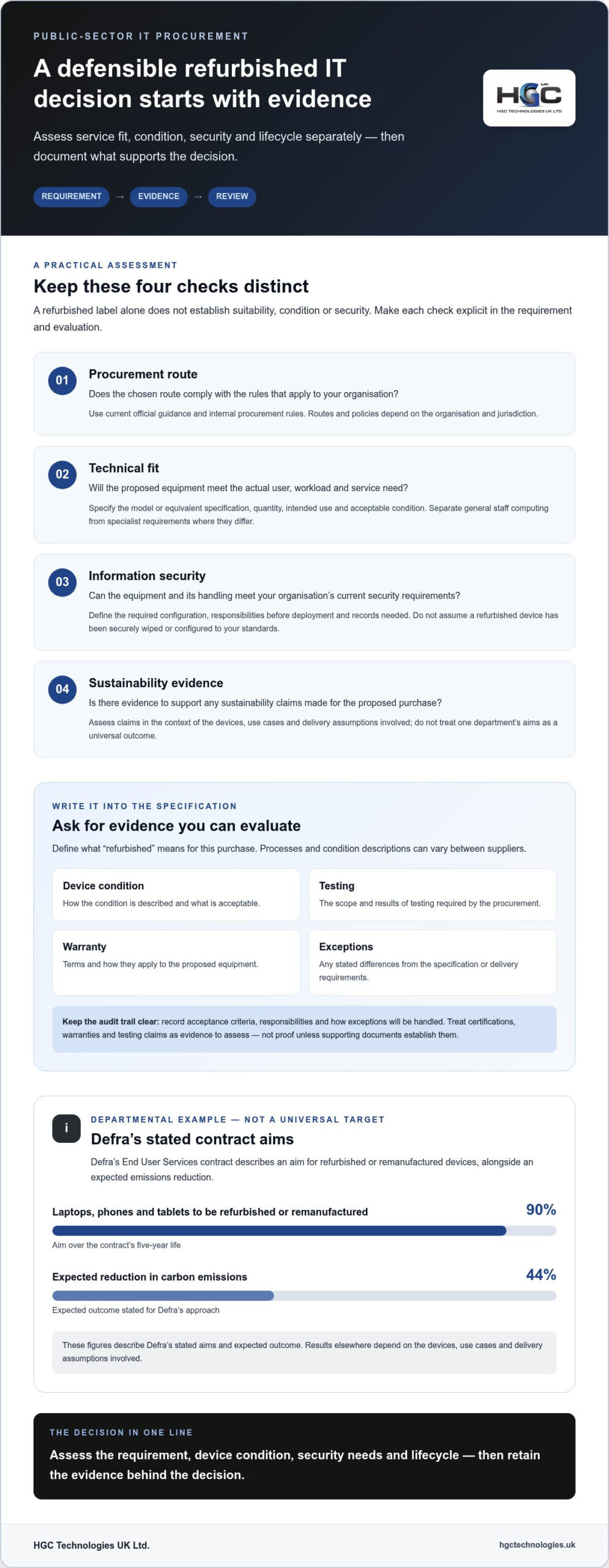
Defra offers one example of a departmental approach, not a template every public body must adopt. Its End User Services contract aims for 90% of laptops, phones and tablets to be refurbished or remanufactured over the contract’s five-year life, with an expected 44% reduction in carbon emissions. These are Defra’s stated aims and expected outcome. Results elsewhere depend on the devices, use cases and delivery assumptions involved.
Refurbished hardware can support value and sustainability objectives when its condition, service fit and lifecycle are assessed against clear procurement requirements.
Which public-sector teams may benefit from refurbished IT?
Councils, education providers, healthcare organisations and central-government teams may all have roles where refurbished equipment is worth evaluating, but no single device suits every workload. Standard staff computing, such as document work and online collaboration, has different requirements from specialist, high-performance or fixed-purpose systems. Match the device to the task, infrastructure and support model rather than assuming one choice will suit an entire organisation.
Bulk purchasing can help align requirements across teams by supporting planning around shared specifications, quantities and deployment needs. A practical approach is to separate the general staff fleet from specialist equipment, so that each purchase reflects genuine differences in use instead of forcing every user into one configuration.
Refurbished and remanufactured: why the distinction matters
These terms can describe different processes, and their use may vary between suppliers. Broadly, refurbished equipment has been used and then prepared for reuse; remanufacturing generally describes a more extensive restoration to a defined condition. Treat these as working descriptions, not universal technical standards. Defra’s example refers to both categories, but its target does not establish a standard definition for all public-sector purchases.
Specify what the distinction means for your requirement. Set out the acceptable device condition, relevant testing or refurbishment evidence, required specifications and records needed for evaluation and audit. Clear wording helps teams compare offers consistently and assess whether the proposed equipment fits the intended service life and users.
How public-sector buyers can address quality, security and procurement concerns
Confidence in refurbished IT comes from a well-defined requirement and evidence that lets the organisation assess it. A refurbished label alone does not establish a device’s condition, suitability or security. For refurbished IT for the UK public sector, keep four questions distinct: does the procurement route comply with applicable rules, will the device meet the technical need, can information-security requirements be met, and is there evidence to support any sustainability claims?
Procurement policy and framework routes depend on the organisation and jurisdiction. Apply current official guidance and internal procurement rules when selecting a route or setting evaluation criteria. Defra’s published account of its sustainable technology procurement is a departmental example, not a universal process or assurance standard.
What evidence should a refurbished IT specification request?
Write requirements so offers can be compared consistently. State the required model or equivalent specification, quantity, intended use and acceptable condition. Then define the evidence needed for evaluation rather than assuming “refurbished” means the same thing in every offer. Relevant documents may cover:
- Device condition and how it is described.
- The scope and results of testing required by the procurement.
- Warranty terms and how they apply to the proposed equipment.
- Any stated exceptions to the specification or delivery requirements.
Record acceptance criteria, responsibilities and the process for handling exceptions in the procurement and contract documents. This gives the team a clear basis for evaluation and later review. Treat certifications, warranties and testing claims as part of the evidence to assess, not as proof unless the supporting documents establish them.
How should teams assess security and procurement governance?
Translate the organisation’s current information-security policies into requirements for the equipment and its handling. Consider the intended device configuration, who is responsible for each step before deployment, and which records the organisation needs. Do not assume refurbished equipment has been securely wiped or configured to your standards. Define the required evidence and responsibilities explicitly.
Apply current official guidance and organisational rules when choosing a procurement route. Keep a decision record that explains the route, evaluation criteria, approvals and material exceptions. Assess sustainability separately: distinguish documented environmental information from general claims, and record how it informed the decision. The UK government’s sustainable IT procurement account provides context for one department’s approach.
For teams evaluating a bulk laptop requirement alongside these assurance questions, HGC Technologies supplies refurbished Dell, Lenovo and HP laptops. Explore bulk refurbished laptop options as part of your requirements planning.
Refurbished versus new IT: compare lifecycle, operational fit and risk
There is no universal winner between refurbished and new hardware. Compare each option against the same use case, deployment plan and intended service life, then document the assumptions behind the decision. Purchase price is only one part of the picture: configuration, rollout, maintenance, downtime risk and end-of-life arrangements all affect value.
| Decision factor | Refurbished IT | New IT |
|---|---|---|
| Upfront procurement | May offer a lower purchase cost, depending on specification and condition. | Compare the quoted specification and cost on an equivalent basis. |
| Intended service life | Assess remaining suitability for the planned deployment period. | Set the same service-life expectation and replacement assumptions. |
| User needs | Match device capabilities to roles, software and daily workload. | Apply the same workload and user requirements. |
| Support and maintenance | Include documented support terms and expected maintenance needs. | Include the relevant support terms and maintenance assumptions. |
| End-of-life planning | Plan reuse, redeployment or disposal based on the organisation’s requirements. | Apply an equivalent lifecycle and disposal plan. |
Keep the comparison consistent. A refurbished option may cost less upfront, but the assessment should also account for deployment effort, compatibility, maintenance, replacement timing and disposal. Conversely, a new device is not automatically better value if its capabilities exceed the workload. Historic departmental purchasing figures, including Alchemy’s 2022/23 snapshot, describe activity in a particular period and scope. They should not be treated as evidence of current purchasing across the whole public sector.
Environmental potential also needs careful framing. Defra estimated that its plan to use refurbished or remanufactured laptops, phones and tablets over the five-year End User Services contract could reduce carbon emissions by 44% compared with buying new devices. This is a departmental estimate, not a measured result for every purchase or a guaranteed saving. The Defra account of sustainable IT procurement sets out that context.
Environmental potential signals an opportunity; only evidence from a specific procurement can establish its measured result.
When might refurbished devices fit the requirement?
Standard office, administrative and shared-device roles may be suitable candidates, subject to assessment. Match processor, memory, storage, connectivity and operating-system requirements to the actual workload, software and existing infrastructure. Where needs align, bulk refurbished Dell, Lenovo and HP laptops can be considered for a consistent fleet, with condition and evidence requirements specified in advance.
When might new or specialist hardware be more suitable?
Resource-intensive applications, specialist peripherals or a long support horizon may justify assessing new or purpose-built alternatives. For requirements beyond standard laptop deployments, compare custom-built PCs or server solutions against the technical workload and lifecycle plan. The right decision for refurbished IT for the UK public sector depends on fit, evidence and whole-life assumptions, not a blanket preference for either category.
A practical checklist for procuring refurbished IT across a public body
A sound buying plan turns an operational need into requirements that can be evaluated and checked after delivery. For refurbished IT for the UK public sector, involve service owners, IT, information security and procurement early. Carry the agreed criteria from the initial assessment through deployment and review.
Define the requirement before requesting supply
Start with users and workloads, not a preferred device category. Segment staff by role, identify the applications and peripherals they rely on, and set minimum specifications for each group. Estimate headcount and quantities, then account for rollout waves, existing infrastructure, compatibility, device management, timings and budget-cycle constraints. Keep standard laptop needs separate from custom PC or server requirements.
- Map users and workloads. Record which teams need devices, what they do on them and whether they need standard laptops, shared equipment or more specialised configurations.
- Set measurable requirements. Specify minimum processor, memory, storage, connectivity and operating-system needs, alongside acceptable device condition and evidence. Define how each requirement will be assessed.
- Plan quantities and timing. Estimate the number of devices by user group and rollout wave. Factor in onboarding schedules, existing infrastructure and the organisation’s budget cycle.
- Confirm the procurement route. Apply current organisational rules and relevant official guidance. Record the selected route and required approvals before proceeding.
- Evaluate offers consistently. Document how the team will assess specification fit, condition, assurance evidence and commercial terms. Record exceptions and how they affect the requirement.
- Plan deployment and review. Assign responsibility for imaging, asset records, onboarding, acceptance checks, replacement planning and end-of-life decisions. Review actual performance against the original criteria.
For teams shaping the commercial comparison, a guide to cost-effective IT procurement can help frame the wider value assessment. Keep criteria transparent. For example, record whether each mandatory specification is met, what evidence supports it and how any deviation will be treated.
Plan evaluation, delivery and lifecycle evidence
Before purchase, ensure contract documents capture the agreed specification, acceptance criteria, responsibilities and relevant terms. Plan how devices will be received, recorded, prepared and issued, including who manages exceptions. Clear ownership matters: buying teams, IT staff and service users should understand their roles in acceptance, onboarding, maintenance and eventual replacement.
Terminology around device condition can vary, so define the condition and evidence your requirement calls for rather than relying on a grade label alone. The refurbished laptop grades guide can support that terminology review. To put a bulk laptop requirement into practice, explore refurbished laptop options for public-sector teams.
Source refurbished IT for the UK public sector with HGC Technologies
Once your requirements and evaluation criteria are defined, identify hardware that fits the documented need. HGC Technologies supplies bulk refurbished Dell, Lenovo and HP laptops to customers across the UK. These branded laptop options may suit public bodies planning standardised business-device requirements when the specifications, condition and supporting evidence meet the procurement criteria.
Keep the sourcing decision tied to your organisation’s procurement route and approval process. Choosing a supplier does not replace the need to assess technical suitability, security requirements or the evidence needed for your records. For a brand-specific view of bulk sourcing, the bulk Dell refurbished laptop procurement guide can help inform your consideration of Dell devices.
Match HGC hardware categories to the procurement requirement
Bulk refurbished laptops can suit staff fleets where user roles, software and infrastructure requirements align with the proposed specification. For needs beyond a standard laptop deployment, HGC also supplies custom-built PCs and server solutions for business environments. Assess each category against its workload rather than treating one hardware type as the default across the organisation.
If the procurement also covers corporate mobile hardware, HGC supplies original smartphones. Keep that requirement distinct from the laptop or infrastructure assessment so each category has clear specifications, quantities and evaluation criteria.
Move from shortlist to a clearly scoped enquiry
A focused enquiry translates a procurement plan into a practical proposal. Prepare the information that defines the requirement, including:
- Device category and required specifications, including any acceptable equivalents.
- Quantities, user groups and intended workloads.
- Required device condition and the evidence your evaluation needs.
- Preferred delivery schedule and any rollout phasing.
- Evaluation criteria and relevant organisational requirements.
With these details to hand, HGC can discuss a proposal aligned with the documented requirement. This gives your team a clearer basis for comparing the proposed hardware with its acceptance criteria, while keeping procurement decisions and approvals within your organisation’s governance process.
For public bodies considering refurbished IT for the UK public sector, a well-scoped requirement connects the shortlist to operational needs and a defensible evaluation. Share your hardware requirement, quantities and specifications with HGC Technologies to discuss the next step.
Discuss your public-sector hardware requirement
Make your next refresh a planned opportunity
Your next device refresh can be an opportunity to make reuse a considered part of the procurement plan, rather than an afterthought. Choose an upcoming requirement and bring the relevant service, IT and procurement colleagues together before the specification is fixed. A shared view of user needs and acceptance criteria helps turn an objective into a practical, reviewable decision.
For refurbished IT for the UK public sector, connect the requirement to a clearly scoped hardware discussion. Set out intended users, quantities, specifications and preferred delivery schedule, then assess a proposal against your organisation’s criteria. HGC Technologies supplies business hardware directly to customers across the UK.
Take the next step with a clear brief. Discuss your public-sector refurbished IT requirements with HGC Technologies and plan a procurement that reflects your organisation’s needs.
A thoughtful process gives your team a stronger basis for decisions today and future refresh planning. Start with the requirement, then build from there.
Frequently Asked Questions
Is refurbished IT suitable for UK public-sector organisations?
Yes, refurbished IT can suit public-sector organisations when the equipment meets the service need and the purchase follows applicable procurement rules. A team replacing laptops for document work, for example, has different considerations from one using specialist clinical or technical software. Assess the workload, compatibility and operational impact, then evaluate suitable options against current organisational policy and relevant official guidance. Reuse alone does not make a device appropriate for every team.
What is the difference between refurbished and remanufactured IT?
The terms generally describe different levels or types of preparation for reuse, but their meaning can vary by organisation and supplier. Remanufacturing often refers to a more extensive restoration than refurbishment, yet the label itself does not define exactly what work was completed. Defra uses both terms in describing its approach. For purchasing, define the condition, process information and evidence you require rather than relying on the terminology alone.
Can refurbished laptops run current business software?
They can if the laptop’s hardware and operating system meet the software supplier’s current requirements. Compare the required processor, memory, storage and connectivity with the applications staff will use, and account for peripherals such as docking stations or specialist equipment. Check compatibility before committing to a fleet, ideally through a representative device trial. Also consider software licensing and supported operating-system versions as part of the deployment plan.
How should public bodies manage data on refurbished laptops?
Set data-handling controls before devices enter service, and distinguish previous-user data from information your organisation will create. Define the evidence required to show that devices are ready for deployment, then apply the organisation’s approved configuration, encryption and access-control policies. Record asset identifiers and assigned users in the relevant system. At retirement, follow the organisation’s established data-retention and disposal procedures rather than assuming a reused device is automatically free of data.
Can a public-sector team buy refurbished IT in bulk from a wholesaler?
Yes. A team can procure bulk devices from a wholesaler, subject to its own procurement rules and route. HGC Technologies supplies bulk refurbished Dell, Lenovo and HP laptops to corporate clients and technology resellers across the UK. For a public-sector requirement, define quantities, acceptable specifications and delivery phasing, then evaluate the proposed supply against the organisation’s documented criteria and approvals.
Does refurbished IT automatically count towards sustainability targets?
No. Whether a purchase contributes to a target depends on how that target is defined and measured. Check whether it covers purchasing, device use, reuse or emissions, and what evidence and reporting period it requires. Keep procurement records that identify the equipment and the basis for any sustainability claim. A refurbished purchase may support a reuse objective, but it does not by itself establish a quantified environmental saving.
How can a public body standardise devices across a large team?
Set a common baseline for each user group, then allow documented variants where roles genuinely need different capabilities. For example, staff using standard office applications might share one specification, while teams relying on specialist peripherals need a separate one. Check software and infrastructure compatibility, trial the proposed configuration with representative users, and record approved exceptions. This gives procurement a consistent basis for comparing devices without forcing every role into an unsuitable standard.

What to Check When Buying Bulk Used Laptops: A 2026 Procurement Checklist
A single BIOS lock in a batch of fifty laptops isn't just a technical hurdle; it's a complete write-

Capex vs Opex IT Hardware UK: Why Buying Refurbished Wins in 2026
Why are UK businesses still paying a premium for hardware they will never own, especially when inter

Cost-Effective UK Start-up Server Guide 2026
The era of cheap, predictable cloud computing has officially ended, leaving many founders trapped be