
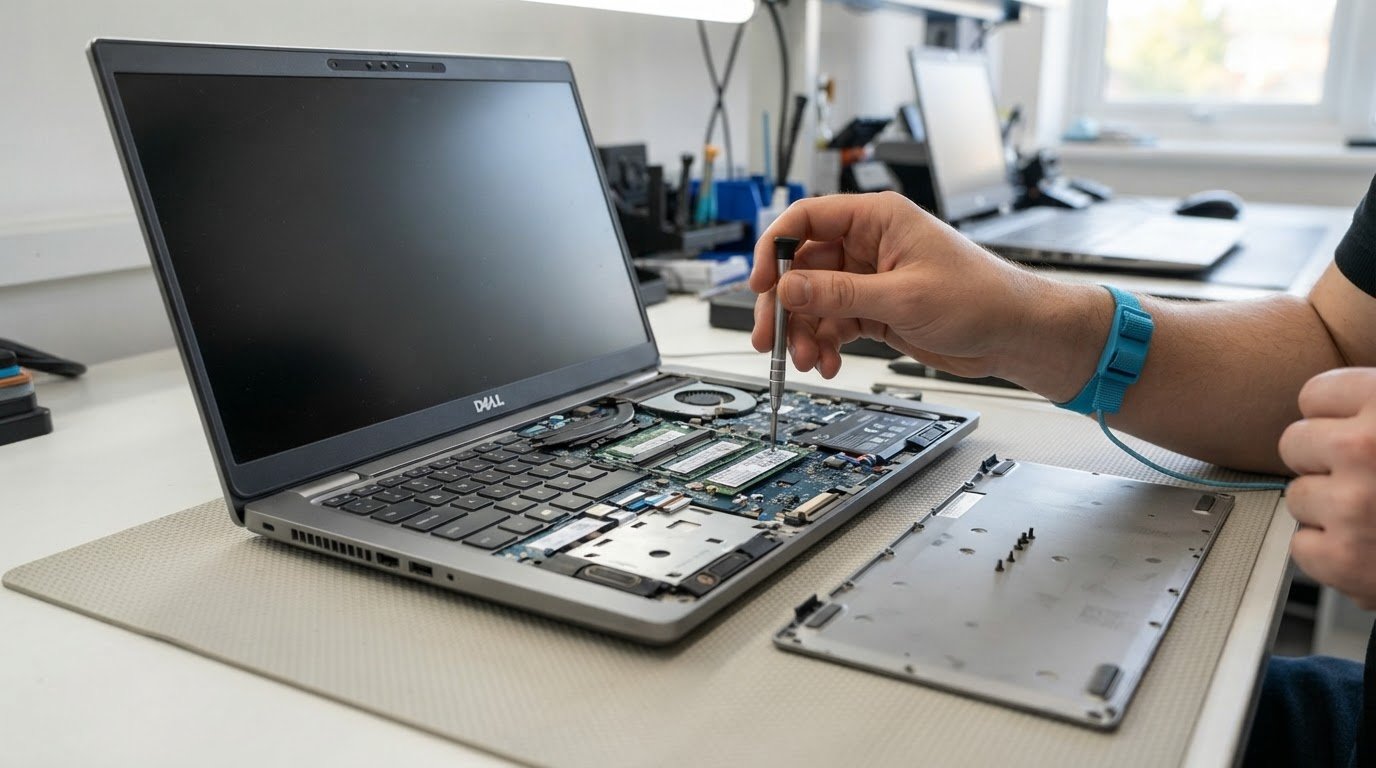
Repairable business laptops for UK professionals
Repairability can matter more than the badge on the lid. The latest ThinkPad T14 and T16 laptops score 10 out of 10 for repairability, making them strong examples of business laptops that are easy to repair. The cheapest option to repair depends on the fault: the cost is shaped by the replacement part and how accessible it is inside the laptop.
A cracked screen, worn battery or faulty charging port can affect whether a repair is practical. For a well-specified laptop under five years old, consider repair before replacement.
This guide explains what makes business laptops easier and cheaper to repair, and what to consider when replacing screens, batteries and charging ports. You’ll also learn how to weigh repair against replacement and choose equipment with a longer, more manageable working life.
Key Takeaways
- Compare how accessible key components are, not just the laptop’s specification, when assessing repairability.
- For screen, battery or charging-port damage, weigh the repair against the laptop’s condition and suitability for ongoing work.
- Build repairability into procurement decisions so equipment is easier to maintain throughout its working life.
- Protect personal data as part of repair planning; the Data Protection Act 2018 is relevant to this responsibility, according to UK legislation.
Which business laptops are easiest and cheapest to repair?
Look beyond the manufacturer name: accessible components, replaceable memory and storage, and clear model-specific repair information all matter. These features can make business laptops that are easy to repair more flexible throughout their working life.
Upgradeable memory and storage
Upgradeable RAM can be replaced or expanded, while soldered RAM is fixed to the motherboard. A replaceable SSD likewise allows storage upgrades without replacing the whole computer. Before purchase, identify the exact model and check which components can be changed, rather than assuming every Lenovo or other business laptop has the same layout.
For a practical upgrade, match the RAM and SSD to the model’s requirements, then plan the installation around software needs and expected downtime. A laptop with replaceable parts gives IT teams more options as workloads change, while soldered components limit those options. Include access to memory and storage in your procurement checklist.
Parts availability and warranties
There is no reliable manufacturer-wide answer to which brand offers the longest parts availability and warranty. Compare the exact model and generation: record the warranty term, what it covers and how long essential replacement parts are listed as available. A manufacturer name alone does not establish the strongest support for every computer in its range.
For lifecycle planning, keep the model identifier with procurement records and compare it with the warranty documentation and parts information. This makes it easier to assess support for a specific laptop instead of relying on a broad brand rating. Warranty coverage and parts availability are separate considerations.
Repair costs and scores
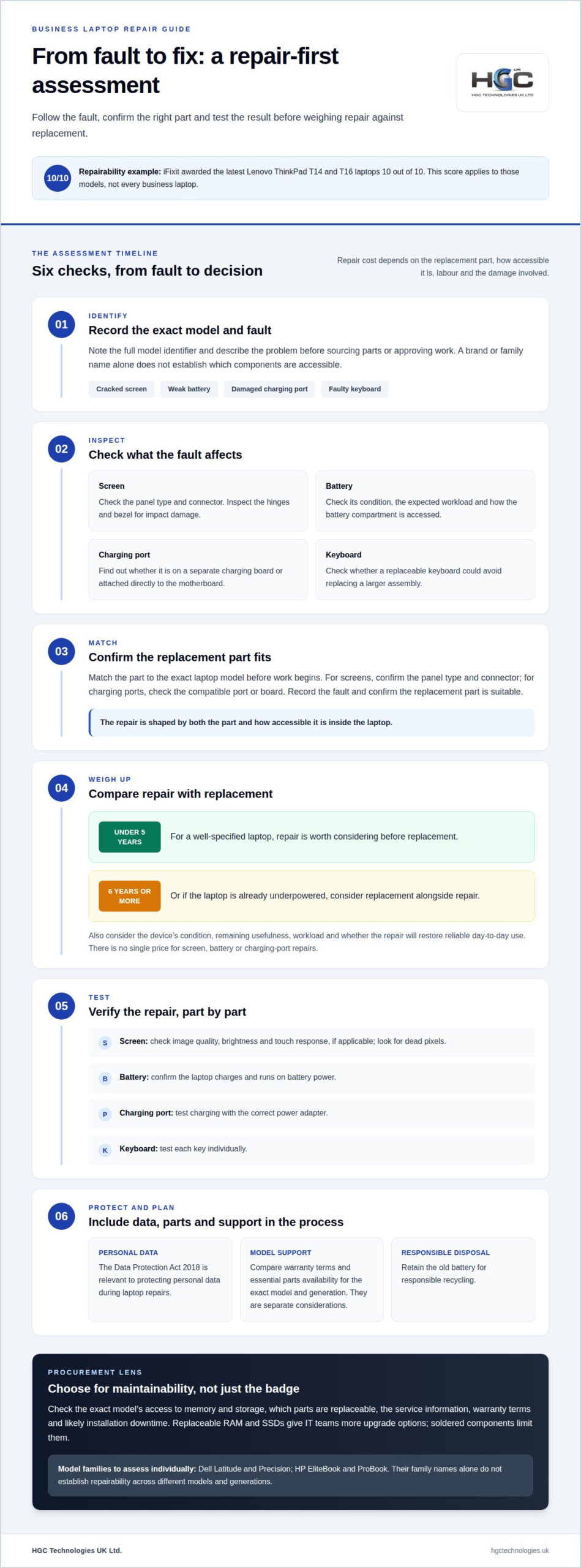
Common UK repair costs depend on the part, labour and damage involved, so there is no single price for repairing a screen, battery or charging port. Identify the fault and required component first, then compare the repair with the laptop’s remaining usefulness and the cost of replacement. This gives you a practical basis for deciding whether to repair or upgrade.
For repairability scores, iFixit awarded Lenovo’s latest ThinkPad T14 and T16 laptops 10 out of 10. Treat that rating as specific to those models, not a score for every business laptop. A score can guide comparison, while the precise model and repair task determine which components are accessible.
Dell and HP model repairability
Dell Latitude and Precision, and HP EliteBook and ProBook, span different models and generations. A family name alone cannot establish which is easier to repair. Compare the exact model’s service information for RAM and SSD access, replaceable components and the steps needed to reach them. These details show how flexible the design is for repairs and upgrades.
For a purchasing shortlist, assess each model against the same criteria: component access, parts information, warranty terms and likely downtime for an installation. UK legislation identifies the Data Protection Act 2018 as relevant to protecting personal data during laptop repairs. Include data protection in the repair process alongside the hardware assessment.
Screen, battery and charging-port replacements
For a well-specified business laptop under 5 years old, repair is worth considering before replacement. The decision depends on the fault, the device’s condition and whether a replacement part restores reliable day-to-day use.
A cracked screen doesn’t always require replacing the whole lid assembly. First identify the laptop’s exact model, check the panel type and connector, then match the replacement screen. After fitting, test image quality, brightness and touch response, if applicable. A repair workshop should also check the hinges and bezel, since impact damage can affect surrounding parts.
For a weak battery, compare its condition with the laptop’s expected workload and check how to access the battery compartment. A replaceable battery can make a targeted repair possible; a battery integrated into a more complex assembly may require additional work. After replacement, check that the device charges and runs on battery power. Retain the old battery for responsible recycling.
A loose or damaged charging port may be mounted on a separate charging board or attached directly to the motherboard. That difference affects the repair process: identify the exact model, inspect the port and board, then source a compatible part. Replaceable keyboards offer a similar advantage when keys fail or liquid damage affects only the keyboard, potentially avoiding replacement of a larger assembly.
Before approving a repair, record the fault and confirm the replacement part matches the laptop model. Inspect the screen for dead pixels, check each keyboard key individually and test charging with the correct power adapter. These checks help assess parts quality and confirm that the original fault has been resolved.
For laptops 6 years old or more, or already underpowered, consider replacement alongside repair. If replacing equipment better suits your team, compare refurbished business laptop options as part of that decision.
Repairable business laptop selection
Choose by the exact model, not the brand label: component access can differ across a manufacturer’s range. Compare repairability with workload, support needs and the time technicians may need to restore each device.
Replaceable batteries, RAM and SSDs
Which business laptops have replaceable batteries, RAM and SSDs? It varies by model and generation, so identify the full model number before selecting equipment. Review its maintenance documentation for battery access, memory slots and SSD replacement steps. A brand name alone won’t tell you which parts are removable.
Use a practical checklist during procurement: note whether each component is replaceable, how it is accessed and whether the planned upgrade supports your software. A laptop with accessible memory and storage can adapt as work changes. If a component is soldered, that upgrade route is unavailable, which may affect the device’s useful life.
Comparing repairable laptop ranges
How do Framework laptops compare with ThinkPads, Latitudes and EliteBooks for repairability? Compare specific models using the same criteria: removable parts, repair documentation, replacement-part access and the steps needed to reach key components. The range name alone cannot establish which laptop is easiest to maintain.
For example, compare the Framework model under consideration with a particular ThinkPad, Dell Latitude or HP EliteBook. Check whether batteries, memory and storage can be replaced, then assess the likely downtime for each repair. ThinkPad T14 and T16 models have an iFixit repairability score of 10 out of 10, a useful model-specific reference rather than a rating for every ThinkPad.
Match that assessment to the working environment. A team relying on laptops may value quick recovery from a fault, while a desktop-based team may prioritise different equipment. Consider whether technicians can access clear repair information and whether replacement parts support your chosen brands. A competitive selection process should compare lifecycle flexibility alongside purchase requirements, so decisions reflect how the computers will actually be used.
ThinkPad T-series repairability
Lenovo’s ThinkPad T14 and T16 received a repairability score of 10 out of 10 from iFixit. That rating gives business owners a useful reference, but it applies to those models, not every T-series machine. Check the exact model and generation before planning hardware work, as components and repair procedures can differ.
Start with the service documentation for the specific ThinkPad. Identify how technicians access the battery, memory, storage and keyboard, then note any tools or part identifiers listed. This helps specialists assess the repair before opening the machine and supports consistent fleet maintenance planning, rather than assumptions based on the ThinkPad name.
Consider the storage configuration, too. A hard drive or SSD fault can affect access to files and business software, so plan data recovery and replacement as separate tasks. Record the machine’s model and storage type, then establish how your organisation will restore its working data. Keep a current backup before hardware work begins.
For a laptop connected to a business network, include post-repair checks in the work plan. Confirm that the machine starts, recognises its storage and connects to the required network and peripherals. Test the keyboard and screen, too, if the repair involved nearby components. A clear checklist helps identify whether the original fault has been resolved.
Use the iFixit rating as one comparison point, alongside model-specific repair instructions, parts access and the needs of your team. A highly rated design still needs to suit the software and workload it must support. For organisations comparing Lenovo equipment in bulk, explore bulk Lenovo refurbished laptops as a procurement option.
HGC Technologies UK: Bulk Dell Refurbished Laptops
HGC Technologies UK Ltd. supplies bulk refurbished laptops for organisations planning a fleet refresh or sourcing equipment for resale. Its Dell, Lenovo and HP options give procurement teams established brands to compare against their requirements for repairability, workload and lifecycle management.
Use the model-level criteria in this guide to assess whether a refurbished laptop suits your team, including access to replaceable components and support information. Where standard laptops aren’t the right fit, HGC Technologies UK Ltd. also offers custom-built PCs for business requirements that call for a different configuration.
For a bulk purchase, define the intended use and preferred brand before narrowing the selection. Contact HGC Technologies UK Ltd. to discuss your requirements, or visit hgctechnologies.uk.
Make repairability part of your next procurement decision
Set a clear direction for your next refresh: define the work each device must support, how long you intend to use it and which components matter most to maintain. That gives your team a practical basis for comparing models and planning future replacements, rather than choosing on specification alone.
For organisations sourcing equipment in volume, HGC Technologies UK Ltd. offers bulk Dell, Lenovo and HP refurbished laptops. These options help procurement teams compare established brands against their operational requirements. The best business laptops that are easy to repair are those that suit your workload and make ongoing maintenance a considered part of ownership.
Bring your preferred brands and requirements together for the next step. Contact HGC Technologies UK Ltd. to discuss bulk refurbished laptop options for your organisation, and move forward with a more deliberate equipment plan.
Frequently Asked Questions
Which business laptops are easiest to repair in 2026?
Lenovo ThinkPad T14 and T16 models stand out for repairability, while the best choice depends on the fault and exact model. Before selecting a laptop for a fleet, match its model number to the repair task your team is most likely to face. A machine suited to storage replacement may not be equally straightforward to repair after screen damage.
How repairable are Lenovo ThinkPad T and P series laptops?
ThinkPad T14 and T16 models received a 10 out of 10 repairability score from iFixit; that score shouldn’t be applied to every T-series model. For P-series laptops, assess the individual model and generation rather than relying on the family name. Compare the service instructions for the component involved, especially if a repair could interrupt specialist software or workflows.
Are spare parts and repair manuals available for UK business laptops?
Parts and repair documentation vary by laptop model, so begin with the complete model identifier on the device or its system information screen. Use it to find the correct service instructions and part references before arranging work. For a business fleet, keep those details alongside asset records so staff can identify compatible components without relying on appearance or brand alone.
What should I check before buying a used or refurbished repairable business laptop?
Check the exact model, condition and specifications against the software your team uses. Test the screen, keyboard, battery, charging port, Wi-Fi and every required connection, then confirm the device starts reliably. Ask for the refurbishment and warranty details in writing, and ensure the laptop is ready for secure business setup. These checks help distinguish a suitable machine from one that needs immediate work.
How do Framework laptops compare with ThinkPads, Latitudes and EliteBooks for repairability?
Compare specific models by removable parts, repair documentation, replacement-part access and the steps needed to reach key components. ThinkPad T14 and T16 models have an iFixit score of 10 out of 10; range names alone do not establish which laptop is easiest to repair.

Refurbished Hardware for Disaster Recovery: Practical Guide
Could refurbished hardware strengthen your recovery plan, or create another point of failure? The an

Refurbished Laptop Multitasking: A 2026 Guide
You don't need a four-figure budget to eliminate the stuttering video calls and frozen browser tabs

Sustainable IT Hardware UK: The 2026 Strategic Procurement Explainer
Sales volumes for refurbished PCs in Britain nearly doubled between late 2024 and 2025, cementing th