

Refurbished Hardware for Disaster Recovery: Practical Guide
Could refurbished hardware strengthen your recovery plan, or create another point of failure? The answer depends on whether each device can support the workload, configuration and recovery timeframe it’s assigned to. Refurbished hardware for disaster recovery plans can be a practical option, but a lower purchase cost alone doesn’t make equipment recovery-ready.
It’s reasonable to question whether refurbished devices will be compatible, available when needed and reliable enough for your business. Assess them against your Recovery Time Objective (RTO), the time you can tolerate being without a system, and Recovery Point Objective (RPO), the amount of data loss you can accept.
This guide explains which recovery roles refurbished equipment may suit, how to compare it with new hardware and other approaches, and what to check before procurement. You’ll also learn how to plan compatibility checks, configuration consistency and recovery testing around your objectives. For UK organisations, bulk refurbished Dell, Lenovo and HP laptops may be considered for endpoint replacement pools. Custom-built PCs and server solutions are separate options for specified infrastructure needs.
Key Takeaways
- Identify which recovery roles refurbished hardware for disaster recovery plans can support, and where other options may better fit infrastructure requirements.
- Prioritise workloads by business impact, then set device requirements around your recovery time and data-loss tolerances.
- Compare refurbished and new equipment against readiness, compatibility, configuration, support, lifecycle and sourcing requirements.
- Build an asset register that records each device’s model, specifications, quantity, location and assigned recovery role.
- Set clear acceptance criteria and ask suppliers for relevant details on condition, testing evidence, warranty and batch consistency.
What role can refurbished hardware play in a disaster recovery plan?
Disaster recovery hardware is equipment reserved or sourced to help restore essential IT operations after disruption. It might include replacement devices for staff, alongside the infrastructure needed to bring applications and services back online. The right choice depends on the recovery role. Refurbished laptops may help restore access for users, but they aren’t a substitute for servers, networking equipment or specialist systems.
“Recovery-ready hardware is equipment that can be accessed, configured and used for an assigned recovery task; equipment being available is not, by itself, proof that recovery will succeed.” This distinction matters when assessing refurbished hardware for disaster recovery plans. A device has value only if it suits its intended role and can be put into service as the recovery process requires. The wider disaster recovery process also involves objectives, people and procedures, not just equipment.
Backups protect copies of data. They don’t provide the computers, capacity or configurations needed to restore services and let people use that data. A recovery plan should account for both where recoverable data comes from and what equipment and steps are needed to restore access to business operations.
Which recovery tasks might refurbished laptops support?
Refurbished laptops may serve as replacement endpoints when employees’ usual devices are damaged, inaccessible or unavailable. A pool of standardised laptops can support planned user roles, provided you check compatibility with required applications, operating systems, peripherals and security controls. For example, a general office user may have different device requirements from someone who relies on specialist software. Don’t assume one laptop model will suit every role.
Bulk refurbished laptops from Dell, Lenovo or HP could be considered for an endpoint replacement pool, subject to those checks and confirmation that the required devices can be procured. They shouldn’t be treated as replacements for server capacity, network infrastructure or equipment that runs specialist services. Assign each device a specific recovery purpose.
What hardware does not solve on its own
Buying equipment doesn’t design backups, restore data or recover applications. Those tasks depend on documented processes, appropriate access, available software licences and secure configurations as well as hardware. If a replacement device can’t connect to required systems or run necessary software, having it on hand won’t restore a user’s ability to work.
Document who owns each recovery task and what equipment it requires. Record each device’s assigned role, the people responsible for preparing or using it, and dependencies such as connectivity, software access and data restoration. This makes gaps visible before an incident and gives recovery exercises a clear basis for checking whether equipment and procedures work together.
Match refurbished hardware to RTO, RPO and business-critical workloads
Choose recovery equipment only after you know what must come back first and how quickly. A Recovery Time Objective (RTO) is the target time for restoring a service after disruption. A Recovery Point Objective (RPO) sets the point in time to which data must be restored, indicating how much recent data the organisation can afford to lose. Ready.gov’s guidance on an IT disaster recovery plan also stresses connecting technology recovery with business needs.
RTO and RPO shape the recovery capacity you need, not just the devices you buy. A short restoration target may require enough compatible equipment, prepared configurations and access to dependencies to restore priority users or services promptly. Equipment alone cannot meet a target if identity services, licences, data or connectivity remain unavailable.
Start with recovery objectives, not a device list
Ask service owners to record the order in which services should return, the acceptable interruption for each, and its organisation-approved RTO and RPO. Don’t assume every workload needs the same target. Map dependencies such as identity systems, network access and data restoration, then note the minimum number of users or processing capacity each service needs to operate. Leave targets for service owners to confirm rather than guessing.
Check refurbished equipment against workload requirements
Translate each recovery role into a specification before comparing devices. For replacement laptops, document the required operating system, applications, processor, memory, storage, ports, connectivity and peripherals. Check that software and security controls are compatible, and confirm that the configuration can be reproduced across the intended device batch. Ask suppliers about consistency between units and whether matching replacements can be sourced, without assuming availability.
For example, a laptop intended for general office work may not meet the needs of an employee who relies on specialist applications or peripherals. Bulk refurbished Dell, Lenovo or HP laptops may be considered for defined endpoint roles, but assess each model against your organisation’s requirements rather than assuming a brand or device type is suitable for every workload.
Capture the result in a workload-to-equipment record: service, recovery order, confirmed RTO and RPO, minimum capacity, assigned device configuration, dependencies and task owner. This gives procurement a clear basis for deciding whether refurbished hardware for disaster recovery plans is appropriate for each role, and helps expose gaps before an incident or recovery exercise.
If refurbished laptops are part of your endpoint assessment, you can review bulk refurbished laptop options alongside your documented specifications.
Refurbished or new hardware for disaster recovery: how to compare
Neither refurbished nor new equipment is automatically the right choice. Compare both against the recovery role, approved RTO and RPO, and the evidence you can obtain before procurement. NIST’s Contingency Planning Guide provides a structured framework for considering recovery requirements. Use that kind of planning discipline to make hardware decisions traceable to business needs.
Suitability depends on tested requirements, not condition alone. Use the same criteria for each option, then record any gaps and how the recovery plan will address them.
| Criterion | Refurbished hardware | New hardware |
|---|---|---|
| Readiness | Confirm its assigned role, preparation steps and ability to meet recovery targets. | Confirm configuration and preparation requirements before relying on it. |
| Compatibility | Check operating-system support, applications, security controls, peripherals and connectivity. | Validate the same requirements, including compatibility with existing systems. |
| Configuration | Establish whether the required models and specifications can be kept consistent across a batch. | Specify a standard build and verify that it suits the recovery role. |
| Support | Ask about condition descriptions, testing scope, warranty terms and support arrangements. | Confirm applicable manufacturer or supplier support and its terms. |
| Lifecycle | Check remaining useful life and whether software and security support meet your needs. | Assess expected service life and support period against the plan. |
| Sourcing lead time | Confirm current availability, quantities and timing with the supplier. | Confirm expected supply timing and whether it fits the recovery schedule. |
When refurbished equipment may fit the recovery role
Refurbished laptops may suit a defined endpoint pool if you can verify specifications, software compatibility and configuration before deployment. Check whether the required models and quantities can be sourced consistently, and ask the supplier to explain condition descriptions, testing evidence, warranty terms and support arrangements. Confirm these details for the specific equipment being considered.
When new or specialist equipment may be more appropriate
New equipment may be a better fit where current support, specialist performance or strict compatibility is essential. A workload may also depend on manufacturer-specific support or a validated configuration that an alternative device can’t meet. Record the reason for each choice against the service’s recovery objectives, rather than assuming new equipment is inherently more recovery-ready.
Cloud or virtual recovery is a separate strategy, not a universal replacement for physical equipment. It may suit some workloads, but assess its dependencies, access requirements and ability to meet recovery objectives alongside any hardware approach. For refurbished hardware for disaster recovery plans, make the decision role by role and include the outcome in the plan.
Build a practical refurbished hardware recovery readiness process
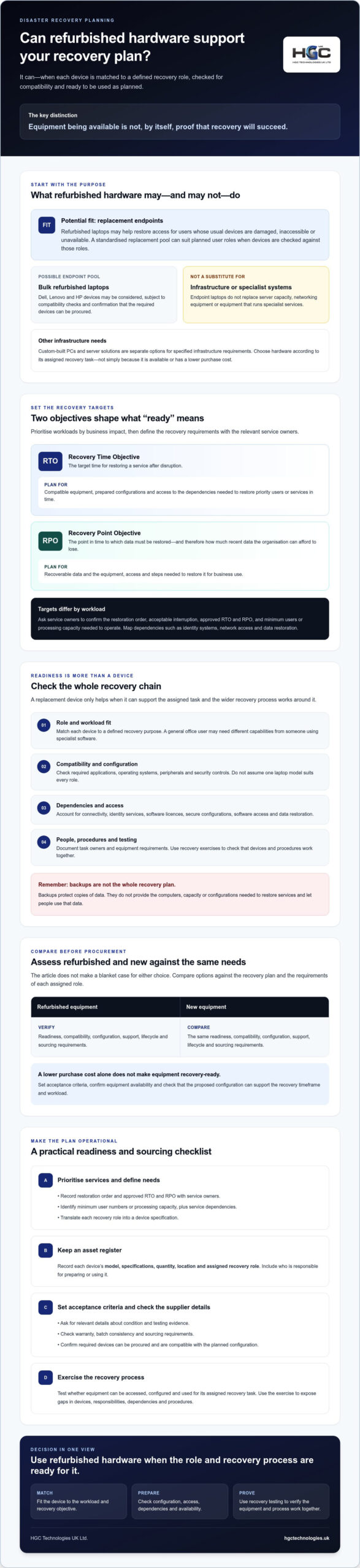
Turn procurement decisions into an operational process that someone can follow under pressure. A recovery inventory should connect each device to a named role, a responsible owner and the systems that role depends on. Use this sequence to make refurbished hardware for disaster recovery plans easier to track, prepare and validate.
- Inventory the equipment. Record device models, specifications, quantities, organisational locations and ownership. Identify which devices are reserved for recovery and which would need to be sourced after an incident.
- Assign each batch a recovery role. Map devices to the user groups or workloads they are intended to support. Note any limits, such as incompatible software or peripherals, so equipment isn’t allocated beyond its tested purpose.
- Document how to prepare each device. Record the approved configuration image, required applications, update steps and user access instructions. List dependencies, including connectivity, identity services, licences and credentials, and explain how authorised staff can obtain access securely.
- Set ownership and upkeep responsibilities. Name who reviews equipment condition, update status, configuration changes and replacement needs. Store recovery equipment securely, keep it accessible to authorised staff and document the controls for locating and releasing it.
- Exercise the process and track actions. Test representative devices and restoration procedures, then record results, gaps, action owners and corrective steps.
Document and prepare the recovery inventory
Keep the inventory usable, not merely complete. For each batch, include the supported user roles, required applications, setup instructions, dependencies and the person accountable for its readiness. Define how changes in device condition, software updates or business needs trigger a review. If equipment is held in a different organisational location from the users who need it, include the steps and responsibilities for accessing it.
Exercise recovery before an incident
Rehearse deploying a device, giving the intended user secure access and restoring the essential applications and data needed for their role. Measure actual performance against the organisation’s documented RTO and RPO, and record where delays or dependencies affect the outcome. A device that starts successfully may still fail the exercise if staff can’t sign in or required services remain unavailable.
After an exercise, assign each gap an owner and a corrective action, then update the relevant inventory entry and recovery instructions. Review the plan when hardware, systems or business priorities change. Set the exercise schedule according to organisational policy rather than relying on an assumed universal interval.
For procurement planning, review bulk refurbished laptop options against the roles and specifications in your recovery inventory.
Source recovery hardware through a plan based procurement decision
Procurement should start with the recovery plan, not a supplier’s available catalogue. Define the role, required configuration, quantity and acceptance checks for each batch, then compare supplier responses against those requirements. This helps identify gaps before placing an order and confirms that received equipment can be assessed against its intended recovery use.
Questions to resolve before placing a hardware order
Ask suppliers to confirm the proposed models and specifications, how equipment condition is described, what testing evidence is available, and the terms of any warranty and support arrangements. Check whether the batch will be consistent across key components and configurations, and confirm stock and expected fulfilment details directly. If a proposed model or component changes, agree that substitutions require approval against your compatibility criteria before acceptance.
For endpoint replacement pools, HGC Technologies UK Ltd. supplies bulk refurbished Dell, Lenovo and HP laptops. These may be a sourcing option when the models and quantities meet your documented requirements, subject to supplier confirmation and your own compatibility and readiness checks. Server requirements are distinct from endpoint needs. For that infrastructure decision, see this enterprise server hardware procurement guidance. HGC also supplies server solutions and custom-built PCs as separate offerings; neither should be described as refurbished.
Turn the plan into an actionable procurement brief
Give suppliers a concise brief that names the recovery roles, required quantities, specifications and configurations, along with the acceptance checks and the decision-makers responsible for approval. Include requirements such as supported operating systems, applications, ports and peripherals where relevant. Record unresolved questions about compatibility, condition, support, batch consistency and availability, and seek confirmation before committing to the proposed equipment.
At receipt, compare the supplied models, quantities and stated specifications with the approved brief. Inspect and test representative equipment using your documented criteria, record any discrepancies and resolve them before adding devices to the recovery inventory. This closes the loop between sourcing and readiness: refurbished hardware for disaster recovery plans should be accepted because it meets an assigned role, not simply because it has arrived.
For wider context on equipment lifecycles and the refurbished market, read about wholesale refurbished IT equipment trends. To discuss bulk hardware requirements, contact HGC about your hardware needs. HGC supplies hardware; your organisation remains responsible for disaster recovery planning, configuration and testing.
Assess refurbished hardware for disaster recovery plans
Refurbished hardware for disaster recovery plans is most useful when every device has a defined role, fits the organisation’s recovery objectives and can be prepared as intended. Compare refurbished and new options against the same operational criteria, then validate your assumptions through documented checks and recovery exercises.
A clear inventory and procurement brief connect recovery priorities with practical decisions: which equipment is needed, what it must support, who approves it and how you’ll confirm it meets requirements. Keep hardware in perspective, too. Successful recovery also depends on people, data, access, applications and processes working together.
HGC Technologies UK Ltd. supplies bulk refurbished Dell, Lenovo and HP laptops for corporate and reseller requirements, alongside bespoke custom-built PCs and professional server solutions for separately defined infrastructure needs. If you’re assessing equipment against your recovery requirements, discuss your bulk hardware requirements with HGC Technologies UK Ltd.. With clear criteria and careful preparation, you can make informed choices and build a more dependable path to recovery.
Frequently Asked Questions
Can refurbished hardware be used in a disaster recovery plan?
Yes, refurbished hardware can support a disaster recovery plan if it meets the requirements of its assigned recovery role. Check compatibility with essential software, security settings, peripherals and connectivity, then document how equipment will be accessed and prepared. For example, refurbished laptops may serve as replacement endpoints for staff, but they won’t automatically suit every user or restore server-based services. Include equipment in a recovery exercise before relying on it.
Is refurbished hardware reliable enough for business continuity?
It can be, but reliability should be assessed for the specific equipment and workload rather than assumed from its refurbished status. Ask the supplier about the device’s condition, testing scope, warranty terms and support arrangements, then carry out your own configuration and recovery checks. Consider whether the equipment’s lifecycle and software support fit your plans. Record any limitations and decide how they’ll be managed before designating devices as recovery resources.
How do RTO and RPO affect disaster recovery hardware choices?
RTO is the target time to restore a service; RPO is the point in time to which data must be restored, reflecting tolerable data loss. Together, they shape the capacity and preparation a recovery process needs. A service with a demanding RTO may require prepared, compatible devices and dependencies that can be accessed promptly. Hardware alone cannot meet an RPO: the organisation also needs suitable backup and data-restoration arrangements.
What refurbished equipment can support a disaster recovery plan?
Refurbished laptops may support staff whose usual devices are unavailable, provided each model suits its assigned user role and required applications. HGC Technologies UK Ltd. supplies bulk refurbished Dell, Lenovo and HP laptops for corporate and reseller requirements. Check specifications and compatibility before procurement. Don’t assume laptops can replace servers, networking equipment or specialist systems. HGC’s custom-built PCs and server solutions are separate offerings, not refurbished equipment.
How should a business test recovery hardware before an incident?
Test representative devices using the steps staff would follow during recovery. Rehearse deployment, secure user access, connectivity and restoration of essential applications, then compare actual results with documented recovery targets. Include relevant dependencies, such as identity services, licences and data access, so the exercise checks more than whether a device powers on. Record failures, assign corrective actions to owners and update the inventory and procedures after changes to systems or business priorities.
What should I ask a refurbished hardware supplier before buying?
Ask for the exact proposed models and specifications, how condition is described, what testing evidence is available, and the warranty and support terms. Confirm whether the batch will be consistent, whether the required quantity is available and how substitutions would be handled. Share your compatibility and acceptance criteria, then check supplied equipment against the approved brief. Confirm unresolved details before ordering, rather than relying on assumptions about condition, stock or fulfilment.
Should a disaster recovery plan use refurbished or new hardware?
Choose according to the workload’s recovery objectives, compatibility needs, support requirements and the evidence available for each option. Refurbished equipment may fit defined roles where specifications and configuration can be verified; new equipment may be preferable when current support or specialist compatibility is essential. Compare both using consistent criteria, document the rationale and test the selected approach. Cloud or virtual recovery can also be assessed as a separate strategy where appropriate.

Refurbished Laptops vs Smartphones for Business Productivity: The 2026 Guide
The most expensive mistake a procurement officer can make in 2026 isn't choosing the wrong brand, bu

Circular Economy IT Procurement UK: The 2026 Strategic Guide for Enterprises
Manufacturing a single new laptop requires roughly 190,000 litres of water, and nearly 85% of its li

Environmental Impact of Buying New vs Refurbished Tech: A 2026 UK Business Guide
Manufacturing a single new laptop generates approximately 350kg of carbon emissions, whilst a certif