

Stress Testing Refurbished Servers for Stability and Quality Assurance
A server can pass a basic start-up check and still struggle under sustained pressure. Stress testing refurbished server hardware commonly includes continuous burn-in under load for 24-72 hours, alongside checks of stability and performance.
It’s reasonable to want more than a simple pass result before relying on refurbished equipment. A useful test shows how a server behaves under demanding workloads and helps distinguish hardware faults from performance constraints.
This article explains what a server stress test checks, how rising demand can expose processor, application, database and network bottlenecks, and what to look for in test reports and warranty terms. You’ll also learn why a workload that resembles your own matters when assessing whether a server is ready for production.
Key Takeaways
- Use sustained testing, often a 24-72-hour burn-in, to reveal stability issues that a basic start-up check may miss.
- Compare processor, application, database and network behaviour under simultaneous demand to help pinpoint where performance is constrained.
- Read test reports for the workload, duration, load, ambient temperature and pass criteria, then relate the results to your intended use.
- Assess warranty terms alongside the testing record, and consider how the server responds to overload, failure and recovery before production use.
What Happens During a Server Stress Test?
A stress test applies intensive workloads to server infrastructure, revealing how its components behave under pressure. Unlike load testing, which examines performance under expected or rising demand, stress testing pushes a system beyond normal operating conditions. Stress testing refurbished server hardware helps show whether the system remains stable as demand intensifies.
Hardware stability and operating lifespan
Hardware stability testing runs demanding tasks to expose faults that ordinary use may not reveal. It helps assess whether a server can sustain its intended workload, but it cannot predict the system’s exact operating lifespan.
For example, increasing CPU and memory activity can reveal instability before production use. Engineers can address underlying issues or improve performance through load balancing and software tuning when configuration is the constraint. Stress testing refurbished server hardware helps expose these limits before they affect live services.
Sustained processor and thermal checks
CPU testing runs computationally intensive tasks over time while monitoring processor load and temperature. This shows whether performance remains consistent or degrades as heat builds during sustained workloads.
Record temperature alongside system load and response times. Overheating, memory failures or motherboard errors are warning signs. Stop the test if temperatures exceed the processor’s operating limits or errors appear.
Test duration and component coverage
Refurbished servers commonly undergo continuous burn-in under load for 24-72 hours. The appropriate duration depends on the workload and test criteria; longer observation can reveal faults that short checks miss.
Check CPU calculations, RAM for errors, disk read and write speeds, device health, network throughput and response. Look for bad sectors and monitor errors as demand rises. Together, these checks cover the server’s main components.
Safe testing procedures
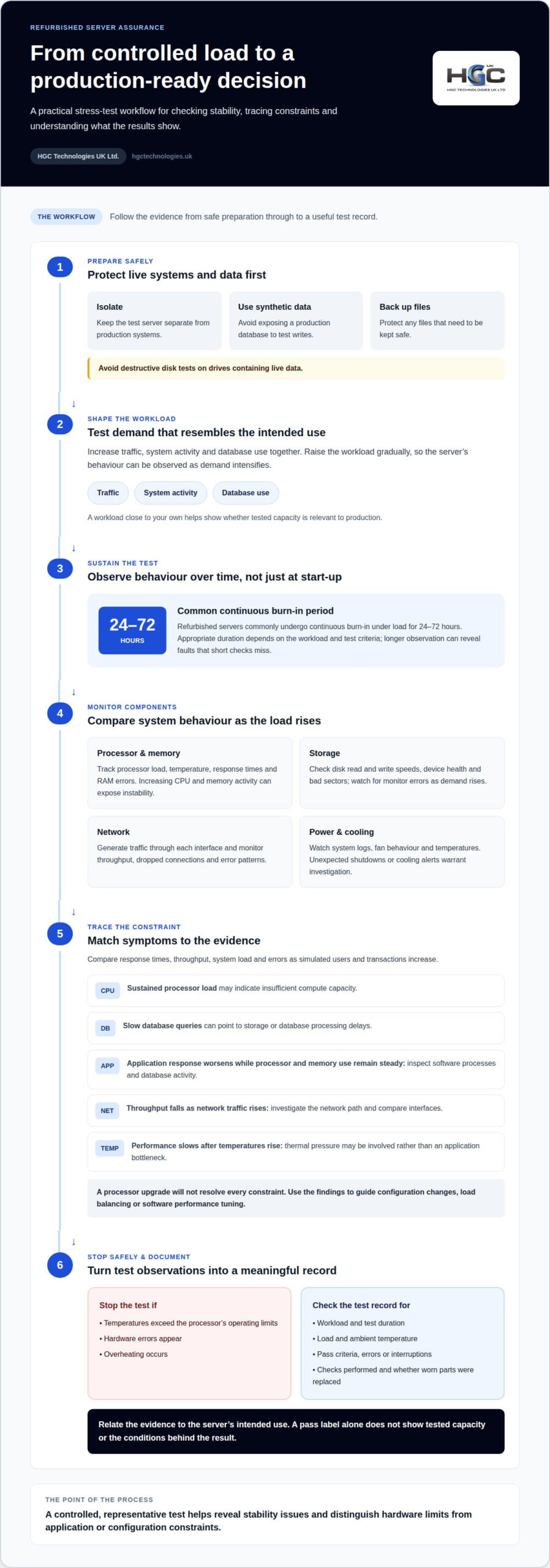
To reduce the risk of data loss or hardware damage, isolate the server from production systems, use synthetic data and back up any files you need to protect. Increase the workload gradually, monitoring temperature, system load and error patterns throughout.
Avoid destructive disk tests on drives containing live data, and stop if overheating or hardware errors occur. A controlled workload, for example, can reveal instability without exposing a production database to test writes.
Processor, application, database and network bottlenecks
Run a representative workload that increases traffic, system activity and database use together. Compare response times, throughput, system load and errors to locate constraints before demand affects users.
Tracing performance bottlenecks
Bottleneck analysis identifies which component limits performance as demand rises. It matters because high response times can have several causes, and adding processor capacity won’t fix every constraint.
Monitor processor utilisation and memory alongside application response and database activity. Sustained processor load may indicate insufficient compute capacity, while slow database queries can point to storage or database processing delays.
Compare results as simulated users and transactions increase. If application response worsens while processor and memory use remain steady, inspect software processes and database activity. If throughput falls as network traffic rises, investigate the network path. This evidence helps distinguish hardware limits from application inefficiency.
Network interface and port checks
Network checks assess whether the network card and its ports maintain reliable connections and transfer data under load. A faulty interface or connection can restrict throughput even when the processor has capacity.
Generate traffic through each interface and monitor throughput, dropped connections and error patterns. Test the ports used by the intended configuration, including connections to storage or other infrastructure. Compare results across interfaces: a fault isolated to one port suggests a different issue from slow performance across the server.
Power and cooling under demand
Power supply and fan checks help reveal whether supporting components cope as processing demand increases. Monitor system logs, fan behaviour and temperatures during the same workload. Unexpected shutdowns or cooling alerts warrant investigation.
Compare these observations with network and processor results. For example, a server that slows only after temperatures rise may be responding to thermal pressure rather than an application bottleneck.
Use the findings to direct configuration changes, load balancing or software performance tuning. For broader infrastructure planning, discuss your server requirements against the workload you need to support.
Final quality assurance, test reports and warranty
Before a refurbished server enters production, quality assurance should connect test results to the workload it must support. A pass label alone says little about tested capacity, observed failures or the conditions behind the result. A useful record makes those details clear, helping technical teams assess operational risk and plan for downtime.
Read the burn-in record as a test summary, not just a certificate. It should state what ran, for how long, at what load and ambient temperature, and against which pass criteria. A CPU and memory test at sustained load, for example, answers different questions from a brief power-on check. Results should identify errors or interruptions, not simply record that testing finished.
Quality assurance should also describe the checks performed and whether worn parts were replaced. Match the evidence to your intended use: a database server needs relevant storage and application checks, while a network role depends on suitable interface testing. A documented workload close to your own helps show whether the tested capacity is relevant to production.
- Coverage: Which components and functions were tested, and what failures were recorded?
- Conditions: What workload, duration, load and ambient temperature were used?
- Outcome: What pass criteria applied, and were any faults corrected or parts replaced?
Read warranty and return terms separately from the test report. Identify the covered components, exclusions, claim process and available remedy, such as repair or replacement. Check whether the terms explain how a faulty unit is assessed, who arranges its return and what happens if the original part cannot be supplied. These details shape the practical response to a failure and its potential downtime.
A three-year advance-replacement warranty is a hypothetical example, not a standard term for refurbished servers. The written warranty determines its duration, scope and replacement route. Align those terms with the server’s role: a system supporting critical services may need a clearer recovery plan than one used for non-production tasks.
Why is it advisable to conduct stress tests?
Stress tests push a server beyond normal operating conditions to expose limits before they affect users. They help assess how infrastructure behaves during overload, failure and recovery.
Testing beyond normal operating conditions
A stress test applies unusually demanding workloads to reveal system limits and causes of failure. This matters because a server that performs well during routine operation may behave differently under exceptional demand.
For example, increase simulated traffic and computational tasks until performance degrades, then observe errors and recovery. A controlled overload can reveal deadlocks and bugs, and show whether clear error messages appear. Testing failure behaviour also shows whether the system recovers safely or leaves applications unavailable. These findings help teams improve configurations before disruption reaches production.
Benchmark results compared with new hardware
Acceptable results depend on the intended workload, server configuration and benchmark conditions, not a universal score for refurbished versus new hardware. Compare equivalent processor, memory, storage, operating system and software profiles, then assess response and throughput against your service requirements.
A lower score than a new system may still suit a workload that needs less capacity. Inconsistent results, calculation errors or unexpected slowdowns need investigation. Repeat the same benchmark after checking settings, drivers and background tasks to help distinguish configuration differences from possible component faults.
Choose tools for distinct checks: MemTest86 exercises memory, stress-ng creates processor and system workloads, and vendor diagnostics test hardware components. Run them alongside application benchmarks to see how software performs on the actual configuration.
Confirm that the operating system, drivers and hypervisor support the server’s components. Then test the intended software stack, since a hardware benchmark alone cannot establish application compatibility. Record operating conditions and test profiles so the results remain meaningful.
Stress tests are especially useful for mission-critical systems, where identifying limits early can reduce disruption. Include overload and recovery scenarios, rather than measuring peak performance alone. For server capacity planning, discuss your server requirements in relation to your workload.
HGC Technologies UK: Server Solutions
HGC Technologies UK Ltd. provides Server Solutions for businesses assessing refurbished hardware against their operational needs. Once your testing requirements are clear, consider the workload, required capacity and the server’s intended role, such as database processing or network services. These priorities help shape a practical specification for your environment.
Turn to HGC Technologies UK Ltd. when sourcing server equipment for a business or reseller and discussing which solution fits your intended use. A clear view of your workloads and infrastructure needs helps guide the conversation.
Contact HGC Technologies UK Ltd. to discuss your server requirements.
Turn test evidence into your next decision
A test result is useful when it informs what you buy next and how the system fits your operating plan. Treat stress testing refurbished server hardware as part of a broader capacity decision: map the workload it must carry, the applications it will support and the consequences of interruption. This turns technical evidence into a practical procurement brief, rather than making a benchmark score the sole basis for a decision.
HGC Technologies UK Ltd. offers Server Solutions alongside bulk refurbished Dell, Lenovo and HP laptops. For organisations planning equipment across server and end-user environments, considering both sets of requirements can help align procurement priorities. The right mix depends on the role each device must perform.
Before your next purchase, turn test findings into acceptance criteria. Define the workload, expected response behaviour and failure or recovery conditions your team needs to understand. This gives technical and purchasing teams a shared basis for assessing suitability. Contact HGC Technologies UK Ltd. to discuss your requirements and take a considered next step.
Frequently Asked Questions
How to stress test refurbished server hardware before deployment?
To stress test refurbished server hardware before deployment, isolate it from production systems and record its component inventory, firmware versions and idle readings. Run separate CPU, memory and network workloads, then a combined workload reflecting the applications it will host. Monitor for crashes, throttling and unexpected errors, and check the system again after it cools. Keep the results with the server’s asset record.
How to check refurbished server temperatures, fans, power supplies, and error logs under load?
Use the server’s management interface or operating-system monitoring tools to observe component temperatures and fan speeds throughout a controlled load test. Compare readings with the hardware manufacturer’s operating limits, and watch for throttling or fans that fail to respond as demand rises. Check power-supply status and redundancy indicators, then review hardware and system logs before and after testing for new warnings or faults.
How to test RAID controllers, drives, and storage performance on a refurbished server?
Start by checking controller status, firmware and drive-health reports, then run the controller’s consistency or diagnostic checks. Test read and write performance on a non-production volume; destructive write tests should use only drives with backed-up or disposable data. Observe latency, throughput and error counts under a workload similar to deployment. HGC Technologies provides Server Solutions for businesses with tailored configuration needs.

Choosing a Reliable Ex-Corporate Laptop Supplier: A 2026 Procurement Guide
Purchasing a blind-pallet of technology isn't a procurement strategy; it's a gamble that your IT inf

Common Problems with Ex-Lease Laptops: A 2026 Procurement Guide
Did you know that battery-related faults account for 26% of all reported laptop issues, making them

Custom Built PCs vs Pre-built for Business: The 2026 Procurement Guide
With enterprise PC prices projected to surge by up to 18% in 2026, the traditional cycle of frequent