

Supplier Checklist for Refurbished IT: 2026 Guide
A refurbished IT supplier is best assessed through evidence about the batch, not a grade label. If refurbishment and testing claims are difficult to compare, the supplier checklist for refurbished IT procurement should focus on what you can verify before placing an order.
That matters even more when buying in bulk. Differences in model, specification or condition can disrupt deployment, while gaps in testing and data-erasure records may create problems for asset management and resale. A clear process for defining requirements, reviewing evidence and accepting equipment helps your team manage those risks.
This 2026 guide sets out practical questions for assessing a supplier’s refurbishment process, test records, batch consistency, documentation and after-sales support. It also explains how to specify equipment around user needs, software compatibility and deployment plans, so the order is aligned before procurement proceeds. For UK businesses and resellers sourcing bulk refurbished Dell, Lenovo or HP laptops, the aim is to compare relevant evidence, not broad assurances.
Key Takeaways
- Define user numbers, workloads and deployment dates before comparing quotations, then separate essential specifications from preferences.
- Use the supplier checklist for refurbished IT procurement to distinguish documented refurbishment, testing and data-handling procedures from general assurances.
- Compare like-for-like batch configurations in a scorecard covering specification match, evidence, support and order terms.
- Set out a clear acceptance process, including who inspects equipment, records assets and escalates discrepancies.
- Assess procurement value by matching bulk refurbished laptops to corporate deployment or reseller requirements.
Supplier checklist for refurbished IT procurement: define the requirement first
A reliable bulk order starts with a clear specification, not a catalogue description. Before requesting quotations, record how many devices you need, who will use them, what their workloads involve and when they need to be deployed. This gives suppliers a consistent brief and helps your team compare suitable configurations rather than broad product labels.
The supplier checklist for refurbished IT procurement should separate essential requirements from preferences. Set out minimum and preferred operating system, processor, memory, storage, screen size and connectivity requirements. For example, a role that relies on specialist software may need a particular operating system and memory capacity, while a general office role may have different priorities. Treat these as requirements to assess, not assumptions about what any device includes.
Translate business needs into a refurbished IT specification
Match each configuration to its intended use, whether that is office work, education, remote working or resale. List the software, peripherals and network connections users need, then identify compatibility constraints before selecting equipment. For resellers, include the specifications and configuration options needed to meet customer requirements. Keep minimum specifications distinct from preferences, so a quotation shows clearly where a proposed batch meets the brief and where it differs.
Refurbishment can involve different processes, so use the term precisely. The overview of refurbished electronics describes common practices such as inspection and testing. Your procurement specification should still state the particular evidence and configuration records required for the order.
Set quantities, timelines and acceptance criteria
State the total quantity, required delivery window and whether deployment needs to be phased. If different user groups need different configurations, list the quantity for each configuration rather than combining them into one broad device request. This makes the batch composition easier to review before the order is approved.
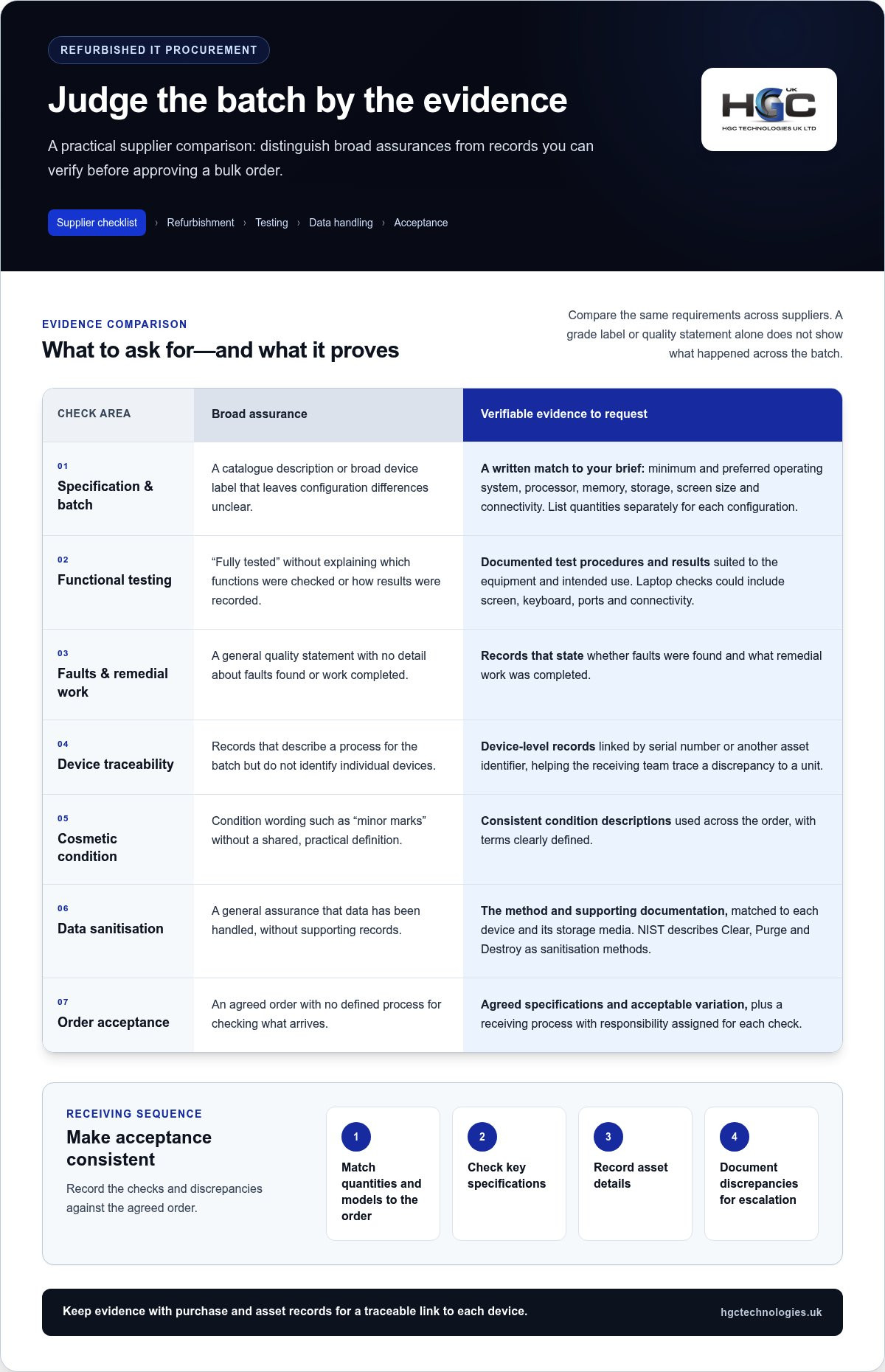
Define acceptance criteria in advance. Record the agreed specifications and acceptable configuration variation, then set out how the receiving team will check the delivered batch against them. A practical sequence is to match quantities and models to the order, check key specifications, record asset details and document discrepancies for escalation. Assign responsibility for each step so issues have a clear owner and a consistent record.
For broader context on market developments that may shape sourcing decisions, see the article on wholesale refurbished IT equipment trends. Use that perspective alongside your deployment requirements: trends can inform planning, but a precise brief is what makes supplier quotations comparable.
Check refurbishment, testing and data-handling evidence
Broad assurances such as “fully tested” don’t show what was checked, how results were recorded or whether the same process was applied across the batch. Ask for documented procedures and records that you can compare with your agreed specification. Evidence helps distinguish a consistent refurbishment process from a general quality statement.
What refurbishment and testing records should show
Request records explaining which functions were tested, whether faults were found and what remedial work was completed. For a laptop, this could include checks of the functions your users rely on, such as the screen, keyboard, ports and connectivity. The checks should reflect the equipment and intended use, rather than an assumed universal test list.
For bulk orders, establish whether the records identify individual devices or describe only a process applied to the batch. Device-level records linked by serial number or another asset identifier can help your receiving team trace a discrepancy to a specific unit. Also ask for cosmetic condition descriptions to be defined consistently across the order. The aim isn’t to repeat a full grading guide, but to make sure terms such as “minor marks” have a shared, practical meaning.
Data security and responsible equipment handling
Make data sanitisation evidence part of the procurement record. Ask what method is used, what documentation is provided and how that evidence is matched to each device, particularly its storage media. The NIST Guidelines for Media Sanitization describe Clear, Purge and Destroy as sanitisation methods. This is a useful technical reference, not a substitute for assessing your organisation’s requirements or applicable UK guidance.
Keep the evidence with the purchase and asset records so there’s a traceable link between each device and its documented handling. This supports internal review and helps prevent general assurances from being mistaken for proof. Before setting contractual or operational requirements, verify current UK data protection and WEEE guidance against official sources. Don’t rely on a supplier’s summary alone to establish legal obligations.
Apply this evidence-focused approach within your supplier checklist for refurbished IT procurement: compare written procedures, sample records, device identifiers and condition definitions against the agreed batch specification. For corporate buyers and resellers, bulk refurbished Dell, Lenovo and HP laptops are a procurement option where clear batch requirements help align equipment with its intended use.
Compare refurbished IT suppliers on batch consistency and commercial terms
A quotation is only comparable if it describes the same order. Match each offer against your agreed specification and compare the full batch, not just a headline description such as “business laptop”. A clear comparison separates documented details from assumptions, helping procurement teams identify gaps before committing.
Build a simple scorecard with one column per supplier and rows for:
- Specification match: model or model range, configuration, condition description and quantity.
- Evidence: available batch or device-level records and how they support asset recording.
- Support and warranty: written scope, duration, exclusions and claim process.
- Order terms: returns process, fault reporting, stated lead times and stock commitments.
Mark each point as documented, unclear or not applicable. This prevents an assumption, such as identical configurations across all units, from being mistaken for a confirmed order term.
Compare batch consistency and available documentation
Review the quoted batch for model, processor, memory, storage and condition details. If a supplier proposes configuration variation, record which differences are acceptable and how many units may vary. Check whether documentation identifies each device or summarises the batch, and whether that format fits your asset-recording process. For more detail on condition terminology, refer to a guide to refurbished laptop grades, while keeping the purchase comparison focused on the definitions stated in each quotation.
Compare like with like. Two offers described as refurbished laptops may differ in configuration or condition, so assess them against your specification rather than assuming the headline description means equivalent equipment. If a detail is missing, record it as unresolved instead of filling the gap with an estimate.
Evaluate support, warranty and order terms
Read the written terms alongside the quotation. Compare warranty duration, coverage, exclusions and the steps for making a claim. Don’t assume that one supplier’s terms apply to another. Review how returns are handled, how faults should be reported and what process applies if delivered equipment differs from the agreed order.
Record delivery windows, lead times and stock commitments only where they’re stated in the supplier’s documentation. Note any variables that remain open, along with who must resolve them and by when. This makes the commercial comparison more reliable and gives the team a clear basis for approval.
Use the supplier checklist for refurbished IT procurement as a consistent scorecard across quotations. For bulk refurbished Dell, Lenovo and HP laptops, aligning the batch description, evidence and written terms helps corporate buyers and resellers assess whether an offer fits their deployment or resale requirements.
Use a practical acceptance checklist before approving a bulk order
Turn the agreed specification into a documented process that runs from purchase approval to deployment. This gives budget holders, technical reviewers and the receiving team a shared reference, and makes it easier to identify where a discrepancy occurred. Keep the checklist with the quotation and order records so decisions are traceable.
Before purchase approval
Review the quotation against the requirement before authorising the order. Confirm that quantities, configurations, condition descriptions and intended deployment match what’s been agreed. Record the supporting documentation, warranty terms and returns process alongside the purchase details, rather than relying on verbal assurances or separate notes.
Assign approval responsibilities in advance. For example, the budget owner can review the commercial approval, while technical and security owners check suitability for deployment and the required records. Make unresolved points visible and assign an owner to settle each one before approval. Apply the same checks to a bulk Dell refurbished laptop purchase, paying particular attention to whether the quoted batch meets the agreed configuration.
At delivery and during deployment
Give the receiving team the approved specification and acceptance criteria before the equipment arrives. Inspect the order against those records, checking quantities, model and configuration details, condition descriptions and any agreed device-level documentation. If a full inspection isn’t part of your process, define the sampling approach internally and record what was checked. Don’t treat an unchecked batch as fully verified.
- Record: quantities received and any available asset identifiers.
- Compare: observed details with the quotation and agreed acceptance criteria.
- Escalate: document discrepancies promptly, including the affected device or batch and supporting evidence.
- Review: capture deployment feedback, such as recurring configuration mismatches, for future procurement decisions.
Keep discrepancy records linked to the relevant order and batch. This helps the team follow the issue through its agreed resolution process and gives future supplier scorecards a factual basis. A consistent acceptance routine is particularly valuable when orders are split across user groups or deployment phases, because each part of the batch can be assessed against the same requirements.
Use the supplier checklist for refurbished IT procurement to align the brief, approval record and delivery inspection. Bulk refurbished laptop options can be assessed against the specifications you’ve agreed for a business or wholesale requirement.
Choose a refurbished IT supplier for long-term procurement value
A strong supplier decision should reflect more than the headline specification. Use a repeatable scorecard to assess whether the equipment fits the project, the batch is supported by relevant evidence and the commercial terms are clear. Include operational support and responsible equipment handling in the assessment, using documented information rather than assumptions.
Turn the checklist into a repeatable supplier scorecard
Set pass conditions for essential requirements, then score preferences according to their importance to the project. For example, a minimum configuration or required documentation might be a pass-or-fail condition, while flexibility in model choice could be a weighted preference. This prevents a high score in one area from masking a critical shortfall elsewhere.
- Fit: alignment with user needs, software and deployment plans.
- Evidence: useful refurbishment, testing, data-handling and asset records.
- Consistency: clear batch specifications and defined condition descriptions.
- Commercial clarity: written order, warranty, returns and delivery terms.
- Responsibility: documented approaches to equipment handling and end-of-life considerations.
Keep the scorecard, supporting documents and evaluation notes with the procurement record. For future orders, use the same core criteria and update project-specific weightings. This makes comparisons more consistent while allowing priorities to change between deployments.
Match procurement needs to HGC Technologies UK Ltd.
Bulk refurbished laptops can suit corporate deployments where a defined group of users needs equipment aligned to a common specification. They can also support reseller requirements where buyers need to plan a batch around their customers’ intended use. HGC Technologies UK Ltd. supplies bulk refurbished Dell, Lenovo and HP laptops to UK corporate buyers and resellers, making these ranges relevant to business and wholesale procurement briefs.
Where a project extends beyond laptop requirements, HGC Technologies UK Ltd. also builds custom PCs and provides server solutions for specific business needs. Define the scope by the actual workload, user requirements and deployment plan, rather than adding product categories without a clear need.
The supplier checklist for refurbished IT procurement gives your team a practical basis for comparing evidence, assessing order suitability and building a repeatable process. If you’re planning a business or reseller hardware requirement, discuss your refurbished IT procurement requirements with HGC Technologies UK Ltd.
Build a more dependable refurbished IT procurement process
A reliable bulk order starts with a specification tied to real user and deployment needs. Use the supplier checklist for refurbished IT procurement to assess documented evidence, batch consistency and written commercial terms, then carry the agreed criteria through to delivery inspection. Keeping those decisions on record makes acceptance clearer and gives future procurement rounds a consistent basis for comparison.
For UK businesses and resellers, HGC Technologies supplies bulk refurbished Dell, Lenovo and HP laptops for defined procurement requirements. Where a project calls for a different setup, custom-built PCs and server solutions can also support specific business needs.
Ready to plan your next hardware requirement? Discuss your refurbished IT procurement requirements with HGC Technologies to plan an order around your specifications.
Frequently Asked Questions
What should a supplier checklist for refurbished IT procurement include?
A supplier checklist for refurbished IT procurement should cover technical fit, refurbishment and testing records, data-handling evidence, batch consistency, written commercial terms and delivery acceptance. Start with user numbers, workloads and deployment plans, then document minimum specifications and acceptable variation across the batch. Include who will review evidence, approve the purchase, receive equipment and record discrepancies, so each stage has clear ownership.
How can I check whether refurbished laptops are suitable for business use?
Check suitability against the work users need to do, not the product description alone. Compare the proposed operating system, processor, memory, storage, screen and connectivity with your software, peripherals and network requirements. Consider whether different roles need different configurations. Before ordering, align the quoted details with your deployment plan and define how you’ll check the delivered equipment against those requirements.
What evidence should a refurbished IT supplier provide?
Request written information about refurbishment and testing procedures, including the functions checked, faults identified and remedial work recorded. For a bulk order, ask how device or batch records are linked to the equipment, such as by serial number or another asset identifier. Request data-sanitisation documentation and written condition definitions too. The evidence you need should reflect your internal security, asset-management and procurement requirements.
Are refurbished laptops reliable for bulk business procurement?
They can be suitable for bulk business procurement when the specification fits the intended workload and the order is supported by consistent evidence and clear acceptance criteria. Reliability shouldn’t be inferred from a grade label or general assurance alone. Review the stated testing process, batch configuration, condition definitions and written terms, then inspect delivered equipment against the agreed order before deployment.
How should I compare refurbished IT suppliers?
Compare suppliers using the same specification and a scorecard covering technical fit, batch evidence, consistency, commercial terms and support arrangements. Review like-for-like configurations rather than headline descriptions. Record warranty scope, exclusions, duration, returns process and any stated delivery or stock commitments from the written quotation. Mark missing details as unresolved, rather than treating assumptions as confirmed terms, and apply pass conditions to essential requirements.
What should I check when a bulk refurbished laptop order arrives?
Use the approved quotation and acceptance criteria as your reference. Check the delivered quantity, model and configuration details, condition descriptions and associated records against the order. Record asset identifiers where available, and document any mismatch with evidence linked to the affected device or batch. Assign someone to escalate discrepancies through the agreed process, then capture deployment feedback to inform future procurement decisions.

Choosing the Best Custom PC for Video Editing in the UK: 2026 Buying Guide
Your professional workstation is only as fast as its most restrictive bottleneck. Selecting a custom

Refurbished Dell vs Lenovo Laptops for Business: The 2026 Procurement Guide
By the end of 2026, the UK refurbished electronics market is projected to reach a staggering $24.37

UK GDPR: 2026 Procurement Guide for Used IT Hardware
Research by the University of Hertfordshire's Cyber Security Centre found that 65% of second-hand me