

Training Staff on New Refurbished Equipment: The 2026 Business Checklist
In 2026, the hallmark of a sophisticated IT strategy isn’t the presence of brand-new hardware, but the seamless integration of high-performance, sustainable assets. Many IT directors understandably fear that deploying refurbished laptops to employees might be perceived as a step backwards, leading to a surge in helpdesk tickets and a dip in morale. You’ve likely felt the pressure to reduce overheads whilst maintaining the premium standards your team expects. It’s a delicate balance to strike when staff equate “refurbished” with “inferior” or “unreliable.”
We’re here to bridge that gap. By following this comprehensive 2026 checklist, you’ll master the transition to cost-effective hardware without sacrificing performance or productivity. We will guide you through standardising bulk batches of Dell, Lenovo, and HP units, ensuring every staff member receives a consistent, high-quality experience. This guide covers everything from cultural buy-in to technical familiarisation, providing a roadmap for a rollout that strengthens your bottom line and your team’s confidence.
Key Takeaways
- Learn how to secure staff buy-in by highlighting corporate sustainability whilst ensuring hardware excellence through rigorous pre-rollout quality audits.
- Master the technical sequence for deploying refurbished laptops to employees, from standardising OS images to demonstrating specific port configurations for bulk Dell, Lenovo, and HP units.
- Discover how to maximise the longevity of your refurbished assets by educating your team on battery health management and professional maintenance protocols.
- Reduce the volume of initial support tickets by implementing a tiered troubleshooting framework and a comprehensive self-service training portal.
- Evaluate the long-term success of your transition using feedback loops that help you scale your infrastructure with a trusted wholesale technology partner.
Pre-Rollout: Validating Quality and Building Staff Buy-In
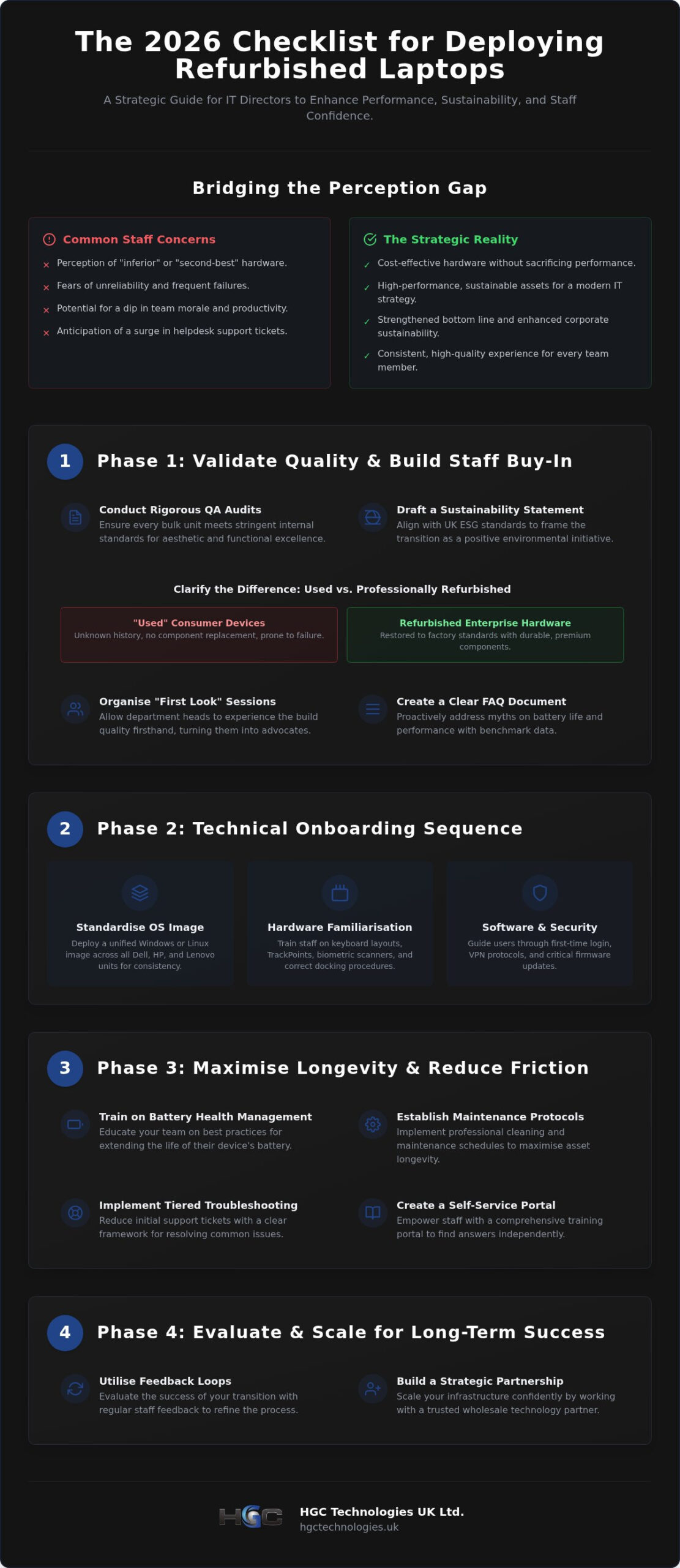
Success in deploying refurbished laptops to employees hinges on the groundwork laid before a single device reaches a desk. It’s about perception management as much as technical verification. You must start by conducting a rigorous quality assurance audit on all bulk units. This isn’t just a hardware check; it’s a commitment to excellence that ensures every device meets your internal standards. Draft a Sustainability Statement that aligns with 2026 UK corporate ESG reporting standards. This transforms a cost-saving exercise into a visionary environmental initiative that staff can feel proud to support.
Addressing the Refurbished Stigma
Many staff members incorrectly assume refurbished gear is second-best or prone to failure. You must clarify the distinction between “used” consumer devices and professionally refurbished enterprise hardware. What are refurbished electronics? In short, they are machines restored to original factory standards through professional testing and component replacement. Enterprise-grade Dell or HP models are built with magnesium alloy chassis and premium internal components. They are inherently more durable and reliable than new, mid-range consumer laptops. Organise a “First Look” session for department heads. Let them experience the build quality and speed firsthand to turn them into advocates for the rollout.
Setting Performance Expectations
Transparency is your best tool for reducing future helpdesk friction. Create a clear FAQ document that addresses common myths about battery life and processing power. Showcase benchmark data comparing your refurbished enterprise models to current mid-range consumer alternatives. Staff need to know that their professional-grade machine often outperforms a brand-new budget model in multi-tasking and durability. Define the equipment grade clearly across the workforce. Whether you are distributing Grade A units or bespoke custom-built PCs, setting visual expectations early prevents disappointment. When deploying refurbished laptops to employees, consistency across the batch is vital. Ensure every unit in a bulk delivery meets the same aesthetic and functional criteria to avoid “hardware envy” amongst the team.
Technical Onboarding: A Step-by-Step Training Sequence
A successful technical transition requires more than just handing over hardware. It demands a structured sequence that builds user confidence from the first power-on. When deploying refurbished laptops to employees, the technical onboarding phase ensures that every staff member, regardless of their technical proficiency, can navigate their new workstation with ease. This process begins with standardising the Windows or Linux OS image across all bulk Dell refurbished laptops. A unified image eliminates inconsistencies and reduces the burden on your IT team during the initial rollout.
Hardware Familiarisation for Dell, Lenovo, and HP
Enterprise hardware often features nuanced differences in design. You must identify key variations in keyboard layouts or trackpad behaviours, especially if your fleet includes models from multiple manufacturers. For instance, Lenovo’s TrackPoint might be new to some, whilst Dell’s Latitude series often features specific biometric security options. Demonstrate the use of fingerprint scanners and integrated webcams to ensure staff feel secure. It’s equally vital to show proper docking station connections. Incorrectly forcing a USB-C or proprietary connector can lead to unnecessary port wear and tear. If you’re looking to scale your fleet with consistent quality, browsing our bulk inventory can help you find matching units.
Software and Security Configuration
Security is paramount in any modern employee computer replacement program. Guide your staff through the first-time login and password synchronisation process to prevent lockouts. This session should include a comprehensive walk-through of internal security software and VPN protocols. Users need to understand how to report software glitches through your specific internal protocol rather than letting frustrations mount. Emphasise the importance of regular firmware updates. These updates, often provided by the wholesale partner, are critical for maintaining the stability and security of refurbished enterprise machines over the long term.
Wrap up the training by establishing a “Sandbox hour.” This is a dedicated period where staff can customise their desktop settings, test software compatibility, and explore hardware features without the fear of causing system errors. Providing this safe space encourages exploration and reduces the volume of minor support queries. It’s a proactive way to ensure your team feels ownership over their tech. By the end of this hour, your employees should feel comfortable with the physical ports, the security login, and the general performance of their refurbished workstation.
Maintenance and Longevity: Training for Refurbished Reliability
Establishing a culture of hardware stewardship is the most effective way to protect your investment after deploying refurbished laptops to employees. Whilst enterprise-grade machines from Dell, Lenovo, and HP are engineered for durability, their long-term reliability depends on proactive user behaviour. Maintenance training shouldn’t be an afterthought; it’s a strategic pillar that ensures your fleet continues to perform at peak efficiency throughout its second lifecycle. By educating your team on the nuances of second-cycle hardware, you significantly reduce the risk of premature component failure and unnecessary support requests.
Maximising Battery Life and Health
Battery longevity is often the primary concern for staff using refurbished units. You must teach your team that modern lithium-ion batteries thrive on shallow discharge cycles. Encourage staff to keep their charge levels between 20% and 80% whenever possible, rather than leaving the device plugged in at 100% indefinitely or letting it drain to zero. Utilise built-in power management tools, such as Dell Power Manager or Lenovo Vantage, to set custom charging thresholds. Proper thermal management prevents battery swelling in enterprise gear by ensuring the internal temperature remains within safe operating limits. Train users to recognise the signs of thermal throttling, such as unexpected slowdowns or loud fan noise, which often indicate blocked vents or high ambient temperatures.
Physical Maintenance Protocols
Physical care is the first line of defence against hardware degradation. Provide your staff with a clear checklist for keyboard hygiene and screen cleaning to prevent oil build-up and surface damage. It’s vital to specify that only 70% isopropyl alcohol or dedicated screen cleaners should be used; harsh household chemicals can strip away protective coatings. When transporting equipment, insist on the use of the padded laptop bags provided during procurement. For a deeper understanding of the quality standards you should expect, consult our wholesale refurbished IT equipment UK guide. This ensures your team understands the premium quality of the assets they’ve been entrusted with.
Finally, implement a Clean Desk policy that extends beyond simple aesthetics. Safe storage of laptops and peripherals when not in use prevents accidental spills and drops. Encourage staff to clear their workspace of debris that could be sucked into the cooling system. This holistic approach to maintenance ensures that your refurbished rollout remains a success long after the initial deployment phase. It’s about empowering employees to take pride in their sustainable hardware choice whilst maintaining the high performance standards your business demands.
Troubleshooting and Support: Reducing Helpdesk Friction
Minimising the impact on your internal IT helpdesk is a critical metric for a successful hardware rollout. When deploying refurbished laptops to employees, the first 48 hours are often the busiest. You can mitigate this surge by implementing a tiered support system specifically designed for the transition. This structure ensures that routine queries don’t clog the pipeline for high-priority technical issues. Appointing “Department Champions” is a highly effective strategy. These are staff members who receive slightly more advanced training and can provide immediate, on-the-ground assistance for minor hardware queries within their own teams.
Establishing clear protocols for hardware replacement is equally vital to minimise downtime. If a unit from a bulk batch underperforms, your team needs to know exactly how to swap it out without bureaucratic delay. Efficiency here maintains high staff morale and proves that the move to refurbished equipment doesn’t mean a compromise in service quality.
Creating a Self-Service Knowledge Base
Empower your workforce to solve common issues independently through a dedicated Self-Service portal. This knowledge base should focus on practical, how-to guides for peripheral connectivity and Wi-Fi troubleshooting. Include specific video tutorials for docking station synchronisation and external monitor configurations. We recommend a section dedicated to performance optimisation, such as clearing system caches or managing background applications if a laptop feels slow. To ensure these resources remain useful when they are needed most, provide an offline version of the guide. This allows users to troubleshoot connection issues even when they cannot access the company intranet.
Hardware Replacement and Warranty Procedures
Transparency regarding the repair and replacement process builds long-term trust. Your internal documentation must clarify the distinction between user-inflicted damage and genuine hardware failure. When a fault is identified, follow a standardised swap process to provide the employee with a replacement unit from your buffer stock immediately. Before any unit is handed over for repair, train your staff on mandatory data backup procedures. This prevents data loss and ensures a seamless transition to the temporary device. If you need to bolster your buffer stock to ensure zero downtime during repairs, you can view our latest bulk inventory for high-quality replacements.
By decentralising support through champions and self-service tools, you transform the IT department from a reactive fire-fighter into a strategic enabler. This proactive approach ensures that deploying refurbished laptops to employees is viewed as a smooth, professional upgrade rather than a technical hurdle. It allows your technical team to focus on high-level infrastructure whilst your employees feel supported and productive with their new enterprise-grade hardware.
Scalable Infrastructure: The Role of a Strategic Partner
Building a resilient IT infrastructure is an iterative process that extends far beyond the initial distribution of hardware. To ensure long-term success, you must evaluate the impact of your rollout and align with a strategic partner that understands the nuances of the wholesale market. This forward-thinking approach allows you to scale efficiently whilst maintaining the high standards your business demands. This iterative cycle ensures that deploying refurbished laptops to employees becomes a core, frictionless competency of your IT department rather than a one-off project.
Analysing Training Effectiveness
Data-driven insights are essential for refining your deployment strategy. Track the volume and nature of support tickets generated in the month following the rollout to identify specific training gaps. If users on a particular model are struggling with connectivity more than others, it’s a sign that your initial walk-through needs adjustment. Gather qualitative feedback through staff surveys after 30 days of use. Understanding their confidence levels helps you refine the checklist for the next time you’re deploying refurbished laptops to employees. These insights allow you to tailor future inductions to the actual needs of your workforce, reducing friction and boosting morale.
Future-Proofing with Custom Solutions
Whilst bulk laptops meet the needs of most departments, creative or engineering teams often require specialised performance. Consider custom PC builds for these high-demand roles to ensure productivity remains high without overspending on generic high-end units. Your infrastructure should also account for the backend systems that power a modern workforce. Investigating how enterprise server hardware UK can support a remote or hybrid team is a vital step in future-proofing your operations. A robust server solution ensures that your refurbished laptops can access internal resources with the speed and security required for enterprise-level operations.
A long-term partnership with HGC Technologies UK Ltd. provides the consistency and reliability needed for sustainable growth. We recommend reviewing your procurement strategy annually to take advantage of the latest refurbished market trends and emerging hardware standards. By treating your wholesale supplier as a strategic ally, you ensure that every hardware cycle is more efficient than the last. This commitment to excellence transforms your IT department into a visionary leader within the organisation, proving that sustainable hardware is a strategic advantage for any modern UK business.
Future-Proofing Your Workforce with Sustainable Hardware
Building a tech-forward organisation in 2026 requires a shift from disposable consumption to strategic longevity. By following a structured onboarding checklist, you ensure that deploying refurbished laptops to employees is a seamless experience that enhances productivity rather than hindering it. Success relies on three pillars: validating hardware quality to build trust, providing clear technical guidance, and fostering a culture of proactive maintenance amongst your staff. When your team understands the value of their enterprise-grade equipment, they become active participants in your company’s sustainability journey.
HGC Technologies UK Ltd. is your partner in this transition. We’re specialists in bulk Dell, Lenovo, and HP systems, providing professional enterprise-grade refurbishment that meets the highest industry standards. With our UK-wide national delivery, you can scale your infrastructure with confidence and precision. View our current bulk refurbished hardware stock to find the right solutions for your next rollout. Transforming your IT procurement is a bold step toward a more responsible and cost-effective future. We’re ready to help you lead the way.
Frequently Asked Questions
Is it harder to train staff on refurbished equipment than brand-new units?
It isn’t harder to train staff on refurbished equipment because the software environment remains identical to brand-new units. The training focus shifts slightly towards hardware stewardship and appreciation for enterprise-grade durability. Since the operating systems are standard, the learning curve is non-existent for users already familiar with Windows or Linux. The primary goal is ensuring employees feel confident in the hardware’s reliability from day one.
How do I handle staff complaints about receiving second-hand laptops?
Address complaints by reframing the procurement choice as a commitment to sustainability and superior build quality. Explain that refurbished enterprise models are often more robust than mid-range consumer laptops. Highlighting the environmental impact helps align the rollout with corporate ESG goals. When deploying refurbished laptops to employees, transparency about the rigorous testing process usually resolves concerns about the equipment being “second-hand.”
What are the most common technical issues when deploying refurbished Dell or HP laptops?
Driver inconsistencies and battery calibration are the most frequent hurdles during the initial deployment phase. You can prevent these by using a standardised OS image and conducting a thorough pre-rollout audit. Some users might encounter minor physical port wear, which is easily managed by demonstrating proper docking station usage. Addressing these small technical nuances during the onboarding session ensures a smoother transition for the entire workforce.
Does training staff on battery care actually improve the hardware lifecycle?
Training staff on battery care is one of the most effective ways to extend the hardware lifecycle. Educating users on avoiding extreme discharge states and managing thermal output prevents common issues like battery swelling. Small changes in user behaviour, such as unplugging devices once they reach an optimal charge, can add years to the functional life of a refurbished unit, maximising your total return on investment.
Should I provide different training for custom-built PCs versus bulk laptops?
Different training is necessary because custom-built PCs often feature specialised internal components or unique cooling requirements. Whilst bulk laptops focus on portability and docking station compatibility, custom builds require guidance on specific driver updates and hardware maintenance. Tailoring your training to the specific hardware ensures that departments using high-performance gear understand how to maintain their unique systems for long-term reliability.
How often should I conduct refresher training for IT equipment use?
We recommend conducting refresher training annually or whenever your organisation implements a major operating system update. Regular sessions keep security protocols and maintenance best practices fresh in the minds of your staff. This proactive approach reduces the likelihood of “user-inflicted” damage and ensures that your workforce remains productive. It’s also an excellent opportunity to gather feedback on how the hardware is performing in the field.
What is the most effective way to document training for audit purposes?
The most effective way to document training is through a centralised digital portal that tracks completion and sign-offs. Use short quizzes or feedback forms to verify that staff have understood the key maintenance and security protocols. This data provides a clear audit trail for compliance purposes and helps you identify which departments might need additional support. It also demonstrates a professional commitment to hardware stewardship.
Can refurbished servers require specialised training for my IT team?
Refurbished servers can require specialised training for your internal IT team, particularly regarding specific rack configurations or legacy hardware interfaces. Whilst the core principles of server management remain the same, your team should be briefed on the specific maintenance requirements of the units purchased. This ensures that your backend infrastructure remains as stable and efficient as the laptops you are deploying to your employees.

Refurbished Laptop Deployment Checklist: From Procurement to Rollout
What if the biggest deployment risk isn’t the age of a refurbished laptop, but issuing a batch wit

Mobile Hardware Distributor UK: The 2026 Strategic Procurement Checklist
Did you know that whilst UK businesses can save up to 50% by sourcing refurbished handsets, a single

Bulk Smartphones for Business UK: The 2026 Comparison Guide to Strategic Sourcing
Is your current mobile procurement strategy actually draining your budget through hidden security ri