

Refurbished Laptop Deployment Checklist: From Procurement to Rollout
What if the biggest deployment risk isn’t the age of a refurbished laptop, but issuing a batch without a consistent process? It’s reasonable to want confidence that each device suits its user’s needs, meets your acceptance criteria and is prepared securely. A refurbished laptop deployment checklist turns those concerns into practical checks before devices reach your team.
Use this guide to assess a batch against real work requirements, organise acceptance checks and plan a clear sequence for preparation, testing and handover. You’ll also find prompts for making a considered sourcing decision that weighs suitability, support and the value of extending technology’s useful life.
We’ll cover procurement questions, arrival and condition checks, functional and security preparation, allocation and user handover, as well as planning for devices when they leave service. HGC Technologies supplies bulk refurbished Dell, Lenovo and HP laptops. Its refurbished and recertified products are rigorously tested for quality and performance. HGC also provides data erasure and after-sales technical assistance, which can support your planning from purchase through rollout.
Key Takeaways
- Use the refurbished laptop deployment checklist to assess the batch as a whole, not just inspect devices one at a time.
- Match refurbished laptops to users’ applications, roles and support requirements before making a sourcing decision.
- Separate supplier refurbishment and data erasure from your organisation’s own setup, acceptance and release checks.
- Introduce devices in a controlled sequence, with clear ownership for preparation, handover and support.
- Compare suppliers on batch suitability, refurbishment checks, data erasure and after-sales assistance to support a considered purchase.
What a refurbished laptop deployment checklist should cover
A laptop can pass a one-off inspection and still be the wrong choice for a team. A fleet rollout needs a repeatable way to judge whether devices suit their users, meet agreed acceptance criteria and can move through preparation and handover consistently.
A refurbished laptop deployment checklist is a documented process for confirming that a batch suits its intended users, meets acceptance standards, is prepared securely and is handed over with clear records. It connects procurement with the work that follows, so the organisation can track decisions and identify issues before they affect a wider rollout.
That’s different from checking one laptop before purchase. An individual check focuses on a device’s condition and suitability. A fleet checklist also considers consistency across the batch, how exceptions will be handled, who owns each stage and how the process will be reviewed after issue. Refurbishment can involve inspection, repair or restoration to a usable condition. For a general overview, see What is refurbishment?
Start with users and the work they need to do
Begin with roles, not model names. Group users by the tasks they perform, such as office work, teaching or mobile work. Record the applications they rely on, the access they need and any role-specific hardware requirements. A mobile role, for example, may place more emphasis on portability, while a teaching role may depend on particular software or connections to workplace equipment. Treat these as requirements to assess, not assumptions about any device.
Separate essentials from preferences. Required applications and access needs should determine whether a candidate device is suitable; preferences can help distinguish between otherwise workable options. This gives procurement a clear basis for comparing refurbished laptops from Dell, Lenovo or HP against actual business use, rather than selecting by brand or appearance alone. HGC Technologies supplies refurbished laptops from these brands in bulk, and its refurbished and recertified products are rigorously tested for quality and performance.
Set batch acceptance criteria before devices arrive
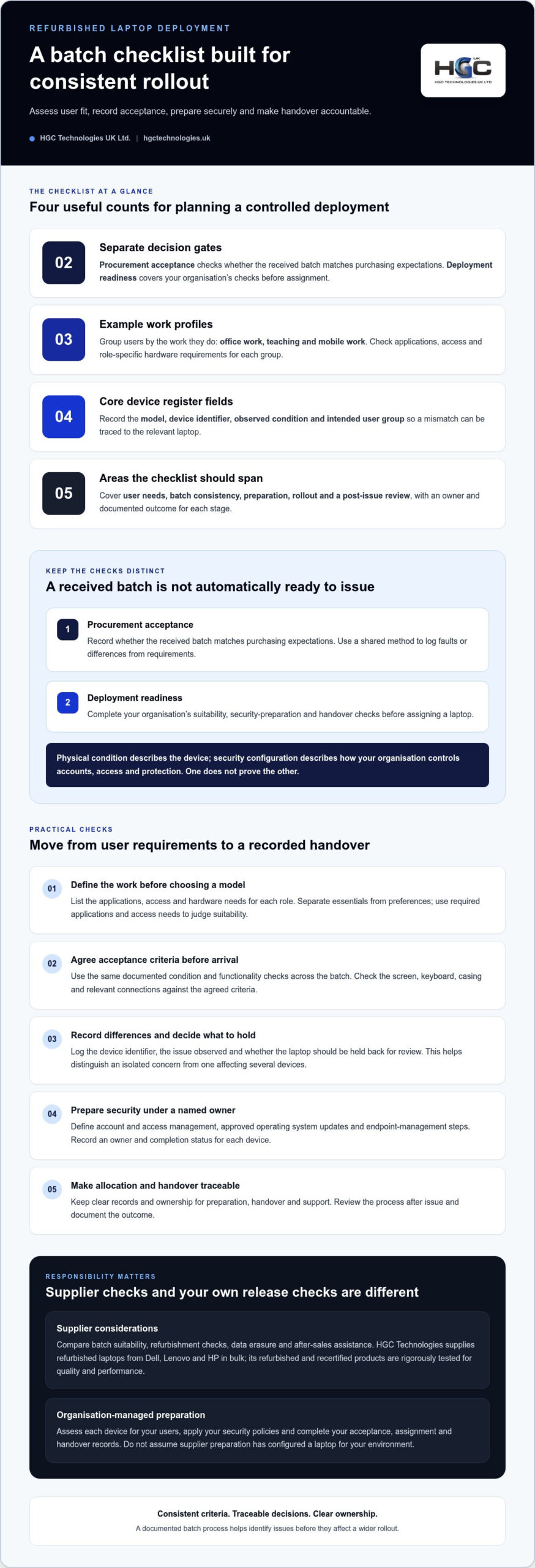
Agree in advance how the organisation will identify and record each laptop. A consistent register might capture the model, device identifier, observed condition and intended user group. Define who completes the records and where they are stored, so a mismatch can be traced to the relevant device rather than treated as a general batch issue.
Set a shared method for recording faults or differences from the agreed requirements. Note the device identifier, the issue observed and whether the laptop should be held back for review. This makes decisions more consistent and helps the organisation see whether a concern is isolated or affects several devices.
Keep two gates distinct. Procurement acceptance records whether the received batch matches purchasing expectations. Deployment readiness covers the organisation’s own checks before a laptop is assigned, including suitability, security preparation and handover records. The checklist should span user needs, batch consistency, preparation, rollout and a post-issue review, with an owner and documented outcome for each stage.
Can refurbished laptops meet business security and user requirements?
Yes, refurbished laptops can be suitable for business use, but refurbishment status alone doesn’t establish whether a device is right for a particular organisation. Assess refurbished and new options against the same practical criteria: required applications, user roles, physical condition and support needs. A new device isn’t automatically a better fit if it exceeds the workload, just as a refurbished laptop isn’t suitable simply because it has been tested.
Separate two decisions: whether the hardware is fit for its intended work, and whether it can be brought into line with your organisation’s security policies. Physical condition describes the device; security configuration describes how your organisation controls accounts, access and protection. One doesn’t prove the other.
Match device capability to the user’s workload
Start with the applications and operating environment your organisation uses. Consider how each role works in practice, including whether users need to move between locations, connect to workplace equipment or access specific systems. Assess candidate devices against those requirements, rather than selecting by model name or a general specification alone.
During acceptance, apply the same documented condition and functionality checks across the batch. Check the screen, keyboard, casing and relevant connections, then record visible damage, missing or mismatched items, and any functional issues against the agreed criteria. Avoid setting universal processor, memory or storage thresholds without first understanding the workload: requirements for everyday office tasks may differ from those for specialist applications.
Plan security and account preparation
Your IT team should define security preparation before devices are issued. Set out how accounts and access will be managed, which approved operating system updates are required, and what endpoint-management steps apply. Treat these as organisation-managed checks, with a named owner and a recorded completion status for each device. This keeps the handover clear without assuming the supplier has configured the laptop for your environment.
Include a record that connects the device identifier to its assigned user or team and shows whether security preparation is complete. If a laptop doesn’t meet an internal requirement, hold it back for review instead of treating batch acceptance as approval to issue every device. Guidance such as Cybersecurity for Refurbished Laptops can provide additional context, but your organisation’s policies should determine the final setup.
HGC Technologies supplies bulk refurbished Dell, Lenovo and HP laptops, with refurbished and recertified products rigorously tested for quality and performance. Its personalised consultations help businesses discuss hardware requirements, while the organisation retains responsibility for its own account, access and endpoint-management processes. For teams comparing options, bulk refurbished laptops for business provides a starting point for a requirements-led sourcing decision.
How to prepare refurbished laptops before users receive them
Move each laptop through the same sequence, from receipt to release, while keeping supplier refurbishment separate from your organisation’s own setup. A supplier may refurbish and test devices, and data erasure may be included in the purchasing plan as a separate service. Your IT team still needs to apply the organisation’s software, access and security requirements. Policies differ, so follow your own approved process rather than treating one setup as universal.
Receive, identify and inspect the batch
Use the organisation’s asset process to connect each laptop to its records and intended role. Compare the delivery with the order and agreed acceptance criteria, then document checks consistently. A clear record helps distinguish an issue with an individual device from a mismatch that affects the batch.
- Reconcile the delivery. Compare the devices received with the order and record each model and device identifier in the asset register or another approved record.
- Inspect condition. Check each laptop against your agreed acceptance criteria. Record visible damage, missing items or differences from the expected condition against the relevant identifier.
- Test essential functions. Follow a documented procedure suited to the device and its intended role. Record the outcome and hold aside any laptop with an unresolved fault or mismatch rather than moving it forward automatically.
Keep the batch record concise but useful. It should show:
- Device model and identifier
- Observed condition and essential-function test outcome
- Any discrepancy, its review status and the decision made
Configure, verify and release each device
Once a laptop has passed acceptance, the organisation’s IT team can complete its internal preparation. Follow approved policies for accounts, access, software and security controls; the correct steps depend on your environment and the user’s role. Keep these activities distinct from supplier refurbishment or data erasure, and record completion before approving a device for issue.
- Apply the internal setup. Use your organisation’s approved process for accounts, access settings, required software, operating system updates and endpoint-management controls.
- Verify user readiness. Check that required applications work and the intended user can access the systems needed for their role. Record the outcome against the device identifier.
- Release or escalate. Mark the laptop ready only when required checks are complete. Document exceptions and route unresolved technical issues through your organisation’s support process.
This sequence makes the refurbished laptop deployment checklist a working control, not just a receipt log. HGC Technologies provides refurbishment and resale, data erasure and after-sales technical assistance. Your organisation’s own setup and release checks remain governed by its IT policies.
How to organise a controlled refurbished laptop rollout
A successful rollout is more than distributing devices. Give each stage a clear owner, keep issue records current and make sure users know how to get help. A controlled release helps your organisation identify process gaps early, before they affect every user.
Issue devices in manageable stages
Group releases around operational needs, user roles or business locations. Start with a representative group whose work reflects the wider deployment, so the first release can reveal practical issues with access, applications or handover. There’s no universal group size; choose an approach your team can support and review effectively.
Before expanding the rollout, review feedback and resolve recurring issues. For example, if users in the initial group report a shared access problem, pause and address it before issuing devices to the next group. This turns the first release into a useful process check, not just an early delivery.
Assign ownership for preparation, issue and support. The people responsible for releasing devices should be able to see which laptops have passed internal checks, which users they’re assigned to and whether handover is complete. Use the organisation’s chosen asset and support records to track:
- Device identifier, assigned user and issue status
- Completion of preparation and handover steps
- Outstanding issues, their owner and current status
Close the loop after handover
Keep handover guidance short and relevant to the user’s role. Explain how to sign in, where to find essential resources, how to request support and how to care for the device. Confirm that users can access the tools they need, rather than treating delivery of the laptop as proof that handover is complete.
During the initial release, gather feedback through the organisation’s usual support route. Log requests and recurring device issues against the relevant records, then review them alongside acceptance and handover notes. This helps distinguish a one-off user question from a repeated issue that may require a change to the rollout process.
Before moving to the next group, check that assigned users can work with their devices, unresolved issues have an owner and support teams understand any patterns emerging. After the wider rollout, use the same records to improve the next deployment cycle. The refurbished laptop deployment checklist becomes more useful each time the organisation applies what it has learned.
HGC Technologies supplies bulk refurbished laptops and provides personalised consultations and after-sales technical assistance. Further details are available in its guide to business laptop requirements.
Choose a refurbished laptop supply partner for deployment readiness
A suitable supply partner should fit into a business purchasing process, not just provide devices. Compare suppliers against the needs already recorded in your deployment plan: intended workloads, batch acceptance, data erasure and the support users may need after issue. The refurbished laptop deployment checklist can keep those considerations visible during procurement.
Compare suppliers against the deployment checklist
Use a simple comparison to distinguish what the supplier provides from what your organisation retains responsibility for. HGC Technologies supplies bulk refurbished laptops, offers personalised consultations and provides after-sales technical assistance. Its refurbished and recertified products are rigorously tested for quality and performance.
| Comparison area | What to consider | HGC Technologies |
|---|---|---|
| Batch suitability | Can device requirements be discussed in relation to user roles and intended workloads? | Personalised consultations help businesses discuss their requirements for bulk laptops. |
| Refurbishment checks | What refurbishment and product testing inform your acceptance process? | Refurbished and recertified products are rigorously tested for quality and performance. |
| Data erasure | Does your purchasing plan include data-erasure needs? | HGC offers data erasure with UK collection. |
| After-sales assistance | What assistance is available after purchase? | HGC provides after-sales technical assistance. |
Use the comparison to clarify responsibilities, rather than assume that hardware supply includes technical configuration or rollout. Your organisation should retain ownership of its own account setup, software, security controls, user allocation and deployment checks unless other arrangements have been agreed. HGC’s UK wholesale laptop distributor guide offers further context for assessing a wholesale relationship, while its overview of wholesale refurbished IT equipment trends explores the wider market.
Make refurbished sourcing part of a considered IT lifecycle
Refurbishment and resale can support a sustainability-focused approach by extending the useful life of technology. That makes sourcing part of a broader lifecycle decision: assess whether the hardware suits its intended work, plan how it will be prepared and issued, then consider responsible next steps when it is no longer needed.
HGC Technologies supplies bulk refurbished laptops from Dell, Lenovo and HP, alongside refurbishment and resale, data erasure with UK collection and wholesale pricing. Organisations can consider bulk hardware sourcing alongside acceptance and support planning, while keeping internally managed deployment responsibilities clear.
Details of bulk refurbished laptops and related services are available from HGC Technologies.
Make your next procurement decision rollout-ready
Turn the refurbished laptop deployment checklist into a repeatable part of your procurement planning. Before the next purchase, use its records to identify what worked, where handovers slowed and which requirements need clearer ownership. That learning can shape a sharper sourcing brief and help your teams plan each stage with greater confidence.
Bring procurement and IT together around the intended users, acceptance process and rollout responsibilities. Agreeing these points early makes it easier to assess suitable options and prepare for a controlled issue, while keeping internal setup and support responsibilities clear. HGC Technologies supplies bulk refurbished laptops from Dell, Lenovo and HP, with refurbished and recertified items tested for quality and performance. Personalised consultations and after-sales technical assistance are also available to support business purchasing and ongoing consideration of your hardware needs.
Start planning your requirements with HGC Technologies’ bulk refurbished laptops and business consultations. A considered sourcing decision is a strong foundation for a more confident rollout.
Frequently Asked Questions
Can refurbished laptops be used in a business deployment?
Yes, refurbished laptops can be used in a business deployment if their capability and condition suit the work and the organisation completes its usual setup and security process. Refurbishment describes a device’s history, not its readiness for your environment. Use a refurbished laptop deployment checklist to record acceptance for each device, then confirm that required applications work and users can access the accounts and services needed for their roles before issue.
What should an organisation check when refurbished laptops arrive?
Start by comparing the received devices with the order and recording each device identifier in your asset records. Check condition and test essential functions against the acceptance criteria agreed for the batch. If a model differs from the order or a function fails, document the discrepancy and resolve it before issue. Apply the same checks to each device, then move on to internal account configuration, security settings and software preparation.
How do you prepare refurbished laptops for users?
Follow your organisation’s IT process: apply approved accounts and access settings, install or verify required software, apply relevant security controls and test access to role-specific tools. For example, check that a user can open the systems needed for their duties, not just sign in to the laptop. Exact steps depend on your policies and device environment. Record completed checks and any exceptions before handover; don’t assume a hardware supplier has configured devices for your organisation.
Are refurbished laptops suitable for schools and public sector organisations?
They can be considered, provided each organisation assesses them against its own procurement requirements, user tasks, security policies, software and support processes. A laptop suitable for administrative work may not meet the needs of a teaching or specialist role. Avoid applying one specification across every team by default. Involve the responsible IT team in assessing devices and documenting the acceptance criteria, preparation responsibilities and handover process that apply to the intended users.
Should a business deploy all refurbished laptops at once?
Not necessarily. A staged rollout gives the organisation an opportunity to test its preparation and handover process before wider issue. Begin with a representative group, then record access problems, user questions and support requests. If the same issue appears more than once, review the process and address it before the next stage. The appropriate sequence depends on operational needs and available support, so choose a pace your organisation can manage rather than a fixed group size.
What does data erasure mean when sourcing refurbished laptops?
Data erasure means removing data from a device before it is prepared for a new user or organisation. Procurement teams should account for data handling in their purchasing process and keep relevant records alongside device acceptance information. This helps distinguish supplier-provided services from the organisation’s own setup responsibilities. HGC offers data erasure with UK collection included. Your internal procedures should establish how the service fits into your records and preparation workflow.

The Long-Term Reliability of Refurbished Servers: A 2026 Procurement Guide
In 2023, refurbished server sales surged by 22% globally as enterprise leaders realised that "new" d

Custom Built PCs vs Pre-built for Business: The 2026 Procurement Guide
With enterprise PC prices projected to surge by up to 18% in 2026, the traditional cycle of frequent

Refurbished Laptops Reseller Supplier: The 2026 Resource Guide for UK IT Partners
Did you know that the UK has officially overtaken Germany as the largest market for refurbished PCs