
Custom PCs for Architectural Rendering Farms and Their Costs
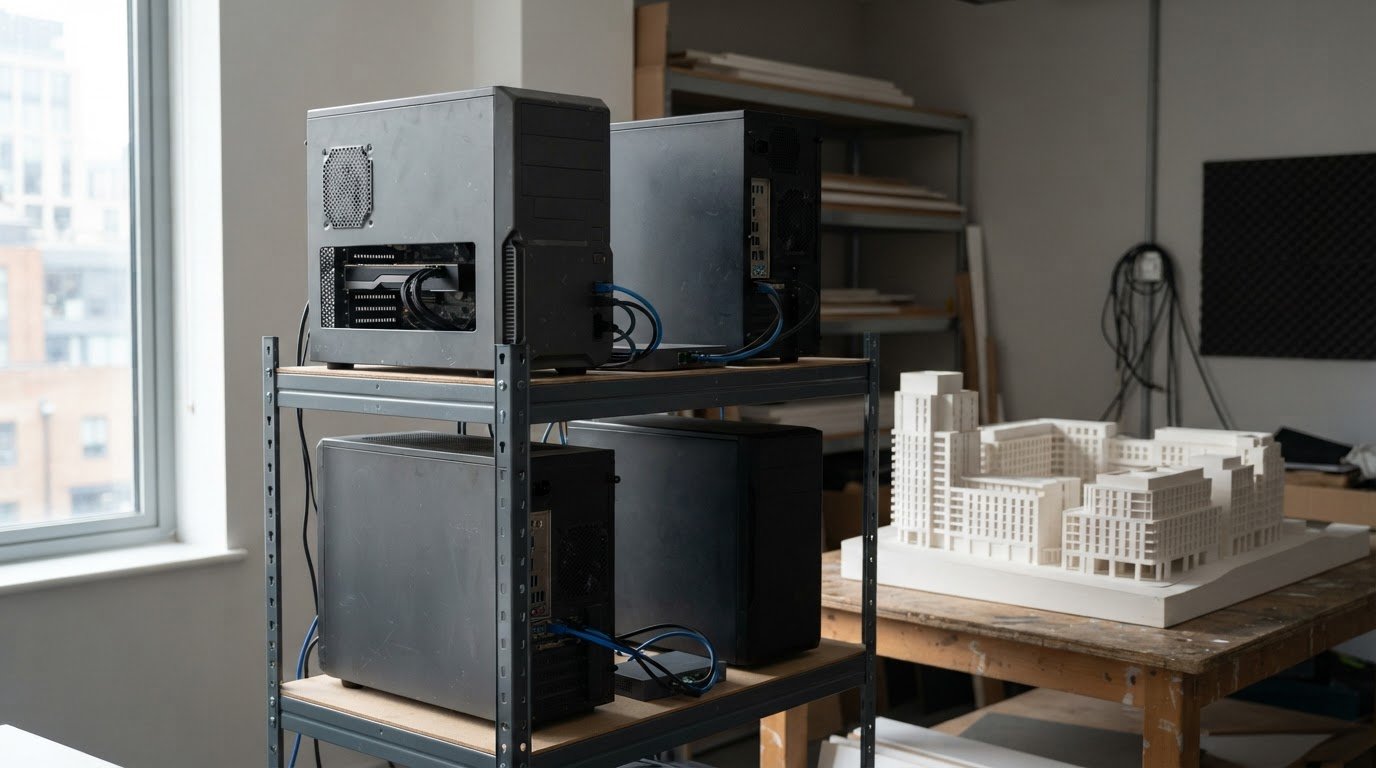
A render farm reduces rendering time by dividing a job into smaller parts and processing them across multiple computers in parallel. For architectural visualisation, custom PCs for architectural rendering farms need to work as coordinated nodes, with hardware and software suited to the scenes being rendered. The right setup depends on the workload, not just the power of a single workstation.
It’s natural to focus first on the cost of the computers, but the decision also involves software compatibility, electricity use and ongoing maintenance. A render farm can also free architects’ and designers’ workstations for other tasks while visualisations render on the cluster.
This guide explains how render farms work, how rendering jobs move between nodes, and what affects the cost and upkeep of a self-built system in the UK. It also covers when a dedicated farm makes sense for architectural visualisation and which hardware considerations shape a practical build.
Key Takeaways
- Match the farm’s 3D software, renderer and plugins to your project pipeline before planning its hardware.
- Understand how CPU and GPU nodes divide rendering work, so you can shape a system around the scenes you produce.
- Factor in software, energy use and ongoing maintenance when weighing the real cost of building a farm.
- Consider whether a dedicated cluster could speed up architectural visualisation while keeping workstations available for design tasks.
What is a render farm?
A render farm is a group of computers, called nodes, that process rendering work in parallel. Rather than relying on one workstation to complete a task, rendering software divides the work into smaller parts and assigns them to the nodes. For an architectural image, this can reduce the wait for a finished visualisation.
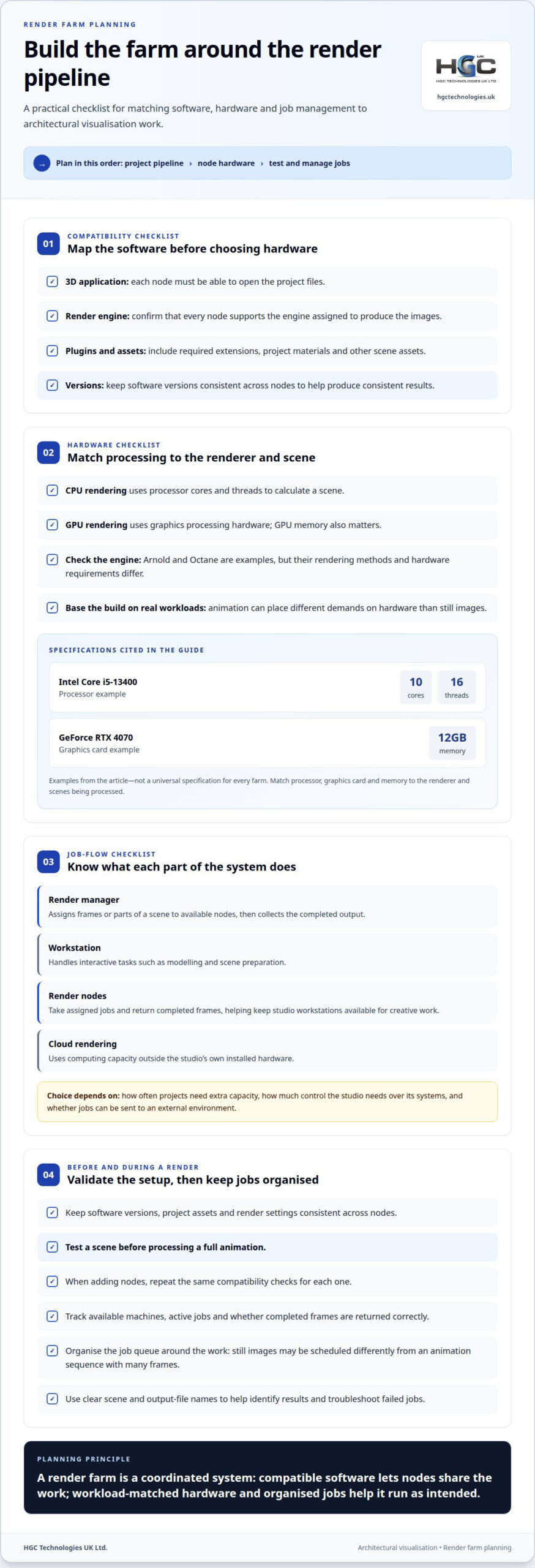
Each node needs to run the 3D software, render engine and plugins used by the project. Compatibility matters: if one computer lacks a required plugin, or uses an incompatible software version, it may not produce the same output as the other nodes. A practical first step is to list the software and plugins in the studio’s existing project pipeline.
Architectural visualisation can involve modelling, materials, lighting and detailed scene assets. A render farm needs to support the tools used to create and render those elements, not just produce images. For example, if a project relies on a particular renderer and specialist material plugin, each node needs to be configured for both. Matching software versions across the farm helps produce consistent results.
UK custom PC builders can configure workstations for rendering, but warranty terms vary by builder and build. A multi-node farm may involve separate cover for each computer, so check the warranty conditions for the systems you purchase.
Before a farm is assembled, map the workflow in order: identify the 3D application, select its render engine, then record every required plugin. Include the versions used by the creative team and the project assets the renderer needs to access. This gives the build a clear compatibility target and helps avoid a farm that runs quickly but cannot process the studio’s actual scenes.
- Software: The 3D application must open the project files.
- Render engine: Each node must support the engine assigned to produce the images.
- Plugins: Nodes need the extensions that add project materials, effects or other functions.
These checks establish which software the farm must run before you choose hardware. The software pipeline therefore shapes the system: compatibility across every node is essential for distributing architectural rendering work reliably.
How do rendering farms work?
A render manager assigns frames or parts of a scene to available nodes, then collects the completed output. Whether CPU or GPU processing takes the lead depends on the renderer and project.
CPU and GPU hardware specifications
CPU rendering uses the processor’s cores and threads to calculate a scene, while GPU rendering uses graphics processing hardware. The Intel Core i5-13400 has 10 cores and 16 threads, offering one example of a processor specification to assess. GPU memory also matters: the GeForce RTX 4070 has 12GB of memory. Arnold and Octane are examples of render engines, but their rendering methods and hardware requirements differ. Match each node’s processor, graphics card and memory to the engine and scenes it will process. Animation work can place different demands on hardware than still images, so base the configuration on actual workloads.
Workstations, render nodes and cloud services
A workstation handles interactive tasks such as modelling and scene preparation, while render nodes take assigned jobs and return completed frames. Separating rendering can keep studio workstations available for creative work. Cloud rendering uses computing capacity outside the studio’s own hardware rather than its installed nodes. The practical choice depends on how often projects need extra capacity, how much control the studio needs over its systems, and whether jobs can be sent to an external environment.
Farm configuration and management
For a small architectural farm, start by matching every node’s CPU or GPU setup to the studio’s chosen renderer. Keep software versions, project assets and render settings consistent, then submit a test scene before processing a full animation. Add nodes as workloads increase, using the same compatibility checks for each addition. Track which machines are available, which jobs they are running and whether completed frames are returned correctly. A custom-built PC configuration can be planned around the intended rendering workload.
Managing the farm also means organising the job queue and preserving capacity for design work. For example, a studio producing still images can schedule them differently from an animation sequence with many frames. Clear names for scenes and output files help teams identify results and troubleshoot failed jobs.
Costs and maintenance of self-built farms
A self-built farm costs more than the computers alone: software, electricity, cooling and maintenance all add to its ongoing demands. For UK studios, available site capacity and the rendering workload help determine what the setup needs.
Electricity, cooling and networking requirements
Plan the farm around the room and computing load, not just the individual machines. Multiple active systems produce heat, so airflow and room cooling need to handle sustained rendering sessions. In the UK, assess the available electrical capacity and how the farm will operate alongside existing studio equipment.
Networking must transfer project files to the nodes and return rendered images without disrupting other studio work. Consider where shared assets are stored, how nodes access them, and whether large transfers could slow designers’ everyday tasks. Review the full path from project storage to each node and then to the final output location.
Component reliability and software compatibility risks
Every additional node introduces components that can fail and interrupt its assigned work. A fault in one machine may delay its jobs even if other nodes remain available. Plan routine checks for cooling, storage and system operation, and keep project files accessible so interrupted work can resume.
Software compatibility is another risk. Redshift and Corona have different rendering requirements, and a project may also rely on specific plugins or software versions. Test the complete application, renderer and project workflow before relying on a new build. A mismatch can stop a node from producing the intended result, even if its hardware is powerful enough.
Building a farm also takes time and technical knowledge for component selection, assembly, setup and troubleshooting. Budget for software and ongoing maintenance as well as hardware. Weigh these responsibilities against the value of keeping rendering in-house: the right approach helps a studio meet its production goals while accounting for the work required to keep the farm running.
Render farms for architectural visualisation
Architects and designers use render farms to create photorealistic images of buildings and interiors before construction. These visualisations help project teams review materials, lighting and spatial effects while design decisions are still being made.
A dedicated farm is most useful when a workflow requires demanding visual output and individual workstations have limited capacity. A cluster handles rendering, leaving creative professionals’ computers available for modelling, revisions and client presentations. For example, a studio can continue refining an interior scene while nodes process its visualisation frames.
Production planning matters as much as technical capacity. Divide work into clear stages: prepare the scene, assign render jobs, review completed images, then make requested changes. This structure helps teams identify whether delays occur during scene preparation, rendering or final review. It also makes workloads easier to schedule around deadlines and presentation dates.
Architectural scenes can include complex lighting, reflective surfaces, detailed materials and extensive surroundings. These elements increase the work needed to produce a convincing image. A farm’s value therefore depends on the studio’s projects: frequent, high-detail visualisations may benefit more than occasional, simpler images. Match the rendering workflow to the required output rather than adding capacity without a defined production need.
Capacity can grow as demand changes. Large render farms can scale to thousands of render nodes, but an architectural studio can start with a smaller cluster and add compatible systems as its workload evolves. Each addition should fit the existing software pipeline, storage access and job-management process. Consistent configurations make it easier to distribute projects and maintain predictable results across nodes.
The practical takeaway is to treat the farm as part of the visualisation pipeline, not simply a collection of powerful computers. Define the images, effects and delivery schedule the team needs first. Then size the technical infrastructure around those production requirements. For studios planning the supporting infrastructure, explore server solutions as part of the wider rendering environment.
HGC Technologies UK: Custom‑built PCs
HGC Technologies UK Ltd. builds custom PCs for businesses planning or expanding their architectural rendering capacity. Consider its custom-built PC service when you need systems selected around your studio’s workload, software and preferred CPU or GPU rendering approach. A clear brief covering project types, applications and how the computers will be used helps define the build requirements.
These systems can form part of a wider studio setup, with rendering computers working alongside staff machines. For organisations also equipping teams with laptops, HGC Technologies UK Ltd. supplies bulk refurbished Dell, Lenovo and HP laptops. This is a separate option for general business computing, while custom-built PCs meet the rendering-system requirement.
To discuss custom-built PCs for your rendering requirements, contact HGC Technologies UK Ltd.
Plan your next step with confidence
Choose custom PCs for architectural rendering farms as part of a long-term studio plan, not as an isolated equipment purchase. Consider how your project mix may change, how the team will use its workstations, and whether the system can support future production needs. A clear requirements brief gives the build a practical starting point.
HGC Technologies UK Ltd. also supplies bulk refurbished Dell, Lenovo and HP laptops for teams that need business devices alongside their rendering setup. Keep these requirements distinct: rendering systems and staff laptops serve different roles in a studio’s technology plan.
Share your intended workflow and priorities with HGC Technologies UK Ltd. to discuss custom-built PCs for your business. A considered plan can help you take the next step with clarity and confidence.
Frequently Asked Questions
What hardware specifications are best for custom PCs used in architectural rendering farms?
For custom PCs for architectural rendering farms, select components according to the renderer, scene complexity and required output quality. Choose a processor suited to CPU rendering, graphics hardware matched to GPU rendering, and enough system memory for complex scenes. Allow for project files and rendered output in your storage plan, alongside cooling for sustained workloads. Compare component choices using representative project files, not a generic workstation specification.
CPU versus GPU rendering: which is more cost-effective for architectural visualisation?
Neither approach is universally more cost-effective; the renderer and workload determine the better fit. Compare the hardware investment and running demands with the time required to produce the studio’s usual images or animation. If a pipeline depends on GPU rendering, CPU capacity alone will not meet that need. For mixed projects, assess each rendering method with representative scenes before choosing a farm configuration.
How much do custom rendering PCs cost in the UK?
The cost of custom PCs for architectural rendering farms depends on the configuration and number of systems needed. Component choices, software, cooling, networking and storage all affect the budget, as do ongoing electricity use and maintenance. Create a project-based estimate that separates initial hardware and software investment from recurring operating costs, using the studio’s actual workload to guide decisions.
How many CPU cores, GPUs and how much RAM are needed for different rendering workloads?
Size each system for the renderer and scenes it must process. CPU-heavy workloads call for suitable processor capacity, while GPU workloads depend on the chosen graphics hardware and its memory. Complex scenes and large assets can increase memory demands. Still images and animation may create different workloads, so use representative projects to assess processing time and memory use before deciding how many nodes to deploy.
Which GPUs and CPUs are compatible with popular architectural rendering software?
Compatibility depends on the specific software, renderer, version and rendering method, so no single CPU-and-GPU pairing suits every pipeline. Arnold, Octane, Redshift and Corona have distinct requirements. Match the processor and graphics hardware to the software documentation for the version in use, then test a representative project. This helps establish whether the system supports the required workflow before wider deployment.

Laptop fleet hardware refresh: compare new and refurbished laptops
A refurbished laptop can be a Windows 11-ready choice for a laptop fleet hardware refresh, but compa
Stress Testing Refurbished Servers for Stability and Quality Assurance
A server can pass a basic start-up check and still struggle under sustained pressure. Stress testing

Bulk Samsung Phone Distribution for UK Businesses
Thirty phones is not a universal minimum for bulk Samsung orders. A bulk Samsung phone distributor i