

Finding Bulk Laptops with Specific Port Requirements: A 2026 Procurement Guide
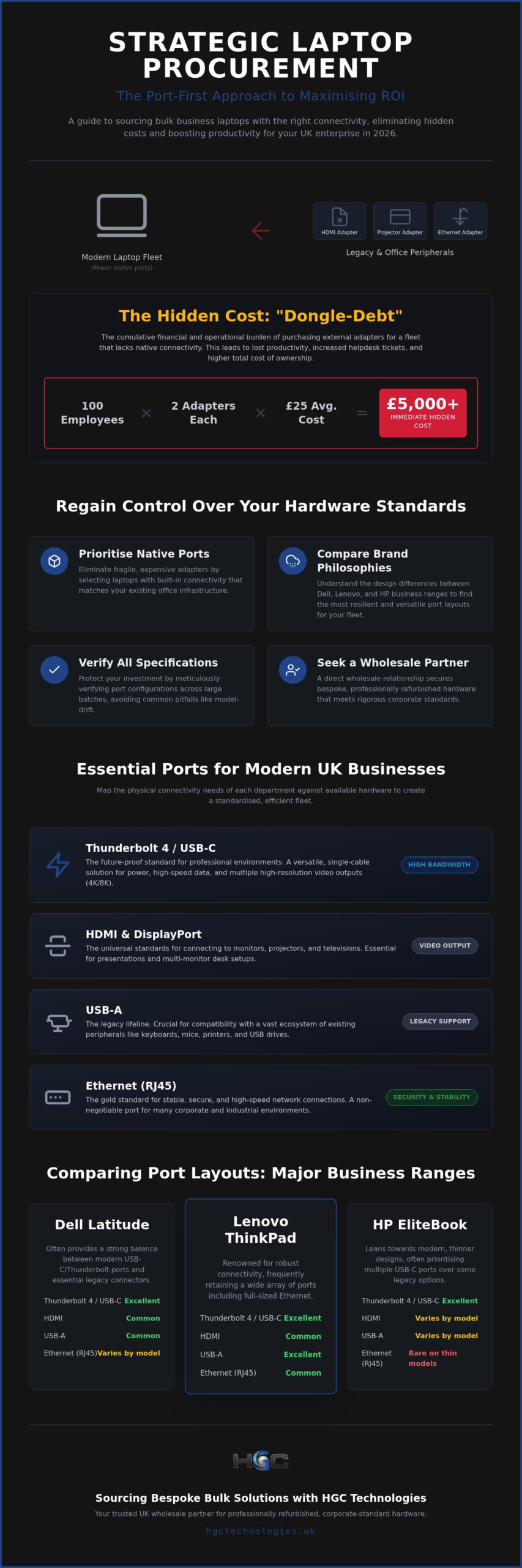
The hidden cost of modern laptop procurement isn’t found on the initial invoice. Instead, it’s often buried in the thousands of pounds spent on replacement dongles and the productivity lost to incompatible hardware. For procurement officers and IT managers, finding bulk laptops with specific port requirements has become a strategic necessity to avoid the mounting “dongle-debt” that plagues modern offices. You likely already know the frustration of distributing a new fleet only to find your legacy projectors or ethernet networks are suddenly inaccessible without a bag of fragile, easily lost adapters.
It’s time to regain control over your hardware standards. This guide will teach you how to source large quantities of business laptops that meet your exact connectivity needs without relying on costly peripherals. We’ll examine the 2026 port configurations for Dell, Lenovo, and HP models, whilst demonstrating how a partnership with a trusted UK wholesaler can provide a standardised and reliable fleet. From understanding the shift in Thunderbolt standards to identifying the best refurbished models for legacy support, this article provides the roadmap for a more efficient and cost-effective procurement strategy that lowers your total cost of ownership.
Key Takeaways
- Eliminate “dongle-debt” and reduce total cost of ownership by prioritising native connectivity over fragile and expensive external adapters.
- Optimise your strategy for finding bulk laptops with specific port requirements to ensure seamless integration with existing office equipment and legacy hardware.
- Compare the design philosophies of Dell, Lenovo, and HP to identify the specific business ranges that offer the most resilient and versatile port layouts for your fleet.
- Protect your investment by learning how to verify specifications across large batches, avoiding the common pitfalls of model-drift and inconsistent grading.
- Recognise the value of a direct wholesale relationship in securing bespoke, professionally refurbished hardware that meets rigorous corporate standards.
The Strategic Importance of Port Selection in Bulk Procurement
Strategic procurement starts with a clear understanding of your physical environment. In 2026, the success of a hardware rollout often hinges on the physical interfaces available to the end-user rather than just raw processing power. Finding bulk laptops with specific port requirements is a financial safeguard that directly influences office productivity and long-term maintenance costs. Whilst wireless solutions have advanced, physical common hardware ports remain the gold standard for stability, security, and high-speed data transfer in professional settings.
Standardising your fleet around specific physical ports simplifies desk-sharing and hot-desking environments. When every workstation offers the same connectivity, employees don’t waste time troubleshooting display issues or hunting for specific cables. This uniformity creates a seamless user experience that supports a mobile and agile workforce. It also aligns with sustainable IT goals. Every adapter you avoid purchasing is one less piece of plastic and circuitry destined for a landfill. By selecting the right I/O from the start, you directly reduce your organisation’s electronic waste footprint and support a more circular economy.
Eliminating Dongle-Debt in Corporate Environments
“Dongle-debt” describes the cumulative financial and operational burden of purchasing external adapters for a fleet that lacks native connectivity. If a 100-person team requires USB-C to HDMI and Ethernet adapters at an estimated £25 each, the hidden cost reaches £2,500 immediately. This doesn’t account for the inevitable loss rate or the surge in helpdesk tickets when a cheap third-party connector fails during a critical presentation. You can significantly reduce these overheads by sourcing hardware that matches your office’s existing infrastructure. Ensuring consistent user behaviour across different office locations becomes much easier when the hardware natively supports the tools your team uses every day.
Future-Proofing with Thunderbolt 4 and USB-C Standards
The transition to universal charging and data transfer has reached a peak in 2026. Professional environments now demand massive bandwidth for 4K and 8K monitor setups, which older USB protocols simply cannot sustain. A reliable wholesale laptop distributor UK prioritises Thunderbolt-equipped models because they offer a versatile, single-cable solution for power, data, and video output. These high-speed ports ensure your fleet remains relevant as peripheral technology continues to evolve. Investing in these standards now prevents the need for a premature hardware refresh when your team eventually upgrades to higher-resolution displays or faster external storage solutions.
Identifying Common Port Requirements for Modern UK Businesses
Effective procurement demands more than a cursory glance at a spec sheet. You should begin by categorising your workforce by their connectivity “profiles”. Finding bulk laptops with specific port requirements requires you to map the physical needs of each department against available hardware. Whilst an administrative team might only require a single HDMI out and a few USB-A ports, your creative or engineering departments will have far more rigorous demands. Creative teams, for instance, often require integrated SD card readers for rapid file transfers, a feature that has vanished from many ultra-portable models.
Modern laptop design often prioritises thinness, which frequently comes at the expense of full-sized connectors. Industrial and medical sectors still rely heavily on robust, physical connections that don’t wiggle or disconnect easily. If you work in these fields, you’ll need to balance the desire for a modern aesthetic with the practical reality of needing integrated ports. For a deeper look at what each symbol on a chassis actually means, this explainer on laptop ports identifies the various connectors you’ll encounter. In industrial settings, the physical stability of a connection is paramount. A USB-C port is convenient but lacks the mechanical locking of a serial port or the “click” of an RJ45 jack.
High-Definition Output: HDMI vs DisplayPort
Choosing the right video output depends on your office infrastructure. HDMI 2.1 is now the standard for modern presentation suites and boardroom centres, supporting the high resolutions required for large-scale displays. However, DisplayPort remains the favourite for multi-monitor workstation setups due to its superior daisy-chaining capabilities. Always verify the version numbers of these ports; older versions won’t support the high refresh rates or colour depths your design team might require. Organising a port audit helps you identify exactly which standard your monitors require before you sign off on a purchase.
Legacy Support: Why RJ45 and Serial Ports Still Matter
Hardwired Ethernet (RJ45) remains a non-negotiable requirement for many sensitive corporate environments. It offers a level of security and consistent bandwidth that Wi-Fi cannot match. Similarly, engineering teams often require RS-232 serial ports to interface with specialised machinery. These “endangered” physical ports are increasingly rare on new consumer gear, making the refurbished market a prime source for these configurations. You can often find these specific, hard-to-source layouts by browsing the bulk refurbished laptop inventory at HGC Technologies, where professionally graded hardware ensures every port functions to original manufacturer standards.
Comparing Port Layouts: Dell, Lenovo, and HP Business Ranges
Selecting the right manufacturer is the most critical step when finding bulk laptops with specific port requirements. Each brand follows a distinct I/O philosophy that impacts how your team interacts with their hardware daily. Dell prioritises accessibility and logical placement, Lenovo focuses on rugged variety and legacy support, whilst HP attempts to bridge the gap between executive aesthetics and functional utility. Understanding these subtle differences helps you choose a fleet that fits your existing office furniture and ergonomic monitor setups.
Port placement significantly affects workstation ergonomics. Cables protruding from the front or right-hand side can interfere with mouse movement or desk space. Manufacturers who place high-bandwidth ports at the rear or the left-hand side are often preferred for permanent desk setups. When you standardise your procurement around one of these three giants, you gain a predictable layout that simplifies your internal IT support and cable management strategies.
Dell Latitude and Precision: The Versatile Workhorses
Dell’s business ranges are often considered the benchmark for port versatility in the UK corporate sector. The Latitude 7000 series is particularly favoured for its comprehensive side-port layouts, which prevent cable clutter from obstructing the view behind the screen. For technical teams, Precision workstations offer dedicated GPU-linked outputs, which are essential for high-end rendering and multi-monitor setups. These bulk Dell refurbished laptops provide a reliable foundation for any business looking to maintain high connectivity standards whilst managing a strict budget.
Lenovo ThinkPad: The King of Connectivity
The ThinkPad T and X series remain the industry standard for physical port variety. Lenovo’s design philosophy assumes that a professional should never be stranded without a connection. Many modern ThinkPads still feature full-sized HDMI and multiple USB-A ports alongside their Thunderbolt connectors. Resellers should distinguish between mechanical side-docking and modern USB-C docking; the former offers a more stable, semi-permanent connection for fixed workstations. Sourcing bulk Lenovo refurbished laptops ensures your fleet benefits from this legendary durability and port-rich heritage.
HP EliteBook: Balancing Sleek Design with Utility
HP excels at creating executive-grade laptops that don’t sacrifice essential ports for a slim profile. Their “drop-jaw” Ethernet port is a clever piece of engineering that allows a full RJ45 jack to fit into an ultra-slim chassis. This makes EliteBooks an excellent choice for executive fleets where aesthetics and function must coexist. They provide the necessary professional look whilst ensuring the user can still hardwire into a secure network during a critical board meeting without hunting for a lost adapter.
How to Verify Port Specifications for Refurbished Bulk Lots
Sourcing pre-owned hardware requires a systematic approach to avoid unexpected connectivity gaps. Finding bulk laptops with specific port requirements is often complicated by “model-drift”, a phenomenon where the same model name carries different physical configurations based on the original corporate buyer’s customisations. You can’t assume every unit in a batch of five hundred will be identical unless you verify the specific batch SKU or the physical build against a technical manifest. This level of due diligence is what separates a successful rollout from a procurement disaster that leaves your team without essential tools.
Establishing a rigorous inspection protocol is the only way to guarantee consistency across a large fleet. You should demand a granular breakdown of the specific I/O on the units being offered rather than relying on generic marketing materials. This verification process should happen before the hardware reaches your office, ensuring that the internal bus speeds of the external ports match your performance requirements. Professional grading standards provide the framework for this verification, offering a reliable baseline for hardware health and port longevity.
Interpreting Technical Datasheets and Model Variations
Technical datasheets are your first line of defence, yet they often list ports as “optional” or “dependent on configuration”. You must decode specific SKU suffixes to confirm if a batch includes the specific HDMI version or the smart card reader your organisation requires. It’s particularly vital to confirm whether USB-C ports support Power Delivery (PD) and DisplayPort Alt-Mode. Without these features, your docking stations won’t charge the laptop or output video, rendering the “universal” port essentially useless for modern desk setups. Avoid broad product descriptions that use vague terms like “multiple USB ports” and instead insist on a detailed specification list.
Physical Inspection and Grading of Port Integrity
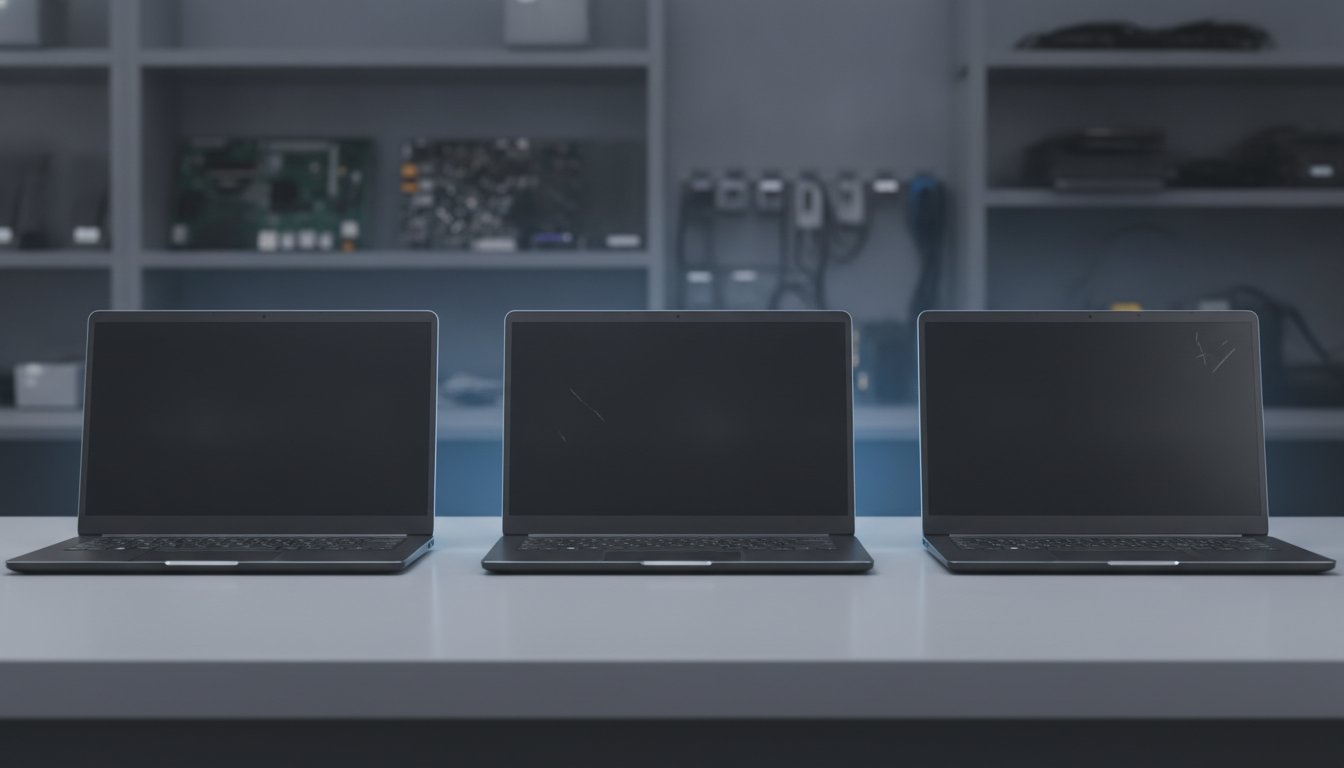
Physical reliability is where professional refurbishment proves its worth. Unlike consumer-grade used gear, professionally graded hardware undergoes rigorous testing for mechanical failure. Inspecting for physical wear, corrosion, or a noticeable “wobble” in frequently used ports is essential for long-term fleet health. You should establish a protocol to test every port in a random sample batch before proceeding with a full deployment. Grade A refurbishment standards ensure these interfaces haven’t been weakened by years of rough handling, protecting your organisation from the sudden connectivity failures that lead to lost productivity. To ensure your next fleet meets these exacting standards, you can browse our certified refurbished laptop inventory and speak with an expert about your specific connectivity needs.
Sourcing Bespoke Bulk Solutions with HGC Technologies
HGC Technologies UK Ltd. acts as a strategic bridge between complex technical requirements and large-scale hardware availability. Finding bulk laptops with specific port requirements is no longer a manual search through inconsistent listings when you leverage a direct wholesale relationship. We specialise in identifying hard-to-find configurations across Dell, Lenovo, and HP ranges, ensuring your organisation doesn’t have to compromise on its physical infrastructure needs. Our national coverage and direct sales model allow us to provide a level of precision that off-the-shelf retailers simply cannot match.
Integrating port-specific laptops into a broader wholesale refurbished IT equipment UK strategy allows businesses to balance high-performance standards with environmental responsibility. We deliver certainty in an unpredictable market. By specialising in high-quality refurbished hardware, we provide the technical accuracy required for complex corporate rollouts, ensuring every unit in your fleet arrives with the exact connectivity your team expects. This methodical approach to inventory management helps you avoid the common pitfalls of mixed batches and inconsistent hardware standards.
Custom Configuration for Specific Enterprise Needs
Our technical team understands that standard configurations don’t always meet the demands of specialised UK-based corporate environments. We offer a consultative approach to procurement, discussing bespoke hardware requirements to ensure your fleet is fit for purpose. Whether you need a specific number of Thunderbolt ports for a creative department or integrated Ethernet for a secure financial hub, we can source large quantities of identical units. This commitment to fleet uniformity eliminates the headache of managing a fragmented inventory and ensures a consistent user experience across your entire organisation. It also allows your IT department to develop standardised cable management and desk setups that work for every user.
Why UK Resellers Choose HGC for Specialised Requirements
UK resellers require a partner that values technical accuracy as much as they do. HGC Technologies UK Ltd. has built its reputation on professional grading and a rigorous inspection process that guarantees the integrity of every physical port. We streamline the procurement process for complex hardware orders, removing the guesswork from bulk buying. By providing reliable, high-quality hardware, we help our partners build long-term relationships with their own clients. You don’t just get a supplier when you work with us; you gain a knowledgeable guide that simplifies wholesale logistics and prioritises your strategic advantage in the 2026 market. Our direct sales model ensures that you receive authoritative advice and hardware that meets the highest professional standards.
Future-Proofing Your Fleet Through Strategic Port Procurement
Success in 2026 procurement requires moving beyond generic hardware specs to focus on the physical connectivity that drives daily productivity. You have seen how native ports eliminate “dongle-debt” and why the design philosophies of Dell, Lenovo, and HP offer distinct advantages for different departments. Establishing a rigorous verification process ensures that every unit in your batch meets your exacting standards for performance and durability. Finding bulk laptops with specific port requirements is ultimately a commitment to a more stable, efficient, and sustainable IT environment.
HGC Technologies UK Ltd. is ready to assist you in securing high-quality hardware that matches your precise needs. As specialists in Dell, Lenovo, and HP business hardware, we maintain professional Grade A refurbishment standards to ensure every interface functions perfectly. With our national UK delivery for wholesale quantities, you can build a standardised fleet with total confidence in its longevity. Contact HGC Technologies for a bespoke bulk laptop quote today and take the first step towards a more connected and cost-effective office.
Frequently Asked Questions
How can I ensure all laptops in a bulk lot have the same port requirements?
You can ensure fleet uniformity by requesting granular batch manifests and SKU-specific data from your supplier. Finding bulk laptops with specific port requirements is difficult with generic listings because “model-drift” often results in varying configurations within the same model name. Working with a dedicated wholesaler allows you to verify that every unit in the lot contains the exact internal bus speeds and physical interfaces required for your office infrastructure.
What is the difference between USB-C and Thunderbolt 4 for bulk office setups?
Thunderbolt 4 offers a guaranteed minimum bandwidth of 40Gbps and supports dual 4K displays, whereas USB-C is merely the physical connector shape. In a bulk office environment, Thunderbolt 4 provides more reliable power delivery and data transfer for complex docking station setups. Whilst USB-C is versatile, it often lacks the strict performance certification found in Thunderbolt-equipped business machines, potentially leading to monitor flickering or slow charging issues.
Are refurbished laptop ports as reliable as those on new machines?
Professionally refurbished ports are highly reliable when sourced through a reputable wholesaler using Grade A standards. These machines undergo mechanical integrity checks to ensure there is no “wobble” or internal pin damage from previous use. High-quality refurbished business laptops are designed for corporate longevity, meaning their physical interfaces are often more robust than those found on brand-new, consumer-grade ultra-portables that prioritise thinness over mechanical strength and stability.
Can I find refurbished laptops with legacy ports like VGA or Serial in 2026?
You can still find refurbished hardware with legacy ports like VGA or RS-232 Serial by targeting specific older generations of business-grade laptops. These ports have largely vanished from the new retail market in 2026, but they remain available in the refurbished sector for industrial and medical applications. Wholesale suppliers often stock these specialised configurations to support engineering teams and businesses that rely on legacy monitors or hardwired diagnostic equipment.
Why should I avoid using adapters and dongles for my corporate fleet?
Avoiding adapters and dongles significantly reduces your total cost of ownership and prevents “dongle-debt” from accumulating. External connectors are easily lost, fragile, and often cause a surge in helpdesk tickets when they fail during critical presentations. Native ports provide a more stable mechanical connection and ensure that your team can work efficiently without the constant frustration of searching for a specific adapter to access basic office peripherals.
What should I look for in a refurbished laptop grading system regarding ports?
A reliable grading system should specifically account for the physical health of I/O interfaces. Look for Grade A standards that guarantee no corrosion, secure mechanical housing, and verified functionality for every port. This level of scrutiny ensures that the ports hasn’t been weakened by years of rough handling. It’s essential to confirm that the grading includes testing for Power Delivery and DisplayPort Alt-Mode on all available USB-C interfaces.
Do business-grade laptops generally have better port selections than consumer models?
Business-grade machines are specifically engineered with a wider variety of ports to support corporate docking and legacy equipment. Whilst consumer laptops often sacrifice connectivity for a sleeker chassis, business ranges like the Dell Latitude or Lenovo ThinkPad retain essential features like full-sized HDMI and RJ45 Ethernet jacks. This design philosophy makes finding bulk laptops with specific port requirements much easier when you focus exclusively on professional-tier hardware rather than retail models.
How does HGC Technologies verify the port integrity of their refurbished laptops?
HGC Technologies employs a rigorous inspection protocol that includes physical testing of every interface on our refurbished hardware. Our team checks for mechanical stability and ensures that every port meets the original manufacturer’s performance standards. By sampling large batches and following professional Grade A refurbishment criteria, we provide resellers and corporate clients with the certainty that their hardware will integrate seamlessly into their existing technical environments and office setups.
Refurbished Laptop Grades Explained: A 2026 Strategic Procurement Guide
With the UK refurbished electronics market projected to reach a staggering $24.37 billion by 2035, t

Scalability of Custom-Built Server Solutions: A 2026 Enterprise Guide
What if the hardware designed to fuel your expansion is actually the primary bottleneck stifling you

Ways to Ship Laptops to Remote Employees Securely, With Costs and Setup
Secure delivery starts before the laptop leaves your hands. The best way to ship laptops to remote e