

Ways to Ship Laptops to Remote Employees Securely, With Costs and Setup
Secure delivery starts before the laptop leaves your hands. The best way to ship laptops to remote employees securely is to use company-owned devices, apply your standard security policies before dispatch and choose tracked delivery. Restrict local administrator rights, and give employees clear setup and support instructions.
A laptop can arrive safely yet still leave a new starter unable to work if it is not configured for remote access or they do not know what to do next. Bringing the device under IT control before dispatch makes delivery part of onboarding, rather than a separate logistics task.
This guide explains how to prepare laptops and supporting equipment, track deliveries and help employees get started. It also covers factors affecting shipping costs, customs paperwork and cross-border delays, so you can plan a smoother rollout for UK-based and overseas teams.
Key Takeaways
- Set up each company laptop with security controls and remote access before dispatch, then provide clear first-login instructions.
- Use shipment tracking and agree how employees will report delivery issues or request IT support.
- For international deliveries, prepare accurate customs paperwork and account for duties, taxes and possible delays when planning the rollout.
- Protect laptops with secure packaging, keep shipment details organised and confirm receipt with each employee.
1. Delivery tracking and ongoing IT support
For UK teams, the best way to ship laptops to remote employees securely is to choose tracked delivery with transit cover and a signature on receipt. Select a courier service that provides all three, then share tracking details privately with the employee. This creates a delivery record that your team can match to the assigned device.
There is no single fixed cost for tracked, insured laptop delivery within the UK. The charge depends on parcel dimensions, weight, destination, delivery speed and the cover selected. Compare quotes using the same parcel details and declared value, including any fees for signature or insurance options.
Protect the laptop with an anti-static bag, cushioning and a sturdy outer carton. Prevent it from shifting, and use a suitable sealed inner layer to guard against moisture. For example, place the bagged laptop centrally, cushion it on every side and separate accessories so they cannot press against the screen.
Record the serial number, declared value, tracking reference and recipient before dispatch. Check the insurance terms against the device’s value. If tracking shows a delay, raise an enquiry. If the package arrives damaged, photograph the packaging and laptop, retain the materials and report the damage promptly through the courier’s claims process.
A 1-year return-to-base warranty is a minimum support option for work-from-home laptops. Give employees a clear IT contact route for setup problems, damage reports and questions about company data. Remote-management tools can help monitor a device that rarely connects to the domain network. Antivirus protection is recommended whether or not its drive is encrypted.
To identify the best way to ship laptops to remote employees securely, plan the handover as well as the journey. Ask the employee to confirm receipt, test the device and report setup issues through the agreed support route. Company-owned equipment lets the business manage hardware, software and security settings throughout the device lifecycle while supporting flexibility for remote staff.
Compare quotes using the parcel’s dimensions, weight, destination, delivery speed and declared value. Check whether signature and insurance options add charges.
2. Customs costs, compliance and delivery delays
Cross-border logistics add customs declarations, possible import charges and extra handling to a laptop shipment. Describe the device accurately, record its value and country of origin, and state the reason for shipping it. Duties, VAT and carrier handling charges depend on the destination and shipment details, so include them in the rollout budget rather than treating postage as the only cost.
Customs compliance can disrupt delivery: 33% of surveyed logistics providers and goods owners identified it as a key challenge. Late vessel arrivals in January 2025 were delayed by an average of 5.32 days. Build contingency into onboarding dates, especially where a new employee needs a laptop to access work software and maintain productivity. Track each shipment’s customs status alongside its delivery progress.
For UK organisations, protect company data during transit and after delivery. GDPR, SOC 2 and ISO 27001 all make visibility and consistent security controls important for IT teams. Apply encryption, restrict access to the device and use remote-management tools to maintain oversight when it connects. Keep a record of the assigned employee, device identifier, shipment status and security configuration.
Before shipping a laptop overseas, confirm the recipient’s address and prepare consistent shipment documents. Tell the employee how to contact IT if customs requests information or delivery stalls. On receipt, have them confirm the device arrived and follow the agreed setup process. During offboarding, remove access to accounts and company data, then arrange the device’s return or redeployment.
Use a shipment register to connect customs paperwork, tracking updates and employee handover records. This gives IT a clearer view of each device’s location and status, supporting the ability to resolve delays and manage its lifecycle. Teams reviewing procurement alongside logistics can explore business laptop procurement options.
3. Pre-configuring and delivering laptops to remote employees
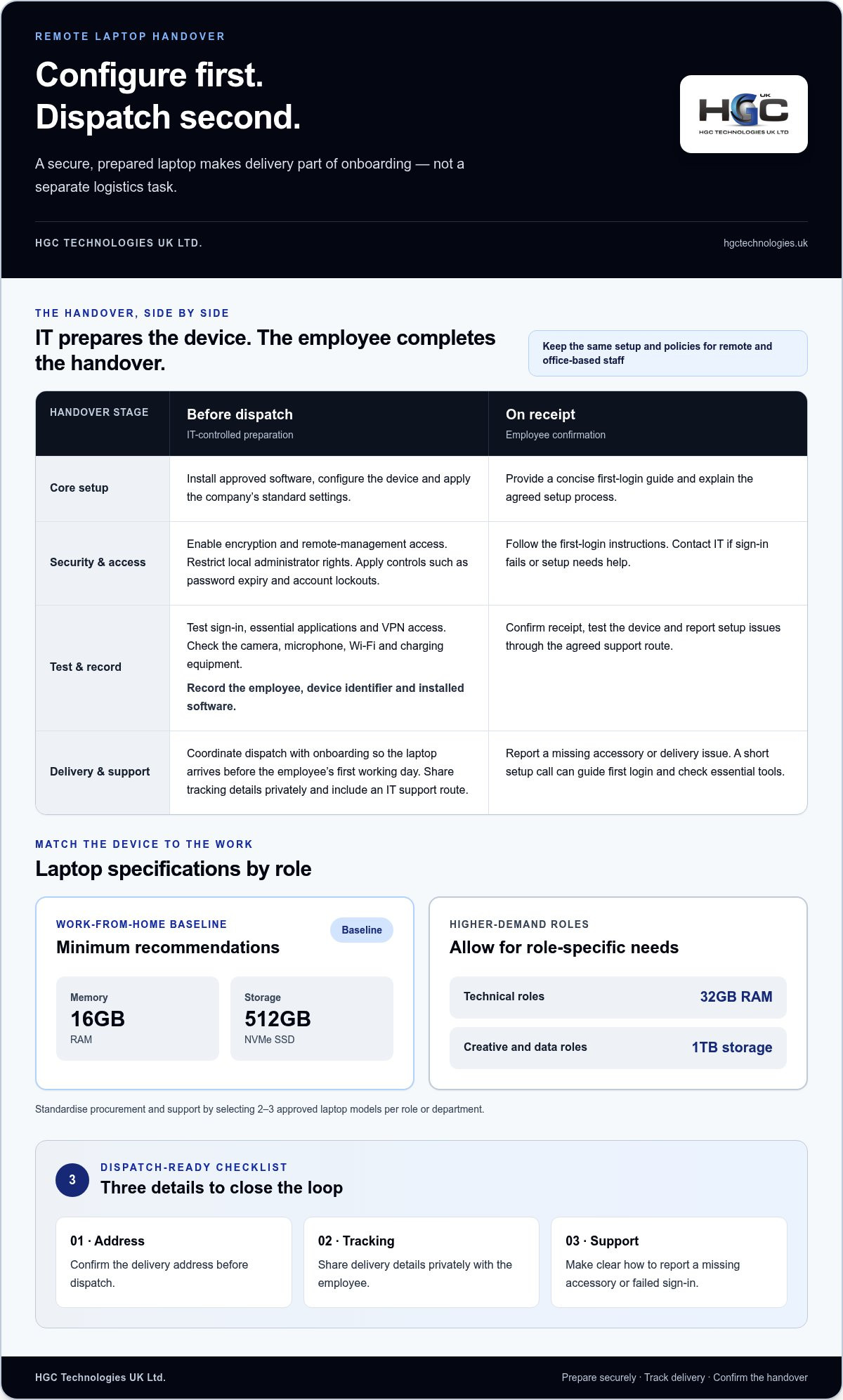
Complete the core configuration before dispatch, while IT still controls the hardware. Install approved software, apply security settings, enable encryption and confirm remote-management access. Remove local administrator rights from the employee account. Remote laptops may need stronger security because they are no longer behind the company firewall and other office protections.
Use the same setup and policies for remote and office-based employees. Apply controls such as password expiry and account lockouts, then test sign-in, essential applications and VPN access before packing. A domain-joined laptop can use an Active Directory account remotely, although authentication depends on where the device signs in.
Standardise procurement and support by selecting 2-3 approved laptop models per role or department. Match configuration to the work: 16GB of RAM and 512GB of NVMe SSD storage are minimum recommendations for work-from-home laptops. Technical roles may need 32GB of RAM, whilst creative and data roles may call for 1TB of storage.
- Record the assigned employee, device identifier and installed software.
- Test the camera, microphone, Wi-Fi and charging equipment.
- Include a concise first-login guide and IT support route.
- For a complete remote-work setup, package a laptop with monitors and headsets.
Coordinate dispatch with onboarding so the laptop reaches the employee before their first working day. Share tracking details privately, confirm the delivery address and explain how to report a missing accessory or failed sign-in. A short setup call can guide the employee through their first login and confirm that essential tools work.
Plan updates for distributed teams as part of the device lifecycle. Schedule VPN check-ins to apply network and Group Policy updates, and explain how employees can request help with Windows updates. This keeps the process clear after delivery and helps IT maintain oversight as devices are used across remote locations.
4. What is the most secure way to package and ship laptops to remote employees in the UK?
Secure the laptop before packing, then protect it against impact, static and moisture. Shut it down fully, disconnect accessories and place it in an anti-static bag. Wrap the bagged device in cushioning, then position it centrally inside a strong, close-fitting box. Fill any gaps so the laptop cannot shift during handling.
Use a second outer carton for higher-value shipments. Cushion the inner box on every side, seal both cartons securely and avoid packaging that advertises electronics. Keep the employee’s address and return details clear, but store the laptop’s serial number and shipment reference in your asset register, not on the outer label.
Before sealing the package, compare its contents with the dispatch record. Include only the laptop and accessories the employee needs, such as its charger or a headset. Keep paperwork containing company data out of view, and send setup instructions separately through an approved company channel. This reduces the risk of exposing account details if the packaging is opened.
Address accuracy matters. Confirm the recipient’s full name, delivery address and a suitable delivery arrangement before handing the parcel to the courier. Use a service with tracking and signature on delivery, and share the tracking reference directly with the employee. A named recipient helps your team match delivery records to the assigned device.
Record the parcel’s condition and seal at dispatch. Ask the employee to inspect the outer box before opening it, then promptly report visible damage or signs of tampering. If the laptop arrives damaged, preserve the packaging and take photographs. These records support the courier’s claims process and help IT decide whether to issue a replacement device.
For a consistent rollout, align the laptop model, accessories and packing process across each employee shipment. A standard checklist helps distributed teams follow the same steps and maintain a clear handover record. Businesses planning device procurement can explore bulk laptop options as part of that process.
HGC Technologies UK: Bulk Dell Refurbished Laptops
HGC Technologies UK Ltd. supplies refurbished Dell, Lenovo and HP laptops in bulk for organisations equipping remote employees or standardising devices across teams. These options can support onboarding or replacement procurement. HGC Technologies UK Ltd. also offers custom-built PCs for business requirements that call for desktop hardware.
Once you have defined the required specifications and delivery workflow, consider which equipment fits each role. A consistent model range can help organise deployment and ongoing support, while refurbished laptops provide another procurement option for business teams.
Contact HGC Technologies UK Ltd. to discuss your business laptop requirements.
Make your next device rollout easier to manage
Treat a laptop rollout as part of workforce planning, not simply parcel dispatch. The best way to ship laptops to remote employees securely begins with choosing equipment that suits each role and fits your organisation’s approach to procurement, onboarding and future replacement. A clear device plan can help teams make consistent decisions as hiring needs change.
HGC Technologies UK Ltd. supplies refurbished Dell, Lenovo and HP laptops in bulk for businesses sourcing devices for remote staff. Consider these options when planning a workplace refresh or equipping employees across different teams. Matching the selected hardware to your requirements gives your organisation a practical starting point for its deployment plan.
Set out your requirements, including intended use and the number of devices your rollout needs, then discuss suitable options with HGC Technologies UK Ltd. Contact HGC Technologies UK Ltd. to start planning your business laptop requirements and move your remote-work setup forward.
Frequently Asked Questions
Should laptops be encrypted and remotely manageable before shipping to employees?
Yes. Encrypt the drive before dispatch and confirm that your organisation can manage the device remotely. Remote management supports oversight when a laptop rarely connects to the company network. Keep recovery information in an approved IT system, separate from the parcel, and test that authorised staff can access it. Antivirus protection is also recommended, whether or not the drive is encrypted.
How can employers securely configure and asset-tag laptops before dispatch?
Set up the laptop using an authorised work account, install approved security software and apply the organisation’s configuration. Assign an asset identifier, then record it alongside the serial number, assigned employee and device status in your inventory system. Keep the tag discreet rather than advertising the device’s value. Before packing, compare the physical laptop with its inventory entry to catch assignment or recording errors.
What steps should employees take when receiving and setting up a shipped work laptop?
Employees should follow the supplied setup instructions and use a trusted home network for their first sign-in. They should confirm that the screen, keyboard, charger and required work applications function, then complete any organisation-approved account security steps. If the device requests unexpected credentials or shows signs of tampering, they should stop setup and contact IT through the agreed support channel before accessing company files.
What are the customs, tax, and shipping requirements for sending laptops to employees outside the UK?
Requirements depend on the destination country, shipment purpose and declared device value. Prepare accurate shipment information, including the laptop description, origin, value and recipient, and identify who will pay any import charges. Duties, VAT or local taxes can affect the total cost and release time. Before dispatch, align the paperwork and delivery plan with the destination’s import process, especially for replacement or return shipments.
How much does it cost to ship a laptop within the UK with tracking and insurance?
There is no single fixed cost. It depends on parcel dimensions, weight, destination, delivery speed and the cover selected. Compare quotes using the same parcel details and declared value, including any signature or insurance charges.

Refurbished vs Open-Box Laptops: 2026 IT Procurement Guide
The cheapest laptop on an invoice often turns into your most expensive operational headache once dep

Calculating ROI on Refurbished IT Equipment: A Strategic Guide for UK Enterprises
A certified, Grade A refurbished desktop is typically 40% to 60% cheaper than its brand-new equivale

Managing Refurbished Laptops for Remote Employees: The 2026 Strategic Procurement Guide
Recent data reveals that 71% of HR professionals have experienced at least one exiting employee fail