

How Laptop Grading Affects Performance: The 2026 B2B Buyer Guide
Surface scratches don’t throttle processors. Even so, corporate procurement teams routinely overspend on pristine hardware out of concern that exterior wear signals sluggish computing. If you want to understand how laptop grading affects performance across an enterprise estate, the operational reality is straightforward: cosmetic tiers assess visual condition, not raw silicon throughput.
It’s entirely natural to hesitate. Nobody wants to deploy hardware that triggers support tickets, frustrates end-users, or inflates warranty return rates. With suppliers often relying on ambiguous, non-standardised grading scales, balancing tight IT capital budgets against workforce productivity can feel like an operational gamble.
This 2026 guide clarifies the relationship between visual grading standards and actual computing reliability. You’ll discover the crucial distinctions between cosmetic wear and internal component health, from thermal pathways to battery retention thresholds. Crucially, you’ll learn how to allocate device grades strategically across different business departments, securing resilient commercial laptops without operational compromise.
Key Takeaways
- Understand precisely how laptop grading affects performance by separating external cosmetic benchmarks from actual processor and memory throughput.
- Identify the core physical standards governing Grade A, B, and C tiers to eliminate supplier ambiguity during procurement cycles.
- Recognise hidden mechanical bottlenecks, such as restricted thermal pathways and degraded battery retention, before they impact operational uptime.
- Prioritise vital internal specifications, including processor architecture and memory baselines, over minor visual casing imperfections.
- Implement a strategic fleet allocation framework that pairs specific hardware grades with departmental roles to stretch IT capital expenditure effectively.
Laptop Grading vs Hardware Performance: The Essential Distinction
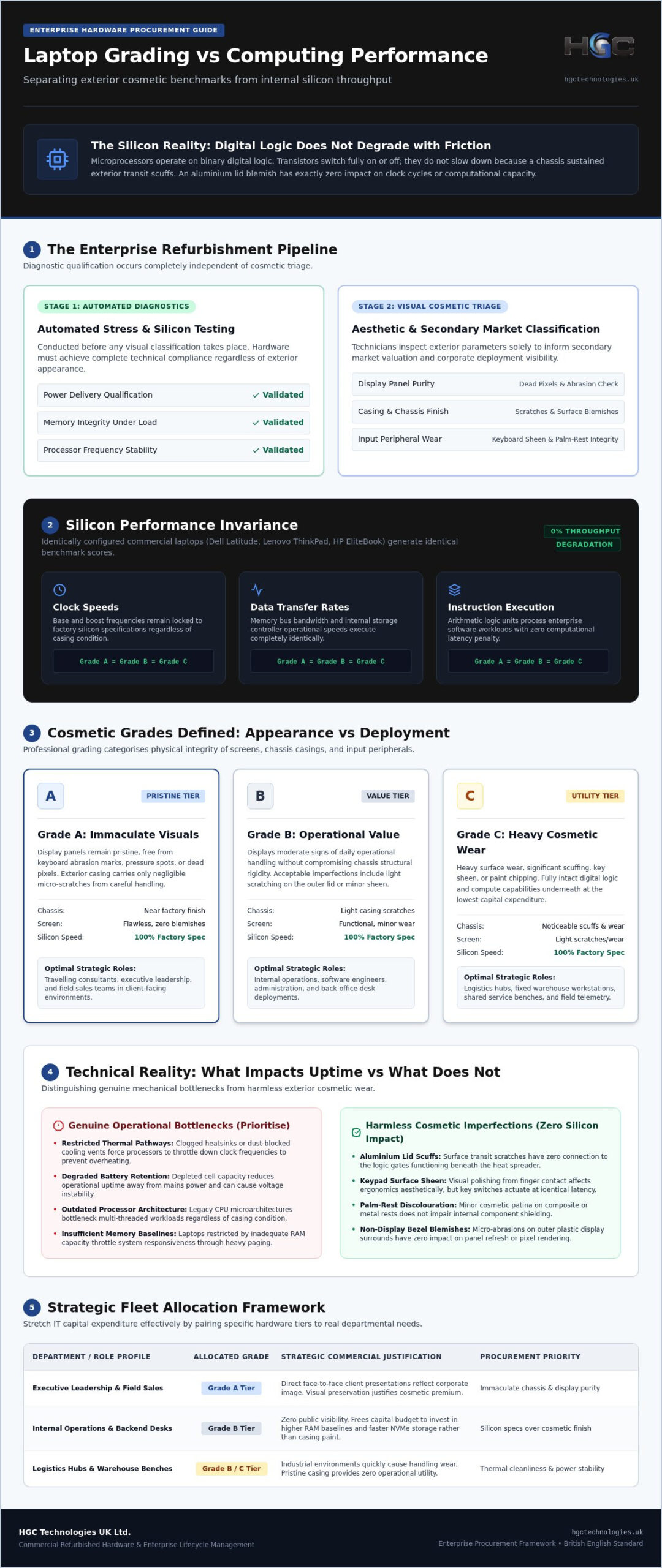
Silicon does not care about scratches. In enterprise procurement, confusion often arises around how laptop grading affects performance across commercial fleets. Industrial grading systems assess exterior cosmetic preservation, not computational throughput. Whether an aluminium lid displays a factory-smooth finish or noticeable surface scuffs, the integrated circuit pathways underneath execute code at identical clock cycles.
Rigorous refurbishment operations separate diagnostic qualification from cosmetic triage. Before any aesthetic classification occurs, hardware undergoes automated stress tests to validate power delivery, memory integrity, and processor stability. Two identical enterprise laptops, whether branded as Dell Latitude, Lenovo ThinkPad, or HP EliteBook, generate the exact same benchmark scores when configured with identical silicon, irrespective of their assigned exterior grade.
Dispelling the Refurbished Computing Power Fallacy
Consumer perception often links physical wear to computational decay. Microprocessors, however, operate on binary digital logic. A transistor switches entirely on or off; it doesn’t slow down gradually because a laptop chassis sustained minor transit friction. Modern commercial-grade microprocessors maintain consistent base and boost frequencies across their operational lifespans provided voltages remain stable and cooling surfaces stay clean.
Understanding how laptop grading affects performance dispels the myth that lower cosmetic tiers represent sluggish, depreciated compute engines. Key hardware parameters remain unchanged across cosmetic tiers:
- Clock speeds: Base and boost frequencies remain locked to factory silicon specifications.
- Data transfer rates: Memory bus bandwidth and storage controller speeds function identically.
- Instruction execution: Arithmetic logic units process enterprise workloads without latency penalty.
The Primary Role of Cosmetic Triage in IT Hardware
Visual triage exists to guide secondary market valuation and corporate deployment strategy, not to serve as a functional performance filter. Specialised technicians inspect returned corporate fleets across specific physical parameters: keyboard sheen, palm-rest wear, casing blemishes, and panel purity. They categorise units so corporate buyers can align hardware aesthetics with end-user visibility.
Deploying pristine units to client-facing teams makes good commercial sense. Insisting on pristine casing for backend operational desks or logistics hubs simply drains capital. Recognising that cosmetic triage reflects exterior appearance rather than processing reliability allows UK procurement leads to allocate budgets with surgical precision, capturing commercial-grade enterprise build quality without paying for cosmetic perfection where it adds zero operational value.
What Refurbished Grades Actually Measure: Grade A, B, and C Defined
Refurbishment grading creates a standardised framework for assessing cosmetic wear across commercial fleets. Rather than rating internal processor speeds, professional grading categorises the physical integrity of screens, chassis casings, and input peripherals. When assessing how laptop grading affects performance, buyers must recognise that these letter tiers indicate previous physical usage patterns, not silicon degradation.
Established testing regimes inspect returned corporate hardware against strict visual benchmarks. This visual triage separates inventory into distinct functional tiers suitable for varied corporate environments.
Grade A Hardware: Pristine Aesthetics for Client-Facing Roles
Grade A represents the cosmetic pinnacle of refurbished enterprise equipment. These units display near-immaculate visual surfaces, exhibiting only negligible micro-scratches on outer casings from careful handling in corporate environments. Display panels remain pristine, free from keyboard abrasion marks, pressure spots, or dead pixels.
Organisations pay a visual premium for Grade A inventory to equip travelling consultants, executive leadership, and field sales teams. In these roles, the physical presentation of hardware directly reflects corporate professionalism during face-to-face client presentations.
Grade B Units: The Functional Value Tier for Internal Operations
Grade B units display moderate signs of daily operational handling without compromising chassis rigidity. Acceptable imperfections typically include light scratching on the outer lid, minor corner scuffs, and visible keycap shine or trackpad smoothing from repetitive typing. The screen itself must remain clear and free of significant blemishes.
For internal personnel, remote developers, and back-office staff, Grade B represents an exceptional value proposition. Resellers and procurement heads frequently source bulk Grade B batches of Dell, Lenovo, and HP machines to maximise hardware budgets while delivering enterprise-calibre build quality.
Grade C Assets: Heavy Wear and Static Deployment Scenarios
Grade C devices feature pronounced exterior wear, including deep scratches, minor casing dents, and peeling surface coatings. Structural integrity, however, remains intact. Display hinges, base latches, and connection interfaces must operate properly without physical fractures or component separation.
These units suit fixed-mount warehouse hubs, point-of-sale desks, or shop-floor monitoring terminals where cosmetic appeal offers zero operational benefit. Partnering with a verified wholesale laptop distributor UK enables procurement leads to align tier-one commercial inventory with specific departmental demands, cutting capital outlays without introducing downtime.
When Physical Condition Does Intersect with Device Usability
A superficial scratch on an outer lid never slows down an operating system. Even so, examining how laptop grading affects performance requires looking past simple aesthetic classifications to assess the mechanical health underneath. When physical wear touches critical cooling components, interface ports, or battery cells, external condition starts to intersect directly with everyday device usability.
Professional engineering standards draw a firm line between harmless cosmetic patina and mechanical degradation. Unvetted second-hand equipment often conceals internal bottlenecks, whereas certified refurbishment remediates these risks before hardware enters commercial deployment.
Thermal Management, Dust Accumulation, and Processor Throttling
Silicon processors dynamically regulate clock speeds based on operating temperature. If internal cooling fans accumulate dense dust or previous impacts have compressed copper heatsink fins, the CPU cannot dissipate thermal energy efficiently. Under sustained multi-threaded workloads, the processor triggers thermal throttling, sharply dropping its frequency to prevent silicon damage.
Professional refurbishment dismantles this failure mode entirely. Technicians clear internal airflow channels, inspect cooling fins, and replace aged, desiccated thermal paste with fresh thermal interface material. This servicing ensures that even a Grade B or Grade C unit delivers sustained boost clocks identical to a factory-fresh counterpart.
Battery Health Retainage and Portable Cycle Life
Chassis aesthetics have no bearing on lithium-ion chemistry. A pristine Grade A laptop sourced from an intensive docking-station setup might have suffered continuous high-temperature trickle charging, degrading its battery cells. Conversely, a Grade B laptop with surface scuffs might retain almost all its original chemical capacity.
B2B buyers should look for guaranteed battery benchmarks rather than assuming aesthetic tiers dictate operational runtime:
- Tier-one threshold: Verified retention of at least 80% original design capacity for mobile workforces.
- Secondary threshold: Usable retention between 60% and 79%, ideal for hybrid workers operating near power points.
- Static allocation: Batteries below 60% capacity, acceptable solely for tethered desk setups.
Display Defects, Chassis Integrity, and Port Functionality
Minor scuffs on outer display covers are purely visual, but internal panel defects harm user productivity. Pressure marks, backlight bleeding, and clusters of dead pixels cause significant eye fatigue during extended spreadsheet or administrative work. Refurbishment standards reject damaged panels from primary deployment tiers.
Chassis stability also matters for interface longevity. Dropped units can suffer warped chassis corners that strain internal logic boards or loosen USB-C and HDMI solder joints. Comprehensive testing subjects every external port to connection cycles, confirming reliable display output, fast data transfers, and consistent power delivery handshakes across all hardware tiers.
Key Technical Specifications to Prioritise Over Cosmetic Grade
Procurement teams fixated on casing condition often miss the internal bottlenecks that actually throttle workforce productivity. Understanding how laptop grading affects performance means shifting capital away from pristine aesthetics toward core silicon architecture, system memory, and input-output bandwidth. A Grade B enterprise workhorse equipped with robust internal components will consistently outperform an immaculate Grade A machine constrained by obsolete silicon or insufficient system memory.
To ensure long-term fleet agility, buyers should verify essential hardware baselines rather than relying on exterior grade classifications alone.
Processor Architecture and Memory Configurations
Processor generation determines enterprise software compatibility, thermal efficiency, and critical operating system support far more than exterior shell conditions ever could. Outdated microarchitectures lack hardware-level security mitigation and instruction pipelines required for modern corporate environments, regardless of how flawless their casing appears.
Memory capacity directly governs multi-tasking speed. In corporate environments running cloud office platforms alongside continuous background endpoint security software, 8 GB of RAM causes severe page-file swapping and sluggish task switching. Deploying 16 GB of dual-channel memory ensures responsive workflows, completely removing the computational drag that non-technical users wrongly attribute to cosmetic wear.
Solid-State Drive Health and Storage Protocols
Storage throughput defines daily system responsiveness. Older SATA solid-state drives transfer data at an architectural ceiling near 550 MB/s, whereas modern NVMe (PCIe) solid-state storage operates at multiples of that speed. This architectural difference dramatically cuts boot sequences and enterprise image loading times.
Professional refurbishment evaluates internal storage through Self-Monitoring, Analysis, and Reporting Technology (SMART) diagnostics:
- Endurance tracking: Verification of remaining Terabytes Written (TBW) to guarantee drive lifespan.
- Sector health: Automated scans checking for bad block allocation or read-write errors.
- Replacement standards: Routine installation of factory-fresh solid-state drives when wear levels exceed corporate tolerance thresholds.
Enterprise Build Quality: Dell Latitude, Lenovo ThinkPad, and HP EliteBook
Tier-one commercial laptops possess structural engineering that consumer-grade alternatives simply do not match. Built with internal magnesium roll cages and carbon-fibre reinforced polymers, bulk Lenovo refurbished laptops and HP EliteBook systems withstand drops, torsional stress, and repeated transit shocks without cracking internal solder points.
Procurement heads investing in bulk Dell refurbished laptops gain access to modular enterprise platforms where replacement keyboards, display panels, and internal batteries remain readily available for years. When you understand how laptop grading affects performance, choosing enterprise-grade durability with minor cosmetic marks consistently delivers superior operational resilience compared to fragile, entry-level consumer hardware. Browse certified enterprise hardware configurations at HGC Technologies UK Ltd. to equip your organisation with thoroughly tested corporate fleets.
Strategic Fleet Procurement: Matching Laptop Grades to Organisational Roles
Procurement teams waste substantial IT capital when treating device estates as homogeneous deployments. Understanding how laptop grading affects performance empowers organisations to implement tiered allocation models. Rather than funding Grade A units across an entire enterprise, IT managers can direct investment precisely where aesthetic presentation delivers operational value.
Tiered hardware frameworks align user profiles with appropriate cosmetic grades, significantly reducing capital expenditure while maintaining zero performance drop-offs for end users.
Optimising IT Budgets Across Departments and Reseller Channels
Departmental responsibilities dictate visual requirements. Corporate leadership and mobile commercial teams require Grade A hardware to protect brand perception during external client pitches. Conversely, allocating pristine casings to internal software developers or support operations diverts capital away from internal infrastructure.
Organisations can structure fleet distribution using a practical three-tier framework:
- Executive and Field Sales (Grade A): Deployed for client-facing engagements where immaculate casing optics reinforce corporate reputation.
- Operations, Engineering, and Administration (Grade B): Assigned to desk-bound, hybrid, or back-office staff who connect to external monitors and peripherals.
- Logistics, Manufacturing, and Training Hubs (Grade C): Dedicated to fixed workstations, warehouse scanning desks, and laboratory environments where surface abrasions occur naturally.
For commercial hardware resellers, stocking balanced cosmetic grade allocations allows flexible quotation structures across broad customer budgets without sacrificing margin.
Ensuring Quality Assurance Through Commercial Wholesale Testing
Standardising procurement requires verified baseline testing rather than subjective grading labels. Commercial wholesalers evaluate hardware through multi-stage diagnostic routines, screening microprocessors, motherboards, display matrices, and power pathways under simulated full-load conditions.
These industrial diagnostic suites weed out erratic components before batches enter wholesale distribution channels. Buyers who track how laptop grading affects performance must insist on comprehensive functional screening. This ensures that every deployed asset operates reliably, regardless of whether its casing shows factory sheen or handling scuffs.
Partnering with a Verified UK Hardware Wholesaler
Direct wholesale engagement provides stability across multi-unit rollouts. Working directly with a UK enterprise hardware specialist guarantees consistent cosmetic standards across 50, 100, or 500 units, preventing the grading discrepancies common in open spot markets.
Direct supply channels also simplify warranty administration, ensuring rapid hardware exchanges if a device encounters component failure during deployment. IT directors can seamlessly integrate dependable commercial laptops and enterprise infrastructure by reviewing available wholesale refurbished computers UK, securing tier-one hardware fleets backed by dedicated B2B distribution support.
Optimise Your Fleet Procurement with Confidence
Securing enterprise hardware doesn’t require compromising between capital budgets and workforce output. Understanding exactly how laptop grading affects performance liberates your procurement strategy from cosmetic anxiety. Aesthetic grading measures external surface wear; it doesn’t determine compute capability, system memory responsiveness, or silicon longevity. When hardware undergoes professional thermal and component-level diagnostic testing, even lower cosmetic tiers deliver sustained processing throughput.
By matching device tiers to precise departmental roles, organisations eliminate unnecessary expenditure while maintaining flawless operational standards. Partnering with an established wholesale distributor ensures consistent standards across every rollout. Backed by nationwide UK distribution, rigorous multi-point testing, and bulk tier-one enterprise inventories from Dell, Lenovo, and HP, your organisation can scale its IT infrastructure without friction.
Explore reliable bulk refurbished laptops for your organisation and equip your teams with commercial-grade performance that drives measurable value.
Frequently Asked Questions
Does a Grade B refurbished laptop run slower than a Grade A model?
No, a Grade B laptop runs at the exact same processing speed as an identical Grade A machine. Aesthetic classifications evaluate chassis blemishes and surface patina rather than silicon efficiency. When considering how laptop grading affects performance, identical processors execute instructions at matching clock speeds regardless of exterior housing wear.
Can cosmetic damage on a refurbished laptop cause premature hardware failure?
Surface scratches and palm-rest shine do not cause hardware failure. However, severe drop damage that bends heatsink fins, warps chassis corners, or strains motherboard solder joints can compromise longevity. Professional refurbishment screens out structural deformities, ensuring cosmetic imperfections remain entirely superficial and mechanically benign.
How do refurbishment technicians test laptop performance before assigning a grade?
Technicians employ multi-stage diagnostic suites under full system load before assigning visual tiers. They test arithmetic logic pathways, stress-test system memory, execute SMART solid-state drive diagnostics, and verify power delivery interfaces. Once baseline component health is confirmed, the system undergoes visual triage to determine its cosmetic grade.
Does laptop grading affect expected battery life and charging capacity?
Grade designations frequently correlate with battery retainage tiers across commercial suppliers. Grade A systems typically guarantee a minimum of 80% original design capacity, while Grade B and C units may present lower thresholds suited to desk-bound work. Buyers should always confirm specific battery retention policies alongside exterior condition.
Why are Grade B enterprise laptops often superior to brand-new consumer laptops?
Commercial-grade fleets utilise structural magnesium alloys, modular internal components, and superior cooling designs engineered for heavy operational demands. Budget retail laptops rely on fragile plastic enclosures and soldered components. A Grade B Dell Latitude, Lenovo ThinkPad, or HP EliteBook offers higher long-term durability and repairability than an entry-level consumer alternative.
Which refurbished laptop grade offers the best return on investment for businesses?
Grade B units deliver the highest return on investment for modern commercial organisations. They provide enterprise-tier processing reliability, display quality, and full port functionality at a noticeable discount compared to pristine inventory. Equipping non-client-facing operational staff with Grade B fleets maximises capital efficiency without harming day-to-day productivity.
What technical specifications should corporate buyers prioritise ahead of cosmetic grade?
Buyers should prioritise modern processor architecture, dual-channel memory configurations of at least 16 GB, and high-speed NVMe solid-state storage. These core components determine software responsiveness, operating system compatibility, and overall fleet longevity. Understanding how laptop grading affects performance ensures your IT budget funds processing power rather than cosmetic perfection.
Wholesale Refurbished IT Equipment UK: 2026 Strategic Market Trends
By the end of 2025, the UK's refurbished electronics market hit a staggering £7.6 billion, official

Choosing the Best Custom PC for Video Editing in the UK: 2026 Buying Guide
Your professional workstation is only as fast as its most restrictive bottleneck. Selecting a custom

Ex-Corporate Laptops Bulk UK: The 2026 Professional Procurement Guide
Manufacturing a single new laptop generates an estimated 300-400kg of CO2 equivalent, a statistic th