

How to Self-Maintain a Fleet of Refurbished Computers
What makes a refurbished computer fleet dependable? Often, it comes down less to fixing problems and more to recording the right information. Self-maintaining a fleet of refurbished computers can feel like another demand on a busy IT team, particularly when it’s unclear what to check, how often to check it or when a device needs attention. A simple, documented routine makes upkeep easier to manage and helps your team respond before small issues disrupt work.
Refurbished devices don’t automatically need a more complicated maintenance plan than new equipment. They do benefit from clear records of condition, software updates, support needs and ownership. These records help your team make informed decisions throughout each device’s lifecycle.
This guide explains how to build a practical routine for checks, issue tracking and decisions about whether to repair, reassign or retire a computer. It also shows how to keep the process proportionate to your team’s time and technical capacity. HGC Technologies UK Ltd. supplies refurbished and recertified devices tested for quality and performance, with after-sales technical assistance, software updates and maintenance advice to support organisations managing their IT assets.
Key Takeaways
- Build self-maintaining a fleet of refurbished computers into a documented lifecycle workflow, from intake and staff assignment to end-of-use decisions.
- Use consistent records to track device condition, software changes and reported faults.
- Separate routine checks your team can manage from issues that need technical assistance. Use staff capability and the effect on work to guide decisions.
- Adapt a practical checklist to your organisation’s handover, maintenance and retirement processes without assuming fixed schedules or device lifespans.
- Combine considered hardware procurement with ongoing care to support a more responsible approach to technology use and waste.
Why self-maintaining a fleet of refurbished computers needs a clear process
Keeping a fleet dependable doesn’t mean your team must diagnose every fault or carry out every repair. It means deciding who checks device condition, where changes and issues are recorded, and how staff report problems. Without a shared process, one employee might log a fault while another tries an unsuitable fix, leaving the device’s history unclear.
Fleet maintenance is a repeatable lifecycle process that tracks each computer’s condition, care, support needs and next use. This definition keeps self-maintaining a fleet of refurbished computers focused on consistent oversight, rather than expecting staff to become repair technicians.
What self-maintenance means for a refurbished computer fleet
Routine self-maintenance can include keeping devices clean and appropriately stored, following user guidance, noting software changes and recording reported issues. What is Refurbishment (electronics)? offers background on the refurbishment process. However, a refurbished label doesn’t tell you how a particular computer will perform in your workplace. Manage each device according to its observed condition and use.
A laptop assigned to one person may be used differently from a shared computer used by several staff. If a user reports intermittent charging or an unexpected shutdown, record what happened and when. Don’t assume that every issue has the same cause, or that routine care includes opening equipment or attempting complex repairs.
What to establish before setting a maintenance routine
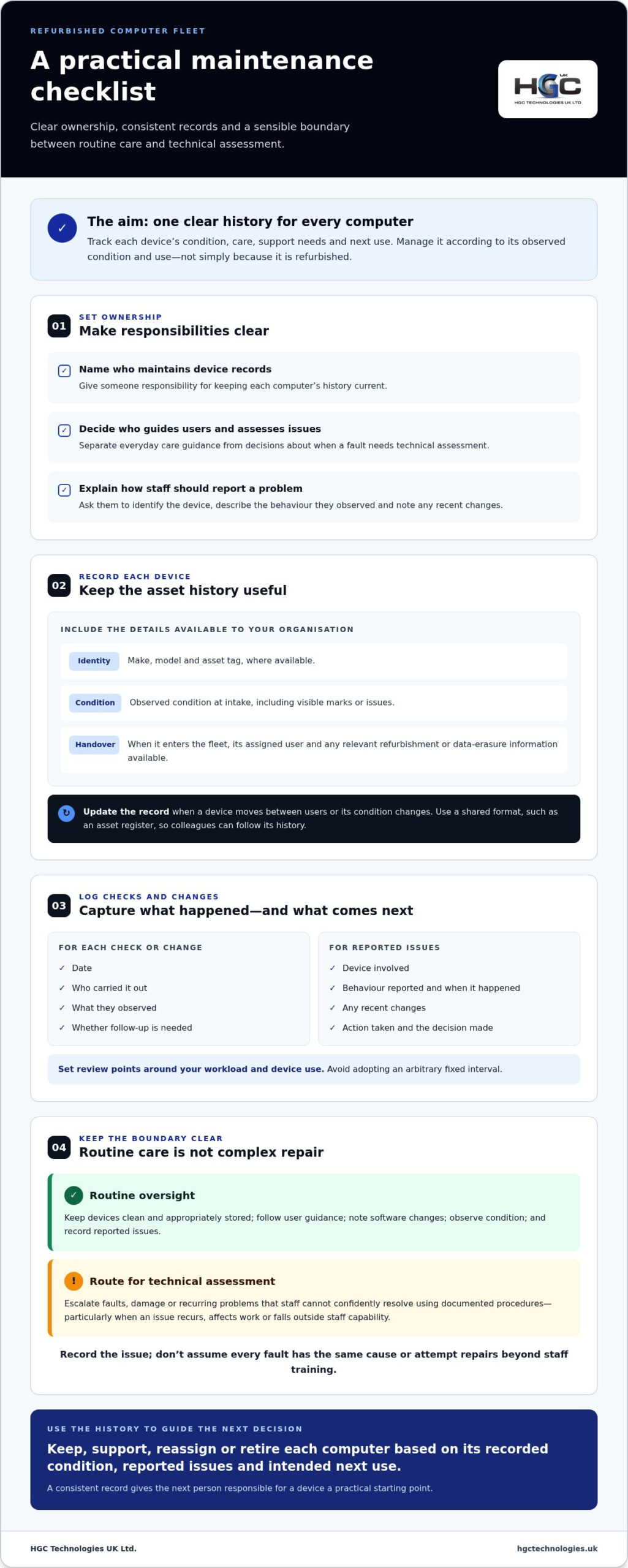
Start by assigning responsibility. Decide who maintains device records, who gives users practical care guidance and who determines when an issue needs technical assessment. Staff should know how to report a fault and what information to include, such as the device involved, the behaviour observed and any recent changes.
Create a record for each computer, including its make, model, condition and assigned user where known. Update it when the device moves between users or its condition changes. Use a consistent format, such as an asset register or another shared record, so colleagues can understand its history without relying on informal handovers.
Set a clear method for documenting maintenance activity. For each check or change, record the date, who carried it out, what they observed and whether follow-up is needed. This creates a useful history for identifying recurring reports and making decisions about reassignment or support. Set review points that fit your organisation’s workload and device use rather than adopting an arbitrary fixed interval.
- Routine care: user guidance, observations about condition and accurate records.
- Escalation: faults, damage or recurring problems staff can’t confidently resolve using documented procedures.
This boundary keeps the process manageable. Staff can handle straightforward oversight, while technical assistance can be directed towards issues that need specialist assessment. Clear ownership and records also give the next person responsible for a device a practical starting point, whether it remains assigned, is reassigned or needs further support.
Build a refurbished computer fleet maintenance routine around the device lifecycle
A lifecycle workflow gives each device a clear route from arrival to its next use. It also makes records more useful: condition notes show what has changed, software records show what was updated, and fault reports help staff decide when a computer needs technical assessment rather than another routine check.
Record each computer as it is prepared, assigned, cared for, reviewed and either reassigned or retired. This sequence makes self-maintaining a fleet of refurbished computers easier to coordinate and keeps user-level checks separate from technical work.
- Receive and identify the device. Create an asset record using available identifiers, such as make, model and asset tag. Note its observed condition at intake, including visible marks or issues, so later changes can be compared with its starting state.
- Capture handover information. Record when it enters your organisation’s fleet, its assigned user and any relevant refurbishment or data-erasure information available. Keep supporting details with the asset history rather than relying on email or a verbal handover.
- Prepare and assign it. Follow your organisation’s approved set-up and access procedures. Give the user clear guidance on everyday care and how to report damage, unusual behaviour or access problems. Users should report what they observe, not attempt repairs beyond their training.
- Maintain routine care and updates. Make ordinary checks proportionate to the device’s use and condition. Manage software updates through an organisation-approved process, recording what changed and who completed the work. Don’t treat a user-reported problem as proof that an update or repair is needed.
- Review reports and decide on support. Add faults to the device history, including the reported behaviour and any action taken. If a problem recurs, affects work or falls outside staff capability, route it for technical assessment. Record the decision and any resulting repair or support action.
- Reassign or retire the computer. Update the asset record when the assigned user changes, noting the device’s condition at handover. If it’s no longer suitable for its role, document the retirement decision and follow your organisation’s data-handling and end-of-use procedures before arranging its next destination.
Keep the device history continuous. For example, if a user reports intermittent access, record when it happened, which device was involved and what steps have already been taken. If the computer is reassigned, the next user or support colleague can see that context instead of treating the same report as a new, unexplained issue. In every entry, distinguish what was observed from what was changed or concluded.
Build the workflow around your team’s responsibilities, not an arbitrary calendar. A review might be prompted by a reported fault, a change of user or a planned software update. Clear triggers help staff act consistently without imposing a fixed interval that may not suit every device or working pattern.
Good procurement and after-sales guidance can complement this internal process. HGC Technologies supplies refurbished and recertified equipment tested for quality and performance, with after-sales technical assistance, software updates and maintenance advice. Organisations planning a fleet can explore refurbished business hardware as part of a lifecycle approach that includes care and support as well as procurement.
Self-maintenance or external support: decide which fleet tasks to handle
A practical support model doesn’t force a choice between doing everything in-house and handing over every issue. Your team can manage predictable, low-risk tasks while referring complex or disruptive faults for technical assessment. Set the boundary by considering staff capability, the effect of the issue on work, the device’s condition and whether an approved procedure exists.
Refurbished status alone doesn’t mean a computer will need more support than a new device. Assess each machine according to its current condition and reported behaviour. A minor user query and a recurring fault affecting an essential task call for different responses, whatever the device’s history.
Which tasks can an organisation manage routinely?
Keep internal work within staff competence and documented procedures. Routine responsibilities can include maintaining asset records, giving users care guidance, carrying out visual checks and recording reported issues. Your organisation can also coordinate software updates through its approved process, noting what changed and when. This is a management procedure, not an assumption that a device updates itself.
| Routine internal task | Seek technical assistance when |
|---|---|
| Update asset details after a user or location change. | A fault persists or returns after approved basic steps. |
| Share user guidance and provide a clear fault-reporting route. | The cause of a hardware problem is uncertain. |
| Record visible condition and note user-reported behaviour. | Damage or unusual behaviour may affect safe, reliable use. |
| Coordinate approved software updates and document changes. | A technical change is outside staff knowledge or procedure. |
Use the table as a decision aid, not a rigid rulebook. If your team has the skills and a documented procedure for a straightforward task, it may be reasonable to manage it internally. If the procedure is unclear, the device’s condition is uncertain or the task could disrupt important work, pause and escalate rather than experiment.
When does a fleet issue need technical assistance?
Escalate recurring faults, uncertain hardware problems and issues that threaten business continuity. For example, a one-off report of an access difficulty may be handled through your normal user-support process, but repeated access failures on a device or an unexplained shutdown warrant closer assessment. Don’t ask staff to open equipment or attempt repairs beyond their training.
Before seeking help, record the symptoms in the asset history: what the user observed, when it began, whether it has happened before and which approved troubleshooting steps have been completed. This gives the person assessing the device a clearer starting point and helps your organisation track the decision and outcome.
For self-maintaining a fleet of refurbished computers, internal oversight and external expertise work best as connected parts of one operating model. HGC Technologies provides after-sales technical assistance and maintenance advice for organisations managing fleet issues beyond routine checks. Update the internal record after an assessment or action, so the next decision is based on the device’s history rather than guesswork.
Create a practical checklist for maintaining refurbished computers
A useful checklist turns your maintenance approach into steps staff can apply consistently, without adding checks your team can’t sustain. Keep it in an asset register, shared document or another system your organisation already uses. Tailor the detail to fleet size, how intensively devices are used and the technical capability available internally. Avoid imposing a fixed inspection schedule or assuming a particular service life. Review and act according to each device’s condition, use and reported issues.
A repeatable checklist for everyday fleet oversight
Use these prompts when a device enters the fleet, changes hands or needs attention. Record the outcome and any follow-up, not just whether a box was ticked.
- At intake: Record available identifiers, make, model, observed condition and any relevant refurbishment or data-erasure information supplied with the device. Note missing details rather than filling gaps with assumptions.
- At handover: Confirm the assigned user and give clear instructions for responsible handling and reporting faults, damage or access problems. Make sure the user knows where to raise an issue.
- During use: Keep the assignment and condition record current. Note user-reported concerns in plain language, distinguishing observed symptoms from suspected causes.
- For software changes: Follow your organisation’s approved update process. Record material changes, when they were made and any related issue or follow-up.
- For support activity: Add technical assessments, actions taken and outstanding next steps to the device history. This helps prevent repeated troubleshooting without context.
- At review: Decide whether the computer remains suitable for its current role, needs support or could be reassigned. Record the reasoning and any action required.
Keep the checklist proportionate. A small team might use a concise record with a few clear status fields, while a larger or more varied fleet may need extra detail to distinguish device types, users and support needs. In either case, make the process easy to follow and assign responsibility for keeping entries accurate.
Plan reassignment, repair and responsible retirement
Before assigning a computer to another user, assess its condition and suitability for the new role. Check its history for unresolved faults and record the new assignment. If it needs technical assessment, pause the handover until the next action is clear. Don’t treat reassignment as a reason to overlook an existing issue.
When devices change hands, leave your organisation or reach the end of their intended use, follow a controlled data-handling and erasure process. Use the method approved for your organisation and record the action and outcome. Deleting visible files alone shouldn’t be treated as proof that data has been securely removed. Then document whether the device will be reused, repaired, resold or retired, following your organisation’s procedures for its next destination.
Refurbishment and resale can help keep suitable equipment in use rather than sending it directly out of service. HGC Technologies provides data erasure with UK collection, as well as refurbished and recertified devices tested for quality and performance. Explore refurbished business hardware as part of a considered approach to maintaining and managing your fleet.
Support a sustainable refurbished computer fleet with the right hardware partner
A responsible fleet depends on more than how devices are maintained after deployment. Procurement choices, day-to-day care and support arrangements all matter: select equipment suited to its intended role, keep useful records as it’s used, and plan what happens when it no longer meets that role. This joined-up approach helps organisations make considered use of refurbished technology and assess whether equipment can be reused, repaired or resold before retiring it.
Refurbished and recertified computers can support a more circular approach to business IT by giving suitable equipment another use. The benefit depends on managing each device thoughtfully, from understanding its condition and support needs to handling data and deciding its next destination. A documented plan helps turn sustainability aims into practical choices rather than treating refurbished procurement as a standalone action.
Connect maintenance planning with refurbished hardware sourcing
Start with the work devices need to support and your team’s capacity to manage them. Consider who will use each computer, the role it will perform and how your organisation will handle updates, reported issues and reassignment. Matching procurement decisions to these needs gives your team a clearer basis for selecting suitable hardware and planning its ongoing oversight.
HGC Technologies supplies refurbished laptops, desktops and MacBooks, including refurbished and recertified devices tested for quality and performance. Personalised consultations help match technology choices to client needs. For a broader view of the market and procurement considerations, explore Wholesale Refurbished IT Equipment UK: 2026 Strategic Market Trends.
Make the next step straightforward with HGC Technologies
Good sourcing should connect naturally with the support arrangements that follow. HGC Technologies provides after-sales technical assistance, software updates and maintenance advice to support organisations as their fleet requirements evolve. Keep your own device records and approved procedures in place too, so support activity can be considered alongside each computer’s condition, use and history.
As you build your approach to self-maintaining a fleet of refurbished computers, bring procurement, routine care and end-of-use planning into the same conversation. This helps your organisation assess the full lifecycle of its equipment and make deliberate decisions about continued use, repair, reassignment or retirement.
Learn more about HGC Technologies’ refurbished and business technology solutions and how they can fit your organisation’s hardware and support needs.
Set your fleet up for its next stage
A maintenance routine is most valuable when it supports informed decisions beyond the next fault. Use device records to understand where your organisation needs support, what equipment remains suitable for its role and how future procurement can fit your team’s capacity. That gives self-maintaining a fleet of refurbished computers a clear purpose: responsible technology management that can adapt as your organisation changes.
When planning your next purchase, consider the support that will sit alongside the hardware. HGC Technologies supplies refurbished and recertified technology across the UK, with devices tested for quality and performance. Its after-sales support includes technical assistance, software updates and maintenance advice, helping your team connect sourcing decisions with ongoing fleet care.
Explore HGC Technologies’ refurbished and business technology solutions to discuss hardware and support options for your organisation.
Frequently Asked Questions
Can a business self-maintain refurbished computers without an in-house IT team?
Yes. A business can manage basic fleet oversight without employing an in-house IT team, provided responsibilities and escalation routes are clear. Assign someone to keep asset information organised and make sure staff know how to report problems. Self-maintaining a fleet of refurbished computers doesn’t mean carrying out complex repairs: tasks beyond your team’s knowledge should be referred for appropriate assistance. This keeps routine administration manageable while recognising the limits of internal capability.
Do refurbished computers need more maintenance than new computers?
Not necessarily. Refurbished status alone doesn’t determine how much attention a computer will need. Its present condition, how it’s used and the issues reported are more useful guides. For example, a refurbished laptop with no recorded faults may need less intervention than a new device experiencing repeated problems. Assess each machine on its own evidence, and avoid setting extra checks or making performance assumptions simply because it has been refurbished.
How should a business document maintenance for a refurbished computer?
Use a consistent record that lets another responsible colleague understand the device’s history. Alongside its asset identifier, note the issue or check, when it occurred, its effect on the user, any action taken and whether follow-up remains. Separate what staff observed from their interpretation of the cause. Keep records in an access-controlled system approved by your organisation, and avoid adding unnecessary personal or sensitive information to fault notes.
What should happen to data when a refurbished computer is reassigned?
Protect the previous user’s information before handing the computer to someone else. Follow your organisation’s controlled data-erasure procedure, confirm the required outcome and retain a record of the action. Removing an account or deleting visible files alone shouldn’t be treated as evidence that data has been sanitised. Also review access linked to the former user, so reassignment covers both information stored on the device and permissions associated with its previous use.
Can refurbished and new computers be managed in the same fleet?
Yes. A shared asset-management approach can cover both, provided records capture each device’s condition and relevant history. For example, staff can use the same reporting route while recording refurbishment details where available. Keep device-specific instructions alongside the asset record rather than assuming every computer follows identical procedures. This gives your team a consistent view of the fleet without treating refurbished and new equipment as interchangeable in every maintenance decision.
When should a business retire a refurbished computer instead of maintaining it?
Consider retirement when a device is no longer suitable for its intended role, has a recurring unresolved fault or needs assessment before it can be used responsibly. Compare its condition and support needs with the work it must perform. Age or refurbished status alone shouldn’t decide the outcome. Record why you’re retiring it, then follow your organisation’s data-handling and disposal procedures. If it remains suitable for another role, reassignment may be an alternative.

Custom Server Solutions for UK SMEs: 2026 Strategic Guide
Did you know that server DRAM contract prices surged by 95% in early 2026, effectively doubling the

7 Strategic IT Budget Optimisation Strategies for UK Businesses in 2026
The volume of refurbished PCs sold through UK distributors doubled between late 2024 and 2025, signa

Choosing a Reliable Ex-Corporate Laptop Supplier: A 2026 Procurement Guide
Purchasing a blind-pallet of technology isn't a procurement strategy; it's a gamble that your IT inf