

Outfitting a New Office with IT Hardware: The 2026 Procurement Checklist
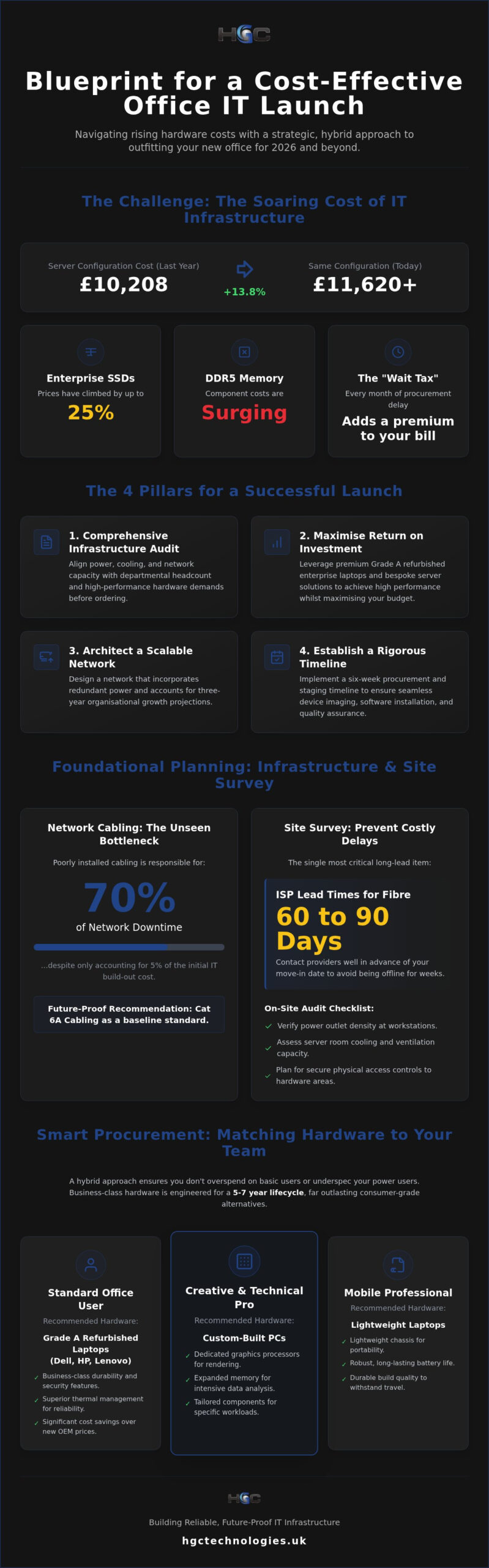
A server configuration that cost your business £10,208 last year will likely set you back over £11,620 today. With enterprise SSD prices climbing by up to 25 per cent and DDR5 memory costs surging, the financial pressure of outfitting a new office with IT hardware has never been more acute. You’re likely feeling the weight of the “Wait Tax,” where every month of procurement delay adds a significant premium to your infrastructure bill. It’s a challenging environment that demands a more sophisticated, strategic approach to technology investment.
It’s understandable to feel hesitant when balancing the need for cutting-edge performance against the reality of shrinking margins. You need a setup that works from day one, yet the complexities of network configuration and the uncertainty of refurbished equipment reliability can make the process feel overwhelming. This guide offers a comprehensive blueprint for a successful, cost-effective office launch in 2026. We will detail how to integrate high-performance refurbished laptops from Dell, HP, and Lenovo with custom-built server solutions to ensure your infrastructure is both powerful and scalable whilst maximising every pound of your hardware spend.
Key Takeaways
- Execute a comprehensive infrastructure audit to align power and cooling capacities with departmental headcount and high-performance hardware demands.
- Maximise your return on investment when outfitting a new office with IT hardware by leveraging premium refurbished enterprise laptops and bespoke server solutions.
- Architect a scalable network environment that incorporates redundant power supplies and accounts for three-year organisational growth projections.
- Establish a rigorous six-week procurement and staging timeline to ensure seamless device imaging, software installation, and quality assurance before move-in.
Assessing Infrastructure and Capacity Needs
Precision in planning is the foundation of a high-performance workspace. Before a single device is ordered, you must conduct a granular audit of your physical and digital requirements. Outfitting a new office with IT hardware requires more than a simple head count; it demands a strategic analysis of how your team interacts with technology. You need to identify the specific hardware requirements per department, ensuring that power outlet distribution and cooling for server areas are sufficient for the density of modern enterprise equipment.
Poorly installed network cabling is responsible for 70 per cent of network downtime, despite only accounting for 5 per cent of the initial IT build-out cost. Planning for Cat 6A or better is essential to support the high-speed internal networking required for 2026 workloads. Without this backbone, even the most expensive hardware will face performance bottlenecks. Evaluate the necessity for specialised hardware amongst creative or technical teams early in the process to avoid last-minute procurement hurdles.
- Audit power density: Ensure workstations have sufficient outlets to avoid hazardous daisy-chaining of power strips.
- Prioritise cabling: Implement Cat 6A as a baseline to future-proof your internal data transfer speeds.
- Review thermal loads: Verify that dedicated server rooms or closets have adequate ventilation and cooling capacity.
Mapping User Personas to Hardware
Successful procurement begins with defining your user personas. Standard office roles typically thrive with reliable, Grade A refurbished laptops from Dell, HP, or Lenovo, which offer the durability of business-class hardware at a fraction of the OEM cost. Conversely, creative or technical teams often require custom-built PCs with dedicated graphics processors and expanded memory to handle intensive rendering or data analysis tasks. Identifying these needs early ensures you don’t overspend on basic users or underspec your power users.
Mobility is another critical factor. Identify which employees are mobile-first and require lightweight laptops with robust battery life, versus desk-bound staff who may benefit from dual-monitor workstation setups. You must also calculate total bandwidth requirements for concurrent video conferencing. In a hybrid environment, the demand for stable, high-definition video streams can quickly overwhelm an under-specced network if not accounted for during the initial infrastructure phase.
Site Survey and Environmental Factors
Physical environment assessments prevent costly post-deployment adjustments. On-site server rooms require meticulous planning for heat dissipation and noise levels to ensure they don’t impact the productivity of nearby staff. Secure physical access controls are equally vital; your sensitive hardware areas must be protected from unauthorised entry as part of a broader security framework. This physical layer of security is the first line of defence for your hardware investment.
Time is your most valuable asset during this phase. ISP lead times for dedicated fibre lines typically range from 60 to 90 days. If you wait until the move-in date to contact a provider, your office will be offline for weeks. Conduct your site survey early to verify existing infrastructure and initiate these long-lead orders well in advance of your launch date to ensure a seamless transition when outfitting a new office with IT hardware.
Choosing Between New, Refurbished, and Custom IT Hardware
Strategic procurement is no longer just about buying the newest model on the market. In an era where component prices for DDR5 memory and enterprise SSDs are climbing, outfitting a new office with IT hardware requires a discerning eye for value. You must weigh the immediate performance of factory-new units against the substantial cost-to-performance advantages of Grade A refurbished enterprise equipment. A hybrid approach often yields the best results, allowing you to allocate budget where it matters most whilst maintaining a high standard of reliability across the organisation.
Business-class hardware is engineered for a five-to-seven-year lifecycle, far outlasting the consumer-grade alternatives found in retail stores. When you choose bulk Dell refurbished laptops or similar units from Lenovo and HP, you’re investing in chassis stability, advanced security features, and superior thermal management. These are tools designed for the rigours of professional use, offering a level of durability that consumer models simply cannot match.
The Case for Refurbished Enterprise Laptops
Refurbished grading systems are the key to quality assurance for any business launch. Grade A units represent the gold standard, showing minimal to no cosmetic wear and full functional integrity. These devices have typically been sourced from corporate environments where they were maintained under strict service contracts. By opting for Grade A, your team receives professional-looking, reliable tools that reflect your brand’s standards. This strategy protects your capital, allowing you to reinvest savings into other critical infrastructure needs like high-speed networking or server capacity.
When to Opt for Custom-Built PCs
Standard laptops don’t always suffice for every role in a modern office. Technical departments, such as data scientists or architectural designers, often require non-standard GPU or RAM configurations that off-the-shelf units cannot provide. Exploring the custom built business PCs UK market allows you to specify components that match your exact workflow requirements. These modular systems offer a distinct advantage in longevity, as they allow for easy future upgrades without replacing the entire unit. This flexibility ensures your high-performance roles stay ahead of software demands without recurring full-scale replacement costs.
Environmental responsibility is also a regulatory and corporate necessity in 2026. With the EPA imposing fines of up to $70,117 per day for non-compliance with e-waste disposal laws, sourcing refurbished equipment is a proactive move for sustainability. It extends the lifecycle of high-quality components and reduces the carbon footprint associated with manufacturing new hardware. Integrating these units into your procurement strategy demonstrates a commitment to ethical growth. Choosing a partner that understands these nuances ensures your procurement strategy remains both agile and compliant. You can view our curated selection of wholesale hardware to find the ideal balance for your team’s specific requirements.
The Essential IT Hardware Checklist for Your Office
Uniformity is the silent driver of IT efficiency. When outfitting a new office with IT hardware, your primary objective is to create a predictable, manageable environment for your technical support team. Procuring bulk laptops for the general workforce ensures that every employee operates on a shared architecture, which drastically simplifies software deployment, security patching, and hardware troubleshooting. This consistency extends to your peripherals, where high-resolution displays and ergonomic input devices serve as the primary interface between your staff and their daily objectives.
Establishing a standard docking station setup is equally vital in the 2026 workplace. With the continued prevalence of hybrid work models, your office must facilitate seamless hot-desking. A universal dock allows any employee to transition from a commute to a fully functional workstation in seconds, maintaining productivity without the friction of cable management issues or port incompatibility. It turns a simple desk into a professional hub.
- Standardise your fleet: Choose one or two specific models to reduce maintenance complexity.
- Prioritise ergonomics: Invest in adjustable monitor arms and high-quality peripherals to support long-term staff health.
- Enable mobility: Ensure every workstation is equipped for rapid laptop connection and disconnection.
Workstation Essentials
Standardisation begins at the desk. We recommend standardising on robust, enterprise-grade models like the Dell 7420 for your general workforce. These units offer a proven balance of portability and performance, making them exceptionally easy for IT departments to maintain. By limiting the variety of models in your fleet, you significantly reduce the complexity of your spare parts inventory and driver management. It allows your team to focus on growth rather than hardware fire-fighting.
Productivity is directly linked to screen real estate. Dual-screen setups are now the industry standard, providing the necessary space for complex multitasking and data-heavy workflows. Complement these displays with reliable, branded keyboards and mice. Whilst peripherals may seem like a minor budgetary consideration, choosing high-quality, uniform input devices prevents the ergonomic complaints and hardware failures that often arise from using substandard, mismatched equipment.
Mobile and Remote Connectivity
Communication must remain secure beyond the office walls. For roles that require constant availability, such as your sales or field teams, it’s essential to source original smartphones wholesale UK. Providing corporate-owned devices ensures that sensitive business data remains within a managed security perimeter, rather than being exposed on personal handsets with varying security standards. This is a critical step in maintaining your organisation’s data integrity.
Remote collaboration tools are no longer optional extras. Ensure all procured laptops feature integrated high-definition webcams and noise-cancelling microphones to support professional video conferencing. For frequent travellers, provide portable power solutions and ruggedised carrying cases. These additions protect your hardware investment and ensure that your team remains operational regardless of their location. When outfitting a new office with IT hardware, these mobile considerations are just as important as the physical desks themselves.
Designing a Scalable Server and Network Architecture
The digital backbone of your business must be resilient, secure, and ready for expansion. When outfitting a new office with IT hardware, your server and network choices dictate the long-term agility of your entire organisation. It’s a strategic imperative to select hardware based on current data loads whilst accounting for three-year growth projections. With the combined cost of server components driving prices up by approximately 14 per cent in 2026, precision in your initial specification is essential to protect your return on investment. Striking the correct balance requires a methodical assessment of your expected data throughput and application demands.
Reliability is non-negotiable for enterprise infrastructure. Implement redundant power supplies and high-capacity Uninterruptible Power Supplies (UPS) to protect against data loss during local power fluctuations. Beyond power, your network must be intelligent. Configure managed switches to prioritise VoIP and video traffic, ensuring that communication remains crystal clear even during periods of heavy data transfer. This Quality of Service (QoS) management is essential for maintaining professional standards in a bandwidth-intensive environment.
Selecting Enterprise Server Hardware
Physical constraints often dictate the form factor of your server. Rack-mount servers offer high density and easy scalability within a dedicated server room, whereas tower servers are often the preferred choice for smaller offices without specialised cooling infrastructure. Researching enterprise server hardware UK options allows you to source localised, high-performance units tailored to your specific regional requirements. Balance your internal SSD storage for high-speed application access with robust Network-Attached Storage (NAS) solutions for cost-effective, long-term data retention.
Network Infrastructure and Security
Wireless connectivity in 2026 demands the latest standards. Deploy Wi-Fi 7 access points to provide high-density coverage that can handle the increased device count of a modern, mobile-first workforce. Physical organisation is equally critical; ensure your server racks are organised with meticulous cable management and clear labelling to prevent the network downtime typically caused by cabling errors. This systematic approach simplifies future maintenance and troubleshooting.
Security must be integrated at the hardware layer. Establish a robust firewall and secure gateway to manage remote access, especially as the updated NIST Cybersecurity Framework (CSF 2.0) places greater emphasis on governance and supply chain risk. Implementing hardware-level security protocols ensures that your data protection is proactive rather than reactive. If you’re ready to build a resilient infrastructure, you can explore our custom server solutions to find a configuration that matches your growth trajectory.
Procurement and Deployment: Ensuring a Smooth Launch
The execution phase of outfitting a new office with IT hardware is where theoretical planning transforms into operational reality. Success in this final stage depends on meticulous timing and a disciplined approach to logistics. Finalise your hardware orders at least four to six weeks before your move-in date. This buffer is essential to account for potential supply chain fluctuations and provides your technical team with the necessary window to conduct thorough quality assurance before the equipment reaches an employee’s desk.
Establish a dedicated staging area for device imaging and software installation. You cannot rely on unboxing and configuring hardware on the morning of your launch; instead, every laptop and workstation must be pre-configured with the necessary security protocols and enterprise applications. Organise a phased rollout that begins with core administrative and IT staff. This staggered approach ensures that your support team isn’t overwhelmed by simultaneous user queries on day one, allowing for a more controlled and professional transition.
Documentation is the final pillar of a professional deployment. Create a central registry to document all hardware serial numbers, specifications, and warranty details. This database is a vital asset for long-term lifecycle management and ensures that your IT department can rapidly respond to hardware issues or audit requirements. A well-documented fleet is a manageable fleet, protecting your investment from the moment it’s deployed.
Wholesale Sourcing Strategy
Strategic procurement requires a partner that understands the scale of enterprise needs. Partnering with a reputable wholesale laptop distributor UK allows you to secure bulk savings whilst ensuring a uniform hardware standard across your organisation. Verify the testing and grading processes of your supplier to ensure every unit meets Grade A standards. It’s important to align your budget with a direct purchase model, as HGC Technologies specialises in wholesale supply and does not offer financing or lease-to-own programmes. This direct approach ensures you maintain full ownership and control over your hardware assets from day one.
Deployment and User Onboarding
User experience during the first week defines the perceived success of your new office launch. Create a concise “Quick Start” guide for every workstation that empowers employees to set up their peripherals and log in to essential systems without immediate assistance. To catch any lingering issues, schedule a dedicated IT “drop-in” session during the first few days of operation. This proactive support model resolves minor friction points before they impact productivity. Finally, ensure all legacy data is securely migrated to your new, high-performance infrastructure, maintaining continuity whilst outfitting a new office with IT hardware that is built for future growth.
Future-Proofing Your Modern Workspace
Successful office launches depend on the synergy between advanced planning and strategic procurement. You’ve seen how balancing high-performance refurbished laptops with bespoke server architecture creates a resilient foundation for growth. By prioritising Grade A hardware and standardising your fleet, you protect your capital whilst ensuring your team has the professional tools they need to excel from day one.
Outfitting a new office with IT hardware is a complex undertaking, but it’s also a vital opportunity to define your company’s technical standards for years to come. As wholesale specialists in Dell, HP, and Lenovo refurbished laptops, we provide the scale and quality your business demands. We invite you to enquire about outfitting your new office with HGC Technologies to access bespoke server and PC builds tailored to your specific needs, all supported by national UK delivery on bulk hardware orders.
Your transition to a new space is the perfect moment to build a more efficient, scalable, and sustainable future. With the right hardware partner, you can launch with total confidence.
Frequently Asked Questions
Is it better to buy new or refurbished IT hardware for a new office?
Grade A refurbished enterprise hardware often provides a superior return on investment whilst maintaining the durability required for professional environments. Unlike consumer-grade new units, refurbished business-class laptops from Dell or Lenovo are built with premium materials and undergo rigorous testing. This strategy allows you to allocate more budget to critical infrastructure like custom servers and high-speed networking without sacrificing reliability.
What is the standard lead time for outfitting an office with IT hardware?
You should allow at least four to six weeks for hardware procurement and staging to ensure a seamless move-in experience. Whilst the hardware itself can be sourced relatively quickly, this window is necessary for device imaging, software installation, and quality assurance. It’s also vital to remember that ISP lead times for dedicated fibre lines can extend to 90 days, so these orders must be prioritised early.
How much should I budget for IT hardware per employee in 2026?
Average IT spend per employee in 2026 typically ranges between $9,000 and $14,000 per year, which encompasses hardware, software, and managed support. Across most industries, organisations are allocating approximately 5.7 per cent of their annual revenue to their IT budgets. When outfitting a new office with IT hardware, these figures provide a realistic baseline for your initial capital expenditure and ongoing operational costs.
Do I need a server on-site or should I rely entirely on the cloud?
A hybrid model is typically the most resilient choice for modern offices, combining the speed of on-site server solutions with the flexibility of cloud services. On-site hardware is essential for handling large data loads and low-latency applications that cloud-only environments may struggle to support. This approach ensures your team remains productive even during external internet outages whilst maintaining local control over sensitive data.
What are the benefits of custom-built PCs for my business?
Bespoke PC builds offer the specific performance required for roles that standard laptops cannot handle, such as 3D rendering or complex data analysis. These systems use modular components that allow for easy future upgrades, which extends the total lifecycle of your hardware. Investing in custom units ensures your power users aren’t throttled by generic hardware limitations, maximising their departmental output and efficiency.
How do I ensure refurbished laptops are reliable for my staff?
Reliability is assured when you source Grade A refurbished hardware from specialists who follow strict testing and restoration protocols. These units are often ex-lease corporate machines that have been maintained to high standards throughout their initial use. Choosing Grade A ensures that your staff receives devices with minimal cosmetic wear and full functional integrity, providing a user experience identical to factory-new equipment.
What network cabling is recommended for a new office fit-out?
Cat 6A is the recommended standard for any new office fit-out to ensure your infrastructure can support 10Gbps speeds. Whilst older standards might seem sufficient for current needs, they lack the future-proofing required for the high-density data demands of 2026. Investing in high-quality cabling prevents the network bottlenecks that account for a significant percentage of business downtime and connectivity issues.
Can I buy smartphones in bulk for my corporate team?
Yes, you can procure original smartphones in bulk to ensure your sales and field teams have secure, uniform communication tools. Sourcing these devices wholesale allows you to implement consistent mobile device management policies across the entire organisation. This is a critical step in outfitting a new office with IT hardware that protects corporate data when employees are working remotely or on the move.

Original Smartphones Bulk Buy UK: The 2026 Strategic Procurement Trend Analysis
In 2026, the competitive advantage in mobile retail has shifted from who holds the most stock to who

Ensuring Software Licensing on Refurbished PCs: The 2026 UK Business Guide
Genuine software licensing is the final stage of professional hardware refurbishment; without it, ev

The Strategic Business Case for Refurbished Hardware in 2026
Sales of refurbished PCs in the UK almost doubled between the final quarter of 2024 and the end of 2