

Refurbished Laptops for Call Centre Staff: A 2026 Guide
A laptop can meet a basic specification and still frustrate a call-centre team. Choosing refurbished laptops for call centre staff means looking beyond the processor to the demands of call-handling software, browser tabs, office applications and headset use. It also means checking that devices are consistent enough for a smooth team deployment.
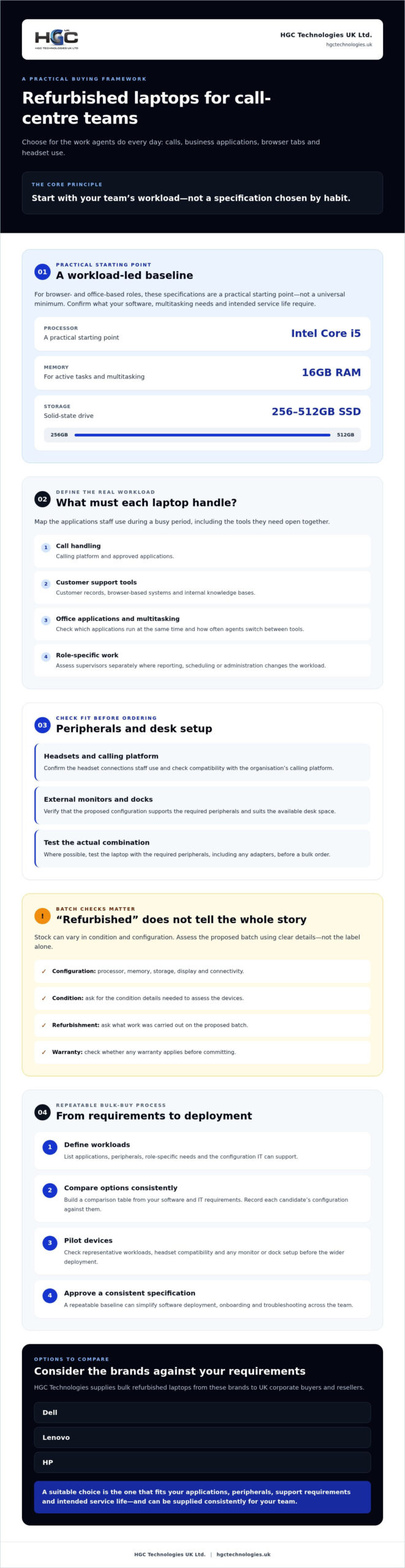
It’s understandable to be cautious: refurbished stock can vary in condition and configuration, and even a small mismatch can complicate deployment. For browser- and office-based roles, an Intel Core i5 processor, 16GB of RAM and a 256-512GB SSD are a practical starting point. Your software, multitasking needs and intended service life should guide the final specification.
This guide offers a workload-based framework for setting requirements, checking stock details and planning a repeatable bulk order. You’ll learn what to ask about device condition, configuration and any applicable warranty before committing, and how to organise deployment so staff receive suitable, consistent laptops. HGC Technologies UK Ltd. supplies bulk refurbished Dell, Lenovo and HP laptops to UK corporate buyers and resellers, giving you several brands to consider as you define your requirements.
Key Takeaways
- Match refurbished laptops for call centre staff to daily calls, business applications and headset use, rather than choosing specifications by habit.
- Build a comparison table around your own software and IT requirements to assess processor, memory and storage needs.
- Look beyond cosmetic condition. Ask for the configuration and refurbishment details you need to assess a batch before purchase.
- Use a repeatable buying process: define workloads, compare options, pilot devices and approve a consistent specification for deployment.
- Once your requirements are clear, compare Dell, Lenovo and HP options. HGC Technologies supplies bulk refurbished laptops from these brands through direct sales.
What call centre staff need from refurbished laptops
Call-centre laptops need to keep pace with long shifts, repeated calls and the business applications agents use to resolve customer enquiries. A device that works well for occasional email may struggle when an agent needs a calling platform, customer records, browser tabs and internal guidance open at the same time. Start with the work the laptop must support, not a feature list built around what sounds impressive.
Separate essentials from preferences. Access to approved applications, compatibility with the team’s headsets and a good fit with the desk setup are operational needs. A premium finish or features staff won’t use may matter less. Define priorities with IT and team leads before comparing refurbished laptops for call centre staff, so procurement reflects actual working conditions.
Consistency matters across a team. A repeatable configuration can simplify software deployment, onboarding and troubleshooting: support staff can work from the same baseline instead of diagnosing a different combination of components at every desk. Suitability also depends on evidence, not the “refurbished” label alone. The term Refurbishment (electronics) describes work carried out on pre-owned devices, but the exact work can vary. Ask for the proposed batch’s configuration, condition details and refurbishment information.
Which tasks will each laptop handle during a typical shift?
Map the applications agents use during a busy period, not just at sign-in. Include call-handling software, browser-based systems, customer records, internal knowledge bases and any office applications they need open together. Ask IT or team leads which applications must run at the same time and whether agents frequently switch between tools. Assess supervisors separately: reporting, scheduling or administration workloads may have different requirements from frontline call handling.
How do headsets and desk setups affect device choice?
Check which headset connections staff use and confirm compatibility with the organisation’s calling platform. If agents connect an external monitor or dock, verify that the proposed laptop configuration supports those peripherals and suits the available desk space. Where possible, test the actual combination, including any required adapters. These checks can reveal compatibility issues before a bulk order, rather than during staff onboarding.
Turn your findings into a short requirements list covering applications, peripherals, role-specific needs and the configuration your team can support. Use it to assess each batch consistently, then confirm available configurations and refurbishment details with the supplier before committing.
Which specifications matter for call centre laptop performance?
There’s no single specification that suits every contact centre. The right configuration depends on the calling platform, browser-based systems, peripherals and the applications staff need open at once. Assess refurbished laptops for call centre staff against your own workload, rather than treating one processor or memory figure as a universal minimum.
Start with a comparison table. Ask IT to list required applications, supported operating systems, peripherals and any minimum specifications provided by software suppliers. Record each candidate laptop’s processor, memory, storage, display and connectivity alongside those requirements. This makes batches easier to compare and helps identify a device that looks suitable on paper but won’t work with your setup.
How much memory and processing capability do agents need?
The processor handles instructions from the operating system and applications; memory gives active tasks room to run. If agents keep customer records, calling software, guidance pages and several browser tabs open together, assess performance with that combination running. Ask internal IT or software providers for supported processor and memory specifications, then compare candidate configurations under the same representative workload.
Check whether memory can be upgraded or whether the configuration is fixed. Don’t assume an upgrade will be possible later. IT should confirm operating-system compatibility and that the device remains within its support lifecycle for the intended deployment. Include security in the assessment: CISA’s cybersecurity best practices for business devices can help inform how laptops are configured and secured.
What should buyers check for screens, storage and connectivity?
Choose a screen that lets staff read scripts and customer records comfortably within the available desk space. Resolution affects how much information fits on screen, while screen size and viewing position affect everyday usability. Storage should accommodate the operating system, required applications and any approved local data, with enough available capacity for routine updates and use.
Match connectivity to the workplace. Confirm that Wi-Fi capability suits the organisation’s network, and check the ports required for headsets, external monitors and docks. If staff use USB or audio connections, verify the exact laptop configuration rather than relying on a model-family description. Check proposed devices with the organisation’s calling platform and peripherals before approving a bulk order.
Once IT has agreed the specification, compare available Dell, Lenovo and HP configurations against the same requirements. HGC Technologies UK Ltd. supplies bulk refurbished laptops from these brands through direct sales. Review its bulk refurbished laptop options as part of your supplier evaluation, and confirm current configurations and relevant refurbishment details before committing.
Are refurbished laptops reliable enough for busy contact centres?
They can be, provided the specific batch meets your operational requirements and the supplier can explain its condition and configuration. The word “refurbished” alone doesn’t establish how a device has been checked, what components it contains or what happens if an issue arises. Assess refurbished laptops for call centre staff using information about the actual stock, rather than relying on a general label or assuming every unit has had the same preparation.
Cosmetic condition is only one part of the assessment. Marks on a casing may not affect daily use, while a tidy appearance doesn’t confirm that a laptop is compatible with your calling platform or suitable for a full shift. Focus on the details that affect deployment: exact specifications, relevant refurbishment and testing information, and the terms that apply if a device needs to be returned or support is required.
What information should buyers request about refurbished stock?
Ask for clear condition descriptions and a configuration breakdown for the proposed batch. Confirm whether the devices share the same key components and operating-system configuration, or whether units differ. Ask what testing, data handling and preparation processes apply, and request enough detail to assess them against your organisation’s requirements. Don’t assume processes are identical across suppliers or batches.
Before ordering, clarify applicable warranty terms, returns arrangements and who is responsible for handling issues. Read the terms rather than relying on a verbal summary, and check that they suit your procurement and support plans. Confirm current stock, configurations, refurbishment details and any applicable warranty directly with the supplier.
How can a pilot batch reduce deployment uncertainty?
A pilot helps you test practical fit before a wider rollout. Use representative devices with the organisation’s calling software, headsets, monitors and normal work routines. Check everyday tasks, including signing in, handling calls and switching between applications, rather than limiting the assessment to a quick start-up test.
Gather feedback from agents, supervisors and IT support. Staff can flag usability or peripheral issues, while IT can assess setup and troubleshooting against existing processes. Record any differences between trial devices and the proposed batch. Resolve compatibility or configuration concerns before scaling, and confirm that the wider order matches the approved specification.
There are trade-offs to weigh. Refurbished stock can provide a route to business-class equipment, but available configurations and batch consistency depend on the stock being offered. A clear specification, documented supplier responses and a realistic lifecycle plan help you decide whether the devices suit the team’s needs and future refresh approach.
How to compare bulk laptop options for a call centre
A repeatable buying process makes bulk decisions easier to assess and can prevent avoidable differences between devices. For refurbished laptops for call centre staff, work through five stages: define workloads, set requirements, compare batches, pilot representative devices and approve the final specification. Record why each option meets or misses your needs instead of selecting on brand name alone.
Compare Dell, Lenovo and HP against the same criteria: configuration, compatibility with your calling platform and peripherals, and fit with your internal IT support approach. Consider the whole operational fit, including setup effort, staff roles and lifecycle plans, rather than relying on a single headline specification. Buyers assessing Dell specifically can consult this bulk Dell refurbished laptop procurement guide.
What should a call-centre laptop comparison table include?
Create one row per proposed batch or configuration, then record the details that affect use and procurement. Separate essential requirements from preferred features so you don’t reject a suitable option over a non-essential preference. Include:
- Technical fit: processor, memory, storage, screen, operating-system requirements and compatibility with headsets, monitors and other peripherals.
- Batch information: condition descriptions, configuration consistency, verified availability and any differences between units.
- Supplier terms: applicable warranty, returns arrangements and the process for raising issues. Confirm details directly before committing.
Use the same application and peripheral requirements to evaluate each option. If a batch varies, note exactly which specifications differ and decide whether those differences affect deployment, support or the experience staff receive.
How should procurement prepare for a team rollout?
Plan beyond the purchase. Estimate team quantities, deployment timing, user profiles and replacement requirements, then coordinate with internal IT on imaging, application installation, user access and support responsibilities. Allow for any steps your organisation needs to validate a device before it reaches an agent’s desk. A pilot can reveal setup or compatibility issues; use what you learn to set the final approval criteria before confirming the wider order.
Keep the rollout specification and approved configuration available to procurement and IT, so later replacements can be checked against the same baseline. For broader supplier evaluation criteria, see the UK wholesale laptop distributor guide.
Once your requirements and rollout plan are clear, you can discuss bulk refurbished laptop options from Dell, Lenovo and HP with HGC Technologies UK Ltd. Confirm current stock, configurations, refurbishment details and any applicable warranty as part of your supplier assessment.
How to source refurbished laptops for call centre staff from HGC
Once your team’s workload, required configuration and rollout plan are clear, approach suppliers with a defined brief rather than a general request for laptops. This makes it easier to compare proposed stock against your organisation’s needs and identify unanswered questions before committing.
HGC Technologies UK Ltd. supplies bulk refurbished Dell, Lenovo and HP laptops to UK corporate buyers and resellers through direct sales. As with any supplier, confirm the details of the stock being offered: current availability, exact configurations, condition information, refurbishment details and any applicable terms. These details can vary, so check availability rather than assuming a particular specification, batch size or warranty will be offered.
What information should you prepare before contacting a supplier?
Prepare a concise procurement brief that describes the intended workloads and gives suppliers a clear basis for identifying potentially suitable stock. Include required quantities, target configuration and preferred deployment timing. List the calling software, operating-system needs, user profiles and any monitors, headsets, docks or other essential peripherals. Distinguish must-haves from preferences, and ask what batch details and applicable terms are available without assuming stock or warranty conditions.
- Team requirements: quantities, roles and intended workloads.
- Technical requirements: target configuration, operating system and required applications.
- Workplace setup: peripherals, connection needs and deployment timing.
- Supplier information: available batch configuration, condition details and applicable terms.
What should happen before approving a bulk order?
Review the supplier’s response against the brief and internal IT policies. Check that the proposed configuration meets application and peripheral requirements, and clarify any differences between units. Where feasible, test representative devices with the actual calling software and work setup. Resolve outstanding compatibility questions before approval, rather than leaving them to surface during rollout.
Before placing the order, confirm the agreed configuration, quantities, delivery arrangements and applicable after-sales terms in writing. Keep the final details with your deployment plan so procurement and IT teams are working from the same approved specification. If anything remains unclear, request clarification before proceeding.
A well-prepared brief turns supplier discussions into a practical evaluation of refurbished laptops for call centre staff. Share your requirements, compare confirmed options and approve a batch only when its documented details align with the team’s needs.
Set your team up for a confident laptop rollout
Choose refurbished laptops for call centre staff by starting with the work they’ll handle: calling software, customer records, concurrent applications and essential peripherals. Match specifications to those needs, then assess each proposed batch using documented configuration, condition information and applicable terms. A representative trial can also reveal compatibility or deployment issues before you approve a wider order.
HGC Technologies UK Ltd. supplies bulk refurbished Dell, Lenovo and HP laptops through a direct-sales model to corporate buyers and resellers across the UK. Prepare your requirements before discussing options, and confirm current stock, configurations, refurbishment details and any applicable warranty with the supplier. HGC doesn’t offer financing or lease-to-own programmes, so plan procurement on that basis.
Ready to discuss your team’s requirements? Discuss your call centre laptop requirements with HGC Technologies.
Frequently Asked Questions
Are refurbished laptops suitable for call centre staff?
Yes, refurbished laptops can suit call-centre work if their configuration meets the team’s software, workload and peripheral requirements. Assess the specific batch rather than relying on the refurbished label: request condition and configuration details, ask what checks and preparation apply, and confirm relevant terms. A trial with the actual calling platform and daily applications can help identify issues before wider deployment.
What specifications should a call centre laptop have?
For browser- and office-based agent workloads, an Intel Core i5 processor, 16GB of RAM and a 256-512GB SSD provide a useful starting point. The right choice still depends on your calling software, number of simultaneous applications, operating-system requirements and IT lifecycle plans. Ask internal IT or software providers to confirm supported specifications, then compare candidate devices against the same representative workload.
Can refurbished laptops run call centre software and headsets?
They can, provided the laptop’s operating system, configuration and connections are compatible with your calling platform and headset. Check the software provider’s requirements and confirm whether staff connect headsets by USB, audio socket or another method. Include monitors, docks and other desk peripherals in the check. Where feasible, test a representative device with the actual software and equipment before approving a batch.
How do I check the quality of bulk refurbished laptops?
Request clear condition descriptions and the exact configuration of the proposed batch, including any differences between units. Ask what testing, data handling and preparation processes apply, and review the supplier’s responses. Cosmetic appearance alone doesn’t establish operational suitability. Before committing, also confirm current availability, applicable warranty terms, returns arrangements and who handles issues. Check that the information is documented and meets your organisation’s procurement requirements.
Should call centres buy identical laptop configurations for every agent?
Consistent configurations can simplify onboarding, software deployment, troubleshooting and replacement, because IT teams work from a shared baseline. However, not every role necessarily has the same workload. Supervisors may use reporting or administration tools that frontline agents don’t need. Define a standard agent configuration, identify any justified role-based exceptions and check that differences won’t complicate support or the wider rollout.
What should I ask a wholesale supplier before buying refurbished laptops?
Ask which configurations and quantities are currently available, how condition is described, what refurbishment and testing information can be provided, and whether the batch is consistent. Confirm applicable warranty and returns terms, delivery arrangements and how issues are handled. Share your required applications, operating-system needs and peripherals so the supplier’s information can be assessed against your requirements. Verify all details before placing the order.
Does HGC Technologies offer finance or lease-to-own for laptops?
No. HGC Technologies UK Ltd. operates through direct sales and doesn’t offer financing or lease-to-own programmes for its hardware. The company supplies bulk refurbished Dell, Lenovo and HP laptops to corporate buyers and resellers across the UK. Buyers should plan procurement on a direct-purchase basis and confirm current stock, available configurations and applicable terms with HGC before committing to an order.

Ex-Corporate Laptops Bulk UK: The 2026 Professional Procurement Guide
Manufacturing a single new laptop generates an estimated 300-400kg of CO2 equivalent, a statistic th

Reducing Capital Expenditure on Business IT: A 2026 Strategic Guide
40% of firms have already delayed or cancelled vital capital expenditures in 2026 due to the volatil

Wholesale Business Smartphones: 2026 Procurement Guide
Procuring a mobile fleet in 2026 is no longer a simple matter of finding the lowest unit price; it's