

Scalable Server Hardware for Growing Businesses: A Guide
The biggest server you can afford may be the wrong choice for a business that’s still growing. Buying more capacity than you need can tie up budget in resources that go unused, while a system with too little headroom may struggle as workloads expand. The better approach is to match scalable server hardware for growing businesses to current workloads, then plan for the next likely milestone. Start by identifying where pressure is building: processor performance, memory, storage or network demand.
This guide explains what server scalability means in practice and how to choose hardware that can support changing business needs. You’ll learn how workloads shape server requirements, how to investigate bottlenecks, and how to compare targeted upgrades with a wider infrastructure change. A staged capacity plan can help you balance current requirements with realistic growth. With a clear view of workloads and priorities, you can define the server configuration your organisation needs and the circumstances that would justify expanding it.
Key Takeaways
- Scale capacity around real business milestones rather than buying the largest server upfront.
- Assess processor, memory, storage and networking demands against the workloads they support.
- Compare vertical, horizontal, cloud and hybrid approaches by their control, complexity and expansion patterns.
- Use a staged planning process to distinguish current utilisation from forecast demand, resilience needs and application dependencies.
- Configure scalable server hardware for growing businesses around specific workloads and expected growth.
What scalable server hardware means for a growing business
Scalable server hardware for growing businesses is infrastructure that can expand as workloads change, without requiring an oversized purchase at the outset or a complete replacement whenever demand rises. Planning for scalability means considering how compute, memory, storage and network capacity can increase, as well as the operational work involved in making changes reliably.
Growth affects more than the number of people logging in. More users can mean more simultaneous requests; higher transaction volumes can put extra pressure on processing and databases; larger datasets need more storage and may increase memory demand; and new applications can introduce dependencies or compete for shared resources. Consider how these demands interact rather than treating each component as a separate specification. Scalability in Computing describes the broader principle of adapting a system as its workload changes.
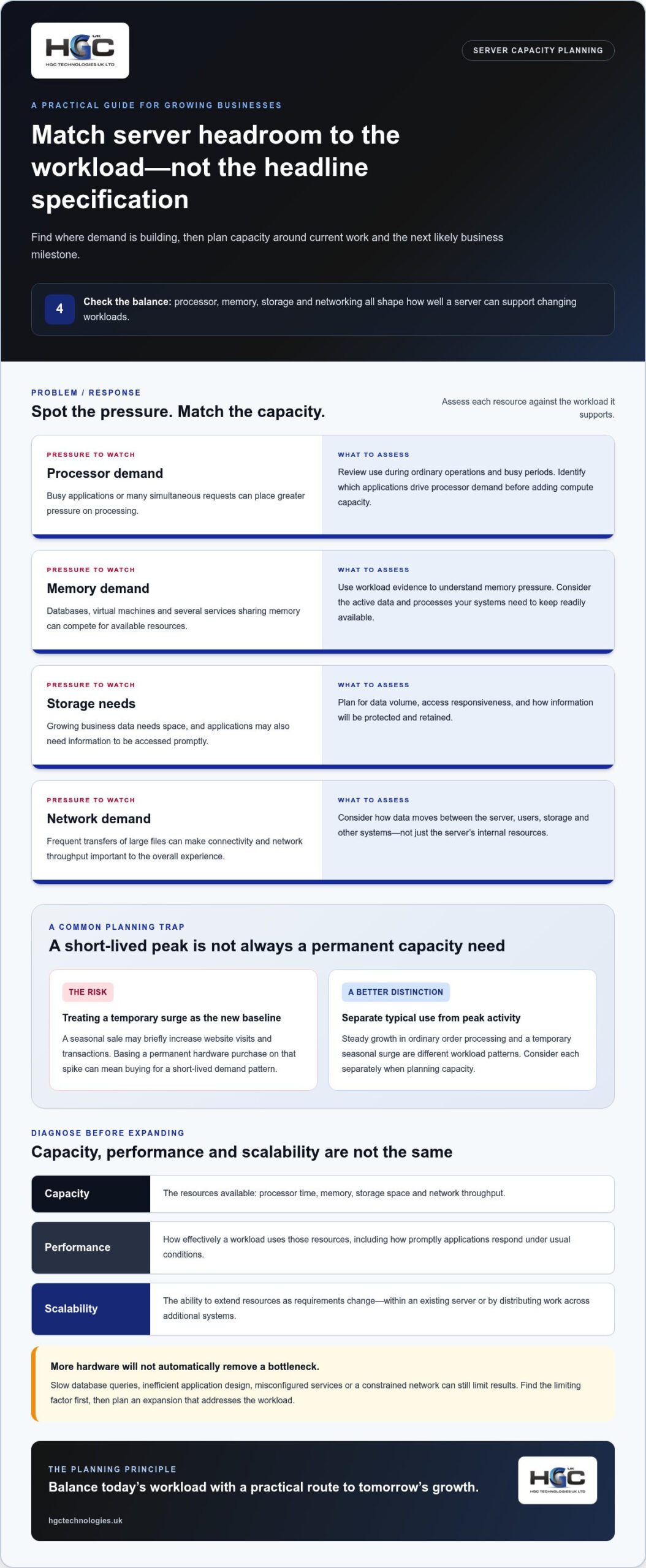
Matching capacity to the workload matters more than choosing a server with impressive headline specifications.
Scalability also depends on operational planning: how you’ll monitor capacity, which workloads can be expanded independently, and how changes affect applications and continuity. A server with ample processing capacity may still struggle if memory is constrained or storage cannot keep pace with data growth. The aim is a balanced configuration with a practical route to expansion.
How server scalability supports changing workloads
Demand can rise steadily as an organisation adds staff, customers, datasets or digital services. It can also fluctuate. A predictable seasonal peak or a short-lived promotion may create a temporary surge rather than a lasting increase in baseline usage. Distinguish between these patterns before deciding whether to add permanent capacity or plan for a more flexible response.
For example, an online retailer may see ordinary order processing increase as its customer base grows, while a seasonal sale causes a brief rise in website visits and transactions. These patterns put different demands on infrastructure and may call for different capacity decisions. Review typical use separately from peak activity so a short-lived spike does not automatically become the basis for a permanent hardware purchase.
Scalability versus capacity and performance
Capacity is the pool of resources available, such as processor time, memory, storage space and network throughput. Performance describes how effectively a workload uses those resources, including how promptly applications respond under usual conditions. A server can have spare capacity but still deliver poor results if its software or configuration does not use resources efficiently.
Scalability is the ability to extend resources as requirements change. This might mean increasing resources within an existing server or distributing work across additional systems. Neither approach is an automatic fix. Slow database queries, inefficient application design, misconfigured services or a constrained network can remain bottlenecks after hardware is added. Diagnose the limiting factor first, then plan an expansion that addresses the actual workload.
Which server components determine room for growth?
Choosing scalable server hardware for growing businesses means assessing how each component supports the work your systems perform. Processor capability, memory, storage and networking all affect capacity, but each addresses a different constraint. Their balance, compatibility with existing systems and the way applications are configured determine how effectively a server can support a changing workload.
Assess processing, memory, storage and networking together, then match each component to measured workload demands.
- Processors: Handle instructions and calculations. A server running several busy business applications at once may need more processing headroom than one supporting occasional, light-use tasks.
- Memory: Keeps active data and processes readily available. A database with a larger working dataset or several virtual machines may place greater pressure on memory than a single-purpose application.
- Storage: Provides space for operating systems, applications and business data. Consider both how quickly information needs to be accessed and how the organisation will protect and retain it.
- Networking: Moves data between the server, users, storage and other systems. Frequent transfers of large files, for example, can make network throughput and connectivity important to the overall experience.
Assess compute and memory against workload needs
Processing demand depends on the application as well as concurrent activity. A system handling calculations or many simultaneous requests may behave differently from one serving mostly static files. Review resource use during ordinary operations and busy periods. Identify which applications drive processor demand before deciding whether more compute capacity is needed.
Memory pressure can affect virtual machines, databases and workloads that keep substantial amounts of data active. If several services compete for available memory, their performance may suffer. Use workload evidence to guide capacity choices. Don’t assume a particular processor model, core count or memory quantity will suit every organisation.
Plan storage and network capacity together
Plan storage around three distinct needs: capacity for the volume of data, responsiveness for how quickly applications access it, and resilience for how data is protected if a component fails. Access patterns matter too: frequently used records can place different demands on storage from infrequently accessed archives. RAID describes ways of arranging drives for performance or resilience, whilst NVMe is a storage interface associated with fast data access. Neither is an automatic answer for every workload.
Storage performance alone won’t help if the network becomes a constraint. Consider traffic between users, applications and storage alongside the connectivity available to the server. Web Server Capacity Planning for Growth discusses monitoring capacity and resource use as part of planning. Reviewing storage and network activity together can help pinpoint where a constraint lies.
Recognise virtualisation and workload dependencies
Virtualisation can consolidate multiple workloads on one physical server, but each virtual machine still draws on shared processor, memory, storage and network resources. Resource allocation matters: one workload can be constrained even when another has capacity to spare. Map dependencies between applications and databases before changing allocations or adding hardware.
A slowdown may originate in an application query, database setup or network configuration rather than a physical server limit. Check usage and configuration together before expanding. HGC Technologies’ server solutions can be configured around specific business requirements, providing a hardware option to consider once workload needs and component priorities are clear.
Vertical scaling, horizontal scaling, or cloud: how do the options compare?
There’s no single expansion model that suits every organisation. Vertical and horizontal scaling describe ways to add resources to systems, whilst cloud describes how computing resources are provided as a service. Hybrid infrastructure combines environments. The right choice for scalable server hardware for growing businesses depends on workload behaviour, technical capability, control requirements and expected growth.
| Approach | Expansion pattern | Control and complexity | Often considered for |
|---|---|---|---|
| Vertical scaling | Add resources within one server or system. | Direct control; upgrades may involve technical limits or planned disruption. | Workloads that benefit from a stronger individual server. |
| Horizontal scaling | Distribute work across additional systems. | More coordination; control depends on how systems are managed. | Applications designed to operate across multiple systems. |
| Cloud | Provision computing resources as a service. | Less direct control of physical infrastructure; requires service and resource management. | Workloads with changing demand or a need for service-based capacity. |
| Hybrid | Place workloads across on-premises systems and cloud services. | Combines environments, requiring coordination across both. | Organisations with different control, demand or placement needs across workloads. |
When adding resources to one server makes sense
Vertical scaling increases resources within an existing server or system. It can suit a workload that benefits from more capability in one place, such as an application whose components are closely linked. This approach may be straightforward to manage, but each system has upgrade limits. Consider how an upgrade will affect service continuity, application dependencies and the organisation’s ability to maintain operations during the change.
When distributing workloads across systems is useful
Horizontal scaling spreads workloads across multiple systems rather than enlarging one server. It can support applications designed to divide work between machines. Application architecture matters: load balancing can direct requests across systems, but workloads must be able to operate in that arrangement. This approach also brings coordination tasks, including managing configurations, data and monitoring across the systems.
How cloud and hybrid options fit the comparison
Cloud is a service model, not a particular type of server hardware. The provider supplies computing resources, whilst the organisation manages its use of those services and workload configuration. Hybrid infrastructure combines on-premises systems with cloud services, allowing workloads to be placed according to their operating needs. It also requires clear oversight across both environments.
Compare each workload on its own merits. Consider how demand varies, how much infrastructure control is needed, which applications can be distributed and what skills are available to operate the chosen environment. A steady, closely controlled workload may lead to different decisions from a short-lived demand spike or an application designed for distributed operation. Evaluate those factors together before choosing an expansion path.
How to plan server capacity around real business growth
A useful capacity plan turns business expectations into reviewable decisions, not fixed forecasts. Start with evidence about current workloads, make assumptions visible, then decide what change each growth milestone would justify. This creates a practical route to scalable server hardware for growing businesses without treating every increase in demand as a reason to replace the whole environment.
Build a workload and capacity baseline
Begin with an inventory of business-critical applications, users, data and dependencies. Record which services rely on shared databases, storage or network connections, and note planned application changes that could alter demand. Review available utilisation and performance information across representative operating periods, including busy times. Separate observed processor, memory, storage and network use from resilience expectations and service windows. This baseline helps show where constraints exist before you plan additional capacity.
Turn growth assumptions into staged decisions
Translate business plans into plausible scenarios and label the assumptions behind each one. For instance, a new service might increase application use, data retention or concurrent access, but treat the scale and timing as assumptions until they can be measured. Define review signals, such as sustained resource pressure or an upcoming application change. Prioritise responses by business impact, technical dependencies and operational readiness rather than reacting to isolated peaks.
- Map the workload: List applications, users, data flows and dependencies, then identify which services are essential to daily operations.
- Establish the baseline: Compare utilisation and performance across representative periods; record current constraints separately from forecast demand.
- Set decision triggers: Agree what evidence or planned milestone prompts a review, such as recurring pressure during normal operations or a new application deployment.
- Choose the right change: An upgrade may fit when one system has room to expand and the workload suits it. An additional server may be appropriate when work can be distributed. If dependencies or limitations make either approach unsuitable, assess whether a revised architecture is needed.
These are decision points, not automatic rules. Confirm the cause of a constraint and consider resilience requirements before committing to a hardware change. This helps distinguish lasting demand from temporary variation and keeps proposed expansion aligned with operational needs.
Plan implementation and review
Before deployment, map application dependencies, migration steps, testing, backup arrangements and service continuity requirements. Set a review point after implementation to compare observed demand with the assumptions in the plan. If actual use differs, update the scenarios and priorities rather than relying on outdated forecasts. For procurement context, the enterprise server hardware guide offers a related resource.
Once you’ve defined workloads, constraints and likely expansion stages, review HGC Technologies’ server solutions as one route to hardware configured around your organisation’s requirements.
How HGC Technologies can support a scalable server plan
A clear capacity plan gives server configuration a practical starting point. Once you understand the workloads, current constraints, application dependencies and likely growth scenarios, you can turn those findings into a brief that guides hardware choices. HGC Technologies supplies bespoke custom-built PCs and server solutions configured for diverse business environments. This helps organisations assess hardware against defined requirements rather than selecting by headline specifications alone.
Translate technical requirements into a server brief
Bring the key information together before making configuration decisions. Summarise the applications the server must support, who uses them, the type and volume of data involved, and any dependencies on other systems. Include current utilisation where available, resilience expectations, service continuity needs and the growth assumptions behind your plan. Label estimates as assumptions, not established requirements.
Separate essential requirements from preferences. For example, identify which workloads are business-critical and which changes are desirable but not necessary for initial operation. This distinction helps structure decisions about processing, memory, storage and networking, while keeping the configuration connected to real operational priorities. A tailored approach can align server hardware choices with the organisation’s defined needs and expected capacity requirements.
Move from planning to a tailored server solution
HGC Technologies’ bespoke server solutions provide a practical option for businesses assessing scalable server hardware for growing businesses. A workload-led brief helps frame the configuration around the organisation’s environment, intended use and growth plan. It also gives decision-makers a clearer basis for comparing an upgrade, an additional system or a broader infrastructure change.
Procurement decisions should reflect both technical fit and the organisation’s planned approach to capacity. The enterprise server hardware procurement guide offers related context for considering server hardware choices. Use it alongside your requirements summary to keep planning focused on business needs.
Make the next step straightforward
Prepare a concise summary before discussing a server configuration. Include the workloads to be supported, current constraints, user and data needs, key application dependencies, resilience expectations and the growth scenarios you’re planning for. Note which points are essential and which remain assumptions. This gives decision-makers a clear basis for discussing the server’s intended role and the configuration priorities that matter most.
With those requirements in hand, discuss your server requirements with HGC Technologies.
Turn your capacity plan into your next decision
Your server plan shouldn’t be a one-off document. Treat it as a working guide that evolves alongside your organisation. Revisit its assumptions when applications change, new priorities emerge or actual demand differs from expectations. This keeps decisions about scalable server hardware for growing businesses connected to business needs, rather than specifications chosen in isolation.
HGC Technologies supplies bespoke custom-built PCs and server solutions, with server configurations designed around specific enterprise needs. Bring your workload priorities and growth plans into the conversation to help shape a practical direction for your infrastructure.
Discuss your server requirements with HGC Technologies and take the next step towards hardware aligned with your business needs.
Frequently Asked Questions
What does scalable server hardware mean for a small business?
It means choosing infrastructure that can adapt as the business’s needs change, without paying for unused capacity from the outset. For a small firm moving shared files and business applications onto a central server, the right starting point depends on how staff use those services and what expansion is foreseeable. A scalable approach leaves room to adjust the configuration as needs develop, rather than assuming a small business will always have small IT demands.
Can a business scale a server without replacing the entire system?
Yes. In some cases, an existing server can be upgraded or its workload redistributed without replacing the whole system. The available options depend on the server’s design, compatible components, application requirements and upgrade limits. For example, if an application is constrained by memory and the system supports a suitable increase, a targeted change may address the issue. Review dependencies and continuity needs before making changes, as adding hardware does not resolve every bottleneck.
How do I know when my business needs more server capacity?
Look for recurring signs that affect work, such as applications slowing during normal busy periods, storage nearing its usable limit or routine tasks taking longer than expected. These symptoms don’t automatically prove the server needs expansion. Compare performance and resource use over time, then investigate the application, database and network as well as the hardware. If evidence shows sustained demand against a particular resource, use that finding to guide a capacity decision.
Is refurbished server hardware suitable for a growing business?
It can be suitable if the hardware’s condition, capabilities and expected useful life fit the workloads it must support. Assess compatibility with required software, available expansion options, data protection needs and how the organisation will manage maintenance or replacement. A refurbished system may suit a defined workload, but it shouldn’t be selected on purchase price alone. Consider how it fits the wider capacity plan and the consequences of future limitations.
What is the difference between a server and a workstation?
A server is designed to provide shared services or resources to other devices, such as hosting files, applications or databases. A workstation is generally intended for one person’s demanding computing tasks, such as design or technical work. Staff might, for example, use workstations to access a shared application hosted on a server. The distinction is about purpose and use, not simply whether a computer has powerful components.
How often should a business review its server capacity plan?
Review the plan at agreed intervals and whenever a material change could alter demand, such as introducing an application, changing data-retention practices or expanding a service. Compare actual resource use with the assumptions behind the plan, and record any new constraints or dependencies. A review doesn’t have to trigger a purchase; it can confirm that current capacity remains appropriate or identify a decision to revisit later. Set the timing around your business’s planning and change cycles.

Dell Latitude 7420: The 2026 Business Procurement & Specification Guide
The most expensive laptop in the 2026 catalogue isn't necessarily the most efficient choice for your

Negotiating a Bulk Purchase of Refurbished Laptops: A Practical Guide
A lower unit price can hide a costly mismatch. When negotiating a bulk purchase of refurbished lapto

Finding Bulk Laptops with Specific Port Requirements: A 2026 Procurement Guide
The hidden cost of modern laptop procurement isn't found on the initial invoice. Instead, it's often