

Server virtualisation on refurbished hardware: 2026 guide
A server’s age is a poor guide to whether it can run your virtualised workloads. The key question is whether its processor, memory, storage and network capacity fit your needs, and whether the hardware is compatible with your chosen hypervisor. It’s understandable to consider reliability, firmware support and security updates when assessing older equipment. With server virtualisation on refurbished hardware, careful assessment matters more than a generic specification or the year a server was released.
This guide provides a practical framework for assessing workload requirements, checking compatibility against vendor documentation and sizing each part of a configuration. It also explains how to avoid overbuying CPU capacity at the expense of memory, storage or networking. You’ll learn how to compare refurbished and new hardware with lifecycle considerations in view, so the decision reflects your operational needs and the risks you’re prepared to manage. Once those requirements are clear, a server solution configured for your organisation can provide a considered starting point for deployment.
Key Takeaways
- Understand how a host, hypervisor and virtual machines work together to run separate business workloads on one physical server.
- Use current and planned virtual machines to guide resource planning, weighing processor needs alongside memory, storage and network demand.
- Assess server virtualisation on refurbished hardware by comparing compatibility, lifecycle, service impact and upgrade flexibility with new equipment.
- Follow a five-stage evaluation process that turns workload, capacity and support requirements into clear deployment decisions.
- Use documented requirements to inform a server solution configured around your organisation’s needs.
What server virtualisation on refurbished hardware means for your business
Server virtualisation allows one physical server to run multiple isolated virtual machines (VMs) through a hypervisor. Each VM behaves like a separate computer, with its own operating system and applications, while drawing on the same underlying hardware. For example, a business might run a finance application and an internal file service as separate VMs on one server.
In this arrangement, the physical machine is the host, the hypervisor manages its resources, and each VM is a software-based server. Refurbishment describes the hardware’s history, not its virtualisation capability. A refurbished server can act as a host if it meets workload needs and supports the selected hypervisor. Suitability depends on the specific machine and configuration, not on the word “refurbished” alone.
How a physical server becomes a virtualisation host
A hypervisor is software that creates and manages virtual machines by allocating a host server’s physical resources to them. It assigns CPU processing capacity, memory, storage and network access to each VM according to its configuration. The VMs share the host’s components but remain logically separated, so their operating systems and applications run in distinct environments. This lets a business consolidate services while managing them as separate servers. For a foundational overview, see how server virtualisation works.
That separation is useful, but it doesn’t mean every VM can use the host’s full capacity at once. If several services become busy together, they compete for shared resources. The host and its allocation settings therefore need to reflect how applications are used, not just how many VMs are planned.
Where refurbished hosts can fit in an IT environment
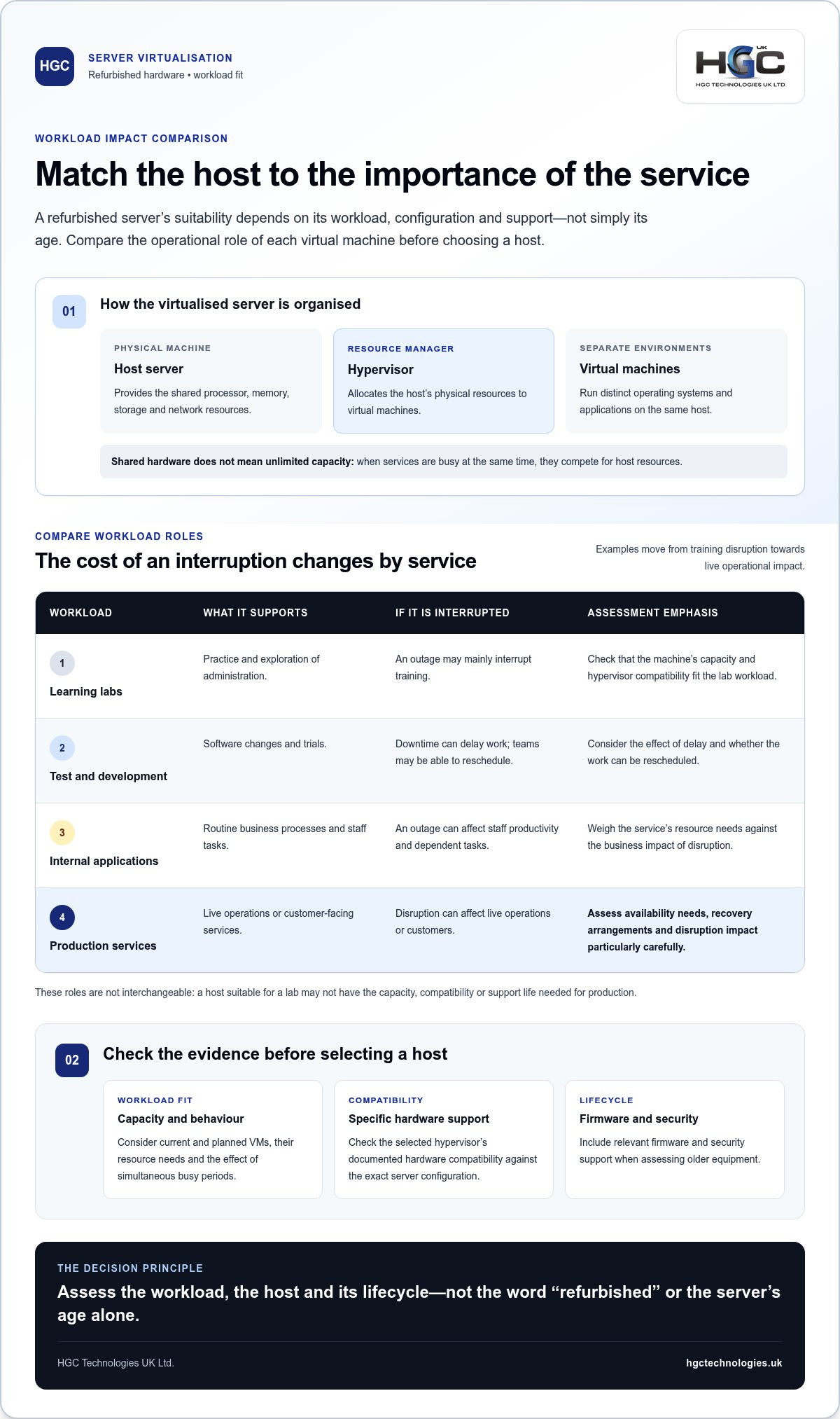
The right role depends on what a service does and what an interruption would mean for the business. A learning lab used to practise administration may tolerate downtime that would be unacceptable for a customer-facing service. Assess each workload’s operational importance alongside its resource needs.
- Learning labs: Useful for practice and exploration, where an outage may mainly interrupt training.
- Test and development environments: Support software changes and trials. Downtime can delay work, although the effect may be limited if teams can reschedule.
- Internal applications: May support routine business processes, so an outage can affect staff productivity and dependent tasks.
- Production services: Support live operations or customers. Assess availability needs, recovery arrangements and the impact of disruption particularly carefully.
These use cases aren’t interchangeable. A host suitable for a lab may lack the capacity, compatibility or support life needed for a production role. Before choosing server virtualisation on refurbished hardware, match the machine to each workload and its operating requirements. Include the hypervisor’s documented hardware compatibility and the relevant firmware and security support. Age alone doesn’t determine suitability, but refurbishment doesn’t make every server appropriate. Base the decision on evidence about the workload, host and lifecycle.
Size refurbished virtualisation hardware around CPU, memory, storage and network demand
Start with the virtual machines you run now and expect to add. For each, record its purpose, allocated CPU and memory, measured peak use, importance to business operations and likely growth. A low average can hide short periods of heavy demand, while a service with little CPU use may still depend on fast storage or reliable network throughput. Size the host around observed behaviour and planned change, not a generic specification.
Estimate CPU and memory needs from actual workloads
CPU core count indicates how many processing tasks can run in parallel; clock speed affects how quickly individual cores handle work. Neither figure alone predicts suitability. Check the hypervisor and application requirements for supported processor features and instruction sets, then compare them with the specific server’s CPU generation. Compatibility and raw capacity are separate considerations.
Review VM allocations alongside peak utilisation to identify where resources are genuinely needed. CPU oversubscription means assigning VMs more virtual CPU capacity in total than the host has physical cores. It can be a considered choice for workloads that rarely peak together, but contention may affect important services if several become busy at once. Treat it as a workload and risk decision, not an automatic way to fit more VMs onto a host.
Memory needs the same evidence-led approach. Check total capacity and whether the platform’s ECC memory support matches the intended configuration; ECC can detect and correct certain memory errors. On multi-socket systems, NUMA (Non-Uniform Memory Access) means memory is associated with particular processors. Keeping a VM’s processing and memory close to the same NUMA node can matter for performance, so consider placement and host topology as well as total capacity.
Match storage and networking to workload behaviour
Plan separately for host or VM boot needs, active virtual-machine data and backups. Capacity tells you how much data fits; performance depends on the workload. IOPS describes how many read and write operations storage can handle, while latency is the delay before each operation completes. A database handling frequent small transactions may be sensitive to both. A file service may be more affected by sustained data transfer and concurrent users. Base the design on those patterns, not a drive’s headline capacity.
Assess network throughput for traffic between VMs, users and storage. Several VMs exchanging data on one host can create different demands from users accessing services across the network. Identify busy periods and required data flows, then compare them with the host interfaces and network capacity.
Plan headroom and resilience around service needs
A 20-30% headroom allowance is sometimes used as a planning example, but it isn’t a guarantee or universal rule. Validate any margin against measured peaks, growth and service importance. N+1 capacity means having enough remaining host capacity to accommodate workloads if one host is unavailable. It may suit some resilience designs, but isn’t necessary for every deployment.
For wider procurement context, HGC’s enterprise server hardware guide complements workload-led sizing. Once your assumptions are documented, explore server solutions configured for business requirements as a practical next step.
Refurbished versus new servers: compare compatibility, risk and lifecycle
Choosing between refurbished and new hardware isn’t simply a test of age. A refurbished server may suit a virtualisation role if its capabilities, supported firmware and remaining support horizon align with the workloads. A newer server may be more appropriate where a specific performance requirement, platform support window or planned growth calls for it. Compare each candidate against the same operational criteria before deciding.
| Factor | Refurbished server | New server |
|---|---|---|
| Acquisition value | Assess the configuration and its fit for the intended workloads, rather than assuming age alone makes it better value. | Compare the proposed configuration with actual requirements, including capacity that may not be needed. |
| Compatibility | Check the exact hardware, firmware and components against the hypervisor’s supported configurations. | Check the same compatibility requirements; new hardware isn’t automatically supported by every platform version. |
| Lifecycle | Establish the expected support horizon and plan for firmware, security updates and eventual replacement. | Assess the support horizon and update path for the selected configuration. |
| Service impact | Consider the consequences of downtime, available recovery arrangements and the role of the host. | Apply the same operational assessment; newness alone doesn’t remove service risk. |
| Upgrade flexibility | Evaluate which upgrades are compatible with the platform and useful for the planned lifecycle. | Assess upgrade options against future workload needs and the intended deployment. |
Check hypervisor, firmware and hardware compatibility
Compatibility depends on the hardware configuration and software version. Consult the relevant vendor’s hardware compatibility list and documentation for supported firmware, drivers and required processor features. VMware vSphere, Microsoft Hyper-V and Proxmox VE are distinct virtualisation platforms, each with its own compatibility and support requirements. Don’t assume that a server supported by one platform is supported by another, or that compatibility with one release applies to every release. Verify current support status before making a platform-specific decision.
Assess lifecycle, security and operational exposure
For each candidate, record the expected support horizon, availability of security and firmware updates, and the point at which replacement should be planned. These factors shape how long the configuration can remain appropriate for its role. Then consider what an outage would mean: disruption to a test environment differs from disruption to a service staff or customers rely on. Backups and a tested recovery plan help address operational risk, but don’t replace suitable hardware support.
VMs are logically separated, but this isn’t complete protection from failures. A host fault can affect multiple VMs; vulnerabilities, configuration errors or operational mistakes can also create wider exposure. Plan safeguards around the whole environment.
Choose refurbished or new hardware for the right reason
An established workload with measured demand may fit a refurbished host when compatibility, support and lifecycle requirements align. New hardware may be preferable if the workload needs capabilities the candidate lacks, a longer support horizon, specialist performance or room for substantial growth. Neither option is universally more reliable, secure or cost-effective. For server virtualisation on refurbished hardware, decide against documented workload and support needs, not age alone.
Evaluate refurbished virtualisation hardware in five practical stages
Use a documented sequence to turn technical investigation into a procurement decision. The first four stages establish whether a candidate host fits your requirements before purchase. The fifth validates it in operation, because specifications alone can’t show how your actual services will behave. For server virtualisation on refurbished hardware, keep the evidence and assumptions together so technical and procurement teams can assess the same configuration.
- Define the workloads. List current and planned virtual machines, what each service supports, and whether it is for a lab, development, consolidation or production. Record operating requirements, peak demand, storage needs and the consequence of downtime. The output should be a workload inventory that identifies which services can share a host and which need separate consideration.
- Size the resources. Map CPU, memory, storage and network needs to measured use, not just VM allocations. Include busy periods and expected growth, and note where demand may overlap. Document the capacity required for each workload and the assumptions behind it, such as expected user activity or data growth. This gives the hardware review a specific target.
- Verify compatibility. Before purchase, compare the exact server configuration with the chosen hypervisor’s hardware compatibility information. Check processor features, components, supported firmware and required management interfaces against current vendor documentation. Record the platform version and any conditions attached to support. The result should be a compatibility decision for that configuration, not a broad assumption about a server family.
- Assess lifecycle and operational fit. Document the expected support horizon, security-update expectations and replacement considerations. Set out backup arrangements and recovery objectives, including how the business would respond if the host or a service failed. Note any vendor-specific support or firmware details that need verification. This stage should produce an agreed risk and lifecycle record, not simply a list of open questions.
- Test and monitor the deployment. After deployment, test representative workloads and recovery procedures before relying on the environment for critical services. Then monitor host and VM utilisation, storage latency and network performance under normal and busy conditions. Compare results with the sizing assumptions; adjust allocations or capacity plans if observed behaviour differs. Keep this operational validation separate from pre-purchase checks.
Procurement and technical review checklist:
- Workloads, criticality, peak demand and growth are documented.
- Required CPU, memory, storage and network capacity is recorded.
- Hypervisor, hardware, firmware and management compatibility are verified.
- Support horizon, security updates, backups and recovery objectives are assessed.
- Representative tests and post-deployment monitoring are planned.
For wider procurement context, explore wholesale refurbished IT equipment trends. With your requirements recorded, discuss a server solution tailored to your business requirements as a practical next step.
Plan a server virtualisation solution with HGC Technologies
Once you’ve assessed workloads, compatibility and lifecycle needs, turn those findings into a clear configuration brief. This gives procurement and technical teams a shared basis for decisions and ties the hardware choice to the infrastructure role it needs to fulfil. HGC Technologies configures server hardware for specific business requirements, making documented needs a practical starting point for a tailored server solution.
Turn workload requirements into a server configuration brief
Describe the environment in terms of services and constraints, rather than leading with a preferred server specification. Include the number of current and planned virtual machines, their peak CPU and memory demand, storage capacity and performance requirements, and expected network traffic. Note which workloads are essential, how they depend on each other, and what level of resilience the business expects.
Record the intended hypervisor and its compatibility requirements alongside lifecycle expectations and growth plans. Separate essential requirements, which the configuration must meet, from optional capacity, which may be useful but isn’t necessary for the initial deployment. For example, distinguish resources needed for current services from additional capacity planned for future workloads. This makes trade-offs easier to review without treating every possible upgrade as a requirement.
How tailored server solutions support business infrastructure planning
A useful server configuration matches documented workloads to the role the infrastructure will perform. HGC Technologies supplies enterprise server solutions and configures server hardware around specific business requirements. A concise brief gives those requirements a clear role in configuration decisions, while keeping the discussion grounded in intended use, compatibility needs and the lifecycle plan.
This approach also gives technical and procurement stakeholders a consistent record of why a configuration was selected. They can distinguish required capacity from assumptions and consider how a proposed server fits the broader environment. The goal is a considered hardware decision, not a promise that one configuration will suit every virtualisation project.
Choose the next step for your virtualisation project
Bring a short, current summary into a project discussion. It doesn’t need to be a lengthy technical specification, but it should make the main requirements and open decisions clear.
- Current and planned virtual machines, their purpose and service importance.
- Peak resource demand, storage behaviour, network needs and expected growth.
- Preferred hypervisor and documented hardware compatibility requirements.
- Lifecycle expectations, resilience needs, backup arrangements and recovery priorities.
- Essential requirements, optional capacity and any assumptions still to resolve.
With this information in hand, you can discuss a server configuration in the context of your actual workloads rather than generic specifications. Explore HGC Technologies server solutions as a practical next step for your virtualisation project.
Make your next infrastructure decision with confidence
Turn your virtualisation plans into a practical brief that reflects how your organisation works today and what it expects from its infrastructure in future. For server virtualisation on refurbished hardware, a clear view of priorities keeps procurement focused on suitability, rather than age or headline specifications alone.
HGC Technologies configures server hardware for specific enterprise needs and works with business customers and technology resellers across the UK. Bring your workload priorities and infrastructure requirements into the discussion to give configuration decisions a useful, business-focused foundation.
Explore HGC Technologies server solutions and take the next step towards a server configuration shaped around your requirements. A considered plan starts with the right questions, and you’re well placed to move forward.
Frequently Asked Questions
Can I run multiple operating systems on one refurbished server?
Yes. A hypervisor can host virtual machines with different supported operating systems, provided the server and hypervisor meet their requirements. For example, a business might run a Linux-based web service alongside a Windows application server, subject to compatibility and licensing terms. Check processor architecture, memory capacity and device support for the intended combination. Keep a record of operating system versions and licensing arrangements, as these may affect how you configure or move the virtual machines.
Does server virtualisation always reduce hardware requirements?
No. Consolidation doesn’t automatically mean you can use less hardware. A host must handle the combined demand of its virtual machines, including periods when several workloads are busy together. For example, a quiet reporting service may compete for resources with a scheduled data process at peak times. Compare measured demand during those overlaps, and include growth and operating headroom before deciding that fewer physical servers can support the same services.
Can I migrate existing virtual machines to refurbished hardware?
Often, but the migration route depends on your existing hypervisor, VM configuration, destination hardware, storage and network setup. A VM using a particular virtual device or processor feature may need adjustments on a different host. Follow the platform’s migration guidance, back up the workload and test a representative VM before moving production services. Record the original settings and define a rollback plan so the team knows how to respond if a cutover reveals an issue.
What happens if a virtualisation host fails?
VMs on a failed host may become unavailable until the host or workloads are recovered. The practical impact depends on how services are arranged and whether recovery procedures can restore them elsewhere. Set an acceptable recovery time and data-loss tolerance for each service, then align backups and recovery steps with those targets. Test the process, including access to required data and dependencies. Virtualisation by itself doesn’t ensure that workloads restart automatically after a hardware failure.
Is refurbished server hardware suitable for a small virtualisation lab?
It can be, if the server supports the hypervisor and the exercises you want to run. A lab for practising VM creation may have different needs from one testing storage, networking or failover behaviour. List the tasks first, including any features that depend on particular hardware or multiple hosts. Then choose a configuration that supports those exercises, and keep lab testing separate from business services so experiments don’t disrupt operational workloads.
Will refurbished hardware support the latest hypervisor versions?
Not necessarily. Support depends on the precise server configuration, processor, firmware and hypervisor release, so a host compatible with an older version may not be supported by a newer one. For server virtualisation on refurbished hardware, check the hypervisor vendor’s current compatibility information alongside the server manufacturer’s firmware and support documentation. Verify the exact configuration rather than relying on a model-family name, and include the supported upgrade path in your deployment plan.
Can virtualisation run without shared storage?
Yes, some setups can store VM files on disks within each host. That can work for a standalone host or a lab, but it may limit how particular migration, clustering or recovery features operate. Shared or distributed storage may be required for some designs, depending on the platform and availability objectives. Before selecting local storage, map where VM files and backups will reside and confirm that the intended operating model supports your recovery needs.
Does server virtualisation automatically make a business more secure?
No. Separate VMs can help keep workloads logically distinct, but a weakness in the host, hypervisor, management access or network configuration can still affect the environment. For instance, excessive administrative access may expose several services even if each runs in its own VM. Apply appropriate access controls, updates and network protections, and maintain backups. Treat virtual-machine separation as one element of your security design, not a substitute for managing the complete system.

Bulk Lenovo Refurbished Laptops: The 2026 Wholesale Procurement Guide
By 2026, the global refurbished laptop market has surged to a valuation of over $10.5 billion, yet m

Custom PCs for Design Agencies: 2026 Procurement Guide
Your agency's most expensive overhead isn't your studio rent or your premium software subscriptions;

How Laptop Grading Affects Performance: The 2026 B2B Buyer Guide
Surface scratches don't throttle processors. Even so, corporate procurement teams routinely overspen