
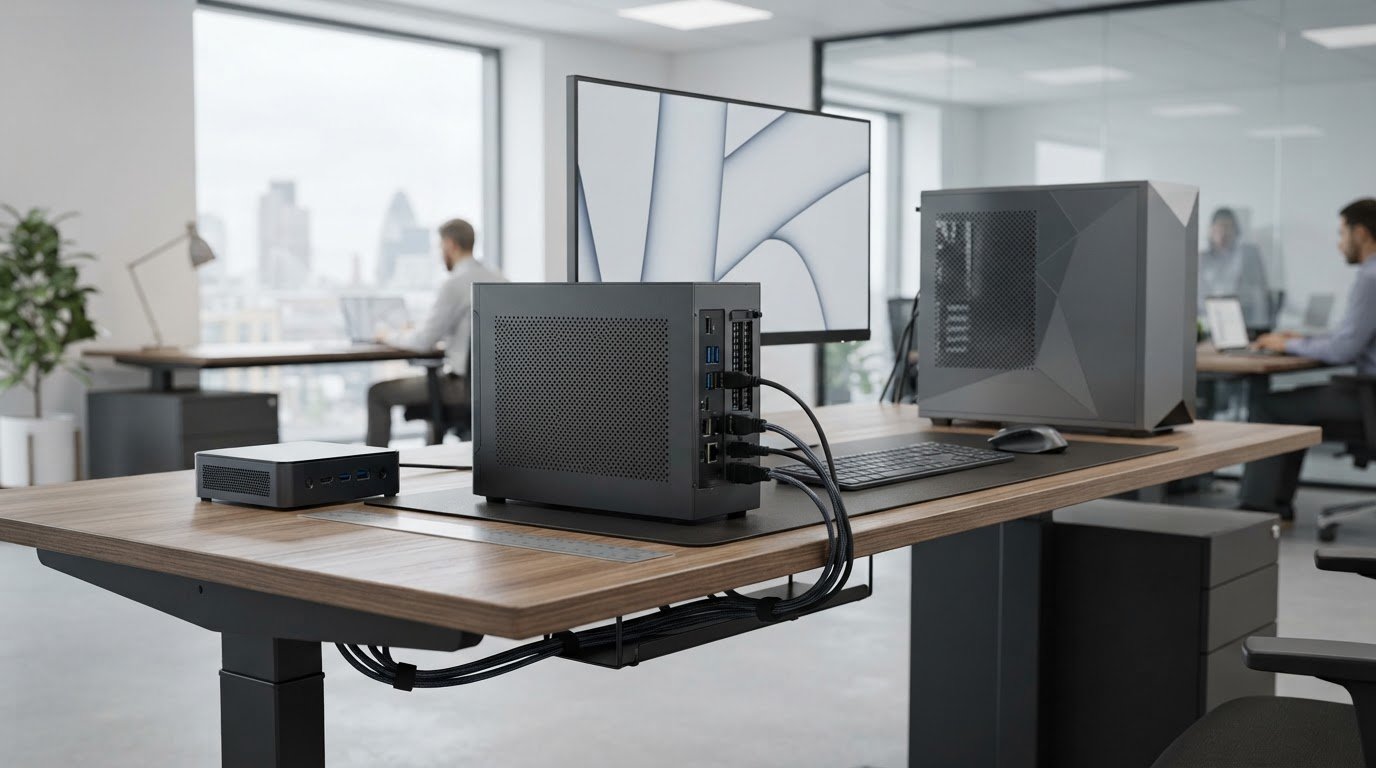
Small form factor custom PCs: business buying guide
The smallest case isn’t automatically the best fit. For businesses considering small form factor custom PCs for limited space, the key question is whether the complete setup fits the installation point and the work it must do. That means accounting for cables, ventilation clearance and room to reach ports, not just the case dimensions. Compact systems can free up desk or cabinet space, but heat, performance and future maintenance also matter.
This guide compares compact options with larger desktops by workload, footprint, cooling and upgrade needs. It explains how to assess case dimensions, cable routes, ventilation and servicing access together, and when integrated graphics may be sufficient. Use the practical checks to brief HGC Technologies UK Ltd. on a custom-built business PC shaped around your workload and workspace, rather than choosing components by headline specification alone.
Key Takeaways
- Match the PC configuration to the applications, users and expected working life, rather than relying on headline specifications.
- Compare small form factor custom PCs for limited space with mini PCs and tower desktops by considering workload fit, access and footprint.
- Prepare a workspace brief that accounts for measurements, ventilation, cable routes, ports, peripherals and servicing access.
- Assess processor, memory, storage and graphics needs together to balance performance, cooling and future expansion.
- Use a clear brief to shape a HGC Technologies custom-built PC around your business requirements and available workspace.
What makes a small form factor custom PC suitable for limited space?
A small form factor (SFF) PC uses a compact case compared with a conventional desktop tower. The category includes different designs rather than one fixed size, as the Small form factor (SFF) PC overview explains. For a business, the useful question isn’t simply how much smaller the case is. It’s whether the complete system fits its position, has suitable airflow and access, and can run the required applications.
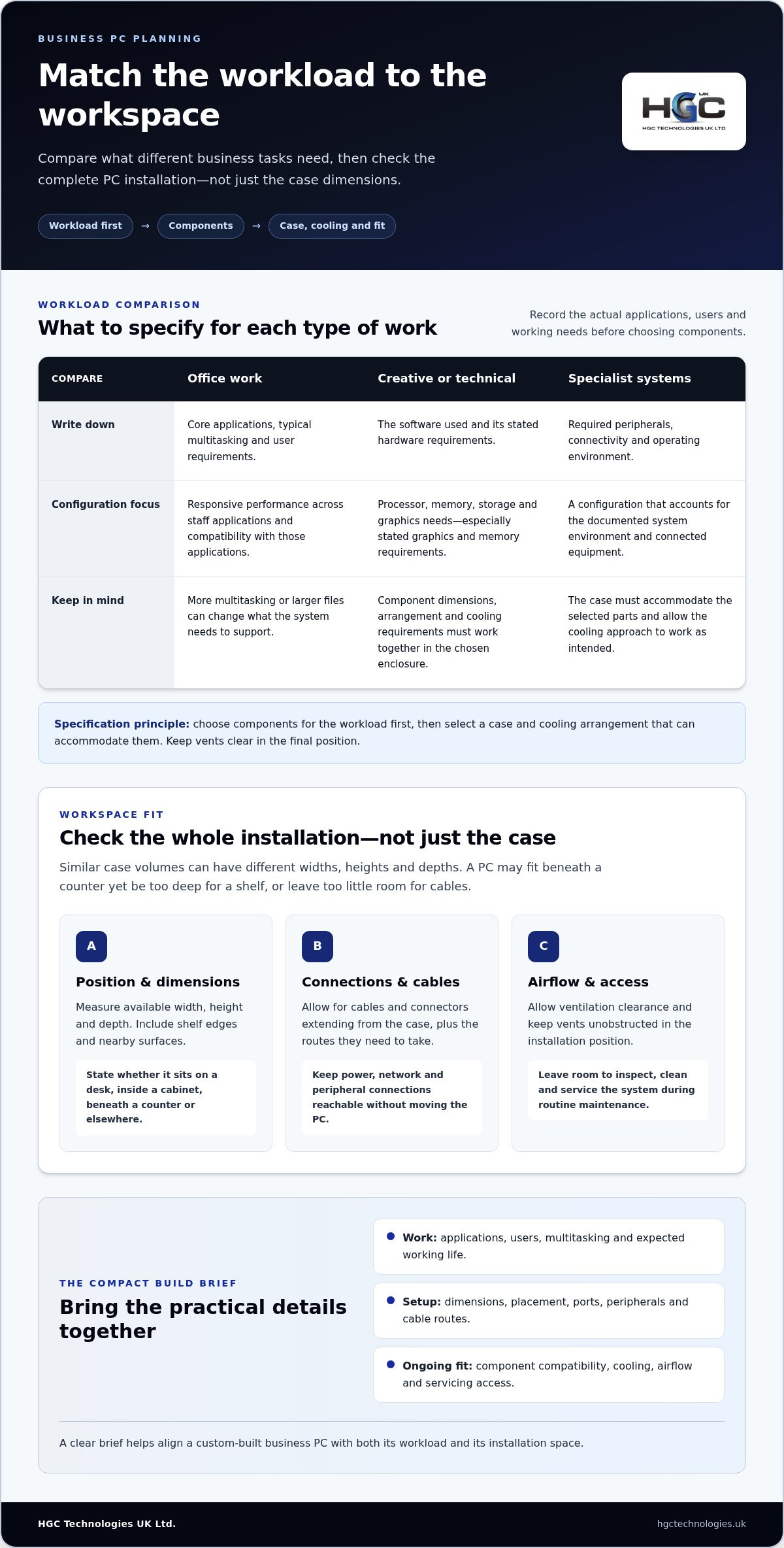
Case volume alone doesn’t show how a PC will fit a desk or equipment area. Two cases with similar volume can differ in width, height and depth. A unit might fit beneath a counter but be too deep for the shelf, or leave too little room behind it for cables. Compare the external dimensions with the actual installation space, including the clearance needed for connections.
Which business environments benefit from a compact custom PC?
Reception desks and retail counters often need to accommodate screens, payment or communication equipment, and paperwork alongside the computer. In meeting rooms, a compact system can help keep the shared work area clear. In space-conscious offices, it may reduce desktop clutter. The benefit depends on placement: a smaller case can free up surface area, but it still needs to remain accessible and ventilated.
Separate standard office duties, such as email, document work and scheduling, from graphics, data or specialist applications. More demanding work may require additional processing, memory or graphics resources, which can affect the suitable case and cooling arrangement. Specify a compact build around its actual workload instead of assuming every business task needs the same configuration.
How should you measure the space before choosing a PC?
Measure the intended position’s width, height and depth, then account for the cables and connectors that extend from the case. Make sure there’s space to reach power, network and peripheral connections without pulling the PC out of place. Allow for ventilation and enough clearance to inspect, clean or service the system during routine maintenance.
Record practical constraints in the procurement brief, including:
- Position and dimensions: note the available width, height and depth, including shelf edges and nearby surfaces.
- Placement: state whether the PC must sit on a desk, inside a cabinet, beneath a counter or in another defined location.
- Access and connections: list nearby equipment, required ports and peripherals, cable routes, airflow needs and the space available for routine access.
This gives a custom-built PC brief a realistic starting point. HGC Technologies builds business PCs around specific requirements, helping align the intended configuration with both the workload and the workspace.
How workload, cooling and components shape a compact PC build
Start with the work the computer must perform: which applications it will run, how many people will use it, how much multitasking they do and how long the system is expected to remain in service. This gives the configuration a practical purpose and helps avoid choosing components solely because they appear powerful on paper. For small form factor custom PCs for limited space, let the workload guide component choices before settling on a case.
Choose components for the workload first, then select a case and cooling arrangement that can accommodate them. This keeps performance needs and physical constraints in view together.
What specifications matter for office, creative and specialist workloads?
For everyday office use, prioritise responsive performance across the applications staff use and compatibility with those applications. Creative or technical work may place different demands on the processor, memory, storage and graphics, so document the software requirements before specifying those parts. Frequent multitasking or handling larger files can also change what a suitable configuration needs to support.
- Office work: list core applications, typical multitasking and user requirements.
- Creative or technical work: identify the software and its stated hardware requirements, especially for graphics and memory.
- Specialist systems: record required peripherals, connectivity and the operating environment in which the PC will run.
How do cooling and component fit affect a small PC?
A compact enclosure gives components less room, so their physical dimensions, arrangement and cooling requirements need to be considered together. The case must accommodate the selected parts while allowing the cooling approach to work as intended. Keep vents clear in the final installation position; obstructed airflow can undermine the planned arrangement.
Use manufacturers’ documented component requirements to guide the build, rather than assuming a particular configuration will suit every compact case. The practical considerations involved in building a small form factor PC include component compatibility, cooling and cable management. For business procurement, relate those choices to the applications, peripherals and expected operating life recorded in the brief.
A clear workload brief gives HGC Technologies a practical basis for tailoring a custom-built business PC to specific requirements, with component choices considered alongside the compact installation.
Small form factor custom PCs versus mini PCs and tower desktops
The best format depends on the work the PC must do and how it will be maintained, not size alone. A mini PC prioritises a very small footprint, a compact custom PC allows the component mix to be shaped around defined business needs, and a tower desktop provides more physical room. These are broad distinctions, not guarantees: actual capability, connectivity and access depend on the individual system and its specification.
A compact case doesn’t automatically mean limited capability or poor reliability, just as a larger case doesn’t guarantee better performance. Assess the proposed components, their compatibility and the system’s fit with the work and workspace. The comparison below is a guide; each point depends on the specification.
| Format | Footprint | Workload fit | Access and changes |
|---|---|---|---|
| Mini PC | Usually the smallest of these desktop options | Can suit defined tasks where its available capabilities meet application and peripheral needs | Internal access and component changes vary by design |
| Compact custom PC | Smaller than a conventional tower, with dimensions dependent on the chosen enclosure | Useful where a tailored component mix is important within a restricted space | Access and future changes depend on the selected parts and case |
| Tower desktop | Requires more desk or floor space | Can suit workloads or plans that call for a larger component arrangement | Often provides more room to work inside, though access depends on its design |
When does a compact custom PC make more sense than a mini PC?
Consider a compact custom build when a standard mini PC’s available component mix or connections may not align with the required software, peripherals or operating environment. This can matter for specialist tasks where processing, graphics or memory requirements need to be balanced against the available space. Guides such as SFF component buyer’s guides illustrate how component choices vary across build types. For a business brief, connect those choices to the actual applications and maintenance priorities.
When is a tower desktop the more practical choice?
A tower may be the sensible option if there’s adequate floor or desk space and easier internal access or future component changes are priorities. Its larger enclosure can make servicing and component arrangement more straightforward, depending on the design. Include cooling needs and routine access in the decision. If the workspace accommodates a tower, there’s no need to choose a smaller format simply for compactness.
Before procurement, identify the necessary workload, footprint and access needs, then weigh compact custom PCs against mini PCs and towers. This keeps the format decision tied to business requirements rather than the assumption that smaller is always better.
How to evaluate and specify a custom PC for a tight workspace
A useful procurement brief brings the work, physical installation and future upkeep into one clear specification. That gives a tailored build a stronger starting point than choosing a case first and trying to fit requirements around it. Use this process to assess small form factor custom PCs for limited space and give the proposed configuration a practical business context.
What should a business PC specification brief include?
Separate essential requirements from preferences. The applications staff must run and the available installation dimensions are essentials; a preferred orientation may be flexible if it doesn’t affect access or operation. Record user numbers and typical tasks, including periods of concurrent work, so the brief reflects day-to-day use rather than a single idealised task.
- Document the workload: list the applications, user tasks, expected multitasking and operating system requirements. Note any software requirements that affect the components needed.
- Map the installation: record the available width, height and depth, the intended position and any mounting or orientation constraints. Include space needed for ventilation and access.
- Plan connections: identify display connections, required ports, peripherals and cable routes. Account for nearby equipment that may obstruct access or airflow.
- Set priorities: mark each requirement as essential or preferred, including performance, maintenance access and future flexibility.
- Review the proposal: compare the proposed footprint and configuration with the brief. Check that the system can be positioned, connected and accessed as intended.
How should buyers assess access, maintenance and future changes?
Think beyond installation day. Record who will manage the PC and whether they can reach it for routine servicing without moving connected equipment or disrupting the workspace. A computer tucked behind a counter may save surface area yet prove awkward to access if cables are difficult to reach or nearby equipment blocks the case.
Consider likely changes over the system’s working life: new software, additional users, different peripherals or revised work patterns. These may affect the required connections, components or physical access. Balance future flexibility against the space available today. A compact build may suit a fixed, well-defined role, while broader maintenance or change requirements may influence the configuration and footprint you specify.
A clear brief helps HGC Technologies shape a custom-built PC around your business requirements and workspace. Explore HGC Technologies’ custom-built PC solutions.
How HGC Technologies can tailor a custom PC to business requirements
A compact PC should fit the work as well as the workspace. HGC Technologies builds custom PCs for businesses with specific computing requirements, using a clear brief to connect everyday tasks, specialist applications and installation constraints to a considered specification. For small form factor custom PCs for limited space, available room is one part of the decision, alongside what users need the computer to do.
From workspace constraints to a tailored business PC
Bring the practical details together: applications and workload, available space, required peripherals and connections, and the environment where the PC will operate. For example, a system for a shared work area may need to support particular displays and peripherals while fitting within a defined desk position. Recording these requirements separately makes it easier to identify what’s essential, compare a proposed configuration with the brief and resolve competing priorities.
The checklist in this guide can help organise those details into a useful specification. Include expected changes over the PC’s working life, such as evolving software needs or new peripherals, as well as the access required for routine maintenance. HGC Technologies builds custom PCs around business requirements, so the brief provides a practical basis for aligning the configuration with the intended role and physical setting. Don’t specify a smaller footprint at the expense of a requirement users rely on every day.
When should a business consider server hardware instead?
A desktop PC is generally intended to support an individual user’s computing tasks. If the requirement is to provide shared services or centralised infrastructure for multiple users, the need may be different from selecting a compact desktop. Consider what must be shared, who relies on it and whether the requirement belongs in an individual workstation or a broader infrastructure plan. Multi-user needs may call for a separate assessment of server requirements.
HGC Technologies also provides professional server solutions for enterprise infrastructure needs. An enterprise server hardware procurement guide can help frame the distinct requirements when weighing a desktop purchase against shared infrastructure.
With the workload, workspace and priorities clearly set out, you can brief a tailored business PC with greater confidence. Discuss a custom-built PC for your business.
Turn your workspace requirements into a confident PC brief
Choosing small form factor custom PCs for limited space is about more than reducing the case footprint. Start with the work the PC must support, then weigh its dimensions against ventilation, connections, maintenance access and future needs. Compare compact custom PCs with mini PCs and tower desktops on those practical criteria instead of assuming the smallest option will suit every task.
A clear brief gives your procurement decision direction. Record the applications, user requirements, installation limits and essential peripherals, then use them to assess the proposed configuration. HGC Technologies builds custom PCs around specific business requirements and provides professional server solutions for wider infrastructure needs.
With your priorities in place, discuss a custom-built PC for your business and take the next step towards a system suited to its role and working environment.
Frequently Asked Questions
What is a small form factor custom PC?
A small form factor custom PC is a desktop computer built in a case that’s more compact than a conventional tower. Its components are selected to suit a particular workload and installation. Suitability depends on the applications it must run, available width, height and depth, and practical details such as ventilation, required ports and maintenance access. A small case alone doesn’t establish whether the computer will meet business requirements.
Are small form factor PCs suitable for business use?
Small form factor PCs can suit business use when their configuration supports the required applications, user tasks and operating environment. Small form factor custom PCs for limited space may help preserve room on a reception desk or retail counter, but compactness isn’t enough by itself. Plan for cable access, clear ventilation and routine maintenance, then compare the configuration with the workload rather than assuming every compact computer suits every role.
Can a small form factor PC handle demanding workloads?
It can, depending on the components, application requirements and the enclosure’s physical and cooling limits. Start by documenting the software and expected workload, then assess whether the proposed processor, memory, storage and graphics configuration is appropriate. Don’t judge performance by case size or a single headline specification. Specialist applications may require a detailed brief that accounts for their stated hardware requirements and the PC’s intended operating environment.
How do I choose a custom PC for a small desk?
Measure the available width, height and depth, then allow for cables, ventilation and maintenance access. Record the applications, peripherals and connections the user needs, including display connections and nearby equipment that could obstruct the PC. Consider whether future servicing or component changes matter. Compare compact custom PCs with mini PCs and tower desktops, choosing the format that meets both workspace and workload needs.
Is a small form factor PC better than a tower desktop?
Neither format is always better; the right choice depends on the task and installation. A compact PC can preserve desk or floor space, while a tower may be more practical if internal access, servicing or future component changes are priorities. Compare the workload, available position, ventilation and maintenance needs. If there’s room for a tower and its practical advantages matter, choosing compact equipment simply because it’s smaller may not be worthwhile.
What should I include in a custom PC buying brief?
Include the applications, user tasks, expected workload, operating system requirements and peripherals. Add the available dimensions, intended position, cable routes, ventilation needs and access for servicing. Record likely changes during the PC’s working life, such as additional users, software or equipment. Separate essential requirements from preferences so the proposed configuration can be assessed against the business workload and installation constraints.

Refurbished Servers UK Wholesale: The 2026 Enterprise Procurement Guide
With OEM prices surging by up to 20% in the opening months of 2026 and lead times often exceeding ei
Refurbished IT Hardware Compliance Standards UK: The 2026 Enterprise Checklist
Rigorous compliance standards transform secondary computing infrastructure from an operational vulne

Managing IT Hardware Refresh Cycles: The 2026 UK Strategic Guide
With RAM prices rising fourfold and SSD costs climbing from £40 to over £150 in early 2026, the tr