
Wholesale Android Phones for Business App Deployment
Bulk buying is only half the deployment plan: Android zero-touch enrolment helps businesses set up and manage devices at scale. For businesses sourcing wholesale Android phones for business app deployment, it can support remotely applied configurations and give employees devices prepared with the apps they need.
Getting phones to users quickly matters, but so do consistent setup and business data protection. Zero-touch enrolment supports enforced device management and security, helping businesses apply a planned configuration across a deployment instead of preparing every phone individually.
This article explains how zero-touch enrolment works, what to consider when choosing budget-friendly Android devices, and how bulk purchasing can support deployment and resale planning. It also covers device management and the factors that shape a practical wholesale order, helping you assess whether this approach fits your business.
Key Takeaways
- Use zero-touch enrolment to apply device configurations remotely and prepare phones with the apps employees need.
- Plan device management around consistent setup and security requirements across your business deployment.
- Factor minimum order quantities and per-unit costs into bulk purchasing and resale margin planning.
- Match device choices to app needs and customer demand to make procurement decisions more commercially relevant.
Mobile device management and app implementation
Successful deployment brings purchasing decisions together with device management, app setup and employee onboarding. For an enterprise, each phone should suit its intended network, business role and inventory process.
Phone purchasing and inventory management
Wholesale purchasing supplies phones in bulk, usually to businesses or resellers. Retail purchasing typically serves end users buying one or two devices. Bulk orders can suit a planned rollout, while retail may be a better fit for individual replacements. The right route depends on deployment size, replenishment needs and how consistently devices must be configured.
Start inventory management with a record of each device, its intended user or team, and its deployment status. This helps distinguish stock awaiting setup from phones already assigned. It also supports migration planning: group employees by role, prepare app configurations and coordinate handover instead of treating each delivery as a separate project.
For network-connected mobile inventory, track each phone alongside its assigned user and the apps required for that role. Managed mobile and IoT services can bring phones and connected devices into one operational plan, with access and configuration tailored to their business purpose.
Compatibility and support terms
Wholesale Android phones are not automatically unlocked, compatible with every UK network or approved for every business use. These attributes depend on the specific model and configuration. Specify the required network compatibility, unlocked status and UK-market approval before purchasing.
Support terms depend on the wholesale agreement. Before ordering, establish what warranty coverage applies, how returns are handled and how to report faults. Clear terms help businesses plan replacements and manage service interruptions without assuming that retail protections apply to bulk business purchases.
Android zero-touch enrolment supports device management at scale. Personalised configurations can be created in the cloud and deployed remotely, so employees can receive phones prepared with the apps and settings they need. This can make migration more consistent across teams and support enforced management and security controls. Before handover, connect each device’s role, app requirements and network access in the setup plan.
Android devices and budget-friendly alternatives
Choose Android devices to suit the apps, work patterns and management approach they need to support. A lower purchase cost matters only if the phones also meet deployment requirements.
Device configuration and deployment
For an enterprise deployment, group devices by team or business role, then apply the relevant configuration. Android zero-touch enrolment supports remote deployment of personalised configurations created in the cloud. Employees can receive phones with the required apps prepared, rather than having to complete separate manual setup on arrival.
Define the intended users, apps and configuration before deployment. This gives the provider a clear basis for preparing each group and keeping setup consistent. For managed Android Enterprise deployments, align the device-management approach with these requirements. Samsung Knox may form part of the discussion for Samsung devices; choose a platform that suits the deployment plan.
Business phone models and budget alternatives
There is no single best Android phone model for every business app or fleet. The right choice depends on the apps employees use, their working patterns and the required deployment configuration. A Samsung A54 5G is one example of a model found in wholesale purchasing, but its name alone does not establish suitability for a particular fleet.
Budget-friendly alternatives can help control procurement spending, while the latest flagship devices may better suit particular users or apps. Resellers should weigh customer demand alongside business requirements. A sound choice balances intended use and purchase cost rather than assuming the newest model is always necessary.
Specification and app compatibility
To assess compatibility, compare each app’s requirements with the proposed device specification and deployment configuration. Consider the app’s operating requirements, how employees will use it, and whether the device supports the required network and management approach. This helps identify a suitable model before preparing a fleet order.
Security planning matters too. Android zero-touch enrolment supports enforced device management and security, while cloud-based configurations help keep deployment consistent across groups. Align access and app setup with each device’s business role to support controlled deployment and protect company data. A wide product range offers choice, but model selection still needs to reflect the organisation’s apps and operating requirements.
Bulk purchase orders and resale ROI
Wholesale phone orders may have a minimum quantity, so order size affects procurement and stock planning. Minimums and lot sizes vary by supplier, model and available stock. Align the requested quantity with deployment or resale demand instead of buying a larger lot without a clear use for it.
Bulk purchasing can lower the cost per unit compared with buying phones individually. However, purchase price is only one part of the commercial calculation. Include configuration, fulfilment and other order-related costs when estimating the total investment. This gives resellers a more useful basis for setting resale prices and assessing potential margins.
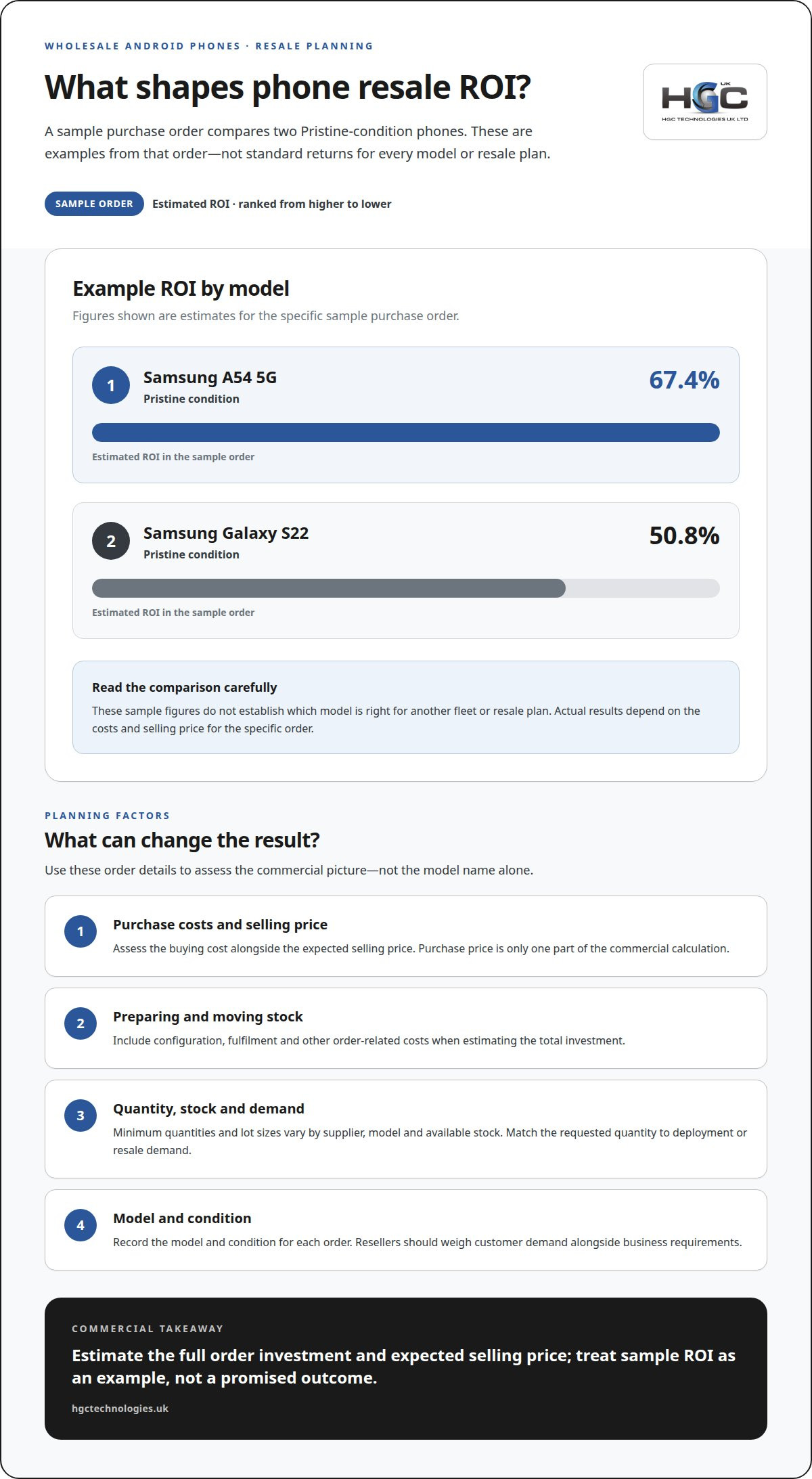
A sample purchase order estimates ROI at 50.8% for a Samsung Galaxy S22 in Pristine condition, and 67.4% for a Samsung A54 5G in Pristine condition. These figures are examples from that order, not standard returns for every model or resale plan. The actual result depends on purchasing costs, selling price and the expenses attached to preparing and moving stock.
For a clear assessment, record the model, condition, lot size and expected selling price for each order. Account for the costs involved before comparing potential proceeds with the total investment. Consumer demand matters too: a model that suits current buyers may be easier to resell than stock chosen without considering their preferences. This supports disciplined purchasing and reduces the risk of tying up funds in slow-moving inventory.
Business deployments add another consideration: a bulk order may need to match the planned number of users and the app configuration required across the organisation. Android Enterprise management can support consistent device setup, but include configuration and deployment costs in the financial assessment. Aligning the lot size with rollout needs connects supply planning to operational use, while resellers can assess each model’s commercial potential before committing to stock.
Wholesale Android phones for businesses
A wholesale order involves more than choosing a model. UK businesses should consider documentation, device origin, condition and deployment requirements. These details affect how smoothly phones reach employees and enter business use. For wholesale Android phones for business app deployment, plan for both the devices and the rollout.
VAT, invoices and import duties
For a UK wholesale purchase, VAT treatment depends on the seller and transaction, while import duties depend on the shipment and its customs classification. The invoice should clearly record the items supplied and applicable charges. The buyer’s accounting treatment depends on its circumstances, so one supplier’s invoice is not a universal example.
Before arranging delivery, establish whether the supply is domestic or involves goods entering the UK from abroad. This affects which import charges may apply. Keep the invoice, shipment and inventory records linked, especially when an order includes different Android models or configurations.
Grey-market and counterfeit phone risks
Grey-market phones are genuine devices sold through channels outside the manufacturer’s intended distribution route. Counterfeit phones falsely present themselves as genuine. For a business, uncertain origin or authenticity can complicate model identification, configuration and app deployment. Refurbished phones are a separate category, so make sure their condition and grading are clear in the order documentation.
Assess each lot using its model details, condition descriptions and supporting purchase records. Then match the devices to the required network and management configuration before assigning them to users. A mismatch can delay deployment or disrupt a planned rollout. Wholesale suppliers focus on product supply and may not provide customer-facing after-sales service, so agreed support and returns terms matter alongside delivery.
For resellers, transparent condition information helps set customer expectations. For business fleets, consistent device details support inventory tracking and replacement planning. The latest model is not automatically the best fit: choose phones according to app requirements, configuration needs and intended users. A purchasing plan for wholesale Android phones for business app deployment should account for these operational factors, not just the product label. An iPhone fleet also needs its own platform-specific management plan, rather than Android settings applied unchanged.
HGC Technologies UK
HGC Technologies UK Ltd. can support businesses whose app rollout also requires suitable computing equipment. Organisations may need laptops for staff workflows or custom-built PCs for specific business environments. HGC supplies bulk refurbished Dell, Lenovo and HP laptops, as well as custom-built PCs, helping businesses source complementary hardware through one wholesale partner.
Consider these options when a mobile rollout forms part of a wider equipment requirement, such as preparing teams to use business applications across phones and computers. Matching each device category to its intended role supports a coordinated procurement plan without assuming every task belongs on a mobile phone.
For business hardware requirements connected to your deployment, contact HGC Technologies UK Ltd. to discuss your needs.
Set your deployment plan in motion
A mobile rollout is also an opportunity to define how new devices fit into your wider technology plans. Before ordering, bring together the intended users, app requirements and procurement priorities in a clear deployment brief. This gives your business a practical basis for coordinating wholesale Android phones for business app deployment with the equipment employees use alongside them.
If your project also requires computers, HGC Technologies UK Ltd. supplies bulk refurbished Dell, Lenovo and HP laptops. Considering these needs alongside mobile procurement can help shape a more coordinated equipment plan, without treating every task as phone-based. Discuss your organisation’s requirements with HGC to identify relevant hardware options.
Contact HGC Technologies UK Ltd. to discuss your business technology requirements and plan your next step with confidence.
Frequently Asked Questions
Which UK wholesalers supply bulk Android phones for business deployment?
UK businesses can enquire with HGC Technologies about bulk original smartphones, including Samsung models that run Android. Wholesale pricing is available on request. Confirm the model and current stock before planning an app rollout, and share the handset model, quantity and deployment requirements when requesting a quote. HGC also buys back used devices, with quotes based on model, quantity, condition and collection location.
What are wholesale prices and minimum order quantities for Android phones in the UK?
Request a quotation to establish the current wholesale price and any applicable minimum order for your selected model. Provide the handset model, required quantity, condition preference and delivery requirements so the offer can be assessed against your procurement needs. Do not assume one price or order threshold applies across different devices; use the quoted terms to plan your purchase and budget.
How does a provider enrol and deploy bulk devices with Android Enterprise?
An Android Enterprise provider enrols devices through an enterprise mobility management (EMM) platform, then applies the organisation’s device policies and approved apps before rollout. Depending on the chosen method, the provider can stage configuration before dispatch or arrange enrolment during first setup. Treat hardware procurement and device management as separate workstreams for HGC orders: HGC supplies original smartphones, while your management provider handles deployment.

Corporate Mobile Phone Procurement UK: The 2026 Strategic Hardware Guide
Your network-bundled mobile contract is likely a debt instrument disguised as a service agreement. F

Capex vs Opex IT Hardware UK: Why Buying Refurbished Wins in 2026
Why are UK businesses still paying a premium for hardware they will never own, especially when inter

Peace of Mind When Buying Used IT Equipment: The 2026 B2B Procurement Checklist
Procurement leaders in 2026 are no longer asking if they should buy refurbished; instead, they're qu