
Choose a refurbished laptop for comfortable typing and navigation
A high refurbishment grade doesn’t guarantee a better typing experience. To assess keyboard and trackpad quality on refurbished laptops, check how the keys and cursor controls work, not just the cosmetic grade. Each key should register, and the trackpad should move the cursor smoothly and respond to clicks and supported gestures.
It’s understandable to expect a Grade A laptop to feel close to new, but grading usually describes appearance rather than typing comfort. This guide explains how visible wear relates to keyboard and trackpad condition, what to check in the layout, and why business laptop keyboards may suit regular typing. It also offers a practical way to weigh cosmetic condition against the feel and function that matter in everyday use.
Key Takeaways
- Use the refurbishment grade to understand cosmetic wear, but judge typing comfort by how the keys work and the condition of the palm rest and trackpad.
- Check the keyboard layout and key response, including function keys, arrows and any fitted number pad, before settling on a model.
- Compare business laptop keyboards by their feel and design; the exact model matters more than the brand name alone.
- Test cursor movement, clicks and supported multi-touch gestures to assess whether the trackpad feels accurate and responsive.
Keyboard and mouse condition by refurbishment grade
Grading describes visible wear, not whether every key or cursor control works. Compare appearance, function and battery condition separately when assessing refurbished models.
Cosmetic grade and functional condition
A cosmetic grade summarises visible condition, such as marks or shine. It doesn’t establish whether the keyboard, trackpad or display works correctly. A Grade A laptop should generally look very good; Grade B may show moderate wear. Use the grade as an appearance guide, then assess operation separately.
Keyboard wear and working condition
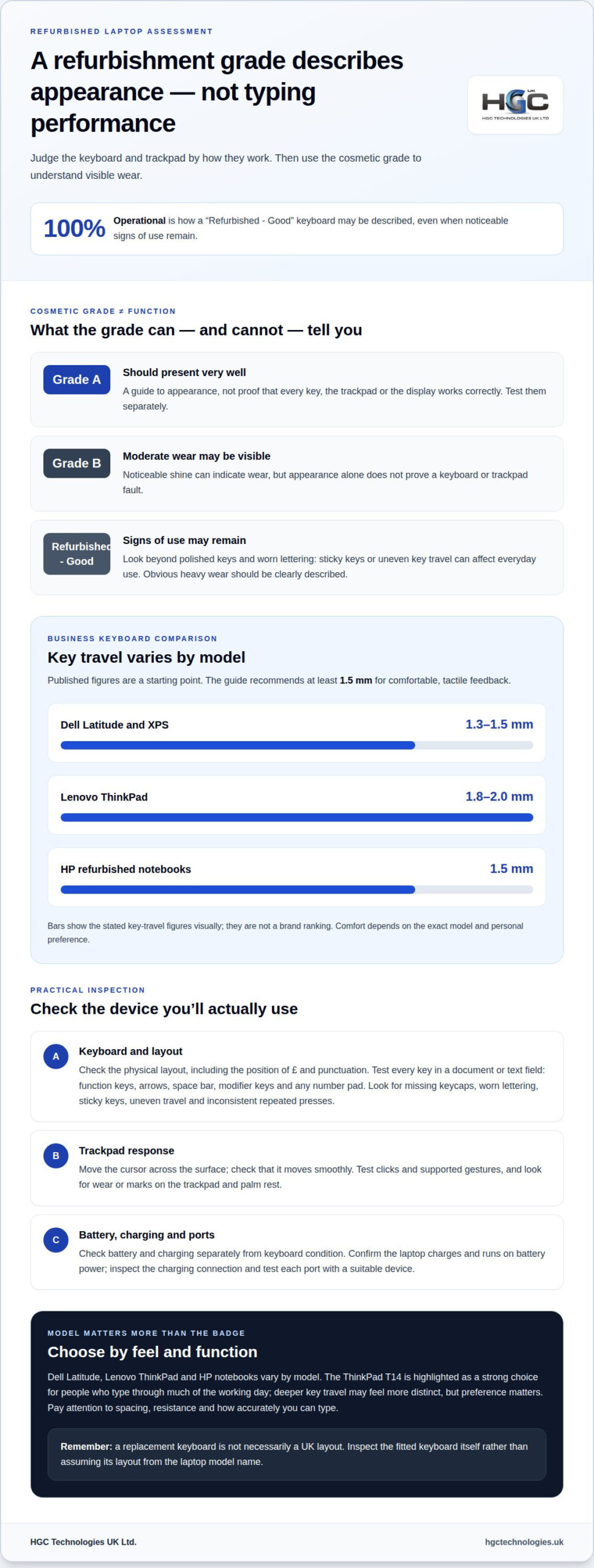
Look for polished frequently used keys, worn lettering, missing keycaps and marks on the palm rest or trackpad. Some visible wear can be compatible with working keys, but sticky keys or uneven travel affect use. A “Refurbished – Good” keyboard may show noticeable signs of use while remaining 100% operational. Obvious heavy wear should be clearly described.
| Grade or description | Cosmetic appearance | What it tells you about function |
|---|---|---|
| Grade A | Keyboard should present very well | Test keys and trackpad separately |
| Grade B | Noticeable shine may indicate moderate wear | Appearance alone doesn’t prove a fault |
| Refurbished – Good | Noticeable signs of use may remain | Keyboard is described as 100% operational |
Choose a device by balancing the visible wear you’ll accept with its working condition.
Check battery and charging separately. A battery that drains quickly or fails to charge can disrupt everyday use, whatever the keyboard grade. Confirm that the device charges and runs on battery power, and inspect the charging connection for damage.
Do UK refurbished laptop warranties cover faulty keyboards and trackpads? Coverage depends on the warranty terms; cosmetic wear and accidental damage may be treated differently. Read the terms alongside your statutory rights.
According to The National Archives, online laptop buyers in the UK can cancel under the Consumer Contracts Regulations within 14 days of receiving an order. Under the Consumer Rights Act, The National Archives says buyers can reject a faulty, unsatisfactory, unfit-for-purpose or misdescribed laptop within 30 days of taking ownership.
Checking keyboard layout before buying
Check the physical layout against the keys you use every day, not just the product description. A UK layout has the £ symbol on the appropriate key, while other regional layouts may position symbols and punctuation differently. Compare the keyboard with the layout you’re used to, especially if you enter figures, use shortcuts or switch between machines.
Test every key in a document or text field, including the function and arrow keys, space bar, modifier keys and any number pad. Look for missing keycaps, worn lettering, sticky keys and uneven travel. Check that repeated presses register consistently. A powerful processor can’t make up for missed keystrokes.
- Confirm the keyboard layout and the position of £ and punctuation.
- Test keys, function controls, arrows and any number pad.
- Inspect the case, screen and ports for damage, then test each port with a suitable device.
A replacement keyboard on a UK-refurbished laptop isn’t necessarily a UK layout. The fitted keyboard depends on the machine and replacement part, so inspect the physical layout rather than assuming it from the model name. A replacement part must match the laptop model and the layout you want.
How much does it cost in the UK to replace a laptop keyboard or trackpad? There’s no fixed cost: the price depends on the machine, the part and the work involved. Replacing a keyboard or trackpad integrated into a larger assembly may involve different work from replacing a separate component.
What should you check during the return period? Test every key, the trackpad, battery and charging, display and ports. Record any faults promptly, and keep the order details and packaging until you’ve completed your checks.
Assess the processor and operating system separately from keyboard comfort. For example, confirm that the processor suits your intended workload and that the machine’s Windows 11 configuration meets your needs. Compare the full specification and condition before choosing a deal; a lower price alone doesn’t establish that a purchase suits your everyday work. For business buying, bulk refurbished laptop options can support consistent model selection.
Business laptop keyboard quality
Business models often prioritise practical typing features, but the brand name alone doesn’t determine comfort. Dell Latitude, Lenovo ThinkPad and HP notebooks vary by model, so assess the specific keyboard and trackpad rather than relying on a brand ranking. Assessing keyboard and trackpad quality on refurbished laptops starts with the model you’ll actually use.
Published key-travel figures offer a useful starting point. Dell Latitude and XPS keyboards are listed at 1.3-1.5 mm, while Lenovo ThinkPad keyboards are listed at 1.8-2.0 mm. HP refurbished notebook keyboards are described as having consistent 1.5 mm travel. The guide recommends at least 1.5 mm for comfortable, tactile feedback.
Lenovo ThinkPad keyboards often exceed 1.8 mm, and the ThinkPad T14 is a strong choice for people who type through much of the working day. Deeper travel may feel more distinct under the fingers, but preference matters. Try a representative model if possible, paying attention to key spacing, resistance and how quickly you can type accurately.
How do keyboard and trackpad quality compare across refurbished business laptop brands? Business laptops may offer better keyboards, depending on the exact model. No brand-wide specification establishes that every model delivers the same experience. A useful comparison of keyboard and trackpad quality on refurbished laptops considers how the keys feel and how the trackpad responds on the particular device.
The ThinkPad TrackPoint offers another way to navigate. This mini-joystick sits in the centre of the keyboard and controls the cursor without moving your hands from the keys. It may suit work that involves frequent screen navigation, but complements rather than replaces the trackpad.
- Inspect the model’s keyboard layout, key travel and visible condition.
- Test the trackpad’s cursor movement, clicks and supported gestures.
- Check that the screen, Windows setup and other functionality suit your work.
The best fit is the one that supports your routine, not necessarily the model with the greatest key travel. Compare a Latitude, ThinkPad or HP notebook by typing a familiar passage and navigating with the trackpad. Notice missed keystrokes, finger fatigue and cursor control; these practical results matter more than any specification alone.
How can you test a refurbished laptop’s trackpad for responsiveness and accuracy?
Test the trackpad with everyday tasks, not just a quick cursor sweep. Open a document, move the pointer across the screen, then guide it to small targets such as menu icons. Movement should feel smooth and controlled, without jumps, pauses or cursor drift after you stop.
Check the whole surface. Move your finger from each edge towards the centre, then repeat diagonally. A dead area or inconsistent response can make precise selection difficult. Try short movements and longer sweeps to check that navigation works accurately at different distances.
Test clicks and gestures separately. Press the left and right click areas, where fitted, and check that each responds reliably. Select text, open a context menu, and drag a file or window. These actions can reveal missed clicks, stiff buttons or dragging that stops unexpectedly.
- Move the cursor around the whole screen and pause at small targets.
- Test left and right clicks, selection and drag-and-drop.
- Try supported multi-touch gestures, such as scrolling or pinch-to-zoom.
- Repeat each action across different areas of the trackpad.
To test scrolling, use a long page and check whether two-finger movement follows your fingers consistently. If the laptop supports pinch-to-zoom, try it on an image or document. Gestures vary by model and settings, so assess the gestures the device supports rather than expecting every trackpad to behave the same way.
Check the physical condition as well as responsiveness. A glossy or marked palm rest may be cosmetic, but cracks, a loose surface or uneven-feeling clicks deserve attention. If the pointer behaves erratically, repeat the same movement after cleaning the trackpad with a soft, dry cloth. This can help distinguish surface residue from inconsistent operation.
Finish by using the trackpad for a familiar task, such as selecting text and scrolling through a spreadsheet. If you’re sourcing refurbished laptops for a team, explore bulk refurbished laptop options for business procurement.
HGC Technologies UK
HGC Technologies UK Ltd. supplies bulk refurbished laptops to businesses and technology resellers. If keyboard feel, trackpad response and consistency across a team are priorities, consider its refurbished Dell, Lenovo and HP laptops. Choosing matching models can help standardise familiar layouts and navigation across a deployment.
If refurbished laptops don’t meet your required configuration, HGC Technologies UK Ltd. also builds custom PCs. The right option depends on how staff work, the equipment they need and whether laptop mobility is essential.
Use the checks in this guide to define the keyboard layout and trackpad functionality your users need, then choose a suitable route for your organisation. Contact HGC Technologies UK Ltd. to discuss your business requirements.
Make typing comfort part of your next device decision
Set clear criteria for how your organisation works before selecting devices. Consider whether staff need a shared keyboard layout, type for long periods or rely on precise cursor control. These priorities can guide a device plan for different roles and support consistent workflows. Assessing keyboard and trackpad quality on refurbished laptops helps match equipment to the way people work.
Consider how the devices will fit into your organisation’s wider technology plans, not just the immediate purchase. Understanding staff needs helps prioritise practical requirements and make future refresh decisions more purposeful.
Use those priorities to shape your next device decision. A thoughtful approach puts your team’s working habits at the centre and helps you move forward with confidence.
FAQs
How can you assess keyboard quality on a refurbished laptop before buying?
Test the device with a task that reflects your usual workload. Draft a short email, enter figures in a spreadsheet or use your everyday shortcuts. Notice whether the keyboard feels comfortable at your usual pace and its layout suits your hands. For a team purchase, try the same task on each model to see which feels most suitable.
Do refurbished laptops usually have worn or replaced keyboards and trackpads?
Input components vary by device: a refurbished laptop may retain its original keyboard and trackpad, show signs of use or have a replacement part. Refurbishment doesn’t automatically mean either component has been replaced. For a business rollout, consistency matters too. Replacement parts can feel different across otherwise matching machines, so consider component condition as well as the model.
What keyboard and trackpad condition grades do UK refurbishers use?
UK refurbishers use different labels and grading descriptions, so no single grade name guarantees a particular keyboard or trackpad condition. Treat each grade as the seller’s description, not a universal scale. Compare the details for individual devices, especially when a team needs consistent equipment, and distinguish cosmetic descriptions from statements about how the controls work.

Business IT hardware partner or supplier? Choose the right provider
The lowest hardware quote is not always the best choice. Knowing how to choose a business IT hardwar

Original Smartphones Wholesale UK: The 2026 Strategic Procurement Guide
Did you know that whilst the UK smartphone market revenue is hitting $18.1 million in 2026, nearly a

Negotiating a Bulk Purchase of Refurbished Laptops: A Practical Guide
A lower unit price can hide a costly mismatch. When negotiating a bulk purchase of refurbished lapto