

Choosing a CPU for a Business PC by Workload
The fastest processor isn’t automatically the right choice for a business PC. Choosing a CPU for a custom business PC means matching a current business-class processor to the applications employees use most, rather than paying for speed their work won’t benefit from. A professional weighs performance, efficiency, threading and graphics against current workloads and likely future needs.
It’s sensible to want a PC that feels responsive now and stays suitable as work evolves. This article explains how workload intensity affects processor choice, when multiple threads can help, how Intel Core, Xeon and AMD Ryzen families differ in broad terms, and when integrated graphics may be enough. You’ll have a clearer basis for choosing a system that fits the work, without treating the highest specification as the default.
Key Takeaways
- Match processor performance and efficiency to the applications employees rely on, rather than choosing the highest specification by default.
- Consider how threaded workloads use CPU resources, especially when teams handle demanding analysis or creative work.
- Compare processor families by the features and software support the workload requires, including virtualisation.
- Use integrated graphics for everyday office tasks where suitable, and consider a separate graphics card when visual workloads demand more.
1. Processor performance, efficiency and AI workloads
Choosing a CPU for a custom business PC starts with the applications employees use every day. A professional maps each role’s workload, then selects processor performance to match its busiest tasks. A computer for spreadsheets and video calls has different demands from a creative workstation running design software or AI workloads.
For office work, a current business-class processor can deliver suitable performance without prioritising the fastest available tier. Coding needs depend on the software and whether developers compile large projects or run virtual machines. Design applications can place greater demands on processors, particularly for complex models or image processing. A professional considers the actual applications, multitasking and anticipated business needs, rather than choosing a tier by job title alone.
Processor efficiency also affects a workstation’s operating environment. Higher power consumption can increase electricity use and heat, while extra cooling can add cost and fan noise. Matching the processor to its workload can reduce unnecessary power and cooling demands, although the complete hardware configuration also affects reliability. A professional balances performance with cooling capacity, case airflow and expected hours of use.
Future planning matters because processors in business PCs are almost certainly soldered to the motherboard and generally cannot be upgraded later. For a custom desktop, the professional selects a processor and compatible motherboard as a platform, considering whether that platform can support later component changes. Intel CPUs do not fit motherboards designed for AMD CPUs, or vice versa, so the choice affects upgrade options from the outset.
AI work calls for the same workload-first assessment. A professional identifies whether the intended applications run AI tasks on the CPU and whether they require particular processor features. They then balance those needs against everyday performance, efficiency and the rest of the system. This avoids choosing specialist processing capability that employees’ software won’t use, while reducing the risk of the processor limiting a demanding creative or analytical workflow.
2. Hyper-Threading and simultaneous multithreading
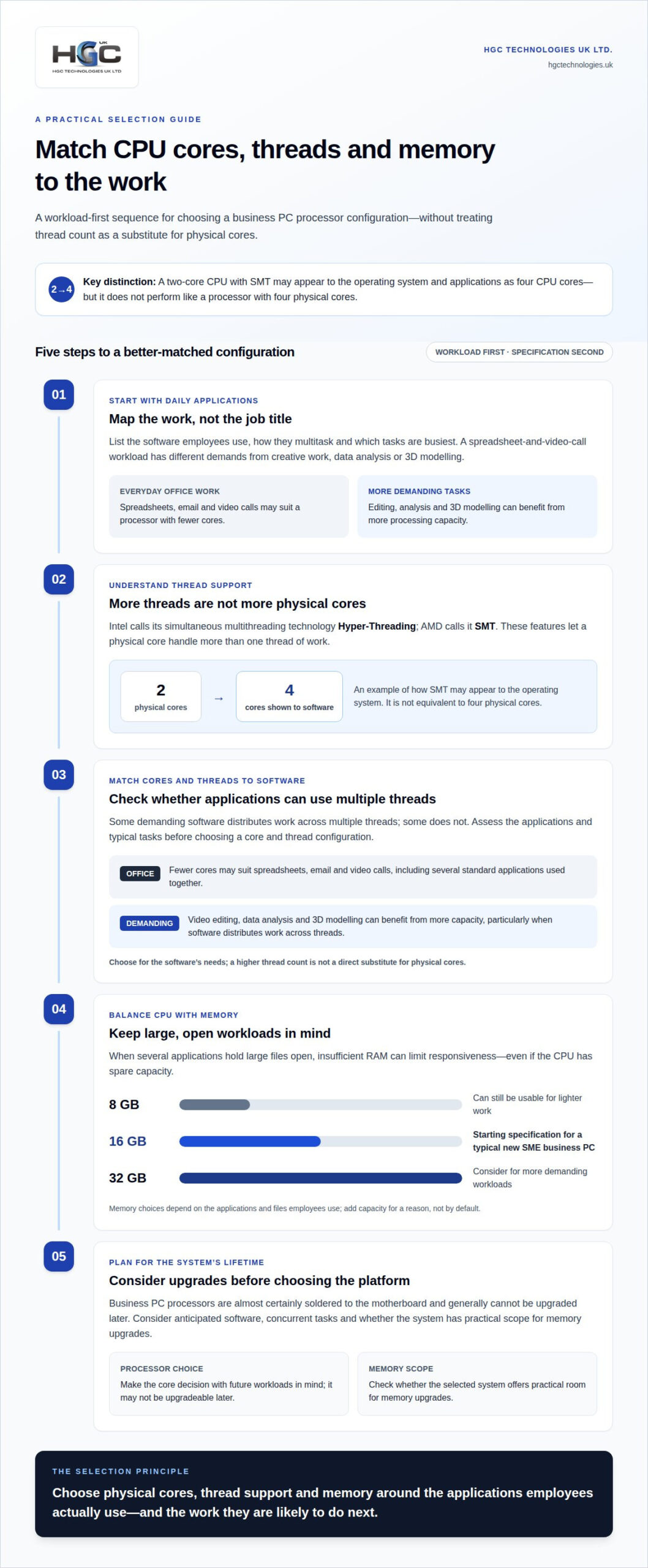
Intel calls its simultaneous multithreading technology Hyper-Threading; AMD uses SMT. These features let a physical processor core handle more than one thread of work. A two-core CPU with SMT may appear to the operating system and applications as four CPU cores, but it won’t perform like a processor with four physical cores. A professional considers both physical core count and thread support when matching a processor to the software.
For spreadsheets, email and video calls, a processor with fewer cores may suit the workload, particularly when employees use several standard applications together. Video editing, data analysis and 3D modelling can benefit from more processing capacity, especially when the software distributes work across multiple threads. A professional assesses the applications and typical tasks first, then chooses a core and thread configuration that serves that workload without treating a higher thread count as a direct substitute for physical cores.
Memory is another part of effective multitasking. If several applications hold large files open, insufficient RAM can limit responsiveness even when the CPU has spare capacity. An 8 GB configuration can still be usable for lighter work, whilst 16 GB is a starting specification for a typical new SME business PC. For more demanding workloads, a professional can consider 32 GB, weighing the applications and files employees use rather than adding memory without purpose.
Upgrade planning also affects the decision. Business PC processors are almost certainly soldered to the motherboard and generally cannot be upgraded later, so the original core choice has lasting consequences. A professional considers anticipated software, concurrent tasks and whether the selected system has practical scope for memory upgrades. For example, a machine intended for regular editing should be assessed against the project workload and memory demands, not merely its ability to open the editing software. This balanced assessment helps prevent a mismatch between processor threads, physical cores and available memory.
3. Assessing CPUs: Intel Core, Xeon, or AMD Ryzen?
In 2026, a professional can consider Intel Core i3, i5 and i7 processors, newer Core Ultra 5 and Core Ultra 7 models, or AMD Ryzen CPUs. Intel’s Core Ultra 200S desktop family, known as Arrow Lake, includes Core Ultra 5 2xx, Core Ultra 7 2xx and Core Ultra 9 2xx tiers. The right recommendation depends on workload and software requirements, not the family name alone.
Compare processors by physical cores, clock speed, supported features and compatibility. Clock speed is measured in gigahertz (GHz); a higher figure alone doesn’t establish which CPU performs better across different applications. Intel Core i3 processors are described as having 2 physical cores, while Core i5 and i7 examples span 2-4 physical cores. For demanding CAD, image editing or virtualisation, a professional assesses how the intended software uses cores.
Intel Core and AMD Ryzen can both suit business desktops, but the practical comparison is between specific models and the work they must handle. A professional checks whether the processor supports the virtualisation features required by the intended software. A professional matches those capabilities to software requirements. For specialist processing, the relevant instruction set can matter too: the supplied processor comparisons list AVX and AVX2 for both brands, and AVX-512 for Intel.
Desktop processors generally offer more power than laptop processors, making a desktop a consideration for demanding applications such as CAD. Examples in the HP EliteDesk 800 G4 and HP EliteBook 850 G5 show different form factors with 8th Generation Core i3 and i5 processors respectively. Their specifications also differ: the EliteDesk example has 8GB of memory. Such examples illustrate why a professional compares the complete system, not just the CPU label.
There’s no single UK price for a suitable business CPU: the exact model, performance tier and platform affect cost. For compatibility, a professional matches the CPU socket to the motherboard, then checks the chipset, supported RAM and cooler fit. Intel CPUs won’t fit AMD motherboards, or the reverse. They also consider virtualisation support and manufacturer update support. Continued updates matter to security, so consider how long manufacturers support devices.
There is no single best CPU for every business PC: suitable choices include Intel Core i3, i5 and i7, Core Ultra 5 and 7, and AMD Ryzen. Choose a specific model according to the workload, software requirements, compatibility and features needed.
Intel Core and AMD Ryzen can both suit business desktops, but performance depends on the specific models and workload. Compare cores, clock speed and relevant features rather than relying on the CPU family name or clock speed alone. Value also depends on the exact model, performance tier and platform, so there is no single price for all suitable CPUs.
4. Integrated graphics and the need for a separate graphics card
For email, spreadsheets and browser-based applications, integrated graphics can be sufficient. Built into the processor, they use system memory rather than a separate graphics memory bank. This can use less power and produce less heat than a separate graphics card. A professional considers the operating system, displays and applications employees use before recommending graphics hardware.
A separate graphics card becomes relevant when visual workloads need more graphics processing than the integrated option can provide. Examples include demanding design software, 3D modelling and video editing, where the application’s graphics requirements shape the recommendation. The professional assesses the specific software and typical projects, then matches the graphics card and processor. An imbalance between GPU and CPU capabilities can reduce performance or cause visual stuttering and lag.
Integrated graphics share system memory with the processor, so graphics activity uses resources that other tasks may need. That matters when employees run several applications or handle large creative files alongside everyday work. A professional considers the computer as a whole: processor, memory, graphics needs and overlapping workloads. Choosing a faster graphics card alone won’t resolve a limitation elsewhere in the system.
For a standard office role, a processor with integrated graphics may avoid the need for a separate card. For CAD or creative work, a professional checks whether the software benefits from dedicated graphics and selects hardware to suit those tasks. They also consider heat and power demands when combining a graphics card with the processor, so the components work together. This workload-led approach avoids adding graphics hardware employees won’t use and reduces the risk of slowing visual applications with a mismatched setup.
For a system planned around specific graphics applications, discuss your business PC requirements and the workloads it needs to support.
HGC Technologies UK: Custom‑built PCs
HGC Technologies UK Ltd. builds custom PCs for businesses that need systems designed around their workloads. Consider its custom PC service when standard specifications don’t suit the applications employees use, from everyday office software to demanding creative tasks.
To shape the build, set out the main applications, how employees use them together, and whether the work needs dedicated graphics or specialist processing. This gives the system design a practical basis, aligning the processor, memory and graphics with business requirements instead of treating components in isolation. HGC Technologies UK Ltd. also supplies bulk refurbished Dell, Lenovo and HP laptops for businesses seeking established laptop options.
For a business PC tailored to your workloads, contact HGC Technologies UK Ltd.
Turn your requirements into a clear procurement brief
Translate workload needs into a specification that can guide future decisions. A concise brief can record which applications matter most, where staff experience slowdowns and how teams expect their work to change. This gives each recommendation a practical business purpose and helps keep purchasing decisions consistent across roles.
Choosing a CPU for a custom business PC also means treating the processor as part of a complete system, not an isolated component. Bring together employees’ needs, the software they use and the demands of their daily work. This makes it easier to distinguish essential capabilities from optional extras and plan equipment around real operational priorities.
For support translating those requirements into a suitable custom-built system, contact HGC Technologies UK Ltd. A clear brief is a strong starting point for a more focused business PC decision.
Frequently Asked Questions
What PC can a professional recommend for my business?
A professional can recommend a PC configured around employees’ applications and working patterns. A role centred on browser-based systems, for example, may need a different setup from one using specialist design software or local development tools. Share the applications, typical files and busiest tasks for each role. That context helps shape a practical specification rather than relying on job titles alone.
How does a professional assess Intel Core, Xeon and AMD Ryzen CPUs?
A professional compares specific processor models against software, platform and workload requirements. Family names alone don’t show how a CPU will perform in a particular application, so the assessment considers its specifications and compatibility with the wider system. If an earlier-generation processor meets the technical requirements, it may offer better value when a compatible motherboard is available.
What Is a Processor?
A processor, or central processing unit (CPU), executes instructions and coordinates many computer operations. It works with memory, storage and other components to run the operating system and applications. For example, opening a spreadsheet involves the processor handling instructions while the system retrieves the file. Its role differs from that of a graphics processor, which handles visual workloads.
What about AI PCs?
An AI-focused PC is worth considering when employees’ applications require specialised AI processing. A professional identifies which software will run those tasks and whether the work happens on the computer or through a service. That distinction helps establish whether AI-related processor capability is relevant to the purchase. If staff use no applications that require it, ordinary workload priorities should guide the specification.
What do I need to know about a CPU’s specs?
Read a processor specification as a group of details, not a single performance score. Clock speed is measured in gigahertz (GHz), while core count and supported features describe other aspects of the CPU. The model and generation identify the exact processor under consideration. A professional relates those details to the target applications, since a specification matters only in context.
Which CPU specs matter most when a professional builds a custom business PC?
The most relevant specifications depend on the software and the computer’s other components. A professional considers the exact CPU model, core configuration, clock speed, required instruction features and motherboard compatibility. They also assess how the processor fits the system’s memory and graphics requirements. A workstation for specialist software, for example, needs a different assessment from a device used mainly for routine administration.
Refurbished Dell vs Lenovo Laptops for Business: The 2026 Procurement Guide
By the end of 2026, the UK refurbished electronics market is projected to reach a staggering $24.37

Convincing Management to Switch to Refurbished IT
What if refurbished laptops were judged by how well they meet business requirements, rather than by

Upgrading Business Laptop Fleet UK: The 2026 Asset Recovery Guide
A typical three year old business laptop can still command a resale value of up to £250, yet many U