

Custom PC Cooling for Performance: A Practical Guide
The biggest radiator isn’t automatically the best answer for a high-performance PC. The right custom PC cooling solutions for performance depend on what your CPU and GPU do under sustained load, how much noise you’ll tolerate and what your case can accommodate. Get that balance wrong and temperatures may rise enough to limit performance. Choose more cooling than your workload needs and you could add complexity without a practical benefit.
It’s understandable to be unsure whether air cooling, an all-in-one (AIO) cooler or a custom loop is the sensible choice. This guide compares their strengths and trade-offs, then helps you match a setup to your workload, noise priorities, maintenance expectations and case. You’ll also learn what to include in a bespoke PC brief, from component specifications and case dimensions to noise targets and typical use, so cooling decisions support the way you work.
Key Takeaways
- Start with the CPU and GPU workloads, including how long they run, before choosing custom PC cooling solutions for performance.
- Understand how heatsinks, fans, radiators and case airflow work together to move heat away from components.
- Compare air, AIO and custom-loop cooling by complexity, upkeep and compatibility, not cooling format alone.
- Before specifying a build, check the CPU socket, GPU model, case support and cooler clearances against your requirements.
- Use workload and component details to shape a bespoke PC brief; HGC Technologies configures custom-built PCs for specific business requirements.
Why custom PC cooling solutions matter for sustained performance
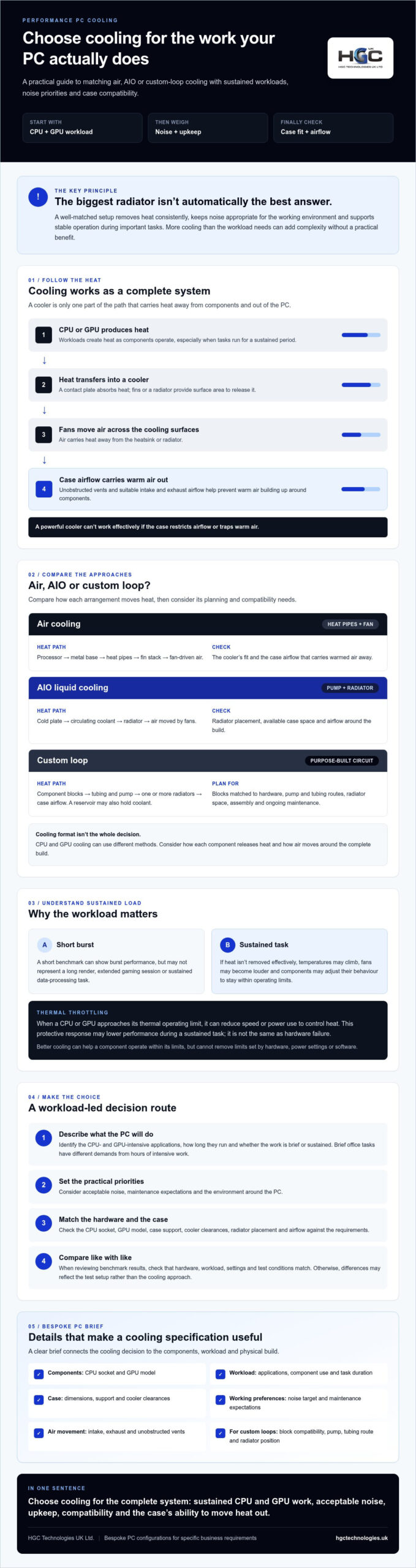
PC cooling moves heat away from components such as the processor (CPU) and graphics card (GPU), then releases it into the surrounding air. A cooler is only one part of the system: fans and case airflow determine whether warm air can escape or builds up around components. The fundamentals of computer cooling help explain how these parts work together.
A short benchmark can show how a PC performs in a burst, but it may not reflect a long render, extended gaming session or sustained data-processing task. As components work, they produce heat. If that heat isn’t removed effectively, temperatures may climb, fans may become louder and components may adjust their behaviour to stay within operating limits.
There’s no universal cooler choice. The right setup depends on the specific CPU and GPU, the applications they’ll run, how long those workloads last, the case’s airflow and clearances, and the environment around the PC. That’s why custom PC cooling solutions for performance should be selected for the complete system, not a headline specification in isolation.
How heat affects CPU and GPU performance
When a CPU or GPU approaches its thermal operating limit, it can reduce its speed or power use to control heat. This behaviour, known as thermal throttling, may lower performance during a sustained task. It’s a protective response, not the same as hardware failure, although repeated slowdowns are a reason to review temperatures, airflow and workload. Better cooling can help a component operate within its limits, but it can’t remove limits set by the hardware, power settings or software.
What a well-matched cooling setup should achieve
A suitable setup removes heat consistently, keeps noise appropriate for its working environment and supports stable operation during important tasks. Start by identifying actual use: a PC handling brief office tasks has different demands from one running CPU- and GPU-intensive work for hours. Don’t assume a larger cooler is automatically better; compatibility and airflow matter too. When comparing benchmark results, check that the hardware, workload, settings and test conditions match. Otherwise, differences in performance or noise may reflect the test setup rather than the cooling approach.
How PC cooling works: airflow, heatsinks and liquid loops
Every cooling arrangement follows the same basic path: heat leaves the CPU or GPU, travels into a cooler, then transfers to the surrounding air. The cooler’s contact plate absorbs heat from the component, while its fins or radiator provide surface area for releasing that heat. Fans move air across those surfaces, and the case’s intake and exhaust airflow carry warmed air out of the system. Intel’s guide to the importance of PC cooling explains why managing heat matters for consistent operation.
CPU and GPU cooling don’t have to use the same method. A system might have an air cooler on the processor and fans built into the graphics card, or liquid cooling for one component while the other relies on its own cooler. Consider how each component releases heat and how air moves around the complete build. A powerful cooler can’t work effectively if the case restricts airflow or traps warm air.
How air cooling and AIO liquid cooling move heat
With air cooling, heat passes from the processor into a metal base and through connected heat pipes to a fin stack. A fan pushes air across the fins, carrying heat away. An all-in-one (AIO) cooler uses a cold plate and pump to circulate coolant to a radiator, where fans transfer heat into the air. Both methods rely on case airflow to remove warm air, so fan placement and unobstructed vents remain important.
How a custom loop circulates and dissipates heat
A custom loop is a purpose-built circuit that moves coolant through component blocks, tubing and a pump before releasing heat through one or more radiators. A reservoir may also be included to hold coolant. Heat transfers from a CPU or GPU into its block, then travels with the coolant to the radiator and into the case airflow. A loop can include blocks for both CPU and GPU, provided they’re designed for the specific components.
That flexibility calls for careful planning. Blocks must match the hardware, and the pump, tubing route and radiator placement must work with the case’s available space and airflow. Assembly and ongoing maintenance also need consideration. This is why custom PC cooling solutions for performance involve the whole system, not simply choosing a cooling format. If you’re defining a workload-led specification, HGC Technologies’ bespoke custom-built PCs are configured around specific business requirements.
Air, AIO or custom loop: which cooling solution fits your performance goals?
There’s no universally best cooler. Choose according to the heat your CPU and GPU produce during your workload, the case’s clearances and airflow, and your priorities for noise, appearance and upkeep. The computer cooling principles behind each approach are similar, but complexity and compatibility requirements differ.
| Approach | Complexity | Upkeep | Typical fit |
|---|---|---|---|
| Air | Generally simpler | Keep heatsink and fans clear of dust; check fan operation | Builds where a compatible heatsink can handle the workload |
| AIO liquid | Moderate; radiator and tubing need space | Keep radiator clear and monitor the cooler’s operation | Systems needing an integrated liquid cooler with suitable case support |
| Custom loop | Highest; requires component selection and loop planning | Plan for ongoing inspection and maintenance | Builds prioritising tailored CPU and GPU cooling or presentation |
These are broad comparisons, not performance guarantees. Noise depends on fan curves, component loads, radiator size and case design. A large radiator may allow slower fan speeds in a particular build, but results depend on the complete configuration and workload.
When air cooling or an AIO is a proportionate choice
Air cooling can be a straightforward option if the heatsink is compatible and has enough capacity for the CPU’s sustained workload. An AIO offers an integrated liquid-cooling arrangement, but its radiator must fit the case in the intended position without conflicting with other components. Check cooler height, radiator support, graphics card dimensions and manufacturer guidance before deciding. Neither format can be judged separately from case airflow.
When a custom loop may justify added complexity
A custom loop may suit a build where tailored cooling for both CPU and GPU, or a particular presentation, justifies more detailed planning and upkeep. Any thermal or acoustic benefits depend on the components, loop design, radiator capacity, fan settings and workload. Ask for test evidence using equivalent hardware under consistent conditions, including workload, ambient temperature and noise measurement. Results from another configuration may not transfer directly to your PC.
For a bespoke PC brief, start with workload and component requirements, then weigh compatibility and upkeep against noise and presentation priorities. HGC Technologies configures bespoke custom-built PCs for specific business requirements; confirm which cooling configurations can be specified before making them part of your brief.
How to specify custom PC cooling for your components and workload
A useful cooling brief starts with what the PC must do, not with a preferred cooler type. Record the full system and its operating conditions, then check that the cooling plan fits both the workload and the case. This makes it easier to compare custom PC cooling solutions for performance against practical requirements rather than assumptions.
Five checks to complete before choosing a cooler
- Describe the workload and duration. List the main applications, whether they rely mainly on the CPU, GPU or both, and how long demanding tasks typically run. Include periods when workloads run simultaneously.
- Record the components. Note the exact processor, CPU socket, graphics card model, motherboard and case model. Cooler compatibility can vary between component models.
- Verify fit and support. Check manufacturer guidance for socket compatibility, mounting requirements and cooler dimensions. For an air cooler, check height and clearance around nearby components. For an AIO or custom loop, confirm radiator support, thickness and placement, as well as space for fans and tubing.
- Plan airflow and dust management. Decide where fans will draw cool air in and exhaust warm air. Check that the PC’s position won’t block vents, and consider how easily filters and intakes can be accessed for cleaning.
- Set operating priorities. State an acceptable noise level for the work environment, how much visual presentation matters, what maintenance you’re prepared to undertake and whether future component changes should be accommodated.
Be specific about the operating environment, too. A PC in a confined space may face different airflow constraints from one with clear space around its case. For radiator-based cooling, record the intended radiator position and fan direction so the airflow plan is clear, rather than treating radiator fit as a box-ticking exercise.
How to assess cooling results without misleading comparisons
Use test results as evidence for a particular configuration, not as a promise for every build. Check whether comparisons use similar CPUs and GPUs, workloads, ambient conditions, case layouts and fan settings. A short test may not represent performance during a longer task.
Separate idle readings from sustained-load temperatures, and look for acoustic measurements taken under the same workload. Temperature figures without test conditions or noise context show only part of the picture. If a supplier or manufacturer quotes a gain, ask which hardware and settings produced it, and whether the comparison reflects your intended use.
HGC Technologies configures bespoke custom-built PCs for specific business requirements. To discuss your workload and component brief, discuss your custom PC requirements, and confirm which cooling configurations can be specified.
Plan a performance-focused bespoke PC with HGC Technologies
Build the specification around the work the PC must perform. Start with the workload and expected operating duration, check component and case compatibility, then decide which cooling format fits your priorities for noise, maintenance and appearance. This makes custom PC cooling solutions for performance a practical part of a wider system brief, rather than a decision based on cooler size alone.
HGC Technologies supplies bespoke custom-built PCs configured for specific business requirements. Which cooling configurations can be specified for a particular build should be confirmed directly. Use the points below as a brief to discuss, not as a promise of a specific cooler or service.
What to include in a custom PC cooling brief
- Workload: Name the applications, describe whether they place greater demand on the CPU, GPU or both, and estimate how long intensive tasks usually run.
- Components: Provide the proposed processor and socket, graphics card model, motherboard and case. These details help identify compatibility and physical space requirements.
- Operating priorities: Set expectations for noise during demanding work, visual presentation, maintenance and future upgrades. Mention any limits on where the PC will sit, such as restricted space around the case.
- Cooling questions: Ask which configurations are currently available for the proposed specification, how the cooler and case airflow would suit the workload, and what upkeep the selected arrangement requires.
Be precise about fit. Ask for the proposed cooling configuration and component compatibility to be confirmed in writing, including cooler clearances, radiator placement where relevant, and fan direction. A system that fits on paper still needs an airflow plan suited to its position and operating environment.
What to confirm before proceeding with a bespoke build
Ask how the suggested configuration addresses sustained workloads, expected noise and the space available around the PC. If performance or acoustic claims are provided, request the test conditions and check whether they reflect comparable hardware and use. Verify availability, support arrangements and any service details directly with HGC rather than assuming they are included.
A clear brief gives both sides a stronger basis for discussing a suitable bespoke PC. Discuss a bespoke custom-built PC with HGC Technologies and confirm which cooling options can be specified for your requirements.
Make cooling part of your next PC brief
Choose cooling by working through the system in order: define the workload and how long it runs, confirm component and case compatibility, then weigh cooling format against noise, maintenance and presentation priorities. Air, AIO and custom-loop options each have trade-offs. The right fit supports your actual use without adding unnecessary complexity.
Assessing custom PC cooling solutions for performance as part of the whole build helps you ask focused questions about the proposed components, case fit and available cooling configurations before proceeding.
HGC Technologies supplies bespoke custom-built PCs configured for specific requirements and configures server hardware for enterprise needs. Confirm specific cooling options and service arrangements directly for the proposed PC specification.
Ready to discuss the wider system requirements? Discuss a bespoke custom-built PC with HGC Technologies and take the next step towards a build shaped around your work.
Frequently Asked Questions
Is liquid cooling always better than air cooling for performance?
No. A compatible air cooler can be suitable if its capacity matches the processor’s workload and the case has effective airflow. An AIO or custom loop may suit other component combinations or priorities, but liquid cooling isn’t automatically faster or quieter. Compare complete systems under similar workloads and noise settings, and check case fit. The right option depends on the hardware, how it’s used and your priorities.
Can a custom loop cool both the CPU and GPU?
Yes, a custom loop can cool both components if it’s designed with compatible CPU and graphics-card blocks. The pump circulates coolant through the blocks and on to the radiator, which releases heat into the air. Planning needs to account for the specific hardware, available case space, radiator placement and airflow. A loop shared by CPU and GPU isn’t a universal fit, so confirm compatibility and upkeep requirements before choosing this approach.
How much cooling does a high-performance PC need?
There’s no single cooling capacity that suits every high-performance PC. Start with the exact CPU and GPU, their operating limits, the applications you’ll run and how long demanding tasks last. Then factor in case support, airflow and the environment around the system. A brief workload may call for a different setup from sustained rendering or GPU-intensive work. Choose cooling to support stable operation under your real workload, not just a headline specification.
What happens if my PC cooling is inadequate?
If a CPU or GPU reaches its thermal operating limits, it may reduce its speed or power use to manage heat. This is called thermal throttling and can lower performance during demanding tasks. Fans may also become louder as they work harder to remove heat. Components have protective behaviours, but recurring high temperatures or slowdowns deserve investigation. Check airflow, fan operation and temperatures under load, and consult the manufacturer’s guidance if concerns continue.
Are AIO liquid coolers difficult to maintain?
AIO coolers are generally designed as integrated units, so routine upkeep is usually simpler than maintaining a custom loop. You’ll still need to keep the radiator and fans clear of dust, check that fans operate normally and pay attention to unusual noise or changes in performance. Follow the cooler manufacturer’s instructions, since maintenance guidance can differ by model. Don’t assume an AIO needs coolant refilling unless its documentation specifically says so.
How do I choose a cooler that fits my PC case?
Check the case manufacturer’s cooler support and compare it with the cooler’s dimensions and mounting requirements. For an air cooler, confirm its height and clearance around memory and other components. For an AIO, check radiator size, thickness, fan space and supported mounting positions. Also account for graphics-card dimensions, tubing or cable routes, and unobstructed airflow. Verify compatibility against the exact components and case model before settling on a cooling configuration.
Can HGC Technologies configure a custom PC around my cooling requirements?
HGC Technologies supplies bespoke custom-built PCs configured for specific business requirements, but which cooling configurations can be specified for each build should be confirmed directly. Share your applications, expected workload duration, CPU and GPU priorities, case requirements, noise preferences and maintenance expectations. Ask HGC to confirm available options and whether the proposed components and cooling arrangement are compatible. Confirm any support or service details directly before proceeding.
To discuss a bespoke PC for your business, contact HGC Technologies about your requirements.
High Performance Workstation Build UK: A 2026 Case Study in Bespoke Engineering
In 2026, the standard office tower isn't just falling behind; it's actively bottlenecking the UK's m
How to Order Custom Specification PCs in Bulk: A 2026 Procurement Guide
In 2026, the era of treating bulk PC procurement as a simple commodity purchase is officially over.

Wholesale Business Smartphones: 2026 Procurement Guide
Procuring a mobile fleet in 2026 is no longer a simple matter of finding the lowest unit price; it's