
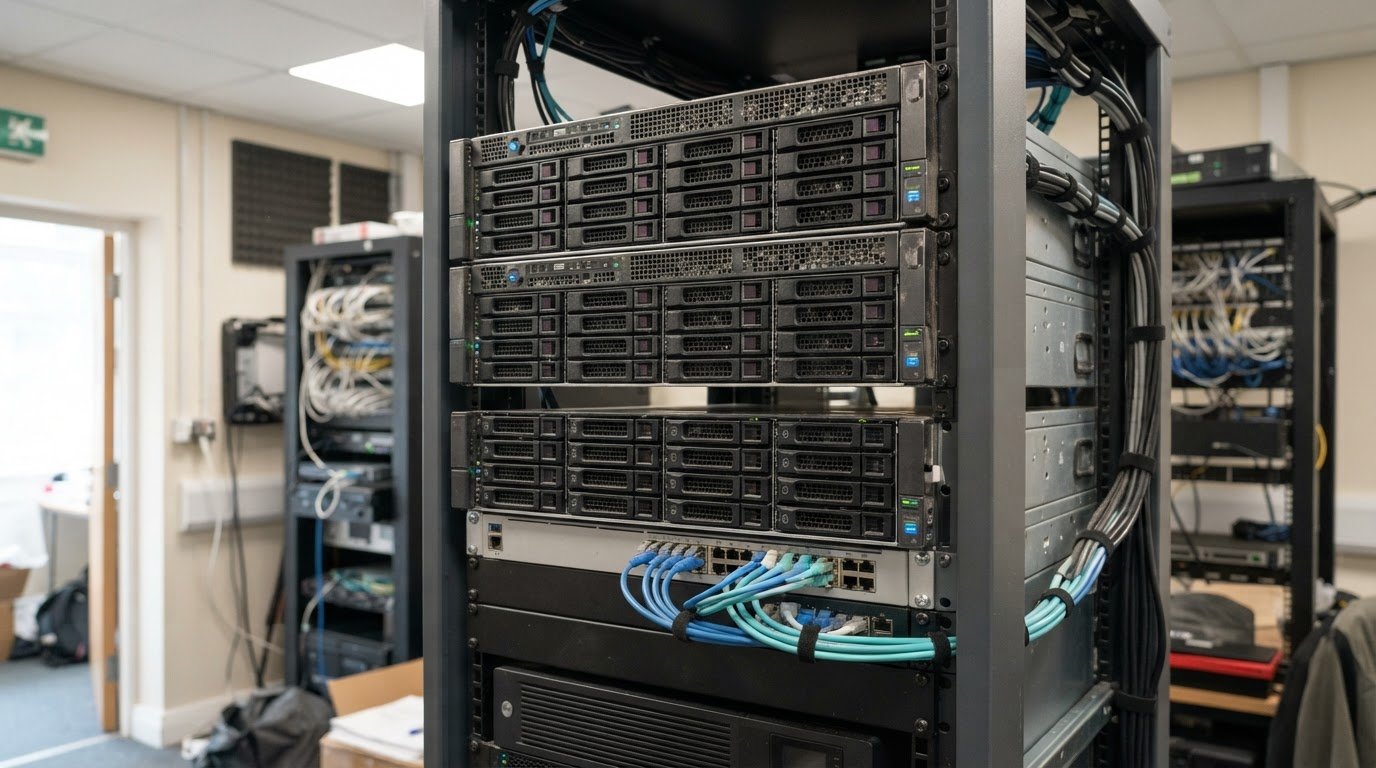
Custom server hardware for VDI deployment: key choices
A VDI server is not simply a desktop with more memory: it hosts virtual desktops centrally and delivers them to users’ devices. Custom server hardware for VDI deployment must balance processor capacity, memory, fast storage and network performance to support the workload. Unlike a desktop, a VDI server serves multiple users, with resources shared across their virtual machines.
That changes what matters when choosing hardware. A familiar desktop specification may not account for the storage response times, network capacity or sustained demand a shared environment requires.
This guide explains how VDI servers differ from traditional desktops and how workload, storage, server resources and room to scale shape the design. It also explores how bespoke hardware choices can align a deployment with its users, applications and lifecycle needs, helping you assess the system as a whole instead of focusing on one component.
Key Takeaways
- Use workload and user numbers as inputs to storage calculators, then account for peak demand when sizing capacity and network performance.
- Match processor, memory and graphics resources to the applications users run, rather than relying on a standard desktop specification.
- Consider how lifecycle support, warranty terms and remote diagnostics affect ongoing management and hardware planning.
- Explore bespoke server design when rack space, storage layout or deployment requirements call for a tailored configuration.
How does storage affect VDI server performance?
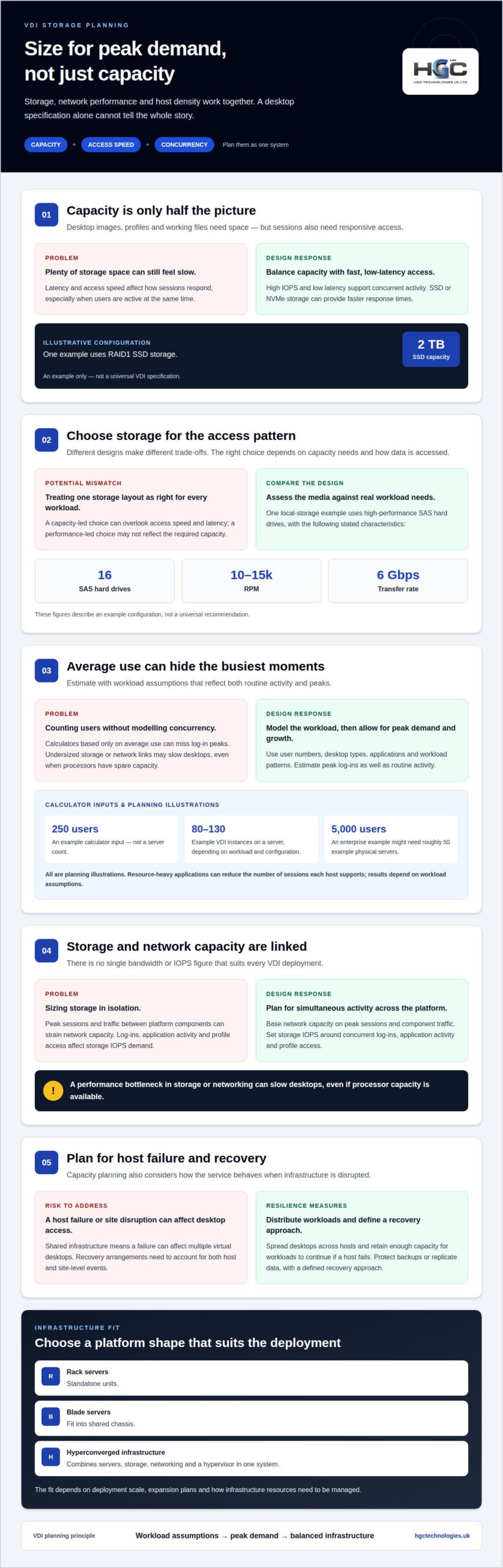
VDI storage needs enough capacity and fast access for virtual desktops. Estimate requirements alongside host density and network demand, rather than treating storage as an isolated component.
Storage Performance and Capacity
Storage capacity determines how many desktop images, user profiles and working files the infrastructure can hold. Performance depends on access speed and latency: high IOPS and low-latency access help sessions respond during concurrent activity. SSD or NVMe storage can provide faster response times. One example configuration uses 2 TB of RAID1 SSD storage, an illustration rather than a universal specification.
A local-storage design might instead use 16 high-performance SAS hard drives, operating at 10-15k RPM with a 6 Gbps transfer rate. The right choice depends on capacity needs and access patterns.
Estimating Capacity with Vendor Calculators
Vendor calculators use user numbers, desktop types, applications and workload patterns to estimate capacity. A 250-user deployment is an example input, not a server count: results vary with desktop memory, storage demand and concurrency. Model peak log-ins as well as routine activity, then account for expected growth. The estimate is only as useful as its workload assumptions.
Host density also varies. One example server may support 80 to 130 VDI instances, depending on workload and configuration. An enterprise with 5,000 users might need roughly 50 example physical servers. Treat these figures as planning illustrations: resource-heavy applications can reduce the number of sessions each host supports.
There is no single bandwidth or IOPS figure that suits every VDI deployment. Plan network capacity around peak sessions and traffic between platform components. Set storage IOPS according to simultaneous log-ins, application activity and profile access. Insufficient network or storage capacity can slow desktops even when processors have spare capacity.
Rack servers are standalone units, blade servers fit into shared chassis, and hyperconverged infrastructure combines servers, storage, networking and a hypervisor in one system. The right fit depends on deployment scale, expansion plans and how you need to manage infrastructure resources.
For high availability, distribute virtual desktops across hosts and retain enough capacity for workloads to continue if a host fails. Disaster recovery also needs protected backups or replicated data and a defined recovery approach, so users can regain access after a site-level disruption.
Common sizing mistakes include counting users without modelling concurrent demand and focusing on storage capacity while overlooking latency. A calculator based only on average use may miss log-in peaks, leaving hosts or network links undersized.
What hardware resources are needed for a VDI server?
VDI hardware should reflect the business objectives behind the deployment and the workloads employees run. A server example uses 128 GB of RAM, while an enterprise example uses dual eight-core processors and at least 192 GB of fast DDR3 memory. These configurations show why processor capacity and memory must be planned together: the hypervisor and each virtual desktop draw on the same physical resources.
Begin by grouping users according to their work. An office workload centred on documents has different demands from computer-aided design or data analysis. Configure processor and memory allocation for the applications, then factor in concurrent sessions. A uniform desktop image can simplify management, but resource-intensive applications may still need a distinct allocation or host group.
Graphics-intensive workloads can benefit from GPU acceleration. A GPU handles rendering tasks that would otherwise use CPU resources, which can improve the experience with demanding visual applications. Include GPU capacity when graphics performance is a defined business objective. For general office desktops, assess the application mix before adding this hardware.
Performance monitoring helps you compare the design with real-world use after deployment. Track CPU utilisation, available memory, virtual machine behaviour and application response during busy periods. If CPU demand stays high, review processor allocation and concurrent sessions. If memory pressure persists, adjust host resources or desktop configuration. Usage patterns can also guide future capacity planning, rather than relying on procurement assumptions.
Align the final specification with the intended workload, growth plans and operational priorities. A tailored design can balance compute, memory and graphics resources instead of over-investing in one component. For organisations assessing infrastructure options, Server Solutions provide a relevant starting point for considering how server hardware can support VDI objectives.
Lifecycle support, warranties and remote diagnostics
VDI hardware supports a shared service, so lifecycle planning should cover the server, virtualisation software and connected infrastructure. Map warranty coverage and support terms to the organisation’s replacement plans, including what happens when a component fails. A storage fault, for example, can affect multiple virtual desktops, making clear escalation and recovery arrangements important for continuity.
Remote diagnostics can help IT teams assess hardware health without being physically beside the server. Depending on the tools in use, teams can review system logs, component alerts and performance data to investigate faults or spot emerging issues. Pair diagnostics with a defined access policy: encryption, multi-factor authentication, role-based access control and network segmentation can help protect administrative access and VDI data.
Remote access also shapes the user experience. VDI lets employees reach centrally hosted desktops from different locations and devices, including laptops, thin clients and mobile devices. Because desktop data is held on the server rather than the endpoint, a stolen device need not contain the same local files. Secure access still depends on the organisation’s identity controls, network design and monitoring.
Software maintenance matters, too. Centralised desktop management can simplify patching and updates across virtual machines, while management consoles support provisioning, monitoring and policy enforcement. A practical lifecycle plan links these activities to hardware capacity. For example, review whether existing hosts can support the workload before a software change or expansion.
There is no single typical UK price for VDI server hardware and support. Costs depend on the required processor, memory, storage, graphics capability, deployment scale, and scope of support and warranty coverage. Compare the proposed configuration and support terms with the intended workload and operational requirements, rather than treating hardware price as the whole lifecycle cost.
Bespoke server hardware design
Bespoke design aligns server components and chassis with the deployment’s workload, operating environment and expansion plans. Custom server hardware for VDI deployment should be specified as a complete system, rather than assembled by selecting components in isolation.
Specifying Custom VDI Hardware
Specification turns business objectives into a coordinated hardware design. Start with user workloads, application requirements and expected concurrency, then define compute, memory, storage, graphics and network needs.
Next, map those requirements to the hypervisor and platform architecture. Check rack space, power, cooling, connectivity and room for future expansion. A local-storage configuration, for example, may need a 2U or 3U rack unit to accommodate its drive layout. The chassis choice affects how components fit together and how the system can be maintained.
Document compatibility requirements alongside capacity targets. This makes trade-offs visible before procurement, such as balancing local storage against available rack space. A clear specification gives purchasing and testing teams a consistent reference for custom server hardware for VDI deployment.
Purchasing and Testing Hardware
Purchasing turns the agreed specification into a complete, compatible system, while testing confirms it behaves as intended. Match every ordered component to the design, including processors, memory, storage, network interfaces and any required graphics hardware.
Before production, validate the server with the intended virtualisation software and representative desktop workloads. Test provisioning, application response, concurrent sessions and recovery from component faults. Record results against the original requirements and address any mismatch before users depend on the environment.
For example, test a configuration designed for office applications with those applications running across expected concurrent sessions. A graphics-led deployment needs representative rendering tasks. This can expose bottlenecks that a component checklist alone may miss.
Keep the specification, compatibility decisions and test results together. They provide a practical baseline for future changes, including adding hosts or adjusting the storage layout. For a tailored hardware discussion, explore a bespoke server configuration.
HGC Technologies UK: Custom‑built PCs
HGC Technologies UK Ltd. provides custom-built PCs and server solutions for organisations planning or refining VDI infrastructure. Its server solutions are a practical starting point for assessing virtual desktop hardware requirements. Custom-built PCs can serve other computing needs alongside that environment.
Bring your workload profile, user requirements and proposed hardware specification into the discussion. These details help define priorities, from compute and memory to storage and expansion plans, without treating a standard desktop configuration as a server specification. For endpoint procurement, bulk Dell and HP refurbished laptops are also available.
Contact HGC Technologies UK Ltd. to discuss your VDI hardware requirements.
Plan for a VDI environment that can evolve
Decide how the VDI environment will adapt as business priorities, applications and working patterns change. Record who owns capacity planning, how future requirements will be reviewed, and what would trigger an infrastructure refresh. This gives procurement and IT a shared reference beyond the initial hardware specification.
Planning custom server hardware for VDI deployment can go hand in hand with endpoint procurement. HGC Technologies UK Ltd. supplies bulk refurbished Dell, Lenovo and HP laptops, giving organisations options for sourcing user devices as part of a wider technology plan. Consider how those endpoints fit the intended desktop experience and how the infrastructure roadmap will support future changes.
Set out your priorities and discuss a practical way forward with HGC Technologies UK Ltd. about your VDI needs. A clear starting point can help turn your requirements into a considered next step.
Frequently Asked Questions
How do VDI servers differ from traditional desktops?
A VDI server runs virtual desktop sessions centrally, while a traditional desktop runs its operating system and applications on the individual computer. This changes where processing and administration happen: IT teams manage desktop environments on the server, and employees connect using endpoint devices. For example, a user can access the same managed desktop from a laptop or thin client, subject to the organisation’s access arrangements.
How does a VDI server support remote work?
A VDI server lets employees access virtual desktops from different locations and devices, rather than relying on one office computer. The desktop environment runs centrally, so users can connect from a laptop, thin client or mobile device. Organisations can apply controls such as multi-factor authentication and role-based access to help secure access, while network performance affects how responsive remote sessions feel.
What is a VDI Server?
A VDI server is physical server infrastructure that hosts virtual desktop environments for remote access. Virtualisation software creates desktop instances, while platform components such as a hypervisor and connection broker help run and deliver sessions. An employee signs in from an endpoint and uses a centrally managed desktop, rather than keeping the full desktop environment on that device.
What networking requirements exist for VDI servers?
VDI requires a reliable, low-latency, high-bandwidth network connecting users with platform components, including servers and storage. Required capacity depends on application traffic, concurrent sessions and peak activity, such as a morning sign-in surge. Plan for these demand patterns across the full connection path: a capable server cannot compensate for congested links between users, virtual desktops and shared infrastructure.
What role does GPU acceleration play in VDI servers?
GPU acceleration handles graphics rendering tasks that would otherwise use CPU capacity. It can benefit VDI users running graphics-intensive applications, where visual workloads need more than standard desktop rendering. For instance, a design team using demanding visual software may require GPU resources, while a document-focused workload may not. Assess the applications and required user experience before including graphics acceleration in the server design.
What server hardware specifications are recommended for a VDI deployment?
There’s no universal specification; match hardware to the number of users, concurrent sessions and applications. One enterprise example uses dual eight-core processors and at least 192 GB of fast DDR3 memory; another possible configuration has 128 GB of RAM. These examples aren’t interchangeable prescriptions. A graphics-heavy deployment may need GPU acceleration, while storage and network capacity must also suit the workload.

Managing IT Hardware Refresh Cycles: The 2026 UK Strategic Guide
With RAM prices rising fourfold and SSD costs climbing from £40 to over £150 in early 2026, the tr
Energy Efficiency of Refurbished Laptops: A Practical Guide
A refurbished laptop isn’t automatically less energy-efficient than a new one. The energy efficien

Custom Server Solutions for UK SMEs: 2026 Strategic Guide
Did you know that server DRAM contract prices surged by 95% in early 2026, effectively doubling the