

Energy Efficiency of Refurbished Laptops: A Practical Guide
A refurbished laptop isn’t automatically less energy-efficient than a new one. The energy efficiency of refurbished laptops depends on the model, its components and how it’s used, not simply whether it has been refurbished. That distinction matters when comparing electricity use at work and weighing day-to-day consumption against the impact of keeping a device in service.
It’s reasonable to ask whether an older device will draw more power, particularly when specifications and energy labels are difficult to compare. A fair assessment means comparing similar models and workloads, checking information for the exact model, and separating electricity used during operation from the impact of manufacturing a replacement.
This guide explains which features and usage habits affect power consumption, how to interpret available efficiency information, and what to check before choosing a device. You’ll learn how to compare refurbished and new laptops on a like-for-like basis, whether you’re selecting one laptop or reviewing bulk options. For UK businesses considering refurbished Dell, Lenovo or HP laptops, these checks can make procurement decisions clearer without assuming every device has the same efficiency rating.
Key Takeaways
- Assess energy efficiency of refurbished laptops by looking beyond refurbishment status to the specific model, configuration and workload.
- Consider the processor, display, memory and storage, as well as everyday settings such as screen brightness and sleep behaviour.
- Separate electricity used during operation from the energy and materials involved in manufacturing a laptop.
- Before buying, define the performance requirements, identify the exact model and configuration, then check available manufacturer information and energy labels.
- For bulk procurement, consider energy information alongside workload suitability, device condition, consistency and longer-term usability.
What does energy efficiency mean for a refurbished laptop?
For a laptop, operational energy efficiency is about the electricity it uses to perform its intended work. In practice, consider the power it draws while you write documents, join video calls or run other applications, along with the electricity needed to recharge its battery. To compare devices fairly, consider the electricity used to complete similar tasks rather than relying on a label or single reading in isolation.
This is only one part of the bigger picture. The energy efficiency of refurbished laptops describes their electricity use in operation. It doesn’t measure, by itself, the resources involved in making, reusing or disposing of them. Keeping these questions separate helps you make a more informed choice.
Operational electricity use versus lifecycle impact
Use-phase electricity is the power consumed while a laptop is switched on and working, or while it’s charging. Your hours of use and the tasks you perform affect this measure. Lifecycle impact is broader, covering the energy and materials associated with manufacture, reuse and disposal. These ideas are part of environmentally sustainable computing, which considers both efficient operation and extending a product’s useful life.
A device may have a lower lifecycle impact because it’s reused rather than newly manufactured, yet still use more electricity in operation than a particular new model. One doesn’t prove the other. Assess operating consumption and lifecycle considerations as separate parts of the decision.
What refurbished status tells you, and what it does not
“Refurbished” describes a device’s resale or condition category, not its electricity use. It doesn’t tell you how much power a laptop needs for a particular task or guarantee a specific energy rating. Two refurbished laptops can differ, just as a refurbished laptop and a new one can differ.
Age and model specifications can influence consumption, as can the device’s condition and workload. A laptop used for basic office tasks may have different power demands from one running more intensive applications. Refurbishment status alone cannot establish a laptop’s energy efficiency.
For a sound comparison, identify the exact model and configuration, then look for relevant manufacturer information or available energy-label data. Check whether each device can perform comparable work, and treat broad environmental claims cautiously unless their basis is clear. This gives you a practical starting point before assessing the components and everyday settings that affect electricity use.
Which factors determine a refurbished laptop’s electricity use?
A laptop’s electricity use reflects both its hardware and the work it’s asked to do. The processor handles instructions, while the display, memory and storage also require power. Their contribution varies by model and activity, so a specification alone won’t tell you exactly how much electricity a device will use during your working day.
Specifications and workload: compare like with like
Editing documents or checking email generally places different demands on a laptop from running video-editing software, complex calculations or other resource-intensive applications. Under heavier workloads, the processor may work harder, affecting power draw. Display characteristics matter too: a larger or higher-resolution screen may have different power demands from a more modest display. Memory and storage type and configuration can contribute, but no single component determines the whole device’s consumption.
For a fair comparison, match the expected workload, performance level and operating conditions. Compare laptops doing the same tasks, at similar screen brightness and with similar connected accessories. Check model-specific information where available. Don’t assume a processor brand or generation is automatically more efficient; look for evidence relating to the particular model. ENERGY STAR provides information on ENERGY STAR certified computers, which can help you check whether a specific computer has a recognised efficiency certification.
Condition, battery health and settings
Battery health and operating electricity use are related, but they aren’t the same measure. Battery capacity affects how long a laptop can run between charges. A reduced-capacity battery may mean shorter unplugged runtime, but that alone doesn’t establish how much electricity the laptop draws while performing a task. Check battery condition separately from model-level power information.
Everyday settings can change consumption. A brighter screen needs more power than a dimmer one, while sleep settings can reduce use when the laptop is idle. Connected monitors, storage devices and other peripherals also draw electricity. Demanding applications can keep components working harder, so consider the normal setup rather than the laptop on its own.
In brief: electricity use depends on the model’s components, workload, operating settings and connected devices. Battery condition mainly informs capacity and runtime.
For refurbished devices, ask for the exact model and configuration, along with any available condition details. A general refurbishment grade won’t answer questions about battery health or power use. Businesses comparing bulk refurbished Dell, Lenovo and HP laptops can use these checks to frame procurement questions, then assess available energy information against the work each device must support.
Are refurbished laptops more energy-efficient than new laptops?
Not necessarily. A refurbished laptop may use more, less or a similar amount of electricity to a new one. Its refurbishment status doesn’t establish its operating efficiency. The energy efficiency of refurbished laptops depends on the particular model, configuration and workload, so a useful comparison needs evidence about the devices themselves.
A fair refurbished-versus-new comparison
Start with what the laptop needs to do. Don’t compare a device intended for email and document editing with a higher-performance model expected to run demanding applications. Match the expected performance, then compare similar configurations, including processor, memory, storage and display. This helps distinguish differences in power information from differences in the work the devices are designed to handle.
Look for manufacturer specifications or relevant energy-label information for each exact model. Check that the figures describe comparable configurations and test conditions. Figures measured using different methods, workloads or settings may not support a direct comparison. If the available information isn’t like for like, treat it as a guide rather than proof that one device will use less electricity in your workplace.
For example, a lower power figure is most useful when it refers to a comparable task and operating setup. Screen brightness, power settings and connected equipment can also affect real-world use. Note what information is available and where the conditions differ. Don’t present an approximate comparison as a guaranteed result.
When extending a laptop’s life may matter
Operating electricity is only one part of the decision. Continuing to use a functioning laptop may defer the need to replace it, while buying refurbished gives an existing device another opportunity to serve a useful purpose. These lifecycle considerations are distinct from how much electricity it consumes each day. The overall impact depends on factors such as how long the laptop remains useful and what happens to it when it is no longer needed.
Don’t assume that choosing refurbished automatically delivers a specific environmental benefit, or that a refurbished model uses less electricity than a new one. Assess operating data separately and consider reuse as a broader lifecycle question. For additional context on procurement and product lifecycles, see the guide to sustainable IT hardware.
A balanced decision brings both perspectives together: compare specific devices doing equivalent work, then consider whether a refurbished option can meet your needs for a useful period. For bulk purchasing, apply the same comparison across the models and configurations under consideration, and verify available energy information before making efficiency claims.
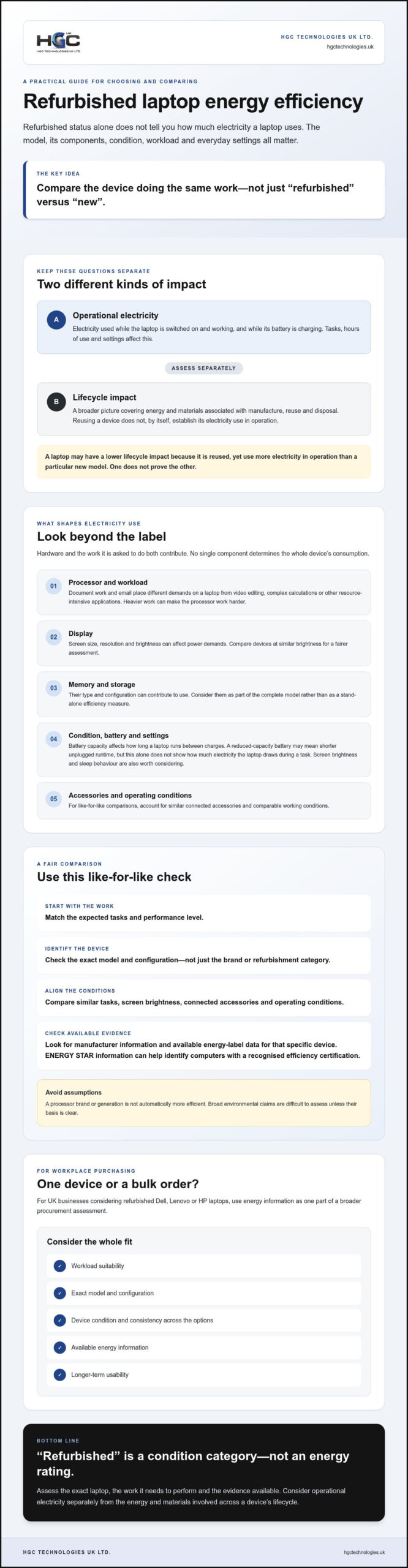
How to assess laptop energy efficiency before buying
Use a consistent process to assess the energy efficiency of refurbished laptops. Start with the work the device must handle, then check model-specific evidence rather than relying on broad claims or the word “refurbished”.
A practical checklist for individual and business buyers
- Define the workload. List the applications people will use, their performance needs and expected operating hours. A device for routine office tasks may have different requirements from one running demanding software.
- Identify the exact device. Record the model and configuration, including processor, memory, storage and display details where available. Similar product names can refer to different configurations, so confirm what is actually being offered.
- Ask for relevant evidence. Request manufacturer power information or other model-specific data, plus any available condition details for the refurbished device. For battery-dependent use, ask separately about battery condition. Don’t treat runtime as a direct measure of electricity consumed during operation.
- Check how it will be used. Consider screen brightness, power-management settings, sleep behaviour and connected accessories. For a meaningful comparison, assess devices under similar operating conditions and with similar workloads.
- Review consistency for bulk orders. Confirm whether the proposed devices share the same model and configuration. If the order includes variations, compare each separately and note where evidence differs or is missing.
How to interpret labels and supplier information
Energy labels can help, but verify the exact product record before treating a claim as confirmed. Check ENERGY STAR, EPEAT and TCO Certified status against the relevant model or configuration and applicable record. A label associated with a product range doesn’t establish that every configuration, or every refurbished laptop, carries that status.
Supplier information is most useful when it identifies the device clearly and explains what a power figure or label applies to. Check that you’re comparing like with like, since test conditions, configurations and workloads can differ. If the source doesn’t explain these details, treat the figure as indicative, not a precise prediction of your own electricity use.
If evidence isn’t available, record that as unknown. Ask the supplier whether model-specific specifications, condition information or supporting product records can be provided. Don’t infer an efficiency rating from a refurbishment grade or make a certification claim without checking the relevant record.
For organisations sourcing devices in volume, review bulk refurbished laptop options and use this checklist to guide questions about models, configurations and available energy information.
What energy efficiency means for bulk refurbished laptop procurement
For a bulk order, energy efficiency is one part of a sound procurement decision, not a substitute for checking whether the laptops will work for the people who need them. Assess the energy efficiency of refurbished laptops against the specific models, configurations and workloads under consideration. A batch that looks consistent on paper may still include variations that affect performance, condition or available energy information.
Start by mapping the intended work to suitable devices. Then check how consistently the proposed models and configurations meet those requirements, what condition information is available, and whether the devices can remain usable within your organisation’s plans. Consider energy use alongside usability, suitability and lifecycle planning. Don’t prioritise a headline efficiency claim if the evidence is unclear or the device doesn’t fit the workload.
Questions to ask when sourcing refurbished laptops in bulk
Use these questions to structure discussions with a supplier and compare options on a like-for-like basis:
- Which exact models and configurations are included in the proposed batch? Are there component variations that need to be assessed separately?
- Is model-specific energy information available? If so, what is its source, and which model or configuration does it cover?
- How consistent are the devices across the batch, and what condition information is provided?
- Do the proposed configurations suit the applications, performance expectations and working patterns of the intended users?
- What information is available to help plan continued use and future replacement or disposal?
Clear answers help procurement teams identify evidence gaps before making a decision. If a figure or label can’t be matched to the exact model, treat it as unverified rather than assuming it applies to every laptop in the batch.
Connecting energy considerations with sourcing decisions
This comparison framework supports broader procurement checks; it doesn’t replace them. Review compatibility with business requirements, usability, device condition and lifecycle plans alongside electricity-use information. HGC Technologies UK Ltd. supplies refurbished Dell, Lenovo and HP laptops in bulk to business clients and technology resellers across the UK. Don’t assume a particular energy rating or consumption figure for its devices without model-specific evidence.
For buyers assessing Dell devices, the bulk Dell refurbished laptop procurement guide offers a related starting point for considering sourcing requirements. Once you’ve defined your criteria, you can Explore HGC Technologies to review its wholesale range. Use the same evidence-led questions with any supplier, and base your final choice on users’ needs as well as the information available.
Make your next laptop choice with confidence
The energy efficiency of refurbished laptops depends on the specific model, its configuration and the work it needs to do, not its refurbished status alone. Compare devices against the same workload and operating conditions, and check available model-specific energy information rather than relying on broad claims. Keep electricity use distinct from lifecycle impact: extending a laptop’s useful life may matter environmentally, but it doesn’t prove lower operating consumption.
For bulk procurement, weigh energy evidence alongside workload suitability, consistency across the batch, condition information and longer-term usability. HGC Technologies UK Ltd. supplies refurbished Dell, Lenovo and HP laptops in bulk to business clients and technology resellers across the UK. Check the details available for each model before drawing conclusions about its efficiency.
To consider refurbished devices for your organisation, explore HGC Technologies’ refurbished laptop range and use the checks in this guide to inform your selection. Define your requirements, compare the available evidence and choose devices that support your team’s needs.
Frequently Asked Questions
Do refurbished laptops use more electricity because they are older?
Not automatically. Age alone doesn’t show how much electricity a laptop uses. Its specifications, condition, settings and workload all contribute, and models from different periods can have different power requirements. An older device running basic office applications may use less than a newer, higher-performance laptop under demanding work, but that can’t be assumed without comparable information. Check the exact model and configuration, then compare evidence for similar tasks and conditions.
How can I check a refurbished laptop’s energy efficiency?
Identify the exact model and configuration first, then look for manufacturer power information and any relevant energy-label record for that product. Confirm the evidence applies to the configuration being offered, and note its test conditions. Compare devices doing similar work, with comparable settings and peripherals. Ask for available condition details separately, particularly battery information. If model-specific evidence isn’t available, record the efficiency as unverified rather than inferring it from the refurbishment grade.
Does a refurbished laptop have a better environmental impact than a new one?
It may, but refurbished status alone doesn’t prove a lower overall environmental impact. Reusing a laptop can extend its useful life and may defer replacing a functioning device, while manufacturing, operation and eventual disposal are separate parts of its lifecycle. The overall comparison depends on the devices and how long they remain in use. Treat lifecycle claims cautiously, and look for reliable, relevant evidence before relying on specific environmental figures.
Does battery health tell me how much electricity a laptop uses?
No. Battery health indicates how much charge the battery can retain compared with its intended capacity, which helps estimate unplugged runtime. It doesn’t directly measure the laptop’s electricity use while operating. A reduced-capacity battery may need charging more often for similar unplugged use, but that still doesn’t establish the device’s power draw. Check battery condition and model-specific energy information as separate factors when assessing a refurbished laptop.
What should businesses check when buying refurbished laptops in bulk?
Confirm the exact models and configurations in the batch, and assess whether they suit the intended applications and performance needs. Ask what model-specific energy information and condition details are available, and check the source of any labels or efficiency claims. Review consistency across the order, as well as usability and longer-term plans for the devices. HGC Technologies UK Ltd. supplies bulk refurbished Dell, Lenovo and HP laptops to business clients and resellers across the UK.
Refurbished Laptops vs Smartphones for Business Productivity: The 2026 Guide
The most expensive mistake a procurement officer can make in 2026 isn't choosing the wrong brand, bu

7 Strategic IT Budget Optimisation Strategies for UK Businesses in 2026
The volume of refurbished PCs sold through UK distributors doubled between late 2024 and 2025, signa
How to Vet a Refurbished Laptop Supplier: A 2026 UK Procurement Guide
Refurbished PC sales in the UK nearly doubled between the end of 2024 and late 2025, marking a defin