

How to plan a business hardware refresh cycle
Business laptops and desktops commonly have a target lifespan of three to five years, depending on workload and vendor support. Preparing for a corporate hardware refresh means treating this as a planning guide, not a fixed date for replacing every device. Performance, reliability and support status all help determine when equipment needs attention.
Device age is easy to focus on, but a fixed timetable can overlook the different demands placed on teams and systems. A practical refresh cycle considers those demands alongside device condition, security and the disruption replacement can cause.
This guide explains how to spot declining hardware, assess refresh timing and organise a phased rollout. It also covers managing devices through their lifecycle, from inventory and deployment to reuse or responsible disposal, so refresh decisions continue to support business needs.
Key Takeaways
- Use recurring slowdowns, support requests and user feedback to identify devices that may need attention.
- Phase procurement and deployment around business priorities to make rollout, migration and training more manageable.
- Build a lifecycle plan that considers compatibility, security, reuse and responsible end-of-life handling.
- Match replacement equipment to workforce needs with bulk refurbished laptops or custom-built PCs.
Employee frustration with slow and unreliable devices
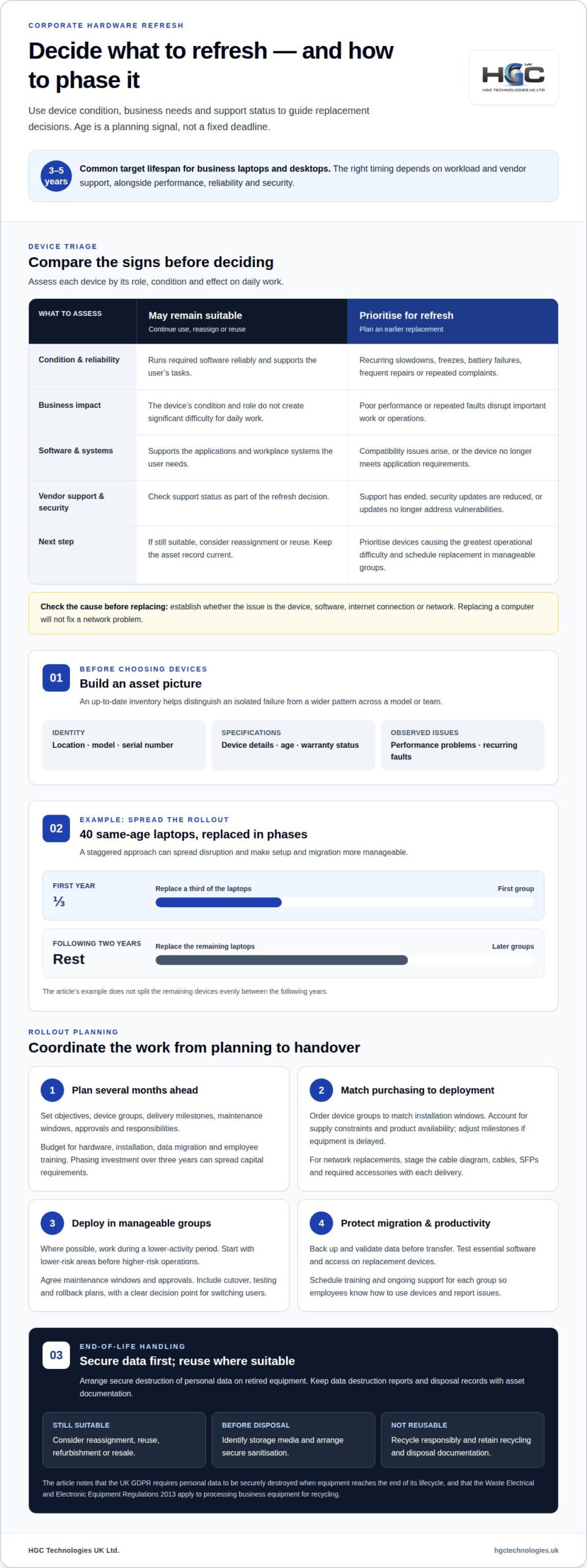
Repeated slow starts, freezes, battery failures and support tickets can signal declining device performance. Record user complaints alongside startup times and recurring faults. A laptop that takes five minutes longer each day can cost hundreds of hours across ten employees, five working days a week and fifty working weeks a year.
Compare laptops, desktops, monitors and mobile devices by their role, condition and effect on daily work. For each device, assess whether it runs required software reliably, supports the user’s tasks and connects properly with workplace systems. A slow monitor can affect a workstation differently from an unreliable laptop used for essential work.
Create an inventory before replacing equipment. Record each device’s location, model and serial numbers, specifications, age, performance issues and warranty status. This helps distinguish an isolated failure from a wider pattern, such as repeated faults across one model or team. Keep the asset record current as equipment moves or changes hands.
Assess each device based on its importance to daily operations and its condition. Frequent repair requests, poor performance and repeated complaints can help identify equipment for earlier replacement. First establish whether the issue lies with the device, software, internet connection or network: replacing a computer will not fix a network problem.
Stagger replacements according to device lifecycles to spread disruption and make planning more manageable. For example, a business with forty laptops of the same age could replace a third in the first year, then replace the rest over the following two years. Start with devices causing the greatest operational difficulty, and schedule smaller groups to support setup and data migration.
Before disposal, arrange secure destruction of personal data on retired devices. The UK General Data Protection Regulation requires personal data to be securely destroyed when equipment reaches the end of its lifecycle. Keep data destruction reports and disposal records with the asset documentation. If a device remains suitable for use, consider reassigning or reusing it.
Early refresh planning and rollout coordination
Begin planning several months before deployment so procurement, testing and migration fit the rollout window. A project plan should set out objectives, device groups, delivery milestones, maintenance windows, stakeholder approvals and responsibilities. Include cutover, testing and rollback plans, with a clear decision point for switching users to replacement equipment.
Budget for hardware as well as installation, data migration and employee training. Phasing investment over three years can spread capital requirements and align purchases with business priorities. Account for supply-chain constraints and product availability, and adjust delivery milestones if a required device is delayed.
Plan procurement around the deployment sequence rather than ordering everything for one weekend. Confirm which device groups are needed first and arrange delivery to match their installation windows. Keep packaging for shipping equipment to the installation site, and ensure each staged network replacement arrives with its cable diagram, cables, SFPs and required accessories.
To minimise downtime, schedule work during a lower-activity period where possible and replace equipment in smaller groups. Start with lower-risk areas before moving to higher-risk operations. A maintenance window, stakeholder buy-in and necessary approvals help teams coordinate the switch. Testing and rollback steps provide a defined response if cutover fails.
Give user migration its own timeline. Plan data backup and validation before transferring files, then test essential software and access on replacement devices. Schedule training and ongoing support for each deployment group so employees know how to use the new equipment and where to report issues. These steps help protect productivity during the transition.
For a practical plan, combine procurement dates, delivery dependencies, migration tasks and training into one schedule. Businesses preparing for a corporate hardware refresh can also consider business hardware options against their deployment requirements.
3. What is a hardware refresh cycle?
A hardware refresh cycle is a planned process for updating and replacing physical computing equipment. It covers business laptops, desktops and other devices from selection through deployment, reuse or disposal. Lifecycle planning helps teams coordinate replacements instead of waiting for repeated failures. It also gives IT teams a chance to assess whether equipment still supports employees’ applications and business requirements.
Age matters because manufacturers eventually stop supporting older devices. When support ends, access to security updates may be reduced and compatibility problems can arise. Unsupported equipment may also affect organisations working towards Cyber Essentials or Cyber Essentials Plus. Include vendor support status in refresh decisions, alongside security requirements and the applications each team needs. If updates no longer address vulnerabilities, prioritise the affected equipment for replacement or another suitable response.
Before retiring a laptop or server, identify its storage media and arrange secure sanitisation. The National Cyber Security Centre highlights the importance of sanitising storage media before disposal. Keep data destruction reports with equipment disposition records to document what happened to each retired asset. Devices that remain suitable can be refurbished, resold or redeployed; equipment that cannot be reused should be responsibly recycled.
In the UK, the Waste Electrical and Electronic Equipment Regulations 2013 apply to the processing of business equipment for recycling, according to UK Government. Separate reusable equipment from items designated for recycling, and retain recycling and disposal documentation. Reuse can extend a device’s working life and reduce waste, while secure data erasure protects information before equipment changes hands. Include these end-of-life steps in the refresh process, rather than treating disposal as an afterthought.
Documented lifecycle management also helps limit disruption. Before each replacement, record the device’s support status, required updates and software dependencies. Test replacement equipment with the organisation’s applications and infrastructure before wider deployment. This helps identify compatibility issues before employees rely on the new devices for daily work.
4. IT hardware lifecycle management
Make lifecycle management an ongoing strategy, not a decision made only after equipment fails. Set replacement targets by device type, then adjust them for workload, condition and manufacturer support. A common planning lifespan is three to five years for business laptops and desktops, five to seven years for network switches and firewalls, and five years for servers. These are starting points, not automatic replacement dates.
Build a rolling schedule that lets leadership forecast technology investment year by year. For example, a sample three-year plan for a forty-person company replaces eight older laptops in year one and twelve in year two. Year three covers the remaining laptops and a server reaching the end of its warranty. Use this approach to identify equipment needing earlier attention and spread purchases across planned stages.
Before procurement, define what the refresh must achieve, such as improved performance, stronger security or support for planned software. Match new hardware to existing applications and the system requirements of upcoming upgrades. Windows 11 requirements can make some older equipment incompatible, so include operating-system compatibility in the assessment. Test replacement devices with existing infrastructure before wider installation.
Manage each asset from deployment through retirement. Record specifications and migration steps, then add replacement devices to network monitoring and syslog after cutover. Review whether the refresh met its objectives and capture lessons for the next cycle. Retiring equipment can also reveal unused software licences and maintenance the organisation no longer needs.
Responsible lifecycle management considers reuse before disposal. Redeploy equipment that remains suitable, and document the disposition of retired assets. Keep inventory and migration records current so future refresh decisions reflect the actual environment, not outdated assumptions. A consistent process makes replacement timing easier to plan and manage.
To align a refresh strategy with business hardware requirements, explore hardware options for your organisation.
HGC Technologies UK
HGC Technologies UK Ltd. can support procurement when a refresh plan identifies devices for replacement. Its bulk refurbished Dell, Lenovo and HP laptops can suit organisations replacing employee laptops in planned groups. Custom-built PCs offer another option when desktop requirements differ.
Let your refresh priorities guide the choice: consider the work each device must support, compatibility with existing software and how equipment fits the rollout schedule. Matching purchases to these requirements connects procurement with the wider lifecycle plan, rather than treating each order as a separate decision.
For organisations planning a business hardware refresh, contact HGC Technologies UK Ltd. to discuss hardware options for your requirements.
Turn the refresh plan into an ongoing decision
When preparing for a corporate hardware refresh, assign an owner to each decision and define what success means for each team. Keep a concise record of priorities, compatibility requirements and deployment choices. This gives future planning a reliable starting point instead of relying on memory.
Match procurement to those requirements. HGC Technologies UK Ltd. supplies bulk refurbished Dell, Lenovo and HP laptops for organisations planning laptop replacements, alongside custom-built PCs, server solutions and original smartphones. Wholesale pricing is available on request. A clearly defined device profile helps connect purchasing decisions with workforce needs and the wider refresh strategy.
Bring your requirements and refresh priorities together before deciding what to procure. Contact HGC Technologies UK Ltd. to discuss hardware options for your organisation. A considered next step can help turn a one-off replacement into a more manageable approach to business technology.
Frequently Asked Questions
How often should you replace business laptops?
Use three to five years as a planning lifespan for business laptops, adjusting for workload and vendor support. A laptop used for demanding applications may need attention sooner than one handling lighter tasks. Review support status, reliability and software compatibility before deciding. If a device still meets operational needs and receives support, its age alone does not require immediate replacement.
Is it cheaper to replace hardware on a schedule or when it fails?
A scheduled refresh makes spending easier to forecast, while replacement after failure can cause unplanned disruption and urgent procurement. Compare the cost of maintaining ageing equipment with the operational impact of failures, including staff downtime and delays to essential work. A rolling schedule helps spread purchases and gives teams time to plan installation and migration, rather than responding only when a device stops working.
What is a hardware refresh cycle?
A hardware refresh cycle is an organisation’s recurring approach to reviewing, replacing and retiring physical technology. It connects procurement with deployment, support and end-of-life decisions. For example, a business might align laptop replacement with software compatibility and manufacturer support, while reviewing servers separately against their operational needs. The cycle should also account for reuse, secure data handling and documented disposal.
What should you do with old computers?
First decide whether each computer can be reused, redeployed, refurbished or recycled. Before it leaves the organisation, securely sanitise its storage media; the National Cyber Security Centre highlights this step before disposal. Keep records of data destruction and the equipment’s final disposition. In the UK, the Waste Electrical and Electronic Equipment Regulations 2013 apply to processing business equipment for recycling, according to UK Government.
What is a corporate hardware refresh and when should businesses plan one?
A corporate hardware refresh is a planned update or replacement of an organisation’s physical computing equipment. Begin preparations several months before the intended rollout to allow time for procurement, delivery, testing and user migration. A refresh may be prompted by declining performance, changing software requirements or the end of manufacturer support. Set the timing around business priorities and operational impact, rather than relying on device age alone.
How do you assess current devices and determine refresh requirements?
Start with an asset register recording each device’s model, location, serial number, age, specifications and warranty status. Add recurring faults, support requests and user feedback, then assess how important each device is to daily operations. Compare its capabilities with required software and planned upgrades. This helps distinguish equipment needing replacement from devices suitable for continued use, reassignment or retirement.

Matching Laptop Specifications to Job Roles: The 2026 UK Procurement Guide
Most UK businesses are effectively wasting a third of their IT budget by over-speccing machines for

Refurbished Servers UK Wholesale: The 2026 Enterprise Procurement Guide
With OEM prices surging by up to 20% in the opening months of 2026 and lead times often exceeding ei

The Long-Term Reliability of Refurbished Servers: A 2026 Procurement Guide
In 2023, refurbished server sales surged by 22% globally as enterprise leaders realised that "new" d