

Managing IT Assets Across Multiple Office Locations: A Practical Guide
What if a laptop listed at one office is already in use at another, while a spare device sits unnoticed elsewhere? Managing IT assets across multiple office locations becomes difficult when records live in separate spreadsheets, teams update them inconsistently and equipment changes hands without a clear record. The result is more than an untidy inventory: audits, procurement decisions and hardware refreshes become harder to coordinate.
A consistent approach starts with shared records showing what each device is, where it is and who is responsible for it. This guide explains how to build reliable asset records, document transfers between people and sites, coordinate audits and use lifecycle information to plan refreshes, reuse and retirement. It also covers how better visibility can support considered hardware purchasing, including refurbished equipment, and responsible end-of-life decisions such as data erasure and buyback. With clear ownership and repeatable processes, every office can work from the same dependable view of its IT equipment.
Key Takeaways
- Managing IT assets across multiple office locations is easier when every site follows one shared process for recording ownership, location and lifecycle status.
- Build a useful asset register around consistent identifiers and core device details, then update it whenever equipment changes hands.
- Compare spreadsheets, central platforms and hybrid processes against your organisation’s scale, reporting and audit needs before choosing an approach.
- Roll out the process in manageable stages, with clear owners and repeatable checks to improve record accuracy across offices.
- Use reliable condition and status records to guide decisions about redeployment, refurbished replacements, new equipment and responsible retirement.
Why managing IT assets across multiple office locations needs one shared process
At one office, a team may know which laptops are spare and who borrowed the meeting-room monitor. Across several sites, that local knowledge is hard to share, easy to lose and rarely enough to support consistent decisions. Managing IT assets across multiple office locations means keeping a shared view of equipment, its assigned owner, current location and lifecycle status, from purchase through reuse or retirement. The process should work across offices, rather than depend on one person remembering what moved.
This is the practical foundation of IT asset management: organising information about technology so the organisation can make informed operational and lifecycle decisions. An asset register records what equipment an organisation owns, where it is assigned and what stage of its lifecycle it has reached; it does not, by itself, monitor devices or remotely manage them. This distinction keeps the process focused: records support accountability, while monitoring and remote management are separate functions.
Which IT assets should a multi-site register cover?
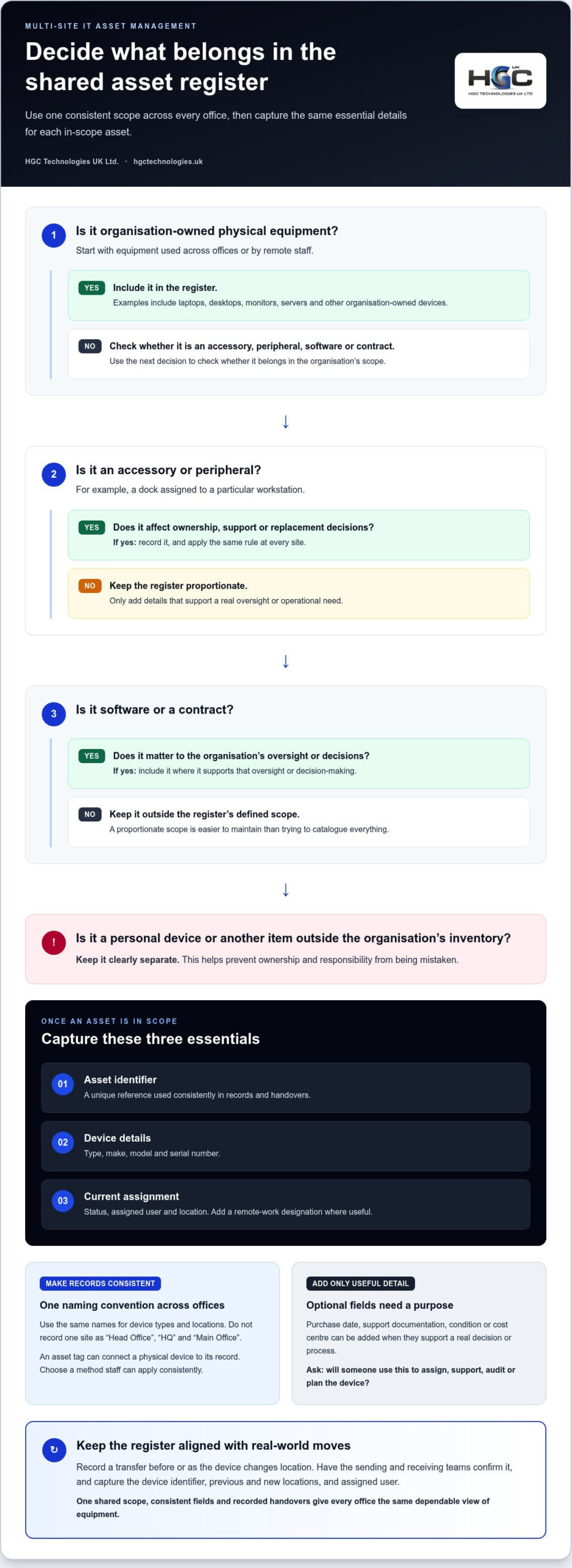
Start with organisation-owned physical equipment, including laptops, desktops, monitors, servers and other devices used across offices or by remote staff. Record accessories and peripherals when they affect ownership, support or replacement decisions, such as a dock assigned to a particular workstation. Include software or contracts only where they matter to the organisation’s oversight and decisions. Keep personal devices and other items outside the organisation’s inventory clearly separate, so ownership and responsibility aren’t mistaken.
A proportionate scope is easier to maintain than an attempt to catalogue everything at once. Define what counts as an asset, then apply that rule consistently at each site. For example, if monitors are recorded because they’re allocated to employees, record them across all offices, not just the site where one team happens to track them.
What makes asset management harder across offices?
Records become unreliable when each location uses its own device names, spreadsheet layout or update routine. One office might list a computer by its user’s name, whilst another records only the model. A device moved to a different floor, site or employee might then appear as a duplicate, remain assigned to its former user or disappear from the register altogether.
Office moves, hybrid working, staff departures and temporary equipment loans all change where devices are used and who is responsible for them. If updates rely on informal messages or memory, the register gradually stops reflecting reality. Teams may not know whether a suitable spare is available elsewhere, prompting avoidable purchasing. Audits take longer when staff must reconcile conflicting records, and responsibility is unclear if equipment is lost, damaged or awaiting return.
One shared process gives every office the same basis for updating records and resolving discrepancies. Sites don’t need to work identically in every operational detail, but they do need common definitions, clear ownership of updates and a reliable way to record transfers. That consistency helps distinguish equipment ready for redeployment from devices that need assessment or replacement, supporting more deliberate purchasing and lifecycle decisions.
Build an accurate asset register from purchase to retirement
A useful register doesn’t need to capture every detail about every device. It needs enough consistent information for staff to identify equipment, confirm its status and update its history as it moves through the organisation. An asset register exists to show what equipment the organisation has, where it is and who is responsible for it. That purpose applies to a large estate as well as a small team splitting its time between an office and home.
For each physical asset, make these fields mandatory:
- Asset identifier: a unique reference used consistently in records and handovers.
- Device details: type, make, model and serial number.
- Current assignment: status, assigned user and location, including a remote-work designation where useful.
Use one naming convention for device types and locations. For example, don’t record the same site as “Head Office”, “HQ” and “Main Office”. An asset tag can connect a physical device to its record; choose a method your team can apply consistently, without making the process dependent on a particular tagging technology. These shared basics are central to IT asset management lifecycle thinking, which follows equipment through its stages rather than treating inventory as a one-off exercise.
Keep the core register manageable. Add optional fields, such as purchase date, support documentation, condition or cost centre, only when they support a real decision or process. A small organisation may need fewer fields than a business with dedicated procurement and support teams. Ask a practical question about each field: will someone use it to assign, support, audit or plan the device?
How should offices record equipment handovers?
Record a transfer before or as the device changes location. Make the sending and receiving teams responsible for confirming it, rather than relying on an informal message that may not reach the person maintaining the register. Capture the device identifier, previous and new locations, assigned user and handover date. Apply the same routine when someone joins, leaves or changes roles, so equipment doesn’t remain assigned to a former employee. A small team can use a simple handover form or agreed update process, as long as it feeds the shared record.
How do you keep lifecycle records useful?
Use a short, agreed set of status labels, such as available, assigned, in repair, returned and retired. Record lifecycle events as they happen: acquisition, assignment, transfer, repair, return, reuse and retirement. Where available, link purchase or support documents to the relevant asset record, so staff can find context without searching separate folders. Keep the history useful, but avoid adding fields that nobody owns or updates.
Reliable status and condition records can show which devices may be suitable for reuse and which may need replacing. When planning replacements, compare business requirements with options such as bulk refurbished laptops. Refurbished and recertified products are tested for quality and performance, giving procurement teams another option alongside new equipment. For hardware requirements shaped by your inventory and refresh plans, explore business hardware options.
Compare spreadsheets, central asset platforms and a hybrid approach
The right tool depends on how equipment is distributed, how often records change and what decisions the information needs to support. For an organisation with a small, stable inventory, a carefully maintained spreadsheet may be enough. As offices, contributors and reporting needs grow, a dedicated platform or hybrid process may offer a more workable structure. Choose the simplest approach that preserves reliable, shared records and usable oversight.
Compare the trade-offs before selecting a tool:
Shared spreadsheet: Suits a limited, stable inventory. Simultaneous editing and reporting may be restricted by the setup; version conflicts and limited change history can make audits harder. Links to procurement, service-management or finance workflows may require manual handling.
Central asset platform: Worth considering as contributors, transfers and reporting requirements increase. Assess how it supports shared updates, audit trails and the workflow links your organisation needs. Available functions depend on the platform and its configuration.
Hybrid approach: Combines a shared core register with agreed processes or connected records elsewhere. It can suit teams that need to build gradually, but define which record is authoritative and who resolves differences to avoid creating new silos.
These approaches aren’t interchangeable in every respect. A spreadsheet may be simple to start, but its reporting and auditability depend on how it’s controlled. A platform may better suit frequent updates or more involved oversight, but adopting one won’t correct inconsistent fields or unclear responsibility. A hybrid model can bridge existing processes, provided updates don’t have to be entered in several places without a clear owner.
When can a shared spreadsheet work?
A spreadsheet can be a proportionate starting point for a limited inventory that changes infrequently, including a small organisation with a mix of office-based and remote staff. Use one shared template, restrict access appropriately, appoint a named owner and set a review routine. Watch for copied versions, inconsistent edits and weak change history. If staff can’t identify which copy is current, the method is no longer providing reliable shared oversight.
When should an organisation consider a dedicated platform?
Consider a platform when multiple people update records, devices move between sites frequently or routine reporting becomes difficult. First define whether the organisation needs connections to procurement, service-management or finance workflows, and what information must be shared between them. Test your fields and handover process with a representative group of records before committing. This helps show whether the process fits the work, rather than forcing teams to adapt to an unsuitable structure.
For managing IT assets across multiple office locations, agree data standards and ownership before choosing software. A tool should support the process, not stand in for it. Once the register makes replacement needs visible, reliable records can also inform hardware procurement and refresh planning, including business hardware sourcing options.
Roll out multi-site asset management with clear owners and repeatable checks
A workable rollout doesn’t need to begin with every device and office at once. Start with a defined process, test it on a manageable part of the organisation, then refine it before extending it. This keeps the change practical for smaller teams as well as larger estates, including organisations where staff work partly or entirely remotely.
- Define the scope. Decide which equipment and locations the process covers, and agree what counts as a completed record or handover.
- Reconcile what already exists. Gather available lists and compare them with equipment present or assigned. Record gaps for follow-up rather than assuming an old entry is correct.
- Standardise the fields. Set common names for device types, locations and statuses so records can be compared across sites.
- Assign owners. Name who maintains the standards, who reports local changes and who confirms user handovers.
- Pilot and review. Trial the process with selected equipment or participating offices. Review discrepancies and staff feedback, adjust the workflow, then extend it in stages.
Keep the pilot representative. Include equipment used in an office and by remote staff, as well as a transfer or return, so the team tests more than straightforward assignments. A short, realistic trial can reveal unclear instructions before the process becomes routine.
How should a business assign site-level responsibilities?
Make accountability explicit without placing the whole administrative burden on one role. A central process owner maintains definitions, reporting and record standards. Local coordinators communicate transfers, returns and status changes, while line managers help confirm who is responsible for equipment during team changes. Users should promptly report a move, return or change in condition, but shouldn’t be expected to maintain the entire register themselves.
How can audits and reviews improve data quality?
Set a recurring review rhythm that suits the organisation’s rate of change. Compare register entries with available device identifiers, user confirmations and physical checks. A check may be done in person at an office or through a clear confirmation process for remote staff. Record each discrepancy, assign someone to resolve it and update the register once the facts are established. Keep unresolved exceptions visible rather than silently removing them from the review.
Use the review to look beyond missing records. Identify ageing, unused or unallocated equipment, then assess whether it can be redeployed, needs replacing or is ready for retirement. This turns reconciliation into useful planning input rather than a purely administrative task. If accurate records reveal a laptop supply requirement, consider UK wholesale laptop supply as part of procurement planning.
With clear responsibilities and repeatable checks, managing IT assets across multiple office locations becomes a process teams can sustain, not a one-off clean-up. Explore wholesale laptop supply options when your asset reviews point to a hardware procurement need.
Connect asset visibility with responsible hardware sourcing and retirement
An accurate register turns a list of devices into a practical basis for lifecycle decisions. Status, condition and allocation records help distinguish equipment that may be redeployed from devices that need replacement or should be retired. For example, an available laptop in suitable condition may meet a colleague’s needs, whilst a device with a recurring fault may need assessment before reassignment. Good visibility helps teams consider the options before ordering more hardware.
How can asset records support reuse and procurement?
Review condition alongside user requirements, rather than treating age or availability as the only measure. A device might suit one role but not another, so assess its intended use and support needs before redeployment. If replacing equipment, compare refurbished and new options against the organisation’s requirements, including consistency across teams and planned use. Wholesale refurbished IT equipment can form part of that sourcing review; the right choice depends on business needs and the equipment available.
Refurbished and recertified devices are tested for quality and performance, offering another option alongside new hardware. Reuse may help make better use of equipment already owned, while a suitable refurbished replacement may address a gap without defaulting to new purchasing. Neither option should be automatic. Use reliable records to compare device condition, allocation and role requirements, then document the decision to inform future refresh planning.
What should a responsible retirement process consider?
Retirement should be a documented decision, not simply a change of status. Follow organisational policy to record approval, the asset’s final status and its intended destination, whether it is retained, transferred, resold or sent for recycling. Plan data erasure before equipment leaves the organisation or is reassigned. Keep an appropriate record of the steps taken, in line with internal procedures, and distinguish data handling from the equipment’s physical disposition.
For organisations planning to retire used or surplus equipment, HGC Technologies offers data erasure with UK collection, alongside refurbishment, resale and buyback options. Buyback quotes are based on the device model, quantity, condition and collection location. These are hardware lifecycle options, not asset-tracking software, so maintain your own register and approval process to record each device’s journey.
With accurate records, managing IT assets across multiple office locations can support better-informed procurement as well as considered reuse and retirement. HGC Technologies supplies refurbished and new laptops, custom-built PCs and server solutions, with personalised consultations and after-sales support for business hardware requirements. Explore business hardware and lifecycle options to align sourcing with your organisation’s needs.
Turn better asset visibility into confident hardware decisions
Make your next step practical: use the information your organisation already holds to identify a specific sourcing or lifecycle decision, then decide what needs to happen next. A clear view of equipment can help shape requirements for an upcoming refresh, identify potential reuse and bring structure to procurement planning. That’s how managing IT assets across multiple office locations can support decisions beyond the register itself.
HGC Technologies supports business hardware requirements with wholesale pricing and personalised consultations. Refurbished and recertified products are tested for quality and performance, whilst lifecycle options include refurbishment and resale, data erasure, buyback and after-sales support. These services help businesses consider sourcing and retirement together, guided by their equipment and organisational requirements.
Ready to plan your next hardware requirement? Explore HGC Technologies’ business hardware solutions and take a considered next step for your organisation. Clearer decisions start with a clearer view of what your teams need.
Frequently Asked Questions
How do you manage IT assets across multiple office locations?
Manage IT assets across multiple office locations by establishing one shared process for recording equipment and updating its status when circumstances change. Give staff a clear route to report purchases, moves, repairs and returns, and make one person accountable for resolving gaps. For example, a remote worker changing teams should trigger a review of their assigned equipment, not just an update to their access or reporting line.
What should an IT asset register include?
An IT asset register should identify each device and make its current allocation clear. Record a unique asset reference, device type, make, model, serial number, status, assigned user and location. Add supporting details, such as purchase or support documents, where they help with a real task. Keep a field only if someone can explain how it will be used and who is responsible for keeping it accurate.
Can a spreadsheet manage IT assets across several offices?
Yes, a spreadsheet can be a practical starting point if the inventory is limited and changes are easy to control. Use one shared file rather than emailed copies, restrict editing where appropriate, and agree who can change key fields. Before relying on it, test how staff handle simultaneous updates and recover earlier information. If conflicting versions or manual reporting become routine, review whether another approach is more suitable.
How often should a business audit its IT assets?
Set an audit rhythm that reflects how quickly your equipment and workforce change, rather than adopting an arbitrary schedule. A relatively stable organisation may need fewer full checks than one with frequent staff changes, equipment loans or office moves. Also review relevant records after significant changes, such as a team relocation or device return. Track discrepancies and unresolved checks so the next review can focus on outstanding issues.
What should happen when equipment moves between offices?
Record the move as a handover, even if it’s temporary. The person sending the equipment and the receiving team should confirm the device reference, new location, user if applicable, and date. For a loan, note the expected return or review point so the device doesn’t remain indefinitely assigned to the temporary site. Once received, check that the record reflects the actual arrangement and keep confirmation through the organisation’s agreed process.
How should a business handle IT equipment at end of life?
Follow organisational policy to approve the decision, update the equipment’s status and record its destination. Before a device is transferred, resold or retired, plan data erasure as a separate step and retain appropriate documentation. Equipment in suitable condition may have reuse or resale potential; other devices may need a different disposition route. HGC Technologies offers UK collection for data erasure, along with refurbishment, resale and buyback options for used or surplus IT equipment.

Convincing Management to Switch to Refurbished IT
What if refurbished laptops were judged by how well they meet business requirements, rather than by

High Performance Workstation Build UK: A 2026 Case Study in Bespoke Engineering
In 2026, the standard office tower isn't just falling behind; it's actively bottlenecking the UK's m

Custom Server Solutions for UK SMEs: 2026 Strategic Guide
Did you know that server DRAM contract prices surged by 95% in early 2026, effectively doubling the