
Power Consumption of Refurbished IT Equipment and Its Carbon Footprint
Buying refurbished doesn’t automatically mean using less electricity: the power consumption of refurbished IT equipment depends on the device, its configuration and how it’s used. A refurbished computer can draw a similar amount of power to an equivalent model in the same condition, while its environmental value also reflects the resources used to make it and how long it remains in service.
It’s useful to consider both a device’s electricity use and its carbon impact across its lifecycle. Refurbished equipment can extend a device’s life, and refurbishing IT hardware uses far less energy and resources than manufacturing new devices. Those benefits don’t remove the need to match equipment to the work it must do.
This article explains what affects electricity use, how to compare refurbished equipment with new alternatives, and how usage patterns shape its carbon footprint. You’ll learn why workload, device specifications and time in service matter when assessing overall impact, helping you make a more informed decision for your organisation.
Key Takeaways
- Estimate annual running costs using a device’s power draw, hours of use and your electricity tariff.
- Compare electricity prices on a consistent per-unit basis to understand how tariff changes affect your calculations.
- Assess age alongside processor, memory and workload: the device’s specification and use both shape its energy demand.
- Consider electricity use alongside refurbishment’s potential to extend equipment life and reduce the resources needed for new manufacturing.
Carbon footprint
A device’s carbon footprint includes more than the electricity it uses after installation. Manufacturing, transport, repairs and eventual disposal also contribute. Refurbished equipment changes this lifecycle equation by returning used technology to service instead of immediately replacing it with newly manufactured hardware. Refurbishment consumes far less energy and resources than manufacturing new devices, while extending device lifecycles by several years. These benefits matter when assessing an individual purchase or planning equipment for a whole organisation.
Electricity use still matters. A refurbished desktop running intensive workloads for long periods may consume more electricity than a lightly used laptop. Consumption depends on its specification, workload, operating settings and time in service. Match equipment to actual demand: using a high-performance machine for basic office tasks can mean drawing more power than the work requires. But replacing an older device solely to reduce electricity use also has an environmental cost. Consider both its expected running pattern and the resources involved in manufacturing its replacement.
Reuse can support a more sustainable digital economy, but refurbishment and recycling are different processes. Refurbished equipment is tested and restored for continued use; recycling dismantles electronic waste to recover reusable components. Keeping a working laptop in service preserves it as a complete device, while recycling addresses equipment that has become waste. Repairs, replacement parts, cosmetic work and software updates can each help restore used electronics, depending on the device’s condition.
For workplace machinery, the extent of modification can also matter. According to the UK legislation register, the Supply of Machinery (Safety) Regulations 2008, as amended, require substantially modified machinery considered new to meet applicable requirements. This is relevant to machinery, not a general claim about every refurbished computer. For everyday IT purchases, consider the equipment’s remaining useful life, expected workload and repairability. Warranties can also support confidence in continued use, but they do not by themselves establish lower electricity use or a smaller carbon footprint.
How can I estimate annual electricity costs for refurbished IT equipment in the UK?
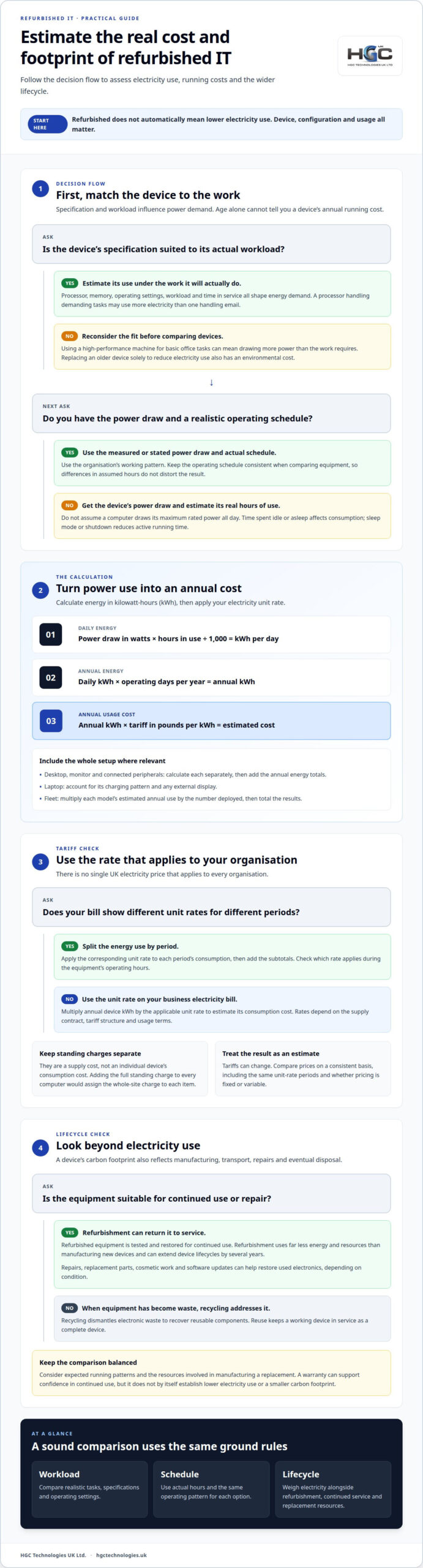
Estimate each device’s electricity use in kilowatt-hours, then multiply it by your electricity rate. The result depends on the device’s actual power draw, operating hours and time spent idle or asleep. A refurbished computer’s age alone won’t tell you its annual running cost; its configuration and workload also affect consumption.
Use this calculation for each device:
- Daily energy: power draw in watts × hours in use ÷ 1,000 = kilowatt-hours per day.
- Annual energy: daily kilowatt-hours × operating days per year.
- Annual usage cost: annual kilowatt-hours × your tariff in pounds per kilowatt-hour.
Use the device’s measured or stated power draw and your organisation’s actual working schedule. Don’t assume a computer draws its maximum rated power throughout the day. A processor handling demanding tasks may use more electricity than one handling email, while sleep mode or shutdown reduces active running time.
Include the whole setup where relevant. A desktop, monitor and connected peripherals each draw power, so calculate their use separately and add the annual energy totals. For a laptop, account for its charging pattern and any external display. Use the same operating schedule for each comparison, or differences in assumed hours can distort the result.
Use the unit rate on your business electricity bill to estimate cost. Since tariffs can change, treat the result as an estimate based on the selected rate and usage pattern. If your bill has different unit rates at different times, calculate each period separately, then add the costs. Keep standing charges separate: they apply to the electricity supply, not an individual device’s consumption.
For a fleet, multiply each model’s estimated annual use by the number deployed, then total the results. This makes it easier to compare different configurations and workloads. Planning a larger laptop purchase? Explore bulk refurbished laptops as part of your equipment assessment.
What are typical UK electricity prices for calculating IT equipment running costs?
There isn’t one UK electricity price that applies to every organisation. Business rates depend on the supply contract, tariff structure and usage terms. For an accurate running-cost estimate, use the unit rate on your organisation’s electricity bill rather than a generic household figure. The rate is usually shown as pence per kilowatt-hour (kWh).
Check which rate applies during the equipment’s operating hours. A business tariff may have different unit rates for different periods, so a device used overnight could incur a different energy cost from one used during the day. If your bill shows multiple rates, calculate consumption for each period separately, apply the corresponding price, then add the subtotals.
Keep the unit rate separate from the standing charge. The unit rate prices electricity consumed; the standing charge is a separate supply cost. For an individual computer, multiplying its annual kWh by the unit rate estimates its consumption cost. Adding the full standing charge to every device would assign the whole-site charge to each item. For fleet budgeting, decide how to account for supply charges across the organisation.
Compare tariffs on a consistent basis. Check whether quoted prices include the same unit-rate periods and whether the contract has fixed or variable pricing. A rate that applies for a limited contract term may not represent costs after that term. For procurement planning, calculate equipment scenarios using the current bill rate, then model how a changed rate would affect the same usage. Keep the assumed workload and operating hours unchanged so the tariff is the only variable.
For example, cost a laptop used mainly during a lower-priced period using that period’s rate, not an unrelated daytime rate. The calculation still depends on its measured or stated energy use. Record the unit rate, relevant time periods and usage assumptions alongside each estimate. This makes annual costs easier to review when your business renews its electricity contract or changes how its equipment is used.
How do power consumption and energy efficiency vary by refurbished equipment age and specification?
Age alone doesn’t determine a refurbished computer’s electricity use. A newer, high-performance desktop can draw more power under demanding workloads than an older laptop handling email. Compare the equipment’s components and intended tasks rather than treating its manufacture date as a direct measure of efficiency. Refurbished models can also have different configurations, even within the same product range.
The processor affects demand because intensive computing tasks require more processing than basic office work. A dedicated graphics card can add to a desktop’s power needs, especially during graphics-heavy use. Memory capacity and storage type also distinguish configurations, but their effect depends on the system and workload. A larger monitor adds another load, so compare the complete workstation rather than the computer alone.
- Processor and graphics: assess whether the computing capability suits the software and workload.
- Form factor: compare a laptop with a desktop designed for the same tasks.
- Display and peripherals: include monitors and connected equipment in the overall assessment.
- Usage pattern: distinguish active work from idle time, sleep and shutdown.
For example, a refurbished laptop used for documents and video calls may be a better match than a powerful desktop built for intensive processing. Conversely, demanding specialist software may require stronger components. A lower specification isn’t automatically more efficient if it struggles with the workload and stays active longer. Match capacity to the work, then compare energy use under a consistent operating pattern.
Age can affect efficiency, but it doesn’t settle the comparison. Design, components, power settings and the task all contribute. Look at the model’s stated power information or measured consumption, where available, and consider the whole setup. To assess bulk refurbished laptop options against your organisation’s workload, explore refurbished laptop choices.
HGC Technologies UK
HGC Technologies UK Ltd. supplies refurbished laptops in bulk and can help organisations consider equipment options alongside their workloads and purchasing needs. Bulk Dell and HP refurbished laptops offer options for teams replacing or expanding a computer fleet, while custom-built PCs suit requirements that call for a tailored configuration. The right choice depends on the work devices must handle, their specifications and expected usage, not refurbishment alone.
Use the electricity-cost method above to assess likely running costs alongside equipment suitability. This gives procurement teams a clearer basis for planning without treating a device’s age as a complete measure of its efficiency. HGC Technologies also supplies original smartphones for organisations reviewing technology needs beyond computers.
To discuss equipment options for your organisation, contact HGC Technologies UK Ltd.
Shape your next technology decision
Make energy performance part of your organisation’s wider technology planning. The power consumption of refurbished IT equipment is one consideration alongside the work each device must support, how long it can remain useful and the resources involved in replacing it. A clear procurement brief can help your team weigh these priorities consistently across future purchases.
For businesses planning a fleet refresh, HGC Technologies UK Ltd. supplies bulk Dell, Lenovo and HP refurbished laptops. Compare these options with your organisation’s workloads and equipment requirements to identify a suitable direction for your next purchasing decision.
Take the next step at a pace that suits your planning. Contact HGC Technologies UK Ltd. to discuss equipment options for your organisation, and move forward with a more considered technology plan.
Frequently Asked Questions
How much electricity does refurbished IT equipment use compared with new equipment?
The power consumption of refurbished IT equipment can be similar to that of a new device with comparable components and workload. The refurbished label alone doesn’t determine electricity use. For example, compare like-for-like laptops running the same software, brightness and working schedule. Differences in processor, graphics hardware, power settings and condition can affect actual use. A meter reading during representative work gives a more useful comparison than age alone.
What is the average power consumption of refurbished laptops, desktops, servers and monitors?
There isn’t one representative average for refurbished laptops, desktops, servers and monitors, because each category includes different designs and configurations. A laptop’s power draw varies with screen size and workload; a desktop’s also reflects its processor and graphics hardware. Server demand changes with installed components and activity, while monitor use depends on size and settings. For a relevant estimate, compare the specific model’s power information or measured use.
What is the carbon footprint of running refurbished IT equipment in the UK?
The power consumption of refurbished IT equipment helps determine its operational carbon footprint, alongside the emissions associated with generating the electricity it uses. Estimate energy use over the actual operating schedule, then apply an appropriate UK electricity emissions factor for the period assessed. This represents use-phase emissions, not the whole lifecycle. Manufacturing, transport, refurbishment and eventual disposal are separate contributions to consider in a broader assessment.
Are there UK regulations or energy-efficiency standards for refurbished IT equipment?
Substantially modified machinery considered new must meet applicable requirements of the Supply of Machinery (Safety) Regulations 2008. This applies to machinery, not refurbished computers generally.

Training Staff on New Refurbished Equipment: The 2026 Business Checklist
In 2026, the hallmark of a sophisticated IT strategy isn't the presence of brand-new hardware, but t

Cost-Effective Business Laptop Refresh Strategy: A 2026 UK Guide
Your four-year-old corporate fleet isn't just slow; it's a silent drain on your bottom line and a gr
Custom PC Builder UK: Myth-Busting the Move from OEM to Bespoke Business Hardware
Why are the UK’s most agile enterprises intentionally turning their backs on the global hardware g