
Refurbished Laptop DOA: Warranty and Return Options
A refurbished laptop that arrives dead on arrival is handled under the seller’s stated return or warranty terms, which set whether the available option is a return, repair or replacement. Knowing what happens if a refurbished laptop is DOA starts with reporting the fault to the seller and following the relevant process. Refurbished laptop warranties commonly range from 30 days to 1 year, while return policies may allow 14 to 90 days.
A faulty laptop is frustrating, especially when you expected a refurbished device to be ready to use. The warranty and returns policy are separate: the warranty explains cover for faults, while the returns policy sets out the conditions and timeframe for returning the laptop.
This guide explains what refurbished laptop warranties typically cover, how DOA policies and UK consumer rights may apply, and which return options to look for. You’ll also learn what to do next, why a commercial purchase may be treated differently from a private one, and how clear terms can help you make an informed buying decision.
Key Takeaways
- Understand how a returns policy differs from warranty cover, and why the terms can affect your options when a laptop arrives faulty.
- Refurbished laptop return policies may allow returns within 14 to 90 days, while warranties commonly range from 30 days to 1 year.
- Learn which faults are typically covered, and why accidental damage and battery wear may be treated differently from hardware faults.
- Find out what to do when a laptop is dead on arrival and why contacting the seller is a useful first step.
- See why your options under UK consumer law may depend on whether you bought the laptop for private or commercial use.
What is a Refurbished Laptop Warranty?
A refurbished laptop warranty sets out the seller’s cover for faults during a stated period. A separate returns policy explains when and how you can return the laptop.
Returns Policy and Warranty Cover
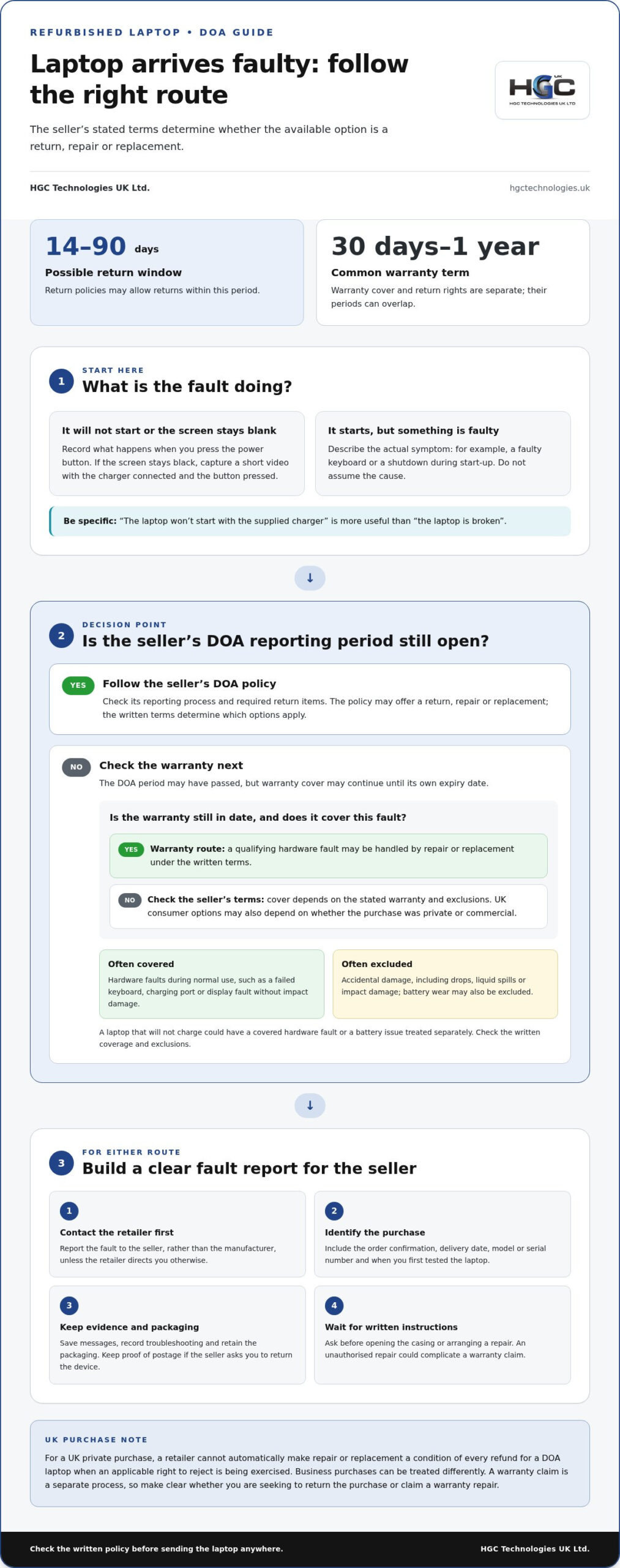
A returns policy covers the conditions and timeframe for sending a purchase back; a warranty covers specified faults during its stated term. Refurbished laptop return policies may allow returns within 14 to 90 days, while warranties commonly range from 30 days to 1 year. These periods can overlap, but they serve different purposes. Keep the receipt, listing and policy together so you can identify the route that applies.
When reporting a fault, save your order confirmation, note the delivery date and describe the problem in writing. Photos or a short video can show symptoms such as a cracked casing or blank screen. Include the laptop’s serial number and copies of messages with the seller. This record helps show whether you’re reporting a fault present on arrival or making a later warranty claim.
Faults Covered by a Warranty
A refurbished laptop warranty commonly covers hardware faults that develop during normal use. Examples include a keyboard that stops registering key presses, a charging port that fails or a display that develops a fault without impact damage. For a covered fault within the warranty period, repair or replacement is typically provided at no additional cost. The written terms identify covered components and explain how the seller handles a claim.
Accidental damage is commonly excluded. A drop, liquid spill, cracked screen or impact damage may therefore fall outside warranty cover. Battery wear is also often excluded because rechargeable batteries degrade over time. Read the exclusions alongside the coverage, especially if a symptom could have several causes. A laptop that won’t charge, for example, could have a covered hardware fault or a battery issue treated separately.
Warranty Cover After the DOA Period
Once the seller’s DOA return period has passed, the warranty may still cover a qualifying hardware fault until its own expiry date. The key distinction is the remedy: the warranty terms may direct you towards repair or replacement rather than a return. Warranty arrangements vary, so check whether the terms require you to send the laptop away for assessment or repair. Such repairs typically take 5 to 7 working days from its arrival there.
Check the warranty’s start date, claims process and return instructions before sending the laptop anywhere. Keep a record of the fault and get written instructions from the seller before attempting a repair. Opening the device or arranging an unauthorised repair could complicate a warranty claim. If the issue is accidental damage or battery wear, the written exclusions explain why standard hardware cover may not apply.
Refunds, Repairs and Replacements
For a UK private purchase, a retailer can’t automatically make repair or replacement a condition of every refund for a DOA laptop. If you’re exercising an applicable right to reject, requiring a repair first may not fit that route. Business purchases can be treated differently. A warranty claim is a separate process, so make clear whether you’re asking to return the purchase or claim a warranty repair.
To escalate a dispute, send the seller a clear written complaint with your order details, delivery date, evidence and preferred outcome. Keep copies of replies and explain why the offered repair or replacement doesn’t resolve your complaint. If the dispute remains unresolved, use the seller’s formal complaints process and seek independent UK consumer advice. A written record helps establish the timeline and the outcome you requested.
Dead-on-arrival device protection
A refurbished laptop classed as dead on arrival may be returned, repaired or replaced. The seller’s DOA policy determines which options apply and how to report the fault. A laptop that won’t power on, for example, presents a different issue from one that starts but has a faulty keyboard. Describe the actual symptom rather than assuming its cause.
Act promptly when the device arrives. Note the delivery date, retain the packaging and record what happens when you press the power button. If the screen stays black, capture a short video showing the charger connected and the power button pressed. Keep the order confirmation and correspondence together so your report clearly identifies the purchase and fault.
Contact the retailer that sold the laptop first, rather than the manufacturer. Give the seller the model or serial number, explain when you first tested it and list any troubleshooting you’ve tried. Ask for instructions before opening the casing or arranging a repair. An unauthorised repair can make it harder to show whether the problem existed on arrival.
Keep your description factual. “The laptop won’t start with the supplied charger” is more useful than “the laptop is broken”. If it powers up but shows a blank screen, say so; if it shuts down during startup, record that behaviour. These details help distinguish a DOA fault from setup issues, a disconnected accessory or damage noticed after delivery.
The policy may offer different remedies: a return, repair or replacement. Check its reporting process and whether it requires the whole device, charger or other supplied items. Pack the laptop securely if the seller asks for its return, and retain proof of postage. Don’t send it to a manufacturer unless the retailer directs you to.
One electronics engineer described spending no more than 60 seconds looking for a fault before issuing a replacement and sending the original item for recycling. That describes one approach, not a universal DOA procedure. Retailers’ policies differ, so the written terms and the seller’s response shape what follows. For a business buyer, record the affected device and any work it prevents. A concise incident record helps keep the return discussion focused on the laptop’s condition and the remedy requested.
If you’re deciding what happens if a refurbished laptop is DOA, focus first on prompt written notice, clear evidence and the seller’s stated process. These steps establish when the fault appeared and what outcome you requested, without risking the device through an attempted repair.
Return options when buying refurbished
Your options depend on who sold the laptop, the purchase terms and whether you bought privately or commercially. The seller’s return instructions help distinguish a faulty-item return from a warranty repair.
Consumer Rights for a DOA Laptop
UK consumer rights and a seller’s returns policy are separate considerations when a refurbished laptop arrives faulty. The type of purchase matters because private and commercial buyers may have different options. Start by identifying the seller named on your order confirmation, then record whether you bought the laptop for personal or business use. This distinction provides context when discussing a remedy with the seller.
If a retailer sold the laptop through an online marketplace, contact the retailer about the fault rather than treating the platform as the seller. Keep the marketplace order record, seller details and messages together. If the seller proposes a repair but leaves the laptop unrepaired for an unacceptable time, you can request a refund and explain why the delay is unacceptable.
Return Postage for Faulty Laptops
Responsibility for return postage depends on the return route and the seller’s stated terms. Before sending a faulty refurbished laptop, read the return instructions and ask the retailer in writing whether it will provide a label or expects you to arrange postage. This prevents avoidable confusion over dispatch and records the agreed process.
Keep any postage receipt and tracking reference with your order confirmation. If the seller asks you to return the laptop, confirm whether the charger and other supplied items should accompany it. Leaving out requested accessories can complicate the assessment, while tracking records show when the parcel was sent and delivered.
Separate the possible routes before agreeing to a return. A policy return may have its own timeframe and conditions; a warranty claim follows the warranty’s fault coverage and process. Refurbished laptop return policies may allow returns within 14 to 90 days, while warranties commonly range from 30 days to 1 year. Those periods describe different arrangements, so identify which one you’re using.
For example, if a laptop arrives unable to start, write to the retailer with the delivery date, the fault and the outcome you’re seeking. Attach the order record and, if practical, a short video showing the problem. Keep your original message and the retailer’s reply; they establish when you reported the issue and how the seller responded.
If a marketplace order page lists both a platform and a separate retailer, use the retailer’s details to direct your fault report. The platform’s own returns process may also apply to the purchase, but it doesn’t replace clear communication with the seller about the device. Keep every case reference and message together.
When a repair is proposed, ask about the process and how the laptop will be returned. If the wait becomes unacceptable and the device remains unrepaired, state your refund request in writing. The key practical distinction is whether you’re relying on a returns policy, warranty process or rights connected to your type of purchase.
Whether refurbished laptops usually include warranties
Refurbished laptops commonly include a warranty, but its length and coverage depend on the seller’s terms. Typical cover ranges from 30 days to 1 year. A shorter warranty can still cover immediate defects, whilst a longer term gives more time to report qualifying faults. Treat the written warranty as part of the purchase decision, not as a standard package with identical terms across sellers.
A 30-day warranty is often provided by smaller refurbished laptop sellers and covers immediate defect issues. A 90-day warranty is common for older refurbished laptops or standard refurbishment. Larger retailers or certified refurbishers offer a 1-year warranty. These are market patterns, not fixed rules for every laptop. Check the warranty supplied with the specific device to understand its duration and claim process.
Duration alone doesn’t show how useful the cover is. Read the warranty for the faults and components it covers, and the remedy it provides. A hardware fault during normal use may be covered, while accidental damage is commonly excluded. For example, a laptop that develops a fault during ordinary use differs from one with a cracked screen after a drop. The written terms define the distinction.
Battery cover deserves separate attention. According to T1A, laptop batteries have warranty terms separate from the standard hardware warranty. Battery wear is often excluded because rechargeable batteries naturally degrade over time. Compare the battery wording with the main warranty rather than assuming both have the same duration or remedy. If a laptop loses charge quickly, the battery terms may determine whether that issue qualifies for cover.
Before buying, find the warranty document and note its start point, expiry and reporting method. Check whether a fault must be reported to the retailer or handled through a return-to-base process. That process generally involves sending the laptop away for repair or replacement. A 5 to 7 working day repair estimate may begin only after the device reaches the manufacturer, so dispatch and assessment affect the overall wait.
Compare the actual cover, not just the headline period. A 1-year warranty with narrow exclusions may address different problems from a 30-day warranty focused on immediate defects. Check whether chargers or other supplied accessories are included, and retain the order record with the warranty. Clear terms make it easier to understand what to do if a refurbished laptop develops a fault after delivery.
What are my UK Consumer Rights Act rights if a refurbished laptop is DOA?
Your options depend partly on whether you bought the laptop as a private consumer or for commercial use. This distinction matters because consumer and business purchases can involve different rights and terms. Before relying on the Consumer Rights Act, identify who bought the device, who sold it and the purpose recorded for the purchase.
For a private purchase from a retailer, keep the order confirmation and product description. These show the seller, the device supplied and the terms presented at purchase. If the laptop arrives unable to start, report that specific fault to the retailer in writing. Include the delivery date and explain whether it failed immediately or stopped working after setup.
A business purchase needs separate consideration. If a company bought devices for staff, the buyer is acting commercially rather than as a private consumer. The contract, invoice and seller’s terms help establish the relevant arrangement. For example, a laptop bought by a business for an employee may be subject to different terms from one bought by that employee for personal use.
The Consumer Rights Act and a seller’s warranty are not interchangeable. A warranty describes the seller’s stated cover and claims process; the purchase relationship determines which other rights may be relevant. Read both, then state which route you’re using in your complaint. Don’t treat a warranty expiry date as the answer to every question about a fault present on delivery.
Build a clear record before discussing a remedy. Keep the invoice, listing, serial number, delivery confirmation and messages together. Record practical symptoms, such as no power, a blank display or startup failure. A short video can show what happens when you connect the charger and press the power button. Don’t open the laptop or attempt an unauthorised repair.
Write to the seller named on the invoice, even if a marketplace hosted the listing. State whether the purchase was private or commercial, when the fault appeared and what outcome you’re seeking. If the seller proposes a repair, ask about its process and keep the reply. If the laptop remains unrepaired for an unacceptable time, explain your concern and request a refund in writing.
If the seller disputes your account, respond with the timeline and supporting records rather than making a general claim that the laptop was faulty. A dated message, delivery record and fault video can clarify what happened. Keep the complaint factual and distinguish an arrival fault from accidental damage or a problem that developed later.
A marketplace may host the listing, but write to the seller named on the invoice. The rights distinction described here is between a private consumer purchase and a commercial one.
HGC Technologies UK Ltd.: Bulk Dell Refurbished Laptops
HGC Technologies UK Ltd. supplies bulk refurbished laptops for business buyers and technology resellers. Its range includes refurbished Dell, Lenovo and HP laptops, giving organisations options from these established brands. For projects needing a different configuration, HGC Technologies UK Ltd. also offers custom-built PCs.
If you’re planning a business purchase, consider which device category suits your users and procurement needs. This guidance can help you assess warranty and return terms alongside the equipment itself, supporting an informed purchasing decision.
Contact HGC Technologies UK Ltd. to discuss your requirements, or visit hgctechnologies.uk.
Plan your next refurbished laptop purchase with confidence
Understanding what happens if a refurbished laptop is DOA can help shape your business procurement plans. Include warranty and return terms in your purchasing brief, alongside device requirements and intended use. This gives your team a clear basis for comparing options and planning how to handle a faulty arrival.
HGC Technologies UK Ltd. supplies bulk refurbished Dell, Lenovo and HP laptops for business buyers and technology resellers. Consider which devices suit your users and procurement needs, then explore the available options in the context of your wider technology plans.
Contact HGC Technologies UK Ltd. about your business requirements to discuss your next technology purchase.
Frequently Asked Questions
Do I need the original box for a DOA claim?
If the laptop arrives faulty, contact the seller for return instructions before sending it back. Contact the retailer before posting the laptop and follow its packing guidance. Keep the charger and accessories together if requested, and photograph the packed parcel. If you no longer have the box, don’t delay reporting the fault while you look for it.
What is usually not covered?
Warranty terms commonly exclude accidental damage, including a cracked screen after a drop, liquid spills and impact damage. Battery wear is also often excluded because rechargeable batteries naturally degrade. For example, a laptop that won’t charge could have a hardware fault or a worn battery, which the warranty may treat differently. Read the exclusions and any separate battery terms before making a claim.
What does DOA mean for a refurbished laptop?
DOA means “dead on arrival”: the laptop has a fault when delivered or fails during initial setup. It might not power on, or it could start but have a key function that doesn’t work. The label describes when the problem occurred, not its technical cause. Tell the seller exactly what happens, such as whether the power light appears or the screen remains blank.
What should I do if a refurbished laptop arrives faulty in the UK?
Contact the retailer that sold it and report the fault in writing. Include your order reference, delivery date and a clear description, such as “the screen remains blank after startup”. Keep the packaging and accessories until you receive return instructions, and save the seller’s replies. Don’t open the laptop or arrange an independent repair before discussing the issue with the retailer.
How long do I have to reject a faulty refurbished laptop for a refund in the UK?
The applicable deadline depends on whether you bought as a private consumer or for commercial use, as those purchase types can involve different rights. A retailer’s returns-policy window is separate from statutory rights, so don’t assume one replaces the other. Check the terms for your purchase, identify the seller on your receipt and report the fault promptly in writing. State that you’re seeking to reject the laptop and request a refund.
Do marketplace purchases and private sellers have different UK rights for a DOA laptop?
For a marketplace purchase, contact the retailer named as the seller rather than treating the platform as the seller. Your options may differ depending on whether you bought the laptop for private or commercial use.

Energy Efficiency of Refurbished Laptops: A Practical Guide
A refurbished laptop isn’t automatically less energy-efficient than a new one. The energy efficien

Custom PC for Financial Modelling: A 2026 Buying Guide
A financial modelling PC doesn’t need to win a gaming benchmark. The right custom PC for financial

How to Self-Maintain a Fleet of Refurbished Computers
What makes a refurbished computer fleet dependable? Often, it comes down less to fixing problems and