

Sourcing Older Laptop Models for Compatibility: A 2026 Guide
A laptop with the right model name can still fail to run the software or connect to the peripherals your team relies on. That is why sourcing older laptop models for compatibility should start with the exact configuration, not a familiar brand or badge.
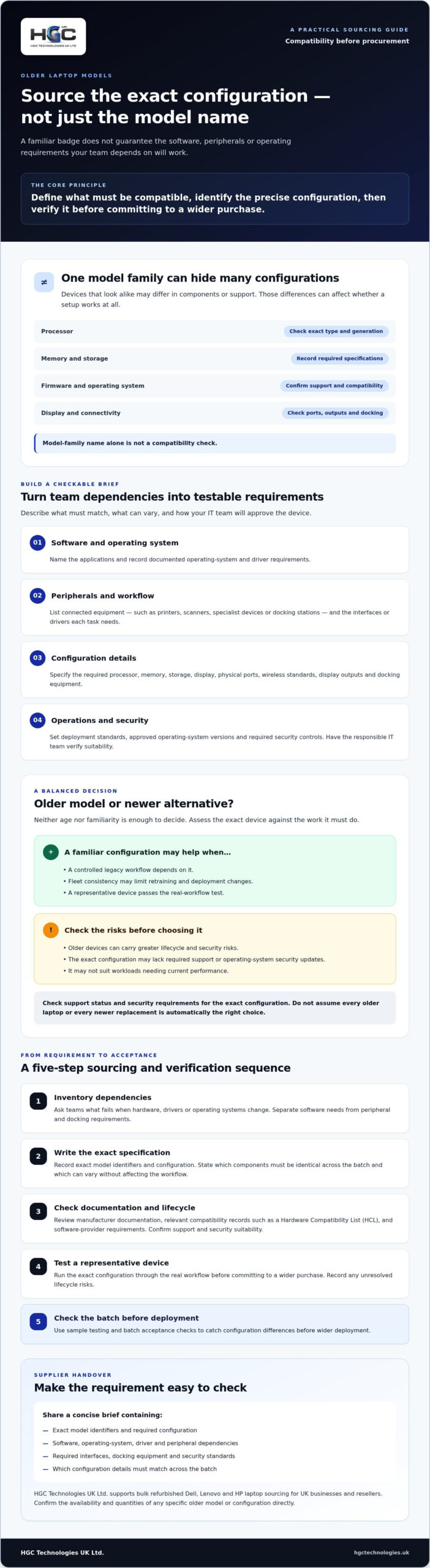
Devices that look identical can differ in processor, memory, storage, firmware or operating-system support. A mixed fleet can also add deployment and support work. If newer hardware will not work with a critical application or peripheral, check compatibility before committing to a purchase.
This guide explains how to document requirements before contacting suppliers, assess exact configurations and lifecycle risks, and verify refurbished stock before procurement. UK businesses and resellers can discuss bulk refurbished Dell, Lenovo and HP laptops with HGC Technologies UK Ltd. Confirm the availability of any specific older model or configuration directly. You will come away with a clearer process for sourcing suitable devices while keeping compatibility and fleet consistency in view.
Key Takeaways
- Build a compatibility brief around the software, peripherals and operating requirements your team actually depends on.
- For sourcing older laptop models for compatibility, compare exact identifiers and configurations, not model-family names alone.
- Check manufacturer documentation and support lifecycle risks before deciding whether an older device is suitable.
- Use sample testing and batch acceptance checks to catch configuration differences before wider deployment.
- Share your requirements with a UK wholesaler of refurbished Dell, Lenovo and HP laptops, and confirm current stock and quantities directly.
Why source older laptop models for compatibility rather than replace everything?
Compatibility is a set of requirements, not a model name. A laptop is suitable only if its operating system, applications, hardware, security controls and everyday workflows meet your documented needs. Sourcing older laptop models for compatibility may help preserve a known working environment, particularly when a business process depends on a specific configuration. However, an older device can carry greater lifecycle and security risks, so assess continuity rather than assuming it is the right choice.
Start by identifying the dependency. An application may require a particular operating system or driver, while a workflow might rely on a specific connection for a scanner, specialist equipment or docking station. Laptops from the same product family can look alike but have different processors, memory, storage, displays or connectivity. Those differences can affect performance or whether the setup works at all. Use manufacturer documentation and relevant compatibility records, such as a Hardware Compatibility List (HCL), to inform checks for the operating system or software involved.
What to check when sourcing older laptop models for compatibility
Ask each team to describe the task that fails when hardware, drivers or operating systems change. Separate application and operating-system dependencies from peripheral and docking requirements, then turn each issue into a testable condition. For example, “keep the old laptop” is not a useful procurement requirement. Naming the software, supported operating system, required port and connected device gives suppliers and evaluators specific details to check.
- Software: record the application and any documented operating-system or driver requirements.
- Peripherals: list connected devices and the interfaces or drivers each workflow needs.
- Configuration: note minimum processor, memory, storage and display requirements where known.
- Operations and security: identify deployment standards and confirm the device can meet current organisational policies.
When does retaining an older model make business sense?
A familiar configuration may suit a controlled legacy workflow or a fleet where consistency helps limit retraining and deployment changes. It is less suitable to assume an older device will meet workloads that require current performance, ongoing manufacturer support or operating-system security updates. Check support status and security requirements for the exact configuration before procurement. Assess each exception on its merits: neither every older laptop nor every newer replacement is automatically the right choice.
Where continuity appears valuable, test a representative device against the real workflow before committing to a wider purchase. Confirm that the exact configuration, not just the model family, behaves as required, and document any unresolved lifecycle risks. This turns a preference for familiar hardware into a controlled decision that can guide the next stage of sourcing.
How to document laptop compatibility requirements before sourcing
A precise brief turns compatibility from a general preference into criteria a supplier can check and your IT team can verify. When sourcing older laptop models for compatibility, record exact model identifiers and configuration details. A family name alone may cover several versions with different components, ports or support status.
Build a compatibility specification the supplier can check
Describe what must match and where variation is acceptable. Include processor generation, memory, storage, display, physical ports, wireless standards, display outputs and docking equipment. List external peripherals such as printers, scanners or specialist devices, along with the operating system, applications and drivers they need. State which components must be identical across the batch and which can vary without affecting the workflow.
Document security requirements too, including approved operating-system versions and any controls required by the responsible IT team. Ask that team to verify support and security suitability against current manufacturer and software-provider documentation. A written approval process helps keep procurement aligned with internal standards. Crown Commercial Service and UK public sector IT procurement guidelines offer a useful reference point for structured technology purchasing, alongside your organisation’s internal policies.
Use a five-step workflow
- 1. Inventory dependencies. Ask users and IT teams to identify applications, peripherals, docks and workflows that could be affected by a hardware change.
- 2. Set minimum specifications. Record the required processor, memory, storage, display, ports and connectivity. Separate essential criteria from preferences.
- 3. Verify support. Check operating-system, application, driver, firmware and security requirements in current vendor documentation. Flag uncertainty for IT review.
- 4. Test samples. Use representative devices to run critical applications and connect the actual docks, adapters, printers and specialist peripherals. Record pass or fail results against each requirement.
- 5. Approve the batch. Compare the proposed configuration and acceptable variation with the brief. Agree how mismatches or condition concerns will be identified before accepting the wider order.
Validate software, firmware and peripherals
Do not treat a device starting up as proof that it is suitable. Confirm the exact operating-system and application requirements, then check firmware, drivers and security-update status with the relevant vendors. Test essential peripherals with representative devices, including the connection and docking setup used in practice. Keep the test results with the specification so the approval decision can be traced.
Once the brief is ready, share the model identifiers, configuration criteria and required quantities with a supplier. UK businesses and resellers can use it to discuss bulk refurbished laptop sourcing with HGC Technologies UK Ltd. Confirm current stock and configuration availability directly.
Older laptop models versus newer alternatives: compare the real trade-offs
Neither an older refurbished laptop nor a newer alternative is automatically the safer choice. Compare exact configurations against the workflows, support requirements and deployment conditions your organisation has tested. A familiar device may preserve application behaviour or peripheral fit, but it can still fail current security requirements or lack ongoing manufacturer support.
| Factor | Older model | Newer alternative |
|---|---|---|
| Compatibility | May suit a known application or peripheral setup, but confirm the exact configuration and drivers. | May need application, driver or peripheral testing before it can replace the existing setup. |
| Support lifecycle | Remaining operating-system, firmware and security support may be limited. Verify status with the relevant manufacturers. | May have a longer support horizon, but check official lifecycle information for the specific device. |
| Performance | Assess against the workload in practice. Age or a similar model name says little about actual suitability. | May better accommodate changed workloads, but compare specifications and test requirements rather than assuming. |
| Consistency | Can align with an existing fleet if processor, memory, storage, display and connectivity match. | Could introduce configuration differences or require a planned fleet transition. |
| Deployment effort | Familiarity may reduce change for users, though condition checks and compatibility testing remain necessary. | Allow for migration, testing and user training where workflows or interfaces change. |
What older models can preserve, and what they cannot
A tested older configuration may retain expected application behaviour, connect to established peripherals and help maintain consistency across a standardised fleet. That continuity is useful only if the devices meet present requirements. Battery condition can vary between units, while parts availability and update support may affect how long the fleet remains practical to operate. Check manufacturer lifecycle and security information against current official sources. Do not infer support from a model’s age or popularity.
When should a business consider a newer model instead?
Compare newer alternatives if essential software or internal security policies require a supported platform, or if staff workloads, battery expectations or connectivity needs have changed. Test the precise refurbished configuration against the precise newer option. Include the operational work around the hardware, such as application migration, peripheral validation and user training, rather than judging by purchase specifications alone.
The right route depends on evidence from your requirements and tests. Sourcing older laptop models for compatibility can suit a defined workflow, while a newer device may be a stronger fit for other teams. Record the reasons for each decision and the lifecycle risks the organisation is prepared to accept.
How to source and verify an older laptop batch step by step
A written compatibility brief is only useful if the proposed batch can be checked against it. Treat sourcing older laptop models for compatibility as a controlled procurement process: confirm what is being offered, test representative devices and document how mismatches will be handled before approving the batch.
What to request from a wholesale supplier
Send the supplier your required model identifiers, configuration, quantity and essential compatibility criteria. Ask which details can be confirmed for the available batch, including processor, memory, storage, display, ports and connectivity. Request the grading criteria and condition information used to describe the devices, and clarify whether components or configurations may vary.
Be specific about substitutions. If a close alternative is proposed, ask for its full configuration and assess it against the same requirements rather than treating it as equivalent by name. Confirm current stock, batch consistency and fulfilment details directly. Do not assume that a particular model, quantity or configuration will be available.
Run a practical acceptance test
Agree the test method and acceptance criteria with procurement and IT stakeholders before approving devices. Select representative units from the proposed batch, then check them against the documented requirements. For each tested device, record its serial or asset identifier, reported configuration, condition observations and test results.
- Confirm specifications: compare the actual processor, memory, storage, display and required ports with the brief.
- Run the workflow: open and use essential applications, then connect the required docks, adapters and peripherals.
- Check performance and security: confirm the device meets the agreed workload and security criteria, with operating-system, firmware and driver status reviewed by the responsible IT team.
- Record exceptions: note any variation or failed check, and classify it as acceptable or requiring resolution.
Define what constitutes a pass, which variations are permitted and what fault threshold would stop approval. Agree how to escalate specification mismatches, condition concerns or failed compatibility tests. If a unit does not match the agreed criteria, pause approval and resolve the discrepancy with the supplier before proceeding. Keep the final test record with the purchase documentation so the decision is traceable.
UK businesses and resellers considering bulk refurbished laptops can share the written brief with HGC Technologies to discuss your batch requirements. HGC supplies refurbished Dell, Lenovo and HP laptops. Confirm available stock, quantities and configuration details directly before making a procurement decision.
How HGC Technologies can support bulk refurbished laptop sourcing
HGC Technologies supplies bulk refurbished Dell, Lenovo and HP laptops to UK businesses, resellers and corporate procurement teams. If you are sourcing older laptop models for compatibility, a clear brief gives the sourcing discussion a practical starting point. It shows which requirements are essential and which configurations may be considered, subject to availability.
Do not assume a specific older model, configuration or quantity is in stock. Ask what is currently available, then compare the confirmed details with your documented acceptance criteria. If a proposed device differs from the target configuration, assess the exact variation against your software, peripheral, security and fleet requirements before proceeding.
What information to prepare before contacting HGC
Make your enquiry specific enough for available options to be assessed. Include the target model identifiers, acceptable configuration ranges, intended use and required quantity. Note legacy applications, operating-system constraints, required peripherals and security requirements, so the discussion can focus on relevant configurations rather than model names alone.
- Target devices: list exact identifiers and distinguish essential specifications from acceptable alternatives.
- Compatibility: document application, operating-system, driver, docking and peripheral requirements.
- Batch expectations: state the required quantity and level of configuration consistency.
- Checks before purchase: identify questions about condition grading, sample testing and fulfilment details that need confirmation.
Move from compatibility brief to sourcing discussion
Use your written criteria to review any configurations confirmed as available. Compare each option against the same requirements, and ask for clarification before accepting substitutions or variation across a batch. For model-specific details, verify operating-system, firmware and peripheral compatibility against current manufacturer documentation. You can also consult the existing bulk Dell refurbished laptops procurement guide for Dell-specific sourcing context and the wholesale laptop distributor UK partner reference for broader supplier considerations.
HGC’s offering includes refurbished laptops from three established business brands, giving buyers a route to discuss bulk requirements across Dell, Lenovo and HP. Prepare your compatibility brief and contact HGC Technologies to discuss current sourcing options. Confirm stock, quantities, configuration details and any fulfilment requirements directly before making a procurement decision.
Turn compatibility requirements into a confident sourcing decision
Successful sourcing older laptop models for compatibility starts with evidence, not assumptions. Define the software, peripherals, security and operating requirements first, then compare exact configurations rather than relying on a model-family name. A familiar device may support fleet continuity, but check its lifecycle and security suitability against current manufacturer information.
Before approving a bulk order, test representative units against real workflows and record acceptable configuration variations, condition criteria and how mismatches will be handled. This gives procurement teams a practical basis for comparing confirmed stock with their requirements, without assuming a particular model or quantity will be available.
HGC Technologies supplies refurbished Dell, Lenovo and HP laptops in bulk to UK businesses, resellers and corporate procurement teams. Custom-built PCs and server solutions are also available. Prepare your model identifiers, configuration criteria and intended use, then discuss your bulk refurbished laptop requirements with HGC Technologies. A clear brief and structured verification process can help you make your next sourcing decision with greater confidence.
Frequently Asked Questions
Can older laptop models still run current business software?
Sometimes, but compatibility depends on the exact laptop configuration and each application’s requirements. Check the software provider’s current documentation for supported operating systems, drivers and hardware, then verify that the specific device meets them. A model-family name alone is not enough. Test essential workflows on a representative unit, including connected peripherals, before deciding whether sourcing older laptop models for compatibility is suitable for your organisation.
How do I find the exact configuration of an older laptop model?
Check the device’s model identifier and service tag or serial number, then compare them with the manufacturer’s documentation. Inspect the installed processor, memory, storage, display and available ports on the laptop itself or through its system information. Do not rely on a listing or family name to confirm the configuration. For a batch purchase, ask the supplier which details can be confirmed for the available units and note any permitted differences.
Is buying refurbished older laptops safe for business use?
Refurbished laptops can be suitable for business use if they pass checks against your organisation’s requirements. Review the supplier’s grading criteria and condition information, confirm the specifications, and assess battery condition and security-update status. Ask your IT team to verify operating-system, firmware and application support using current vendor documentation. Test representative devices with business software and peripherals before deployment. Do not treat a model as suitable solely because it worked in the past.
What should I check before sourcing older laptops in bulk?
Prepare a written brief covering exact model identifiers, required configurations, quantity and acceptable variation. Include operating-system and application requirements, essential ports, wireless connectivity, docks and other peripherals. Ask the supplier what configuration and condition details can be confirmed for the proposed batch, and clarify grading criteria, substitutions and fulfilment details. Agree sample testing, acceptance thresholds and how specification mismatches will be addressed before approving the order.
Can I buy an exact older laptop model in bulk?
Possibly, but the availability of an exact model, configuration and quantity must be confirmed with the supplier. Refurbished stock can vary, and devices sharing a model name may have different processors, memory, storage or connectivity. HGC Technologies supplies bulk refurbished Dell, Lenovo and HP laptops to UK business customers and resellers. Share your exact identifiers and requirements, then confirm current stock and batch consistency directly before committing.
When should a business replace an older laptop instead of sourcing another one?
Consider replacement if the device cannot meet current software, security or manufacturer-support requirements, or if its performance, battery condition or connectivity no longer suits the workload. Compare the full operational impact too, including application migration, peripheral testing and user training. An older device may still fit a controlled workflow, but assess each use case individually. Ask the responsible IT team to verify lifecycle and security information against current official sources.
How can I test refurbished laptops for compatibility before deployment?
Test representative units against a written checklist before approving the wider batch. Confirm their actual configurations, then run essential applications and connect the docks, adapters, printers or specialist peripherals used in daily work. Ask the responsible IT team to check operating-system, driver, firmware and security requirements. Record device identifiers, differences and pass or fail results, and agree acceptance and escalation steps with procurement stakeholders before deployment.

Refurbished Laptops vs Smartphones for Business Productivity: The 2026 Guide
The most expensive mistake a procurement officer can make in 2026 isn't choosing the wrong brand, bu

Data Security on Second-hand Business Laptops: A 2026 Procurement Guide
Thirty-two per cent of corporate data leaks are now attributed to redeployed drives or devices that

Troubleshooting Common Refurbished Laptop Issues: A Professional B2B Guide
The assumption that refurbished hardware is inherently prone to failure is a misconception that cost