

Building a Resilient IT Infrastructure on a Budget: The 2026 Procurement Guide
The cheapest hardware can become the most expensive part of your IT estate. Repeated failures in unsuitable kit can disrupt work and trigger costly replacements, while new enterprise-grade servers and laptops can stretch limited budgets. Building a resilient IT infrastructure on a budget means balancing reliability and room to grow against the initial purchase price.
If you’re responsible for keeping systems running, cutting hardware spend shouldn’t mean accepting avoidable risk. A dependable environment doesn’t have to rely entirely on new equipment. Professionally refurbished laptops and carefully specified server hardware can help you make more of your procurement budget.
This guide covers how to plan for resilience, assess hardware needs and manage total cost of ownership. It explains where refurbished Dell, Lenovo and HP laptops may fit, how custom server configurations can avoid unnecessary features, and what to check when sourcing equipment for a stable, future-ready IT environment.
Key Takeaways
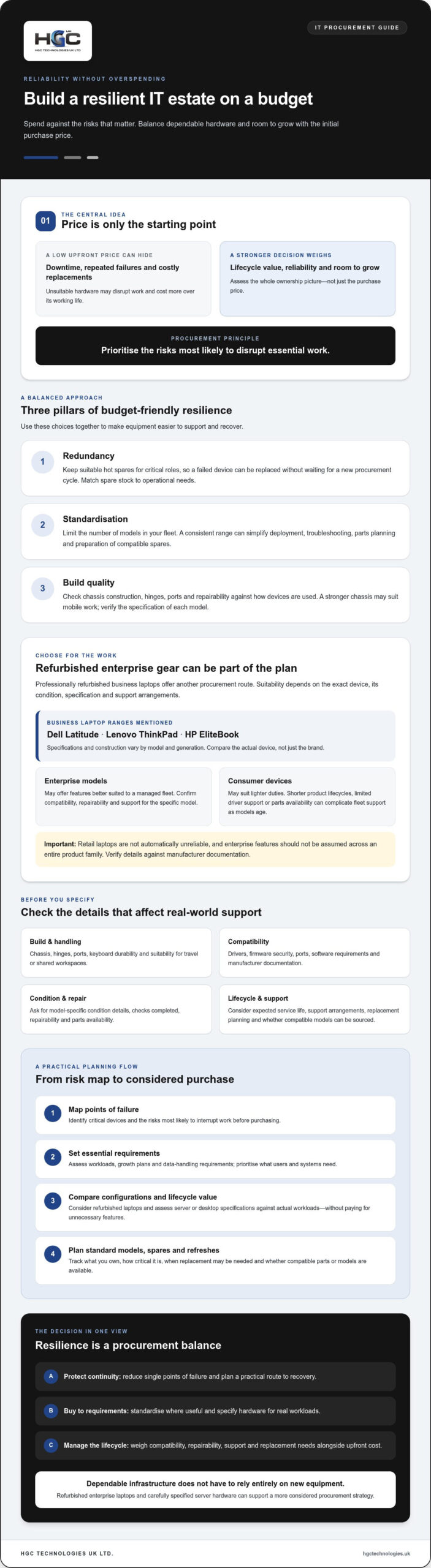
- Map points of failure before purchasing, so your budget addresses the risks most likely to disrupt work.
- Compare refurbished enterprise laptops with consumer devices by build, lifecycle and support needs, not just purchase price.
- Building a resilient IT infrastructure on a budget can start with standardising hardware and prioritising essential requirements.
- Assess server and desktop configurations against workloads, growth plans and data-handling requirements before choosing a specification.
- Professionally refurbished Dell, Lenovo and HP laptops, alongside custom server configurations, can support a more considered procurement strategy.
What Defines a Resilient IT Infrastructure in 2026?
Resilience means keeping essential work running when hardware or software fails. It isn’t simply about buying powerful equipment. A resilient setup limits single points of failure, provides a practical route to recovery and helps staff continue working through disruption. The principles behind High availability, including reducing single points of failure and planning failover, offer a useful starting point for procurement.
The budget paradox is straightforward: a low purchase price can hide higher costs over a device’s working life. If a laptop fails, lacks compatible drivers or becomes difficult to repair, downtime and replacement costs can outweigh the initial saving. Building a resilient IT infrastructure on a budget means judging hardware by its lifecycle value, not just its upfront cost.
Hardware Lifecycle Management makes that principle practical. Track what you own, how critical each device is, when it may need replacing and whether parts or compatible models can be sourced. This helps you plan refreshes rather than replace equipment in a rush. When assessing wholesale refurbished IT equipment UK, consider refurbished enterprise laptops as another procurement route, provided the specification, condition and support arrangements meet your needs.
The Three Pillars of Budget-Friendly Resilience
Build your approach around three complementary choices:
- Redundancy: Keep suitable hot spares for critical roles so a failed device can be replaced without waiting for a new procurement cycle. Match spare stock to operational needs rather than buying devices without a clear purpose.
- Standardisation: Limit the number of models in your fleet. A consistent range can simplify deployment, troubleshooting and parts planning, and makes it easier to prepare a compatible spare.
- Build quality: Assess chassis construction, hinges, ports and repairability against how devices are used. A stronger chassis, potentially including magnesium alloy, may suit mobile work better than a lightweight plastic frame. Check the specification of each model rather than assuming.
Why Consumer-Grade Hardware Can Fall Short
Retail laptops aren’t automatically unreliable, but they may not suit demanding business use. Shorter product lifecycles can make it harder to keep a fleet consistent, while limited driver support or parts availability can complicate repairs as models age. Frequent travel and shared workspaces can also expose devices to more handling. These risks make lifecycle planning and repairability important procurement criteria.
Compare options by expected service life, compatibility and replacement planning. Refurbished Dell, Lenovo and HP laptops give businesses another way to consider enterprise-grade hardware without defaulting to new equipment. Standardised models and carefully selected spares can make support and replacement more manageable.
Strategic Procurement: The Case for Refurbished Enterprise Gear
Resilience depends on more than cloud platforms and software. The physical devices people use every day matter too: a workstation that’s difficult to repair or replace can interrupt work just as surely as a service outage. Refurbished enterprise laptops give procurement teams another way to consider established business hardware while managing capital expenditure. The official definition of IT resilience from NIST offers a useful foundation: plan for disruption and the ability to adapt rather than assuming failures won’t happen.
Business ranges such as Dell Latitude, Lenovo ThinkPad and HP EliteBook are designed for professional use, but specifications and construction vary by model and generation. Compare the exact device, not just the brand: check its ports, chassis, keyboard, upgrade options and compatibility with your software. A consumer laptop may suit lighter duties, while a business model may offer features better suited to a managed fleet. Verify the details against the manufacturer’s documentation.
Assess the model, not the badge
Repairability, keyboard durability, spill resistance and firmware security are useful points to investigate, not benefits to assume across an entire product family. Ask for model-specific details, including each unit’s condition and the checks completed. For bulk procurement, bulk Dell refurbished laptops can form part of a standardised fleet when their specifications suit your users’ needs.
Refurbished equipment has already been used and inspected, but that alone doesn’t prove it has passed a particular test or is immune to future failure. Ask the supplier what inspection and testing were carried out. Record each device’s condition and configuration before deployment, and test it against your own requirements.
Understand grades and lifecycle value
Grade labels aren’t universal standards. Grade A often indicates better cosmetic condition than Grade B, but neither label alone confirms performance, battery condition or testing. Don’t assume Grade A is indistinguishable from new, or that Grade B is unsuitable for staff use. Match each unit to its role: a cosmetically marked laptop may suit a back-office task if it meets the required specification and condition criteria.
Extending the useful life of suitable hardware can reduce unnecessary replacement and support more considered procurement. As part of Hardware Lifecycle Management, track device age and condition, plan refreshes, and check parts availability and compatibility before ordering. For a consistent fleet, request clear grading definitions and comparable specifications across the batch. Businesses assessing refurbished laptop options can also review HGC Technologies’ refurbished laptop range.
Architecting Reliable Server and Desktop Solutions
Reliable infrastructure starts with hardware matched to the workload. A custom-built PC may suit an organisation better than an off-the-shelf workstation when components are selected for the applications, upgrade needs and working conditions it must support. A bespoke build isn’t automatically faster or more dependable, so compare its full specification, compatibility and lifecycle requirements before deciding.
For desktops, standardising identical or closely matched builds can simplify imaging, updates and replacement. Specify components with documented reliability and efficiency characteristics, such as SSDs with published endurance information and a suitably rated power supply. A clean operating-system image can avoid unwanted pre-installed software, but it still needs to be configured, secured and maintained for your organisation’s requirements.
Choose local, cloud or hybrid with intent
Cloud services can offer flexibility, but they aren’t the only route to resilience. A hybrid approach can keep selected workloads on local hardware where predictable access, local control or connectivity constraints matter, while using cloud services for other needs. Consider data location and sovereignty in the context of your organisation’s obligations and architecture. The server’s physical location alone doesn’t settle every question about how data is handled. Explore enterprise server hardware UK when assessing equipment for workloads that need a local foundation.
Build in practical server redundancy
Redundancy doesn’t have to mean buying costly, oversized configurations. First identify which failures you need to tolerate, then check that the server and surrounding systems support the measures you choose.
- RAID: A suitable RAID configuration can keep a system running through some drive failures, depending on its design. It isn’t a backup, so maintain separate, tested backups to protect against deletion, corruption or wider system loss.
- Power and networking: Dual power supplies can reduce reliance on a single supply if they connect to appropriately independent power sources. NIC teaming may help maintain network connectivity, but confirm compatibility across the server, operating system and network.
- Virtualisation: A capable server may host multiple compatible workloads, including legacy applications. Assess performance, memory, storage, licensing and recovery requirements before consolidating.
Custom server configurations can align capacity with actual requirements rather than paying for an oversized pre-configured system. Building a resilient IT infrastructure on a budget means balancing that efficiency with supportability: document the design, test recovery procedures and verify component specifications, including energy use, before procurement. HGC Technologies offers custom-built PCs and server solutions for organisations assessing hardware for specific needs.
Building a Resilient IT Infrastructure on a Budget: 5 Practical Steps
Turn resilience into a repeatable procurement process. Use these steps to identify weaknesses, simplify support and prepare for equipment failures without relying on rushed replacement purchases.
Steps 1 and 2: Audit and standardise
- Audit points of failure. Create an inventory showing each device’s model, age, role, condition and operating system. Identify older or less reliable machines, devices without a suitable replacement, and hardware supporting a critical process. Prioritise risks according to the disruption a failure could cause.
- Standardise your fleet. Reduce unnecessary model variation by choosing one or two suitable enterprise models for common roles. A fleet of 50 matching laptops is generally easier to configure, troubleshoot and supply with compatible parts than 50 unrelated retail models. Build and maintain a tested master image for rapid deployment, with appropriate updates and security settings.
Steps 3, 4 and 5: Prepare spares, protect data and source consistently
- Set a hot-spare policy. As a planning starting point, consider keeping 5% of your fleet as pre-imaged, ready-to-deploy units. Adjust that proportion to reflect critical roles, failure history and replacement lead times. Compare the cost of holding spares with the impact of waiting for a replacement or relying on warranty turnaround. Check warranty terms rather than assuming a particular response time.
- Separate backup from the production network. Establish a routine that includes protected, air-gapped copies, access controls and scheduled restore tests. A backup that can’t be restored when needed won’t provide dependable recovery. Define who checks completion and how often recovery is tested.
- Plan sourcing and replacement. Bulk purchasing can help you keep compatible stock for a swap-and-repair approach: deploy a prepared replacement, then assess the failed unit separately. Before selecting a wholesale laptop distributor UK, ask for clear grading definitions, device specifications, testing information and an explanation of how consistency across a batch is assessed.
Keep the plan proportionate. Building a resilient IT infrastructure on a budget doesn’t mean holding a spare for every device or buying in bulk without checking the specification. Review your inventory and incident records regularly, then align stock levels and replacement decisions with the hardware that matters most to business continuity.
If you’re reviewing bulk refurbished laptops for a standardised fleet, explore HGC Technologies’ laptop options as part of your sourcing assessment.
The HGC Technologies Advantage for Resilient IT
Resilient procurement depends on choosing equipment that fits your organisation, not simply buying the newest available option. HGC Technologies UK Ltd. supplies refurbished Dell, Lenovo and HP laptops in bulk, alongside custom-built PCs and server solutions. For businesses planning an infrastructure refresh, these options provide a way to consider established hardware and bespoke configurations as part of a considered procurement strategy.
Suitable refurbished equipment can help organisations extend the useful life of business hardware. Custom server configurations can be specified around particular requirements instead of defaulting to an oversized pre-configured system. Both choices support building a resilient IT infrastructure on a budget when each device or server is assessed against its intended workload, compatibility needs and lifecycle plans.
Hardware choices that can scale with your needs
Procurement requirements differ between a smaller refresh and a large fleet rollout. Whether you’re planning for 10 devices or 500, establish the required models, specifications, condition and deployment schedule before sourcing. Confirm what can be supplied for your project and how consistency across the order will be assessed. Don’t assume quantities, configurations or availability without checking.
For servers, define the software and workloads the hardware must support, including capacity and compatibility requirements. A bespoke configuration can help align the specification with those needs. Original smartphones may also suit roles where mobile access is important, but choose devices according to your organisation’s requirements rather than treating a mobile fleet as a substitute for resilient core infrastructure.
Direct procurement and long-term value
HGC Technologies operates on a direct sales model, giving corporate buyers a route to discuss hardware requirements as part of procurement. Before ordering, set out the intended use, preferred models, required specifications and any constraints on device condition or configuration. Ask clear questions about refurbishment, grading and the proposed supply, then compare the answers with your internal standards.
For a large-scale refresh, consistency matters as much as the initial specification. Agree model and configuration requirements, check that proposed units meet them, and plan how replacements will fit into your existing fleet. That preparation can make future deployment and support more manageable. Extending the useful life of suitable hardware can also contribute to more considered purchasing.
Explore bulk refurbished hardware for your next infrastructure project and assess how refurbished laptops or custom server solutions could fit your organisation’s procurement requirements.
Make Your Next Procurement Decision Count
Resilience comes from practical choices: identify where equipment failure could disrupt work, standardise devices where it simplifies support, and plan for replacement and recovery before problems arise. Refurbished enterprise hardware can help balance reliability with budget, while carefully specified server and PC configurations keep procurement aligned with business needs.
HGC Technologies UK Ltd. is a UK wholesaler of refurbished Dell, Lenovo and HP laptops, with custom PC builds and server solutions for specific requirements. Its direct sales model gives corporate buyers a route to assess hardware options for their procurement plans.
Ready to review your options? Explore bulk refurbished hardware and custom server solutions from HGC Technologies UK for your next infrastructure project.
Frequently Asked Questions
Is refurbished hardware actually reliable enough for enterprise use?
Refurbished hardware can suit enterprise use if its condition, specification and testing are assessed before purchase. Reliability depends on the individual device and how well it matches the workload, not simply its refurbished status or brand. Ask what checks have been completed, confirm the configuration and review the grading criteria. Test devices in your own environment, and maintain appropriate backups and replacement plans for critical roles.
How does standardising on one laptop model improve my IT resilience?
Standardising on one or a small number of suitable models reduces variation across your fleet. IT teams can maintain fewer device images, become familiar with common components and prepare compatible replacements more easily. Matching laptops across similar roles can also simplify deployment after a failure. Choose models that meet users’ needs, and check compatibility with operating systems, applications and peripherals before making them your procurement standard.
Can I get custom server configurations on a budget?
A custom server configuration can align the specification with your actual workloads instead of paying for capacity or features you don’t need. First document application requirements, expected demand, storage needs, recovery objectives and compatibility constraints. Compare proposed components against that brief, including support and energy-use considerations. HGC Technologies UK Ltd. offers custom server solutions. Confirm the configuration and its suitability for your environment before procurement.
What is the difference between consumer-grade and enterprise-grade laptops?
Enterprise-grade laptops are designed for business environments, but features vary by model and generation. Differences may include chassis construction, repair options, ports, security features and availability of compatible components. Consumer laptops can still suit some roles, so compare actual specifications rather than relying on category labels alone. Consider how devices will be used, how long you intend to keep them and how easily your team can manage or replace them.
How many spare laptops should a business keep in stock for resilience?
There’s no universal spare-device quantity that suits every business. Base your stock level on the number of critical users, your history of hardware failures, replacement lead times and the impact of staff being without a device. A business with mobile or operationally critical roles may need a different buffer from one with readily available alternatives. Review the policy as your fleet, workloads and sourcing arrangements change.
Does refurbished equipment support the latest Windows or Linux operating systems?
Some refurbished devices can support current Windows or Linux releases, but compatibility depends on the exact model, processor, memory, firmware and operating-system requirements. Check the manufacturer’s support information and verify that required drivers and security features are available. Test your intended operating-system version with essential applications and peripherals before a wider rollout. Don’t assume a device supports the latest release simply because it worked with an earlier version.
Why is bulk purchasing better for IT resilience than buying as needed?
Bulk purchasing can help an organisation maintain a more consistent fleet and keep compatible replacement devices available. That can simplify imaging, deployment and support compared with sourcing unrelated models whenever a failure occurs. It also gives procurement teams an opportunity to specify requirements across an order. Larger orders need careful planning: confirm the specification, grading, condition and supply details, and avoid buying more hardware than your refresh plan can use.
How do I ensure the security of refurbished hardware?
Establish a secure onboarding process before any refurbished device accesses business systems. Ask the supplier what inspection and testing were carried out, then reset or reconfigure the device, install an approved operating system and apply current firmware and security updates. Enable your organisation’s required access controls and encryption, and verify that any previous data has been securely removed. Keep devices isolated from sensitive networks until these checks are complete.
Custom PC Builder UK: Myth-Busting the Move from OEM to Bespoke Business Hardware
Why are the UK’s most agile enterprises intentionally turning their backs on the global hardware g

Avoiding Laptop Supply Chain Disruption UK: A 2026 Strategic Guide
Did you know that the global surge in AI development has effectively hijacked 70% of the world’s c

Upgrading Business Laptop Fleet UK: The 2026 Asset Recovery Guide
A typical three year old business laptop can still command a resale value of up to £250, yet many U