

Corporate Smartphones with Long Battery Life: A UK Business Buying Guide
The phone with the biggest battery may not be the one that lasts longest through a working day. Corporate smartphones with long battery life need to be judged by more than capacity in mAh: screen use, processor efficiency, signal strength and business apps all affect real-world endurance. For employees travelling, working shifts or serving customers, running short of charge can disrupt essential tasks.
Battery figures can help narrow the options, but they don’t make different handsets directly comparable. This guide explains what influences day-to-day performance and how to shortlist devices against the demands of specific roles, rather than relying on headline specifications alone.
We’ll also look at charging, connectivity and the practical benefits of keeping a fleet consistent, so you can balance endurance with support and purchasing needs. With those requirements clearly defined, organisations can make more informed decisions when sourcing original smartphones through HGC Technologies, a wholesale supplier to UK businesses and retail partners.
Key Takeaways
- Define a practical working day for each employee role, then identify the tasks and apps that matter most.
- Compare corporate smartphones with long battery life using consistent endurance tests alongside capacity, charging and connectivity.
- Assess battery endurance separately from charging convenience, and consider both alongside employees’ access to power during the day.
- Use a structured fleet process: map roles, document requirements, compare suitable devices, run a pilot and standardise where practical.
- Turn your findings into a clear sourcing brief when purchasing original smartphones for your organisation or retail business.
Why corporate smartphones with long battery life matter at work
A low battery is more than an inconvenience if a phone is central to an employee’s work. A lost connection can interrupt a customer call, leave someone without navigation on a journey or prevent access to an app needed to complete a task. For teams working away from a desk, reliable charge helps keep essential tools available throughout the shift.
There isn’t one runtime that defines a suitable business phone. A desk-based employee with regular access to a charger has different demands from a field worker travelling between appointments. Corporate battery endurance is a phone’s ability to support the calls, apps and other tasks required by a particular role throughout its intended working period, taking access to charging into account.
Which business roles put the greatest demands on phone batteries?
Battery use depends on what employees do, how often they do it and where they work. Frequent calls and mobile data use draw power, while navigation can keep the screen and location services active. Employees using the camera to document work or share images may have another demanding task in their routine. These functions sit alongside the display, processor and other components that make up smartphone technology and components.
A desk-based user may be able to recharge between meetings, even if they use messaging, email and video calls. Someone travelling between customer visits may rely on maps, mobile data and calls without a convenient place to plug in. Field-based staff can face a similar challenge when using work apps outdoors. Shift-based employees may need a device to remain useful for the full shift, rather than just a standard office day.
Shared phones need further consideration: the next user may inherit whatever charge the previous person left behind. Set clear expectations for handover and charging, and account for the device’s actual pattern of use across users. Don’t assess a team phone passed between staff as though one person controls its settings and charging routine.
What does dependable battery life mean for a business?
Dependable battery life means employees can access the mobile tools their role requires throughout the working period the business has defined. That supports continuity, whether the task is answering a customer, checking an appointment or using a work app on site. It’s a practical measure of suitability, not a promise that a phone will last the same length of time for every user.
Separate everyday expectations from exceptional-use scenarios. A phone that meets a typical shift requirement may still need a charging plan for prolonged travel or an unusually demanding day. Before comparing devices, record each role’s normal tasks, expected hours away from a charger and essential applications. This gives your shortlist a clear purpose and helps distinguish genuine role requirements from assumptions based on a headline battery figure.
What determines real-world battery life in a corporate smartphone?
Battery capacity is a useful specification, but it can’t tell you how long a handset will last in every employee’s hands. Capacity is measured in milliampere-hours (mAh): it describes the amount of charge a battery can hold, not a guaranteed number of working hours. Two phones with similar capacity can deliver different runtimes because their components, software and workloads differ.
Measured smartphone runtime reflects the interaction between battery hardware, software settings and the tasks performed during a test or working day. That’s why comparing corporate smartphones with long battery life calls for more than sorting a product sheet by mAh.
How should IT buyers interpret mAh and battery tests?
Use mAh as one comparison point alongside independent endurance tests and manufacturer information. A larger figure may indicate greater capacity, but it doesn’t automatically mean longer use between charges. Screen technology, processor efficiency and power management all affect how effectively a phone uses its available charge.
Check how each test was conducted before comparing results. A controlled video loop, a web-browsing test and a mixed-use assessment represent different workloads, so their runtimes aren’t directly interchangeable. Even within one type of test, settings such as screen brightness, refresh rate and network connection can influence the result.
For a practical comparison, record the test method and conditions beside each published result. Then use a consistent set-up during any internal trial, reflecting the apps and settings your employees use. This won’t reproduce every working day, but it gives procurement and IT teams a more meaningful basis for comparing shortlisted devices.
Which daily habits and operating conditions drain charge?
Sustained screen use can increase consumption, particularly when brightness is high. Video playback, navigation with GPS, gaming and demanding work applications can also draw more power than occasional messaging or calls. Background activity matters too: apps that regularly sync data or use location services may continue consuming energy when employees aren’t actively using them.
Connectivity adds another variable. Mobile data use and calls require the phone to maintain a network connection, while weak or inconsistent reception can affect power use as the device works to stay connected. An employee moving between coverage conditions may therefore see different results from someone using the phone in an area with a stable signal.
Battery condition also matters as a device ages. Its ability to hold charge can change over time, so a handset’s performance in use may differ from its initial test result. Don’t assume one published runtime will remain identical throughout the device’s service in your organisation.
Translate these factors into a comparison record: note capacity, test type, settings, connectivity and the applications used in your own trial. This makes trade-offs visible instead of treating one specification as a verdict. Organisations preparing a sourcing brief can use those requirements to guide the selection of original smartphones for business.
How to compare corporate smartphones with long battery life
A useful comparison turns battery information into a decision for each role, rather than producing a single winner based on one specification. Start with consistent criteria, then assess shortlisted devices against the applications, connectivity and working patterns your employees actually need. This makes trade-offs easier to explain to procurement, IT teams and staff.
| Comparison criterion | What to record | Why it matters |
|---|---|---|
| Tested endurance | Runtime, test type, settings and network conditions | Helps distinguish comparable results from unlike tests. |
| Battery capacity | Manufacturer-stated capacity in mAh | Provides useful context, but does not predict working hours alone. |
| Charging | Charging method, supported speed and available charging points | Shows how readily a device can regain charge during a working day. |
| Connectivity | Required mobile network, Wi-Fi and other connections | Checks that the phone suits the locations and work applications in use. |
| Intended role | Typical tasks, shift pattern and time away from power | Connects each device’s performance with a clear business need. |
Which specifications deserve the most weight?
Prioritise endurance results that use comparable methods and reflect the role’s needs. Treat mAh as supporting information, not a ranking system. Record charging compatibility separately from battery runtime: fast charging can help during a short break, but it doesn’t mean the handset lasts longer on a full charge. Include connectivity and required apps in the assessment, since a device must support the work as well as the endurance target.
How should a business balance endurance with other priorities?
Battery life is one part of a corporate specification. Check that each shortlisted handset supports the operating system, essential applications, security controls and device-management approach your organisation requires. Consider usability too: a lighter or more compact phone may better suit an employee who carries it throughout a shift, while another role may call for a different form factor.
Build a weighted scorecard around your organisation’s priorities. Give endurance appropriate importance, then score each device against other requirements such as application compatibility, ease of use, connectivity and charging access. The weighting should reflect role needs, not a universal formula. A device that performs strongly on battery life but fails an essential software or security requirement should not lead the shortlist.
Before making a decision, verify model-specific capacity, charging details and manufacturer claims against current product information. Check endurance results under comparable test conditions, and keep the source and test method with each entry. This helps your team make a defensible comparison of corporate smartphones with long battery life, without presenting changing specifications as fixed facts.
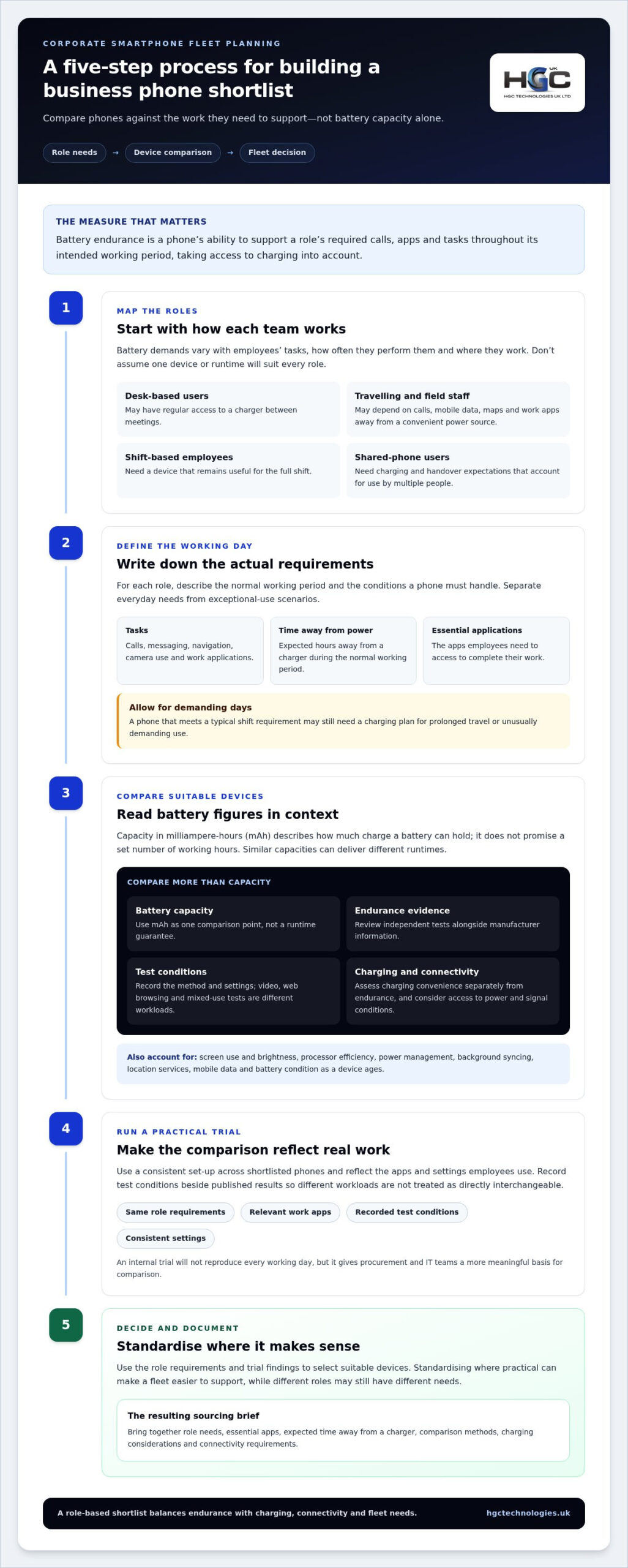
A practical buying process for a corporate smartphone fleet
A fleet decision is easier to defend when it starts with employee needs and ends with evidence, not assumptions about which handset looks strongest on paper. Use a consistent process to connect day-to-day work with device requirements, then test the shortlist before wider deployment.
- Map roles and work patterns. Group employees by how they use their phones, such as desk-based, travel-heavy, field-based or shift-based roles. Record typical calls, applications, mobile data, navigation or camera use, alongside working hours and access to charging.
- Set requirements. Separate essential needs from preferences. Note required applications, operating system, connectivity, security and management requirements, as well as the practical battery endurance expected for each role.
- Compare suitable devices. Use the same criteria for each option, including comparable endurance evidence, stated capacity, charging and compatibility. Record the source and test conditions for each specification so the comparison remains traceable.
- Run a representative pilot. Put shortlisted devices into normal working conditions with employees whose tasks reflect the wider group. Gather structured observations before making a fleet-wide decision.
- Standardise where practical. Review pilot results against role requirements, then select a manageable device range. Document any role-specific exceptions so future purchasing and support decisions follow a consistent approach.
How can teams turn employee needs into a shortlist?
Keep the requirements record simple enough for managers and employees to complete consistently. For each role group, capture a typical workday, essential apps, expected network use and when or where charging is available. Distinguish must-haves, such as an application needed to complete a task, from preferences, such as a particular screen size.
Use that record to screen options before testing. A device that cannot support a required app or the organisation’s connectivity needs should not advance just because its battery figures appear attractive. For shortlisted devices, retain evidence against each criterion, including manufacturer information and independent endurance results.
What should a corporate smartphone pilot measure?
Test devices with representative work tasks, usual screen settings and the network conditions employees encounter. Ask participants to note charge at the end of their working period, any top-ups, charging access and whether the phone remained usable for essential tasks. Capture usability feedback too, since a device that lasts but is awkward to use may not suit the role.
Compare these observations with independent test results, but record differences in apps, signal, brightness and workload rather than expecting identical runtimes. For procurement teams, the checklist is straightforward: map roles, define requirements, compare evidence, pilot under normal conditions, then standardise against the results.
Once your requirements are documented, use them to shape a clear sourcing brief for original smartphones for your business. This helps keep a decision about corporate smartphones with long battery life tied to the work your teams need to do.
Source original corporate smartphones through HGC Technologies
A considered shortlist is only useful if its requirements are clear enough to guide purchasing. HGC Technologies UK Ltd. supplies original smartphones to business clients and retail partners across the UK. For organisations comparing corporate smartphones with long battery life, a documented sourcing brief can connect role-specific needs with a more focused purchasing decision.
Rather than relying on a broad request for “long-lasting phones”, set out how the devices will be used and what they must support. This keeps battery evidence in context and gives procurement teams a consistent basis for evaluating their requirements.
What should a corporate smartphone sourcing brief include?
Start with the intended deployment: how many devices are required, which user roles they will serve and whether they’ll be assigned to individuals or shared. Describe typical working conditions, such as time spent travelling or away from charging points, without assuming every employee follows the same routine.
Then document the technical requirements that affect day-to-day suitability. Include the operating system and applications employees need, relevant connectivity requirements, and charging expectations based on how and where the phones are used. Keep essential requirements distinct from preferences so the brief supports a focused comparison.
Finally, include the evidence behind the shortlist. Record the battery capacity and endurance information considered, the test conditions where available, and any findings from a pilot. Note how the pilot workload, settings and network conditions compare with published results. This gives decision-makers useful context rather than presenting a single runtime as a universal promise.
How can a supplier support a considered purchasing decision?
A clear brief makes it easier to communicate the intended use and specification requirements for a business smartphone purchase. It also keeps the discussion anchored to the roles, applications and battery findings that matter to your organisation. For retail partners, the same discipline can clarify the requirements behind a planned supply decision.
HGC Technologies UK Ltd. provides a UK wholesale supply option for organisations and retail partners sourcing original smartphones. Share a well-defined requirement shaped by your evaluation, rather than relying on a generic battery target. This keeps the purchasing conversation focused on the needs your team has documented.
Ready to move from evaluation to sourcing? Explore original smartphones for business through HGC Technologies UK Ltd.
Turn your shortlist into a confident purchasing decision
Use your evaluation to create a sourcing brief that reflects how each team will use its phone, rather than pursuing a single specification for everyone. That gives procurement a practical foundation for selecting corporate smartphones with long battery life and making decisions that fit real working patterns.
HGC Technologies supplies original smartphones to business clients and retail partners across the UK. Bring your documented requirements into the next stage of purchasing to keep the conversation focused on your organisation’s needs.
Explore HGC’s original smartphones for business and take the next step towards a smartphone fleet that supports your teams with confidence.
Frequently Asked Questions
Is a smartphone with a larger mAh battery always better for business?
No. A higher mAh figure means the battery has greater stated capacity, but it doesn’t guarantee longer use or a better fit for a particular job. A larger battery may also add weight, which could be a drawback for staff carrying a phone throughout a shift. Compare overall suitability, including usability and compatibility with work tools, rather than choosing by capacity alone.
Can a power bank help employees who work away from charging points?
Yes. A power bank can provide a useful top-up for employees travelling between appointments or working on site without reliable access to a wall socket. Set a clear policy on approved accessories, safe storage and recharging the power bank itself. Treat it as contingency support, rather than a substitute for choosing a phone that meets the role’s normal demands.
How often should a business replace a smartphone battery?
There isn’t one replacement interval that suits every business phone. Battery condition depends on use, charging patterns and the device itself, so base decisions on performance rather than an assumed timetable. If a handset no longer lasts through its assigned work, check its battery-health information where available and compare the result with the employee’s normal use. Follow the manufacturer’s guidance for servicing or replacement.
Does fast charging mean a corporate phone has better battery life?
No. Fast charging describes how quickly a compatible phone can regain charge under suitable conditions; it doesn’t show how long the phone runs before needing a recharge. It may help an employee top up during a break, but it won’t resolve a mismatch between battery endurance and a demanding work pattern. Assess charging convenience and day-to-day runtime as separate factors when reviewing corporate smartphones with long battery life.
What happens if employees use different charging accessories?
Charging speed and compatibility can vary between accessories and devices. An unsuitable or damaged charger may charge slowly or create a safety concern, so establish a consistent accessories policy and use equipment that meets the phone manufacturer’s guidance. For shared devices, labelled chargers at agreed charging points can also reduce confusion and help staff return accessories to the right place after use.
Can cold weather affect a smartphone’s battery performance?
Yes. Cold conditions can temporarily affect how a phone battery performs, which may reduce available charge or cause the device to behave differently until it warms up. For outdoor teams, keep phones insulated where practical and avoid leaving them exposed in cold vehicles for extended periods. Let a cold handset return gradually to room temperature before charging, and follow the manufacturer’s care instructions.

Cost-Effective UK Start-up Server Guide 2026
The era of cheap, predictable cloud computing has officially ended, leaving many founders trapped be

How to Present a Refurbished IT Proposal to a CFO: The 2026 Financial Framework
What if your next hardware refresh wasn't just a depreciating liability, but a strategic masterstrok

Post-Purchase Support for Wholesale Laptops: A 2026 Strategic Guide for UK Resellers
In the competitive UK IT hardware market, a low unit price is often a Trojan horse for hidden operat