

ECC memory in refurbished servers: balancing reliability and speed
ECC memory can trade a small amount of speed for better protection against memory errors. The benefits of ECC memory in refurbished servers include detecting and correcting single-bit errors, helping protect data integrity and reduce the risk of crashes. ECC can detect double-bit errors, but it cannot correct them.
If you’re weighing up a refurbished server, reliability matters, but so do workload and compatibility. ECC’s performance impact is usually modest, with RAM estimated to be roughly 2% slower than standard memory. The protection only works when the server’s processor and motherboard support ECC.
This guide explains how ECC detects and handles errors, what its speed trade-off means in practice, and when data sensitivity makes it a sensible choice. It also covers why memory type, capacity and platform compatibility matter when choosing a refurbished server for your workload.
Key Takeaways
- Match memory capacity and configuration to your workload; adding RAM alone won’t resolve a bottleneck elsewhere in the server.
- Consider how disruptive data loss or corrupted results would be when deciding how much memory protection your workload needs.
- Memory generation, module type and slot population all shape how well a refurbished server can use its RAM.
- Use memory monitoring and testing as part of assessing server reliability, not just the specification sheet.
ECC memory error detection and correction
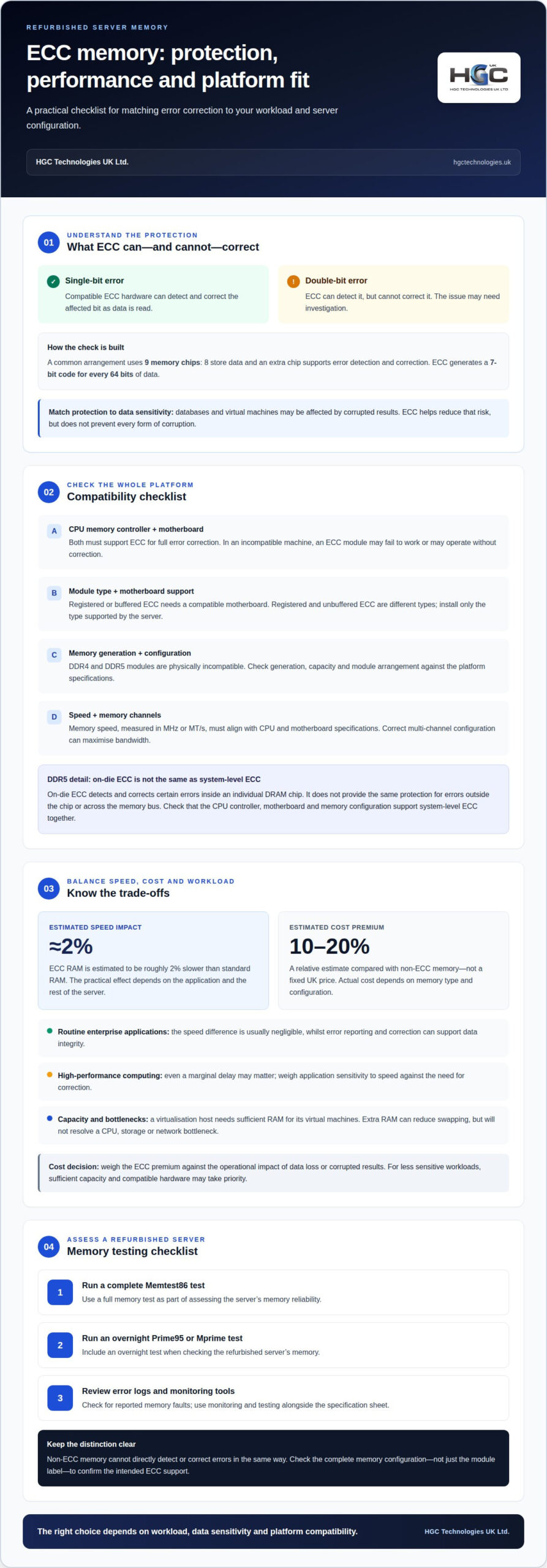
ECC, or error-correcting code memory, adds checks to data stored in a server’s RAM. A common arrangement uses nine memory chips: eight store data, while the extra chip supports error detection and correction. ECC generates a seven-bit code for every 64 bits of data, allowing the memory system to identify certain changes in stored bits.
With a single-bit memory error, compatible ECC hardware can detect and correct the affected bit as data is read. It can also detect double-bit errors, but cannot correct them. This distinction matters for an enterprise server handling databases or virtual machines: correction can help prevent an isolated bit error from corrupting data, while detection can alert administrators to an issue that needs investigation.
ECC memory is generally estimated to cost 10-20% more than non-ECC memory. That is a relative comparison, not a fixed UK price; the actual amount depends on the memory type and configuration.
Full error correction requires both a CPU memory controller and a motherboard platform that support ECC. An ECC module in an incompatible machine may fail to work, or may operate without correction. Module type also matters: registered or buffered ECC memory needs a compatible motherboard, and DDR4 and DDR5 modules are physically incompatible.
To test a refurbished server’s memory, run a complete Memtest86 test, then an overnight Prime95 or Mprime test. Review the server’s error logs and memory-monitoring tools for reported faults; non-ECC memory cannot directly detect or correct errors in the same way.
DDR5 adds another detail: on-die ECC detects and corrects certain errors inside an individual DRAM chip. It doesn’t provide the same protection as system-level ECC for errors outside the chip or across the memory bus. For dependable error correction, check that the server’s CPU controller, motherboard and memory configuration support system-level ECC together.
ECC memory performance considerations
ECC typically carries a modest speed trade-off: its performance impact is estimated at roughly 2% compared with standard RAM. Whether that matters depends on application demand, workload and the rest of the server configuration.
Performance overhead
The overhead is the processing and memory-access cost associated with error correction, which can make ECC RAM roughly 2% slower than standard RAM. For routine enterprise applications, that difference is usually negligible; in high-performance computing, even a marginal delay may matter. Assess the application’s sensitivity to memory speed alongside its need for error correction. A small theoretical gain from non-ECC memory may not improve a workload if storage, CPU or network performance is the actual bottleneck.
Performance in enterprise systems
In enterprise systems, ECC’s performance impact is generally considered negligible, while its error-reporting and correction capabilities can support workloads where data integrity matters. For example, a virtualisation host running several virtual machines needs sufficient RAM capacity as well as reliable memory operation. Memory speed, measured in MHz or MT/s, must align with the CPU and motherboard specifications. Correct channel configuration matters too: multi-channel memory can maximise bandwidth, and the right module arrangement helps avoid unnecessary performance loss.
Performance risks and limitations
Buying ECC memory for a refurbished server involves balancing speed, compatibility and workload demand. Registered modules must match a platform designed to support them; the wrong memory type can prevent operation or undermine the intended configuration. Check that the CPU, motherboard, memory generation and module type are compatible as a system. ECC also won’t automatically make an application faster: extra RAM can reduce swapping, but won’t resolve a CPU, storage or network bottleneck. For a suitable refurbished server configuration, consider memory capacity and speed together with the application’s needs.
The practical impact depends on the workload. Where performance is critical, even a marginal effect may be worth considering; for other tasks, ECC’s usually negligible impact need not dominate the decision. Keep expectations measured: assess ECC in the context of the work being performed, particularly for high-performance computing, rather than assuming it will cause a noticeable slowdown.
Choosing memory for workload and data sensitivity
Choose memory based on the workload’s capacity needs and the consequences of errors. A database, virtualisation host and general-purpose server may each have different priorities.
Protecting data integrity
For mission-critical workloads, ECC can detect and correct supported memory errors, helping protect data integrity and system stability. This matters when a corrupted calculation could affect database records or virtual machine results without causing an obvious immediate failure. ECC reduces that risk, but cannot prevent every form of corruption: some multi-bit errors can be detected without being corrected. Match the level of protection to the sensitivity of the data and application.
Assessing the extra cost
ECC memory generally costs more than non-ECC memory, so its value depends on the consequences of an error. For a business-critical database, the added protection may justify the premium if data loss or corrupted results would have a major impact. For less sensitive workloads, sufficient capacity and compatible hardware may take priority. Weigh the memory cost against the operational impact of the risk it helps reduce.
Registered and unbuffered ECC
Registered and unbuffered ECC are different module types, and the server must support the type installed. Registered modules suit compatible server platforms; unbuffered ECC works only where the CPU and motherboard support ECC operation. Check the platform specifications for memory type, generation and capacity, then match modules to those requirements. Registered ECC is not interchangeable with unbuffered memory just because both offer error correction.
To check a refurbished server’s ECC support, confirm that its CPU memory controller and motherboard support ECC, then verify the supported module type. Enterprise database, virtualisation and AI workloads often use 128-256 GB of RAM or more, so plan capacity alongside data sensitivity. ECC is most compelling when memory errors could disrupt important workloads or compromise results.
ECC memory and server reliability
ECC memory can improve server reliability by reducing the risk of memory faults causing crashes or data corruption. Its practical benefits include stronger data integrity and clearer error reporting, particularly for servers running business-critical applications. The benefits of ECC memory in refurbished servers depend on platform support and the workload’s exposure to memory errors.
Faults can be temporary or persistent. A large-scale study from 2012 found that approximately 70% of DRAM faults were recurring or permanent, whilst 30% were transient. It also found that more than 40% of faults affected multiple bits across structures such as a memory row, column or bank. These findings show why reliability involves more than recovering from a single isolated error.
Some server platforms offer chipkill functionality, which provides protection against certain multi-bit memory faults. A 2012 study found that chipkill reduced system failure rates from DRAM faults by 36 times. That capability is distinct from standard ECC, so the server’s memory controller, motherboard and supported memory features all matter when assessing protection.
ECC is especially relevant when a server processes important records or calculations. For example, a memory fault in a database server could cause a crash or corrupted results; ECC can reduce those risks and report detected issues. It cannot prevent every hardware failure, and it does not replace backups, storage protection or monitoring.
Server and desktop memory configurations can differ in capacity, module type and support for multi-CPU architectures. A refurbished server’s motherboard and processor must support its ECC configuration for error correction to work. Incorrect DIMM slot population can also reduce performance or cause instability, so follow the platform’s channel-population guidance.
For a workload where memory faults could disrupt operations or compromise data, consider a server solution suited to reliability needs. Balance ECC support with compatible hardware, monitoring and the consequences of downtime; no memory feature alone removes every cause of system failure.
HGC Technologies UK: Server Solutions
HGC Technologies UK Ltd. offers Server Solutions for organisations assessing refurbished servers against workload, memory capacity and data sensitivity. If your application depends on data integrity, consider ECC support and compatibility alongside processing and storage requirements.
Describe your workload and the role the server needs to perform. This gives you a clear basis for considering a suitable configuration, including whether ECC memory fits the platform and your reliability requirements. The goal is to match the system to practical business needs, rather than prioritising memory speed or capacity in isolation.
For other computing requirements, HGC Technologies UK Ltd. also supplies refurbished Dell and HP laptops in bulk, as well as custom-built PCs.
Contact HGC Technologies UK Ltd. to discuss your server requirements.
Make your next server decision with confidence
The benefits of ECC memory in refurbished servers are greatest when the memory suits the work the system must do. Before choosing a configuration, consider the cost of data errors or downtime for your organisation, then weigh reliability and performance together. A clear workload brief is a practical starting point for matching server capacity and memory requirements to operational needs.
HGC Technologies UK Ltd. offers Server Solutions, alongside Bulk Dell Refurbished Laptops, Bulk Lenovo Refurbished Laptops and Bulk HP Refurbished Laptops. If you’re planning a server purchase or reviewing requirements for a business workload, contact HGC Technologies UK Ltd. to discuss your needs.
With a well-matched system, you can make a considered choice that supports your organisation’s next stage of growth.
Frequently Asked Questions
What Is ECC Memory?
ECC memory is RAM that uses additional information to identify and correct certain errors in data held in memory. It protects data while the server processes it, rather than acting as a backup or repairing files already corrupted elsewhere. Its protection depends on the server’s complete hardware platform, so the memory type and supporting components must work together.
How does ECC memory improve data integrity and server uptime?
By correcting supported errors during operation, ECC can help prevent faulty memory values from disrupting calculations or triggering a system crash. It can also report errors that need attention, giving administrators useful information when investigating a server issue. This may help maintain continuity for long-running processes, but ECC does not replace backups, monitoring or other measures that help keep services available.
Which workloads benefit most from ECC memory in refurbished servers?
ECC is especially useful when incorrect results or interrupted processing could have serious consequences. Examples include transaction processing, in-memory analytics and services supporting several business applications at once. Assess how sensitive each workload is to corrupted results, how long it runs, and whether an interruption affects other users. These operational priorities help determine whether ECC should be central to the server specification.

Business IT hardware partner or supplier? Choose the right provider
The lowest hardware quote is not always the best choice. Knowing how to choose a business IT hardwar

Standardising Company Laptops Cost-Effectively: A 2026 Procurement Guide
What if the key to a perfectly uniform IT fleet wasn't found in the latest manufacturer catalogue, b

High Performance Workstation Build UK: A 2026 Case Study in Bespoke Engineering
In 2026, the standard office tower isn't just falling behind; it's actively bottlenecking the UK's m