

How to Standardise Bulk Business Laptop Models for UK Offices
Standardise the specification, not necessarily every laptop model. When standardising bulk business laptop models in the UK, set a clear baseline for performance, storage, operating system and condition, then keep it consistent for repeat orders where possible. This makes devices easier to deploy and helps prevent the same poor fit from affecting a whole team.
It makes sense to want a dependable standard: a consistent fleet can simplify support and procurement. But the right choice depends on how staff work. A practical standard should allow for different roles, such as employees who need a more portable device or greater capacity for demanding tasks.
This guide explains how to choose a useful specification, plan top-up orders and assess refurbished laptop condition, operating systems and chargers. It also compares business laptop ranges from Dell, Lenovo and HP, helping you decide where one shared standard works and where a second option makes sense.
Key Takeaways
- Set a role-based baseline for memory, storage and other essentials, then keep repeat orders aligned with that specification.
- Assess refurbished devices by their battery condition, operating system, charger and testing history, not appearance alone.
- Compare Dell, Lenovo and HP business ranges against how your teams work before settling on a standard model.
- Make procurement decisions easier to manage by recording specifications, condition requirements and order terms clearly.
Planning repeat orders using the same model
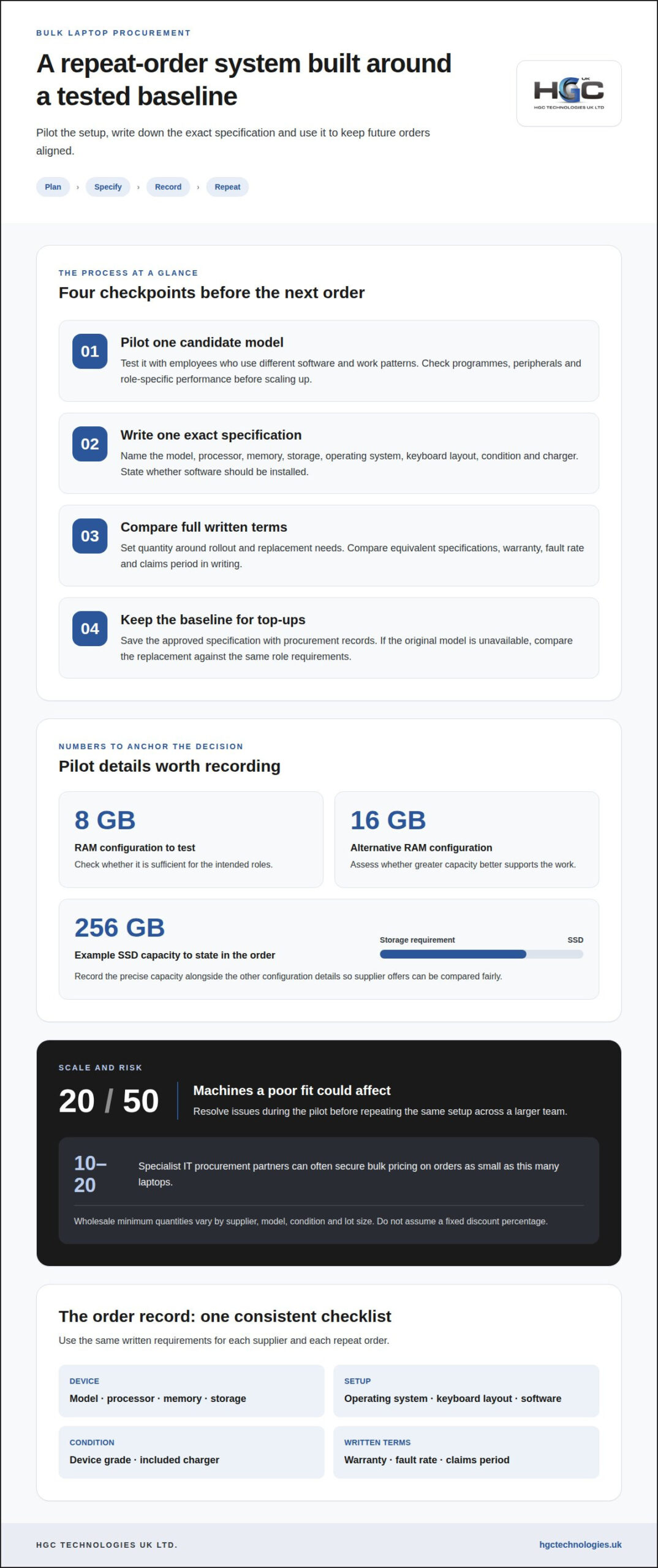
Pilot a standard, define its specification, record order terms and repeat that specification for top-ups where possible. This sequence helps identify problems before a poor fit is repeated across 20 or 50 machines.
-
Pilot a standard laptop model
Test one candidate model with employees who use different software and work patterns. Check that essential programmes run as expected, peripherals connect and the chosen configuration supports each role. A pilot can reveal whether 8 GB of RAM is sufficient or whether 16 GB is more appropriate. Resolve issues before ordering the same setup for a larger team.
-
Specify a consistent bulk order
Write one specification that names the model, processor, memory, storage, operating system, keyboard layout, condition and included charger. For example, record whether the order requires 8 GB or 16 GB of RAM and a 256 GB SSD. State whether devices must be similarly graded, and whether software should be installed. Send the same specification to each supplier so written offers cover equivalent requirements.
-
Assess quantity discounts and warranties
Set the quantity around your rollout and replacement needs, then compare the full written terms. Wholesale suppliers set their own minimum order quantity, which can depend on model, condition and lot size. Specialist IT procurement partners can often secure bulk pricing on orders as small as 10-20 laptops, but don’t assume a fixed discount percentage. Record the warranty, fault rate and claims period in writing.
-
Plan repeat orders and rollout
Keep the approved specification with your procurement records and use it for later top-up orders where possible. Request the batch’s exact specification and warranty terms in the written quote. Before rollout, align setup and installed software with the pilot, then record any approved changes. If the original model is unavailable later, compare the replacement with the same role requirements instead of accepting a different configuration based on its name alone.
Battery condition, operating system and chargers
Plan security and the device lifecycle together: sanitise storage, confirm release from device management, then assess the battery, operating system and charger before deployment. Document each result against the individual device so future replacement decisions reflect its condition, not just its model name.
- Record battery condition. Ask the provider to state the tested battery capacity for each batch; refurbished laptops should have a minimum battery capacity of 80% or higher. Record any exceptions against the device rather than relying on a general grade. A cosmetic grade does not describe battery performance, so treat condition and battery capacity as separate requirements.
- Confirm operating system and software. Specify the operating system and edition that match your business software and device-management approach. Record the installed version and any required licence entitlement with the laptop’s asset details. Check the processor and memory against the programmes employees use, since a compatible operating system alone does not establish that a device suits its role.
- Resolve data and management status. Before deployment, ensure storage media has undergone an appropriate data-sanitisation process, following NCSC guidance. For ex-corporate devices, require confirmation that each laptop has been released from the previous company’s device-management system. Keep sanitisation and release records with procurement documents so no device is issued with former organisational controls still attached.
- Specify chargers and replacement criteria. State whether each laptop must include a charger, then check that the supplied charger is suitable for the device. Record missing or mismatched accessories before rollout. Set a lifecycle review process that uses battery condition, repair history and staff requirements to guide replacement. A bulk discount should not override these checks: a lower purchase cost cannot make an unsuitable device fit for deployment.
For fleets built around refurbished devices, bulk refurbished laptop options can help align model choice with your documented requirements.
Business laptop ranges from Lenovo, HP and Dell
- Compare business models by role, not badge. A Lenovo ThinkPad T14 Gen 6 and Dell Pro 7 Series 14 both have 14-inch screens, but tested configurations differ. The ThinkPad configuration has 16 GB of RAM, a 512 GB SSD and Windows 11 Pro. The tested Dell configuration has 64 GB of RAM and a 1 TB SSD. Treat these as examples, not equivalent specifications: compare processor, memory, storage and operating system for your workload.
- Match the specification to actual work. When standardising across teams, define the needs of office software, browser-based work and specialist programmes. A larger memory or storage configuration may suit demanding workloads, while a leaner setup may fit simpler tasks. Use a pilot to assess performance before choosing the model and configuration. Compare usable configurations, not just manufacturer names.
- Assess Dell, Lenovo and HP against the same checklist. Record screen size, processor, memory, SSD capacity, operating system, keyboard layout and condition for each candidate. Apply the same criteria to refurbished devices and new models. A matching model name does not guarantee matching drives or components, so compare the exact specification offered for each batch. For HP candidates, use the same written checklist to keep comparisons consistent.
- Choose the fleet approach that supports future orders. One model can simplify deployment, accessories and support, but a single specification may not suit every role. If mobile staff and fixed-office teams have different needs, consider a small number of defined configurations instead of unmanaged variation. Before ordering, include keyboard layout and charger requirements in the specification, then align delivery and rollout with your deployment plan. This creates a useful standard without treating every laptop as interchangeable.
What UK procurement frameworks and rules apply to buying laptops in bulk?
- Start with your organisation’s procurement route. For a public-sector purchase, follow the purchasing framework and approval process your organisation uses. For a private business, apply its own purchasing controls and delegated authority. Record who approves the order, the required specification and the reason for selecting it. This keeps a bulk laptop purchase traceable from the initial need through supplier selection and payment.
- Compare equivalent written quotes. Give each supplier the same model or specification, quantity, condition requirements and delivery terms. Compare the written trade quotes on that shared basis, including warranty terms and any stated exclusions. A quote for a different grade or configuration is not a like-for-like comparison. Keep the quotes and decision record with the purchase documentation.
- Clarify VAT and equipment ownership. Used laptops in the UK may be sold under a VAT margin scheme or standard VAT, so record the VAT treatment shown on the supplier’s paperwork. A completed lease does not automatically transfer ownership to the business that used the equipment. Before buying ex-corporate stock, establish that its owner has made it available for sale and retain the relevant transaction records.
- Plan the equipment’s end of life. Include collection, reuse or disposal in the procurement plan, rather than treating removal as an informal task. UK businesses have legal duties under WEEE regulations when disposing of laptops, according to UK Government. Keep disposal records with asset information, and separate equipment intended for reuse from devices designated for disposal. This links purchasing decisions to responsible management throughout the laptop lifecycle.
For a bulk order aligned with your written requirements, discuss your business laptop procurement.
HGC Technologies UK
HGC Technologies UK Ltd. supplies bulk refurbished laptops from established manufacturers to businesses and technology resellers. If your specification is set and you are planning a first order or repeat purchase, its bulk Dell, Lenovo and HP refurbished laptops give you options to assess against your fleet requirements. For teams whose needs do not fit a standard laptop configuration, consider HGC Technologies UK Ltd.’s custom-built PCs as an alternative.
When discussing an order, share your preferred model or requirements, quantity, condition expectations and operating system needs. This gives the discussion a practical starting point and helps align the choice with your deployment plans, rather than focusing on model names alone.
For help sourcing business devices to your requirements, contact HGC Technologies UK Ltd.
Make your laptop standard work over time
A practical approach to standardising bulk business laptop models in the UK should support future decisions, not just the next order. Treat your chosen specification as a working standard and revisit it when staff roles, software or deployment needs change. This gives procurement a clear reference point while allowing considered updates when the business genuinely needs them.
Set a simple review process alongside your purchasing records. Note which requirements remain useful, where employees encounter limitations and what should change in the next specification. This turns each buying cycle into an opportunity to refine the fleet instead of introducing variation without a clear reason.
When you’re ready to discuss business laptop requirements, contact HGC Technologies UK. A clear starting specification can make the conversation focused and help you move towards a laptop standard that suits your organisation. Take the next step with confidence.
Frequently Asked Questions
Should You Standardise on One Specification?
Usually, standardise the core specification but allow controlled exceptions for roles with distinct demands. For example, a finance team using established office software may need a different setup from staff running specialist analysis tools. Record the business reason and approval for each exception, then review it during procurement planning. This maintains fleet consistency without forcing every employee into an unsuitable configuration.
What does standardising bulk business laptop models mean?
It means setting a repeatable procurement approach for business laptops instead of choosing devices individually each time. The standard can define approved model families, configurations, software expectations and condition criteria, along with a process for handling exceptions. It gives procurement and IT teams a shared reference for deployment and support, helping ensure incoming devices fit the organisation’s planned environment.
What are the best business laptop models for bulk purchasing in the UK?
There is no single best model for every UK organisation. Suitability depends on the tasks, support environment and purchasing plan. Compare business ranges from Lenovo, HP and Dell against your organisation’s needs, then assess candidate configurations through representative employee workflows. Consider how each option fits existing software and peripherals, and whether staff can use it comfortably in their working locations.
Which laptop specifications suit common business roles and workloads?
Match specifications to actual work rather than job titles alone. For a role using browser-based systems, office documents and video calls, assess simultaneous applications, storage habits and required peripherals. For staff using resource-intensive programmes, test those programmes on the proposed device before wider deployment. A role-based assessment identifies meaningful differences without adding configuration changes that offer no practical benefit.
How many standard laptop configurations should a UK business offer?
Offer only the configurations that address distinct, recurring work requirements. Group employees according to the applications and working patterns they share, then check whether one configuration meets each group’s needs. Add another option only when the difference affects practical use. Review the range when roles or software change, and retire exceptions that no longer serve a clear operational purpose.
What are typical UK bulk business laptop prices and volume discounts?
There is no single typical price or fixed discount for bulk laptop orders. The amount depends on the selected model, configuration, condition, quantity and stock available for that order. To assess value, compare quotes for equivalent requirements and examine the stated VAT treatment and terms. A headline discount alone does not show whether two offers cover comparable devices and conditions.

Managing Warranties for a Fleet of Refurbished Laptops: The 2026 Procurement Guide
A 2024 study of 500,000 devices confirmed that enterprise laptop failure rates stay as low as 0.2 pe

Creating a Business IT Hardware Policy: The 2026 Procurement Checklist
With DRAM and SSD prices climbing by up to 130% in 2026, the era of casual tech spending is over. Yo
Custom PC Cooling for Performance: A Practical Guide
The biggest radiator isn’t automatically the best answer for a high-performance PC. The right cust